Mod

Brapi
No reviews yet
A Fast UI Rendering Library for Fabric mods. Rounded rectangles, gradients, textures and SDF text.
Provides a framework or library for other mods to use.
Fabric is a mod loader for versions 1.14+ of Minecraft, particularly popular for client side and optimization mods.
Community voices
Reviews
Click once to include, again to exclude, again to clear
No reviews yet. Be the first to review this project!
Get it on
Available Platforms
 Modrinth
Compatibility
Supported Environments
About
Project Details
For authors
Embed Badge
If you're the author of this project, you can embed a live badge anywhere that supports HTML or Markdown. It updates automatically whenever ratings change.
Use HTML for any page that supports it, or Markdown for README files and Markdown-based descriptions.
Identifiers
Platform IDs
About
Description
A UI rendering library for Fabric mods. Supports rounded rectangles, text, gradients, textures, and 9-slice sprites with a simple API. With future support for SVG rasterizer, shadows, more text options, toggleable immediate mode rendering and lines.
Why
Making good-looking UIs in Minecraft is harder than it should be. Vanilla's tools work fine for basic boxes, but as soon as you want smooth rounded corners, circles, or nice-looking text, you hit a wall. Normally you're stuck with two options:
- Bring in a heavy graphics library like Skia, which is hard to set-up for first time
- Write your own shaders from scratch, which means dealing with extra setup and boilerplate most modders would rather skip
Brapi gives a third option. It's a lightweight layer that sits on top of Minecraft's existing rendering system, so you get the nice visuals without the pain. Key Benefits:
- Zero Boilerplate: No setup hassle. Just create a BRender, add your draw calls, and flush.
- Complex Shapes Made Simple: Draw circles, outlines, and rounded rectangles (even with different corner sizes) in a single line of code.
- Automatic Batching & Layering: Brapi figures out the right draw order on its own, so your UI looks right without you micromanaging it.
📦 Setup
Adding as dependency
Add the repository and dependency to build.gradle:
repositories {
    exclusiveContent {
        forRepository {
            maven {
                name = "Modrinth"
                url = "https://api.modrinth.com/maven"
            }
        }
        filter {
            includeGroup "maven.modrinth"
        }
    }
}
dependencies {
    modImplementation "maven.modrinth:brapi:0.25.3+${minecraft_version}+fabric" // only supported minecraft version is 1.21.11 right now
}
fabric.mod.json:
"depends": {
    "brapi": "*"
}
Using in code
Create a BRender instance, add draw calls, then call flush(graphics) to submit. Everything renders at end of frame sorted by layer.
🎨 All colors are ARGB: 0xFFFF0000 = opaque red, 0x80FF0000 = 50% transparent red.
📐 Coordinates are in GuiScale units: (100, 100) at scale 3 = (300, 300) pixels.
Filled shapes
bRender.rect(100, 100, 100, 100, 0xFFFF0000, layer);- red 100x100 rectanglebRender.roundRect(100, 100, 100, 100, 0xFFFF0000, 10, layer);- rounded rectangle, 10px radiusbRender.roundRect(100, 100, 100, 100, 0xFFFF0000, 10, 5, layer);- 10px TL/BR, 5px TR/BL radiusbRender.roundRect(100, 100, 100, 100, 0xFFFF0000, 10, 5, 20, 30, layer);- individual corner radiibRender.circle(100, 100, 50, 0xFFFF0000, layer);- circle, 50px radius
Gradients
All filled shapes support gradients via Gradient and GradientDirection:
bRender.roundRect(100, 100, 100, 100, gradient, GradientDirection.LEFT_RIGHT, 10, layer);
Directions: LEFT_RIGHT, TOP_BOTTOM, TOP_LEFT_BOTTOM_RIGHT, TOP_RIGHT_BOTTOM_LEFT
Strokes (outline only)
bRender.stroke(100, 100, 100, 100, 0xFFFF0000, 2, layer);- 2px outline rectanglebRender.strokeRounded(100, 100, 100, 100, 0xFFFF0000, 10, 2, layer);- 2px rounded outline, 10px radiusbRender.strokeRounded(100, 100, 100, 100, 0xFFFF0000, 10, 5, 2, layer);- 10px TL/BR, 5px TR/BLbRender.strokeRounded(100, 100, 100, 100, 0xFFFF0000, 10, 5, 20, 30, 2, layer);- individual radii
Filled + stroke
bRender.roundRectStroked(100, 100, 100, 100, 0xFF0000FF, 0xFFFF0000, 10, 2, layer);- blue fill, 2px red stroke
Text
bRender.drawText(font, "Hello!", 100, 100, 24, 0xFFFFFFFF, layer);- BFont textbRender.drawText(font, formattedCharSequence, 100, 100, 24, 0xFFFFFFFF, layer);- formatted text with per-character colors
Textures
bRender.drawTexture(tex, 100, 100, 200, 150, 0xFFFFFFFF, linear, layer);- stretch to fillbRender.drawTextureCropped(tex, 100, 100, 64, 64, 0, 0, 32, 32, 0xFFFFFFFF, linear, layer);- cropbRender.drawTextureTiled(tex, 100, 100, 200, 200, 0xFFFFFFFF, linear, layer);- tilebRender.drawTexture9Slice(slice, 100, 100, 300, 200, 0xFFFFFFFF, linear, layer);- 9-slice
🔄 Flushing
BRender r = new BRender();
r.roundRect(...);
r.flush(graphics); // submit to draw list
Screenshots
Gallery
-
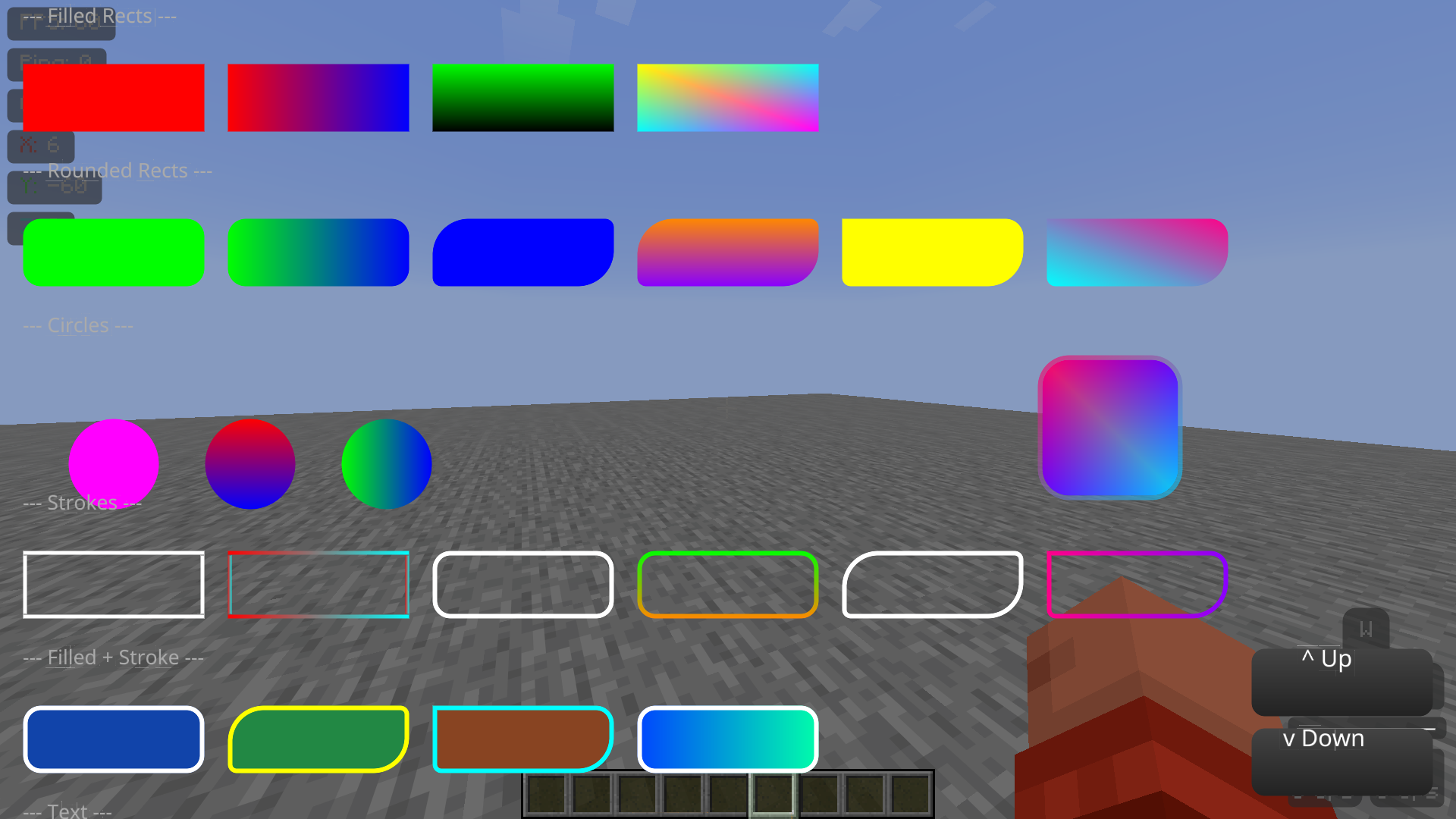 Example screen with Brapi Run /brapitest in game to test it
 -
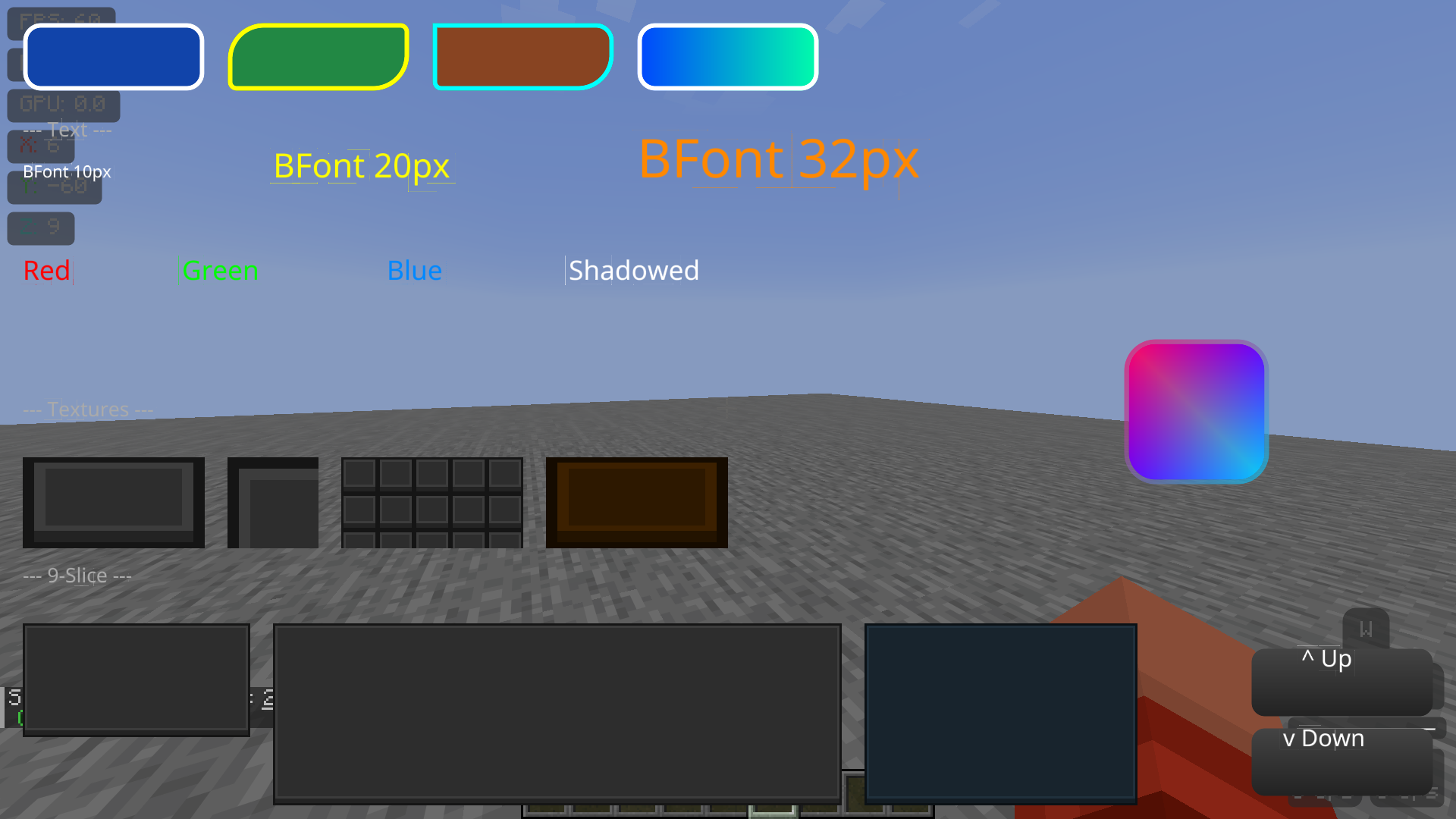 Example screen with Brapi 2: Textures Textures: crop, tile, stretch, nine-slice, color tint (Note: the weird outlines around some text letters are fixed)
Versions
Files
Relations
Project Relations
More like this
Similar Mods
Suggestions use data such as tags, dependencies, dependents, descriptions, titles, and more to rank how much they overlap with this mod.
On ModDex
Community snapshot
By the numbers
Statistics

Want to reach Minecraft players?
We're looking for a server hosting partner to feature here and other parts of the site. Interested? Send us a message!
Get in touchGet it on
Available Platforms
On ModDex
Community snapshot
By the numbers