Mod

ClientCatcher
No reviews yet
Detect the client with which a player has connected to your server
Community voices
Reviews
Click once to include, again to exclude, again to clear
No reviews yet. Be the first to review this project!
Get it on
Available Platforms
 Modrinth
Compatibility
Supported Environments
About
Project Details
For authors
Embed Badge
If you're the author of this project, you can embed a live badge anywhere that supports HTML or Markdown. It updates automatically whenever ratings change.
Use HTML for any page that supports it, or Markdown for README files and Markdown-based descriptions.
Identifiers
Platform IDs
About
Description







Simple Velocity plugin to get the client with which a player has connected to your server
Commands
Permission: clientcatcher.command
Client /clientcatcher client <player>
Permission: clientcatcher.command.client
Shows you a player's client and mods, if any are installed
Mods /clientcatcher mods <player>
Permission: clientcatcher.command.mods
Shows you the player's mods, in case he has any installed
Reload /clientcatcher reload
Permission: clientcatcher.command.reload
Reloads the plugin
Permissions
Bypass Client Detection
clientcatcher.bypass.brand
Bypass Mod Detection
clientcatcher.bypass.mods

- Download it from Modrinth
- Download MCKotlin
- Put both plugins in your Velocity proxy
- And configure the plugin to block the mods and clients of your choice

The plugin is not fully effective, several malicious clients hide their client branding when entering the server or impersonate vanilla clients. However, the plugin can detect several clients such as Forge, Fabric, LiteLoader, Lunar, Vanilla, and others.
It also detects Forge 1.7.10 - 1.12.2 mods.
If you want to use ClientCatcher in Fabric, you can try https://modrinth.com/mod/clientcatcher-fabric
Placeholders
ClientCatcher provides several placeholders for use in other MiniPlaceholders-compatible plugins
<clientcatcher_client><clientcatcher_mods><clientcatcher_player_client:(player name)><clientcatcher_player_mods:(player name)>
Discord WebHook Configuration
If you have a Discord server on which you want to show alerts of which clients your players are using, you can activate the webhooks module and configure it like this
- Copy the URL of the WebHook.
- Extract the ID and Token from the URL.
- Put those fields in the specific configuration options.
- Restart your proxy
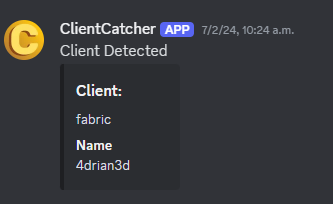


Screenshots
Gallery
-
 ClientCatcherOldBanner
Versions
Files
Relations
Project Relations
More like this
Similar Mods
Suggestions use data such as tags, dependencies, dependents, descriptions, titles, and more to rank how much they overlap with this mod.
On ModDex
Community snapshot
By the numbers
Statistics

Want to reach Minecraft players?
We're looking for a server hosting partner to feature here and other parts of the site. Interested? Send us a message!
Get in touchGet it on
Available Platforms
On ModDex
Community snapshot
By the numbers