Mod
CustomSaveDirs
No reviews yet
A client-side mod allows you use custom directories for reading and saving singleplayer worlds.
Features systems for better item storage and organization.
Forge is a popular mod loader for versions 1.1+ of Minecraft.
Neoforge is a fork of the Minecraft Forge available for versions 1.20.1+ of Minecraft. Many Forge mods are compatible with Neoforge and vice versa.
Fabric is a mod loader for versions 1.14+ of Minecraft, particularly popular for client side and optimization mods.
Community voices
Reviews
Click once to include, again to exclude, again to clear
No reviews yet. Be the first to review this project!
Get it on
Available Platforms
 Modrinth
Compatibility
Supported Environments
About
Project Details
For authors
Embed Badge
If you're the author of this project, you can embed a live badge anywhere that supports HTML or Markdown. It updates automatically whenever ratings change.
Use HTML for any page that supports it, or Markdown for README files and Markdown-based descriptions.
Identifiers
Platform IDs
About
Description
Mod Synopsis
This is a lightweight mod run on client-side, which allows you use custom directories for singleplayer worlds' reading and saving instead of the hard-coded ${GAME_DIR}/saves by the game. No game relaunching required when setting the directories.
How to Use This Mod
After loading this mod, click “Options...” button in Main Menu, and then “Configure Save Directories...”(If you did not see the button, it shows that the button is pushed away by buttons added by other mods, try to increase the window's height).
When ${GAME_DIR}/config/customsavedirs.json does not exist, the text in the highest button in the screen should be “Current: Default”. Then you can click “Edit customsavedirs.json” button, a text editor will be opened after clicking. Edit for the directories you want to let this mod read. Absolute and relative paths are supported. For example, if you want this mod to read “/tmp” “saves” “../../saves” 3 directories, you need to write the following content to ${GAME_DIR}/config/customsavedirs.json:
[
  "/tmp",
  "saves",
  "../../saves"
]
After saving customsavedirs.json, click “Reload customsavedirs.json” in the game. Click “Current: 0: /tmp” button to switch to next valid directory declared in customsavedirs.json(“valid directory” here stands for a string that is capable to successfully create a Path object by java.nio.file.FileSystems.getDefault().getPath(xxx) or java.nio.file.Path.of(xxx) in Java), switch to “1: saves” in this example. And note that first valid directory's index is 0 rather than 1 in customsavedirs.json.
If you want the game load the worlds under default save directory again, just delete customsavedirs.json or change its content to [], then click “Reload customsavedirs.json”.
The save directory will be changed to index 0 or the game default after game relaunching.
When changing directory with singleplayer world opening, the directory will be applied after the world is saved and quitted. For example, open “New World” when using “0: /tmp”, and change it to “2: ../../saves” with the world opening, and then save and quit, the saving directory of that world will still be /tmp, “New World” under ../../saves will not be affected.
Notice
Fabric API run on Fabric or Legacy Fabric API run on Legacy Fabric is strongly recommended in order to apply language files in this mod's JAR. Without them, you can still launch the game, but texts related to this mod will be shown as fallback English texts or translation keys.
Some mods storing there config files on folder names only instead of worlds' full paths will behave abnormally with this mod loading.
Screenshots
Gallery
-
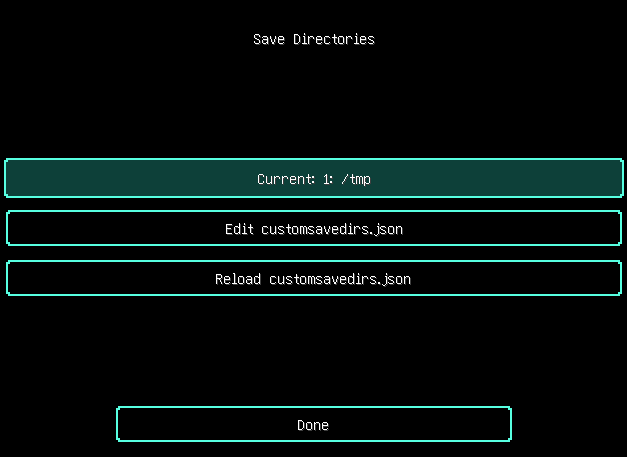 “Save Directories” screen of CustomSaveDirs run on MC 1.21.3 “Save Directories” screen of CustomSaveDirs v0.0.1 run on MC 1.21.3 This image is licensed with GNU General Public License Version 2 or Later, with exceptions (see https://www.unifoundry.com/LICENSE.txt).
Versions
Files
Relations
Project Relations
More like this
Similar Mods
Suggestions use data such as tags, dependencies, dependents, descriptions, titles, and more to rank how much they overlap with this mod.
On ModDex
Community snapshot
By the numbers
Statistics

Want to reach Minecraft players?
We're looking for a server hosting partner to feature here and other parts of the site. Interested? Send us a message!
Get in touchGet it on
Available Platforms
On ModDex
Community snapshot
By the numbers