Mod

Easy Mod Sync
No reviews yet
Automatically sync files from servers to client or clients to clients upon joining with end to end encryption.
Fabric is a mod loader for versions 1.14+ of Minecraft, particularly popular for client side and optimization mods.
Community voices
Reviews
Click once to include, again to exclude, again to clear
No reviews yet. Be the first to review this project!
Get it on
Available Platforms
 Modrinth
Compatibility
Supported Environments
About
Project Details
For authors
Embed Badge
If you're the author of this project, you can embed a live badge anywhere that supports HTML or Markdown. It updates automatically whenever ratings change.
Use HTML for any page that supports it, or Markdown for README files and Markdown-based descriptions.
Identifiers
Platform IDs
Resources
External Links
About
Description
Easy Mod Sync
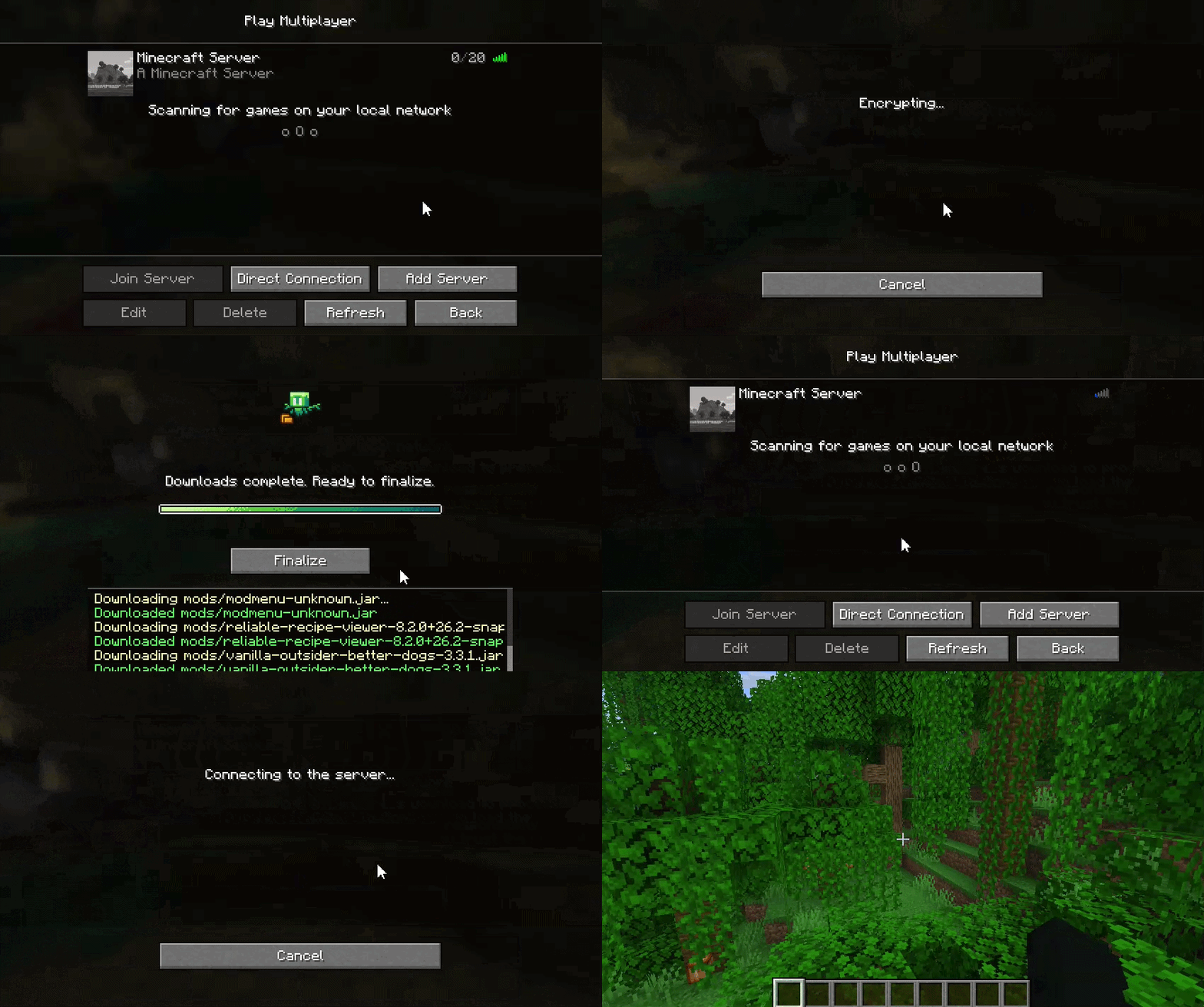
Easy Mod Sync is a Fabric mod designed to synchronize specified files and directories from a Minecraft server or another client to connecting clients. It ensures that players have the necessary configs, mods, resource packs, or other assets required by the server before joining.
Features
- Delta Synchronization: The mod calculates MD5 hashes of the server's tracked files and compares them against the client's local files. The client only downloads files that are missing or differ from the server's version.
- Transfer Methods:
- MINECRAFT (Default)(Slow): Transfers files using standard Minecraft custom payload packets, split into chunks. Suitable for configs or a handful of mods.
- EXTERNAL (Fast): Spawns a lightweight, internal HTTP server to handle file transfers. This method is optimized for larger files (such as big resource packs or hundreds of mods) to prevent stalling the main server thread.
- Security & Encryption:
- When using the
EXTERNALtransfer method, file payloads are encrypted using AES-GCM with single-use Session IDs generated per client connection. - The server enforces strict whitelisting, clients can only request files explicitly added to the sync registry. Directory traversal protections are built-in.
- When using the
- Client Interface & Isolation:
- Connecting players are presented with a prompt detailing the risks, giving them the option to accept the download or disconnect.
- Files are initially downloaded to a temporary directory (
config/easymodsync/temp/). They are only moved to the active game directory when the transfer is 100% complete without errors and the player clicks "Finalize". - There's a scrollable event log on the progress screen to see live file transfers. Players can safely abort the transfer at any time using the Exit button.
Commands
EasyModSync includes in-game commands to manage the file sync registry (config/easymodsync/file_tree.json). These commands require Operator (OP) level 3 or higher.
-
/easymodsync add_files <path>Adds a specific file or recursively adds a directory to the sync list. The path must be relative to the server's root directory. Example:/easymodsync add_files config/mypack/ -
/easymodsync remove_files <path>Removes a specific file or all files within a directory from the sync list. Example:/easymodsync remove_files config/old_settings.json
(Note: Command arguments support dynamic tab-completion for both local server files and currently tracked files to reduce lag that might come from recursively checking the full directory tree of the server. Due to this after typing a folder's name press space and then backspace to get an updated list of files and directories within the folder)
Configuration
The mod's config is stored in config/easymodsync.json and can be edited directly or via Mod Menu/Cloth Config.
| Option | Type | Default | Description |
|---|---|---|---|
offerAdditionalFiles |
Boolean | true |
Toggles whether the server will prompt joining clients to download tracked files. |
fileTransferMethod |
Enum | MINECRAFT |
Determines the protocol used to send files. Options are MINECRAFT (packet-based) or EXTERNAL (HTTP-based). |
externalPort |
Integer | 25652 |
The port utilized by the built-in HTTP server if the EXTERNAL transfer method is selected. This port must be accessible to connecting clients (i.e the port needs to be open on the server or the client offering the files). |
Requirements
- Fabric Loader
- Fabric API
- Cloth Config API
Screenshots
Gallery
-
Easy Mod Sync demo
Versions
Files
Relations
Project Relations
More like this
Similar Mods
Suggestions use data such as tags, dependencies, dependents, descriptions, titles, and more to rank how much they overlap with this mod.
On ModDex
Community snapshot
By the numbers
Statistics

Want to reach Minecraft players?
We're looking for a server hosting partner to feature here and other parts of the site. Interested? Send us a message!
Get in touchGet it on
Available Platforms
On ModDex
Community snapshot
By the numbers
Statistics
Resources