Mod

GriefLogger Rollback Addon (GLRA)
No reviews yet
Addon for GriefLogger by DAQUEM to use Rollback Command + Webinterface
Neoforge is a fork of the Minecraft Forge available for versions 1.20.1+ of Minecraft. Many Forge mods are compatible with Neoforge and vice versa.
Community voices
Reviews
Click once to include, again to exclude, again to clear
No reviews yet. Be the first to review this project!
Get it on
Available Platforms
 Modrinth
Compatibility
Supported Environments
About
Project Details
For authors
Embed Badge
If you're the author of this project, you can embed a live badge anywhere that supports HTML or Markdown. It updates automatically whenever ratings change.
Use HTML for any page that supports it, or Markdown for README files and Markdown-based descriptions.
Identifiers
Platform IDs
About
Description
Grieflogger Rollback Addon
This NeoForge addon reads GriefLogger data from SQLite (default) or MySQL/MariaDB and reverts block actions in-game via command. It targets NeoForge 21.1.213 / Minecraft 1.21.1 and is server-side only: any logged block placements or breaks can be undone selectively. Its like CoreProtect, but for Modded Server.
Features
- Rollback of block changes and container/inventory changes from the GriefLogger database (
blocks+containerstables with joins tomaterials,users,levels). - Filters by time window, optional player name, and optional radius around the command executor.
- Ensures target chunks are loaded before changing blocks.
- Progress logging and batch processing per tick to keep the server responsive.
- Permission nodes for all commands and notifications (LuckPerms/permission mods supported, default op-level fallback 3).
- Broadcast notifications for rollbacks started in-game, rollbacks triggered via web UI/API, and blocked/unauthorized web access attempts.
- Automatically disables itself on startup if no database connection is available.
- Highly configurable via
griefloggerrollbackaddon-common.toml: database backend/credentials, web UI/API bind/port/token, rollback batch size, progress interval, and unauthorized-access logging options.
Requirements
- NeoForge 21.1.213 / Minecraft 1.21.1.
- A GriefLogger database (either the SQLite DB file GriefLogger writes, or a MySQL/MariaDB database with the GriefLogger schema).
- Database credentials with read access (for MySQL/MariaDB).
- Config file
config/grieflogger/griefloggerrollbackaddon-common.tomlgenerated by first server start (set DB type/connection, web options, and batch sizes). - If the web UI/API is enabled: a free TCP port (default
8765) on the bind address (webApiBindAddress, default0.0.0.0) and, if exposed beyond localhost, a configured token (webApiToken) and appropriate firewall/forwarding. - Permission mod (e.g., LuckPerms) optional; without one, only operators (op-level 3) can run commands/receive notifications.
Installation
- Place the mod JAR and the JDBC driver for your backend (SQLite, MySQL, or MariaDB) into the server
mods/folder. - Start the server once to generate
config/grieflogger/griefloggerrollbackaddon-common.toml. - Choose the backend via
dbType(case-insensitive, defaultSQLITE). For SQLite setdbFile; for MySQL/MariaDB set host/port/name/user/password. - Check the log for
[griefloggerrollbackaddon] Database connection succeeded. If it fails, the addon remains disabled until the connection works.
Configuration (config/grieflogger/griefloggerrollbackaddon-common.toml)
dbType(Enum, defaultSQLITE): ChooseSQLITE,MYSQL, orMARIADB(case-insensitive).dbFile(String, defaultconfig/grieflogger/grieflogger.sqlite): SQLite database file path whendbType=SQLITE.dbHost(String, defaultlocalhost): MySQL/MariaDB host.dbPort(Int, default3306): MySQL/MariaDB port.dbName(String, defaultgrieflogger): Database name for MySQL/MariaDB.dbUser(String, defaultroot): Database user for MySQL/MariaDB.dbPassword(String, default empty): Database password for MySQL/MariaDB.rollbackBatchSize(Int, default200): Number of actions processed per tick.progressTickInterval(Int, default20): How many ticks between progress log messages.webApiEnabled(Boolean, defaultfalse): Start a small HTTP server with a web UI to trigger rollbacks.requireApiToken(Boolean, defaultfalse): If true andwebApiTokenis empty, the web UI/API is disabled; otherwise every request must include the token.webApiBindAddress(String, default0.0.0.0): Bind address for the web UI/API.webApiPort(Int, default8765): Port for the web UI/API.webApiToken(String, default empty): Optional shared secret required for web requests. Leave empty only on localhost.logUnauthorizedWebAccess.enabled(Boolean, defaultfalse): Log unauthorized web requests to DB tableglra_web_unauthorized(keeps the latest 1000 entries).logUnauthorizedWebAccess.logHeaders(Boolean, defaultfalse): Store request headers for unauthorized web requests.logUnauthorizedWebAccess.logBody(Boolean, defaultfalse): Store request body for unauthorized web requests (may include tokens).logUnauthorizedWebAccess.logQuery(Boolean, defaulttrue): Store query string for unauthorized web requests.
Command: /gl rollback
Syntax: /gl rollback t:<time> [u:<player>] [r:<radius|c<chunks>>] [i|b]
t:Required time window to roll back. Supported units:s,m,h,d,M(30 days),y. Examples:t:30m,t:12h,t:90s.u:Optional exact player name (matches theuserstable).r:Optional radius. Default uses blocks (r:25). Prefixcswitches to chunks (r:c4= radius of 4 chunks). Prefixbforces blocks (r:b40).iOptional flag: only roll back inventory/container changes (items).bOptional flag: only roll back block changes. If neitherinorbis given, both are rolled back.
Examples
/gl rollback t:2h- Roll back all actions from the last 2 hours./gl rollback t:1d u:Griefer123- Only that player's actions in the last 24h./gl rollback t:30m r:c2- Within 2 chunks around the executor./gl rollback t:10m u:User r:20- Player filter plus 20-block radius./gl rollback t:45m i- Only inventory/container changes from the last 45 minutes./gl rollback t:10m b r:15- Only block changes within 15 blocks from the last 10 minutes.
Additional Commands
/gl web token add <player>— Create/replace a web API token for a player (copyable in chat)./gl web token remove <player>— Delete a player's web API token./gl web token list [page]— List tokens with copy-to-clipboard hints./gl web start//gl web stop— Start/stop the built-in web UI/API (honors config toggles and token requirements)./gl config reload— Reload the addon config (griefloggerrollbackaddon-common.toml) without restarting.
Web UI / HTTP API
- Enable in config with
webApiEnabled=true. Defaults to0.0.0.0:8765; changewebApiBindAddress/webApiPortas needed. - Optional security: set
webApiTokenand pass it as headerX-Auth-Tokenor form fieldtoken. - Open
http://<bind>:<port>/for a minimal form: time window (e.g.,30m), optional player, checkboxes for blocks/items, optional radius plus center X/Z/Y and dimension. The form POSTs to/api/rollback. - The API endpoint
/api/rollbackacceptsapplication/x-www-form-urlencodedwith the same fields and returns a small JSON status. - Unauthorized requests can be logged to the database (configurable) and will notify eligible players/ops with a readable message.
Permissions
- Default fallback: op-level 3 if no permission mod is present.
- Nodes (namespace
griefloggerrollbackaddon):command.rollbackcommand.web.tokencommand.web.servercommand.config.reloadnotify.rollback(in-game rollback command)notify.web.rollback(web-triggered rollback)notify.web.unauthorized(blocked web requests) Use your permission mod (e.g., LuckPerms) to grant/deny; otherwise only operators (level 3) can run commands and receive notifications.
How it works
- Server start: immediately tests a DB connection. On failure, the addon disables itself (no commands/events).
- Command:
/gl rollback ...starts a job:- Loads matching entries from
blocksandcontainerssince the given time in a background thread, optionally filtered by player and/or radius.
- Loads matching entries from
- Reconstructs the previous block state per coordinate (
oldMaterialName) so placements and breaks can be inverted correctly. - Enqueues all actions (blocks + inventory operations) for processing, newest first so the latest change is undone first.
- Server ticks: up to
rollbackBatchSizeactions are processed each tick:BREAKlogs restore the broken block from the DB entry.PLACElogs restore the previous block state.- Container logs remove items that were inserted and add back items (including stored NBT) that were taken. If a container is full, overflow is dropped at the container position.
- Unknown/other codes fall back to restoring the previous state (or air).
- The target chunk is loaded before setting the block.
- Progress: every
progressTickIntervalticks, the queue size and processed count are logged. When the queue is empty, the job finishes.
Notes and limitations
- If a container has no space while items are restored, the overflow is dropped as item entities next to the container.
- Dimension mapping uses
levels.name(ResourceLocation) or falls back for IDs 1/2/3 (Overworld/End/Nether). - Invalid or unknown block names default to
minecraft:airwith a warning. - The JDBC driver is not bundled in the mod JAR; it must be provided separately.
- Large time windows can produce big queues. Adjust
rollbackBatchSizeand radius to control server load.
Development/Building
- Java 21, Gradle wrapper included. Build locally with
./gradlew build(orgradlew.bat buildon Windows). - MariaDB, MySQL, and SQLite drivers are declared as
localRuntime; provide the driver JAR separately for production.
Screenshots
Gallery
-
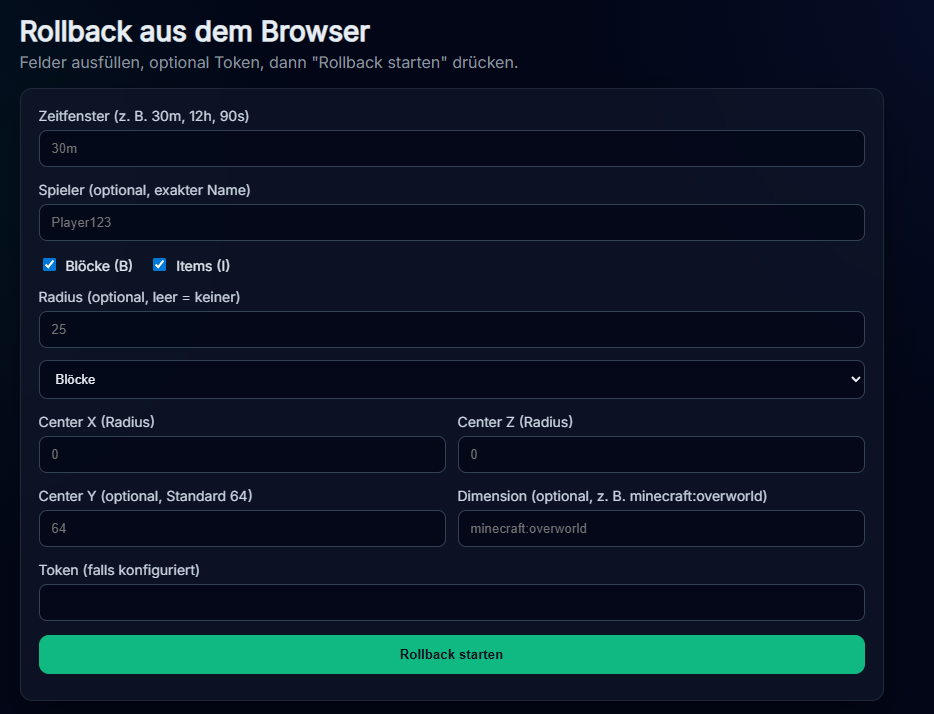 Webinterface in German Locale
 -
 Rollback Message
Versions
Files
Relations
Project Relations
More like this
Similar Mods
Suggestions use data such as tags, dependencies, dependents, descriptions, titles, and more to rank how much they overlap with this mod.
On ModDex
Community snapshot
By the numbers
Statistics

Want to reach Minecraft players?
We're looking for a server hosting partner to feature here and other parts of the site. Interested? Send us a message!
Get in touchGet it on
Available Platforms
On ModDex
Community snapshot
By the numbers