Mod

Hero Statue
No reviews yet
Adds the Hero Statue block, which can hold an item, and be posed using redstone.
Features systems for better item storage and organization.
Community voices
Reviews
Click once to include, again to exclude, again to clear
No reviews yet. Be the first to review this project!
Get it on
Available Platforms
 Modrinth
Compatibility
Supported Environments
About
Project Details
For authors
Embed Badge
If you're the author of this project, you can embed a live badge anywhere that supports HTML or Markdown. It updates automatically whenever ratings change.
Use HTML for any page that supports it, or Markdown for README files and Markdown-based descriptions.
Identifiers
Platform IDs
About
Description
Hero Statue
Adds a new block called the Hero Statue, which can hold an item, and be posed using redstone.
Important
If you have a slower computer, have a lot of statues placed down, or are using a resource intensive shader pack, you may want to change your statue render type config toBasic. See Config.
This renders statues using block models, which is a lot faster, however it does disable visual posing.If you use Shaders, read Known Issues: Shader Rendering Pipelines, and check Tested Shader Packs below.
Features
Hero Statue
- Holds an item
- You can give the statue an item to display by interacting with it whilst holding the item.
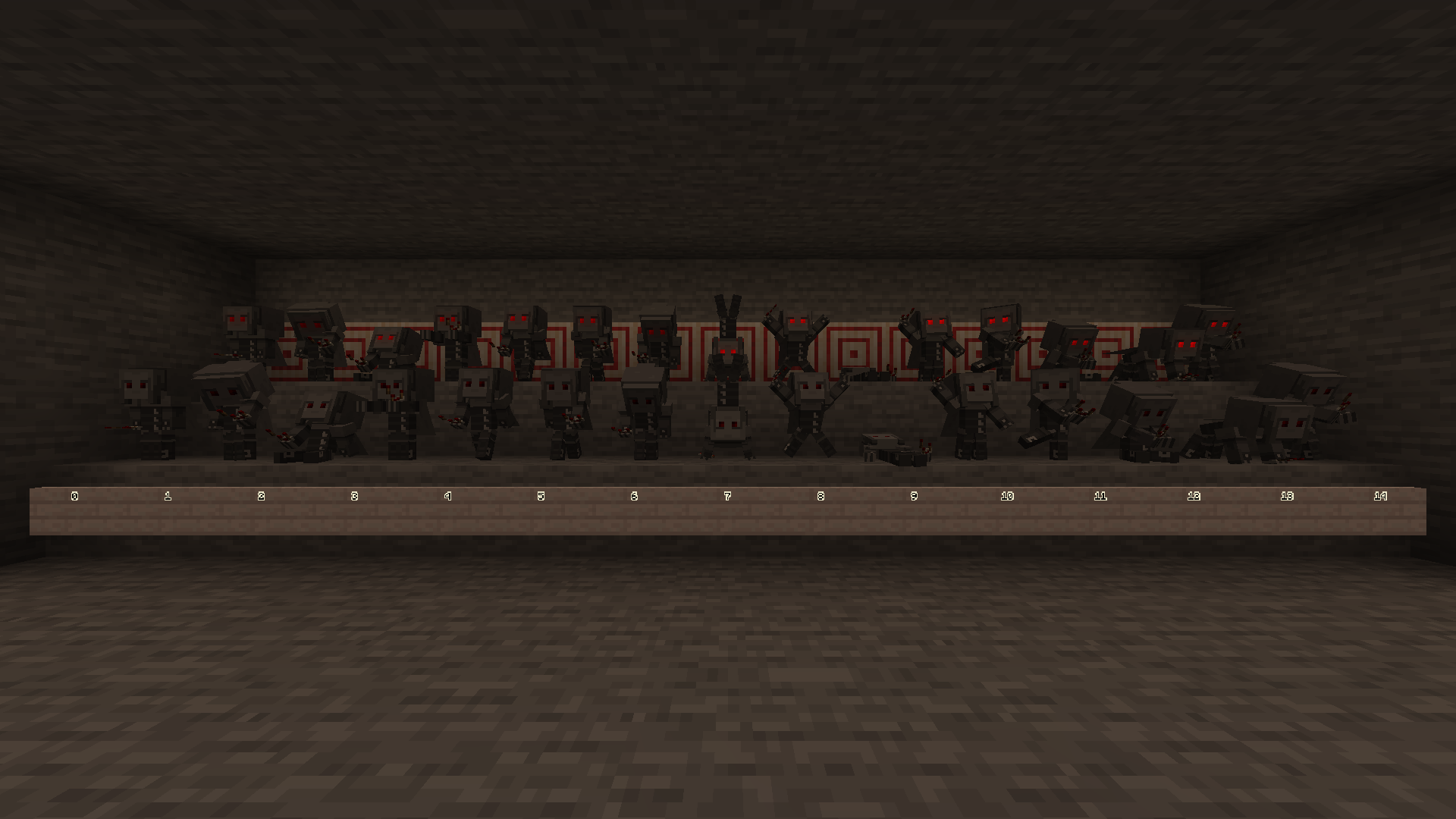
- Posable
- You can pose the statue using redstone.
- This is configurable via a gamerule, which is ON by default. (
hero-statue$allowRedstoneChangeStatuePose)
- This is configurable via a gamerule, which is ON by default. (
- The statue remembers the last set pose when turned off.
- You can pose the statue by interacting with empty hands or when the statue already has an item, if the gamerule is active.
- This is configurable via a gamerule, which is OFF by default. (
hero-statue$allowPlayerChangeStatuePose)
- This is configurable via a gamerule, which is OFF by default. (
- You can pose the statue using redstone.
- Comparators output the level of redstone required to set the current pose.
- rainbows
and unicorns- You can make the statues eyes cycle through the rainbow by giving the statue an item named
jeb_, or by turning theRAINBOW MODEconfig on. - You can also enable this in creative, by setting the
hero_statue_rainbowblockstate with a debug stick or with commands. - This only works with the
Defaultrender type, and if you are not using shaders.
- You can make the statues eyes cycle through the rainbow by giving the statue an item named
- ¿sᴉɥʇ pɐǝɹ noʎ uɐɔ
- You can make the statue render upside down by giving the statue an item named
Dinnerbone,Grumm,legotaylor, ordannnytaylor. - This only works with the
DefaultandVanillarender types.
- You can make the statue render upside down by giving the statue an item named
Config
You can edit the config by using ModMenu, or our Open Config keybinding (defaulted to Home).
If you are using the Open Config keybinding, you will need to be in a world.
Known Issues
Shader Rendering Pipelines
Iris Shaders
Iris overrides core shader pipelines when rendering shader packs, and doesn't provide any documentation for how to add new overrides.
As a workaround, we've copied the ENTITY_CUTOUT and ENTITY_EYES pipeline overrides. We picked these pipelines as they provide a similar effect to our custom pipelines, however it's not 1:1 and some features such as the jeb_ easter egg won't be rendered when a shader pack is active. This functionality matches the Vanilla render type. See Hero-Statue#1.
Rendering should work as intended when no shader packs are in use.
Developer's Note
You may encounter z-fighting with some shader packs.
You can disable our eyes layer using our config if desired. See Config.
Tested Shader Packs
| Shader Pack | |
|---|---|
| Complementary Unbound/Reimagined | No visual issues found.¹ |
| Euphoria Patches | No visual issues found.¹ |
| BSL Shaders | No visual issues found.¹ |
| Rudimentary | Our eyes layer is offset when Vertex Snapping is enabled² and the current render type is set to default or vanilla. This does cause flickering when the player moves. Interestingly, this shader also renders the eyes layer over the player's hand. |
| VECTOR | No visual issues found.¹ |
| Super Duper Vanilla | Resource Intensive when rendering using Default/Vanilla render types, otherwise no visual issues found.¹ |
¹ Except for the above-mentioned render pipeline workaround.
² You can disable Vertex Snapping in the shader pack settings, under Style.
Basic Render Type Poses
The basic render type doesn't render the poses, rainbow, and upside down easter eggs.
I would love to update this in the future to add the poses to the basic render type, however this is easier said than done due to how block model elements rotate.
Technical
For technical details see here.

Screenshots
Gallery
-
Posable Statues! You can pose statues using redstone, and they remember their pose when unpowered.
-
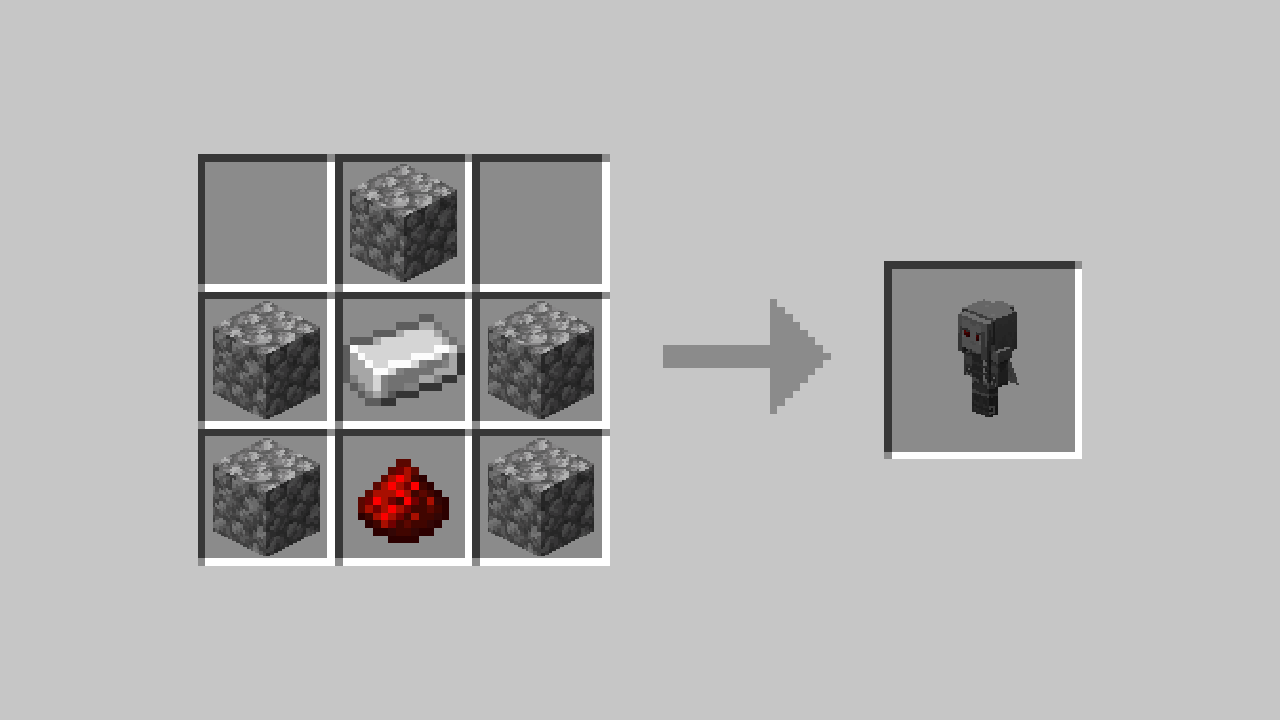
Recipe You can craft a statue using 5 cobblestone, 1 iron ingot, and 1 redstone dust.
Versions
Files
Relations
Project Relations
More like this
Similar Mods
Suggestions use data such as tags, dependencies, dependents, descriptions, titles, and more to rank how much they overlap with this mod.
On ModDex
Community snapshot
By the numbers
Statistics

Want to reach Minecraft players?
We're looking for a server hosting partner to feature here and other parts of the site. Interested? Send us a message!
Get in touchGet it on
Available Platforms
On ModDex
Community snapshot
By the numbers