Mod

HologramMod
No reviews yet
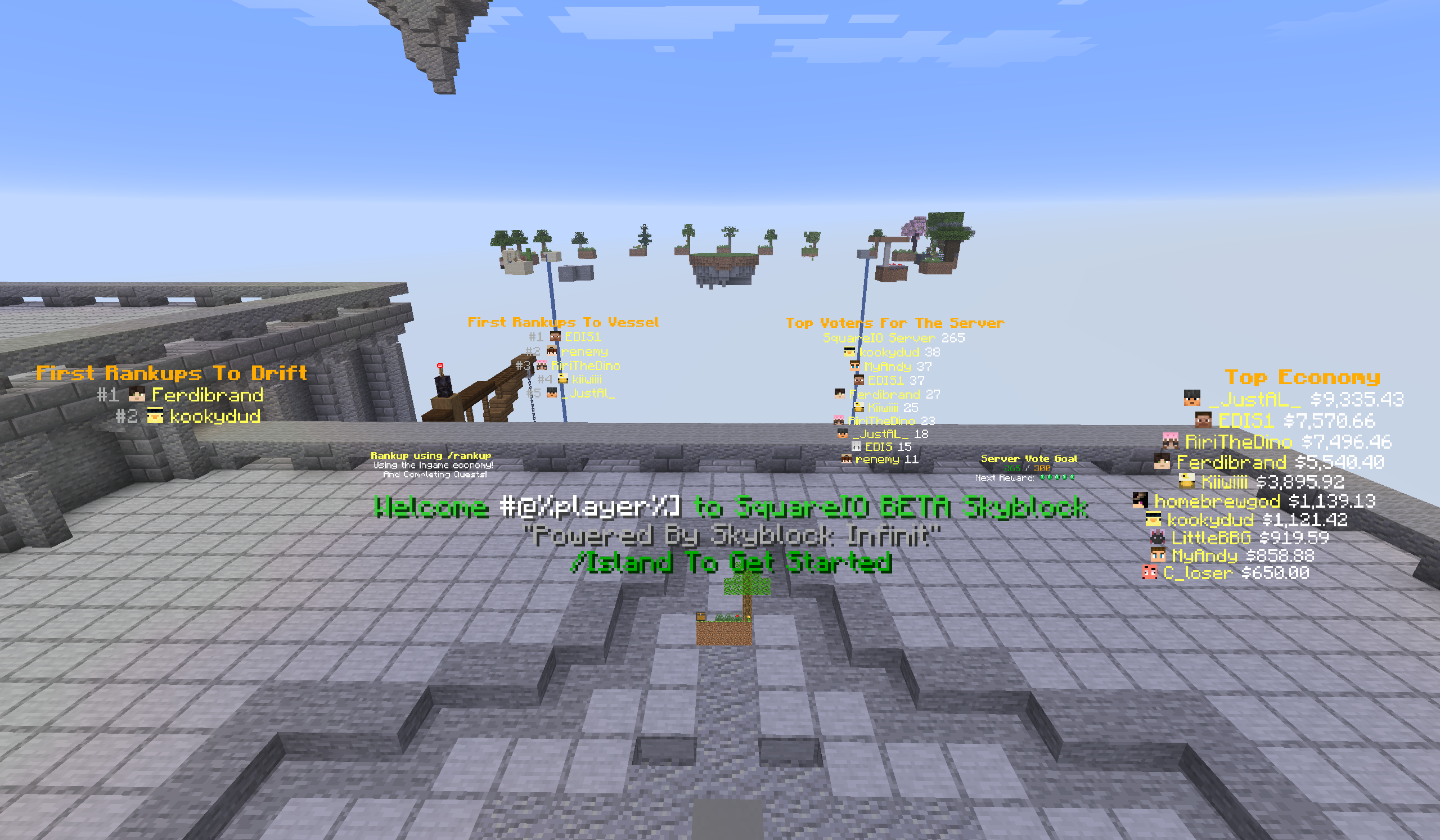
Mod to create holograms texts scoreboards blocks and items the mod uses the sprite features from Chat Mod
Fabric is a mod loader for versions 1.14+ of Minecraft, particularly popular for client side and optimization mods.
Community voices
Reviews
Click once to include, again to exclude, again to clear
No reviews yet. Be the first to review this project!
Get it on
Available Platforms
 Modrinth
Compatibility
Supported Environments
About
Project Details
For authors
Embed Badge
If you're the author of this project, you can embed a live badge anywhere that supports HTML or Markdown. It updates automatically whenever ratings change.
Use HTML for any page that supports it, or Markdown for README files and Markdown-based descriptions.
Identifiers
Platform IDs
Resources
External Links
About
Description
HologramMod — Text, Block & Item Display Holograms with Full In-Game Editing
Built as a companion to ChatMod. Sprite aliases from ChatMod's
sprites.ymlwork directly inside hologram lines — drop an atlas icon anywhere in your text with[#spriteName].
What It Does
HologramMod lets you place floating text, block, and item displays anywhere in your world — all managed through YAML config files and in-game commands that save back to disk automatically. No restarts needed. Everything supports rich colour codes, hex colours, click events, hover text, and atlas sprites.
Features
📝 Text Holograms — /hologram
Floating text displays with per-line formatting. Full ChatMod syntax supported on every line.
holograms:
  spawn_welcome:
    world: "minecraft:overworld"
    x: 0.5
    y: 65.0
    z: 0.5
    scale: 1.2
    billboard: CENTER
    brightness: 15
    shadow: true
    lines:
      - "&#FF5500&lWelcome to the Server!"
      - "[#christmas_chest] &7Seasonal crates are open"
      - "<action:run_command,/spawn>&a[ Click to teleport ]"
Line syntax:
&a,&b…&r— legacy colour and format codes&#RRGGBB— hex colour[#spriteName]— atlas sprite from ChatMod'ssprites.yml{hover text}— hover event on the preceding segment<action:run_command,/cmd>— click event on the preceding segment
Appearance settings: billboard (CENTER / FIXED / HORIZONTAL / VERTICAL), scale, brightness (0–15), see_through, shadow, line_width, opacity, bg_color, view_range_blocks
🔄 Multi-Page Animation
Any text hologram supports multiple pages that cycle automatically on a configurable interval. Useful for rotating announcements or animated signs.
animate: true
animate_interval_ms: 3000
pages:
  default:
    - "&aPage one"
  a:
    - "&bPage two"
  b:
    - "&cPage three"
Use /hologram <name> freeze <page> to pin a specific page, or /hologram <name> freeze off to resume cycling.
👤 Per-Player Placeholder Lines
Any line containing %player% or other player-specific tokens is resolved individually for each player — one entity, personalised text per viewer, no per-player entity duplication.
Built-in placeholders:
| Placeholder | Value |
|---|---|
%player% |
Player's username |
%player_health% |
Current health |
%player_level% |
XP level |
%player_x/y/z% |
Coordinates |
%player_ping% |
Connection latency |
%player_gamemode% |
Game mode |
%player_biome% |
Current biome |
%online% |
Online player count |
%tps% |
Server TPS |
%mspt% |
Milliseconds per tick |
%time% / %date% |
Real-world time and date |
%ram_used% / %ram_percent% |
JVM memory |
%overworld_weather% |
Clear / Rain / Thunder |
Placeholder API placeholders are also resolved automatically when the mod is installed.
🧱 Block Display Holograms — /holoblock
Spawn floating block displays with full block-state support, including rotation and translation offsets.
block_displays:
  my_block:
    world: "minecraft:overworld"
    x: 0.5
    y: 65.0
    z: 0.5
    block_state: "minecraft:stone_slab[type=top]"
    billboard: FIXED
    scale: 0.5
    rotation_yaw: 45.0
Double-block auto-detection: Beds, doors, and tall plants are automatically split into two correctly-offset display entities. Specify just the base block ID — HologramMod handles both halves.
🗡️ Item Display Holograms — /holoitem
Spawn floating item displays with configurable display context, controlling exactly how the item model is oriented.
item_displays:
  floating_sword:
    world: "minecraft:overworld"
    x: 0.5
    y: 65.0
    z: 0.5
    item: "minecraft:diamond_sword"
    display_context: FIXED
    billboard: CENTER
    scale: 1.0
Display contexts: FIXED, GROUND, GUI, HEAD, THIRD_PERSON_LEFT_HAND, THIRD_PERSON_RIGHT_HAND, FIRST_PERSON_LEFT_HAND, FIRST_PERSON_RIGHT_HAND
📊 Scoreboard Holograms — /holoscore
Live leaderboard displays that update automatically when scores change. Three data sources supported:
| Source | What it shows |
|---|---|
scoreboard |
Any vanilla scoreboard objective, sorted by score |
ecobal |
Top player balances from EcoBal economy mod |
votes |
Total vote count with configurable goal milestones |
score_holograms:
  top_kills:
    world: "minecraft:overworld"
    x: 100.5
    y: 65.0
    z: 200.5
    source_type: scoreboard
    scoreboard: kills
    update_mode: scoreboard
    lines:
      - "&6&lTop Kills"
      - "&e#%rank% &f%displayname% &7— &a%score%"
Pagination: Use /holoscore <name> newpage to chain a second hologram that continues from where the first left off.
Update modes: scoreboard (fires when top-N changes) or timed (fires every update_interval_ms milliseconds).
In-Game Commands
All commands save back to their respective YAML files automatically.
Text Holograms /hologram /holo
| Command | Description |
|---|---|
/hologram create <name> |
Create at your position |
/hologram remove <name> |
Delete permanently |
/hologram list |
List all holograms |
/hologram info <name> |
Show settings |
/hologram tp <name> |
Teleport to a hologram |
/hologram move <name> |
Move to your position |
/hologram addline <name> <text> |
Append a line |
/hologram setline <name> <index> <text> |
Edit a line |
/hologram removeline <name> <index> |
Delete a line |
/hologram set <name> <setting> <value> |
Change any appearance setting |
/hologram rotate <name> <yaw> |
Set horizontal rotation |
/hologram addpage <name> |
Add an animation page |
/hologram freeze <name> <page|off> |
Pin or unpin a page |
/hologram reload |
Reload all configs |
Block Displays /holoblock
create, remove, list, move, block, set, rotate — same pattern as /hologram.
Item Displays /holoitem
create, remove, list, move, item, context, set, rotate — same pattern as /hologram.
Scoreboard Holograms /holoscore
create <name> <type> <objective>, remove, list, move, set, newpage, reload.
Permissions
| Permission | Grants |
|---|---|
hologrammod.command |
Base /hologram command access |
hologrammod.create |
/hologram create |
hologrammod.remove |
/hologram remove |
hologrammod.reload |
/hologram reload |
hologrammod.edit |
All editing subcommands |
hologrammod.* |
All permissions |
Works with LuckPerms and Fabric Permissions API.
Configuration Files
All files live under config/hologrammod/. Use /hologram reload after any edit — no restart required.
| File | Contains |
|---|---|
hologramtext.yml |
Text hologram database |
hologramblock.yml |
Block display database |
hologramitem.yml |
Item display database |
hologramscores.yml |
Scoreboard hologram database |
messages_format.yml |
All player-facing system strings |
Dependencies
| Mod | Required? |
|---|---|
| Fabric API | ✅ Required |
| LuckPerms | 🔶 Optional — for permission-based command access |
| Fabric Permissions API | 🔶 Optional — for permission nodes |
| ChatMod | ⭐ Strongly recommended — enables sprites and full rich-text syntax |
| Placeholder API | 🔶 Optional — enables PAPI placeholders in hologram lines |
Modpack Policy: ✅ Free to include in any modpack. ❌ The modpack must not be sold.
Screenshots
Gallery
Versions
Files
Relations
Project Relations
More like this
Similar Mods
Suggestions use data such as tags, dependencies, dependents, descriptions, titles, and more to rank how much they overlap with this mod.
On ModDex
Community snapshot
By the numbers
Statistics

Want to reach Minecraft players?
We're looking for a server hosting partner to feature here and other parts of the site. Interested? Send us a message!
Get in touchGet it on
Available Platforms
On ModDex
Community snapshot
By the numbers
Statistics
Resources