Mod

Instrucciones
No reviews yet
Euforia Instructions is a high-performance cinematic utility designed for Minecraft servers to display professional HUD overlays to all players. It allows administrators to broadcast real-time instructions, rules, and custom titles with smooth fade-in/out
Community voices
Reviews
Click once to include, again to exclude, again to clear
No reviews yet. Be the first to review this project!
Get it on
Available Platforms
 Modrinth
Compatibility
Supported Environments
About
Project Details
For authors
Embed Badge
If you're the author of this project, you can embed a live badge anywhere that supports HTML or Markdown. It updates automatically whenever ratings change.
Use HTML for any page that supports it, or Markdown for README files and Markdown-based descriptions.
Identifiers
Platform IDs
Resources
External Links
About
Description
📺 Eufonia Instructions (fan)
The Cinematic Event Framework for Minecraft Servers
Euforia Instructions is a high-performance administrative tool designed to deliver professional, synchronized visual overlays to all players. Whether you are hosting a massive tournament, a roleplay event, or a community challenge, this mod allows you to broadcast rules, phase transitions, and real-time instructions with a premium cinematic feel.
✨ Core Features
- 🌐 Global Synchronization: Every update, timer change, or text edit is instantly synced across the entire server to all connected clients.
- 🎭 Cinematic Immersion: Features a smooth 2.5-second fade-in/out system and built-in camera shader support to transform the atmosphere of your event.
- ⏱️ Integrated Event Timer: A centralized, high-visibility countdown clock to keep every player informed of event phases or objective deadlines.
- 🎨 Dynamic Styling & Branding: Real-time control over colors (Hex & 80+ presets), text scales, and element positioning. Supports custom logos in screen corners.
- 📁 Config Presets: Save and load different HUD layouts as
.jsonfiles to swap between complex event phases instantly.
⌨️ Command Reference (/luxep)
Master your event with the complete command suite. (Requires OP Level 4)
📂 1. Scene & Display Control
| Command | Description |
|---|---|
/luxep escena mostrar [hh:mm:ss] |
Opens the HUD globally (use 0 for permanent display) |
/luxep escena mostrar_a <players> |
Shows the HUD only to specific users or groups |
/luxep escena ocultar |
Closes the HUD for everyone instantly |
/luxep escena bloquear_hud <true|false> |
Toggles the F1 key blocking for maximum focus |
🎨 2. Visual Customization
| Command | Description |
|---|---|
/luxep ui texto <principal|secundario> <text> |
Updates main titles (use ; for line breaks) |
/luxep ui color fondo <color1> [color2] |
Sets solid or gradient backgrounds (Hex or Names) |
/luxep ui color <element> <color> |
Changes color for titles, clock, lines, or instructions |
/luxep ui escala <element> <value> |
Adjusts sizes for text and logos (e.g., 1.5) |
/luxep ui offset <element> <x> <y> |
Precise X/Y positioning for logos and titles |
⚙️ 3. Content & File Management
| Command | Description |
|---|---|
/luxep controles <add|mod|del|clear> |
Manage the specific action/keybind list on screen |
/luxep logos <primary|secondary> <path> |
Load custom corner images from the mod folder |
/luxep archivo <save|load|list> |
Manage your professional .json configurations |
Developed by Sofyx
Screenshots
Gallery
-
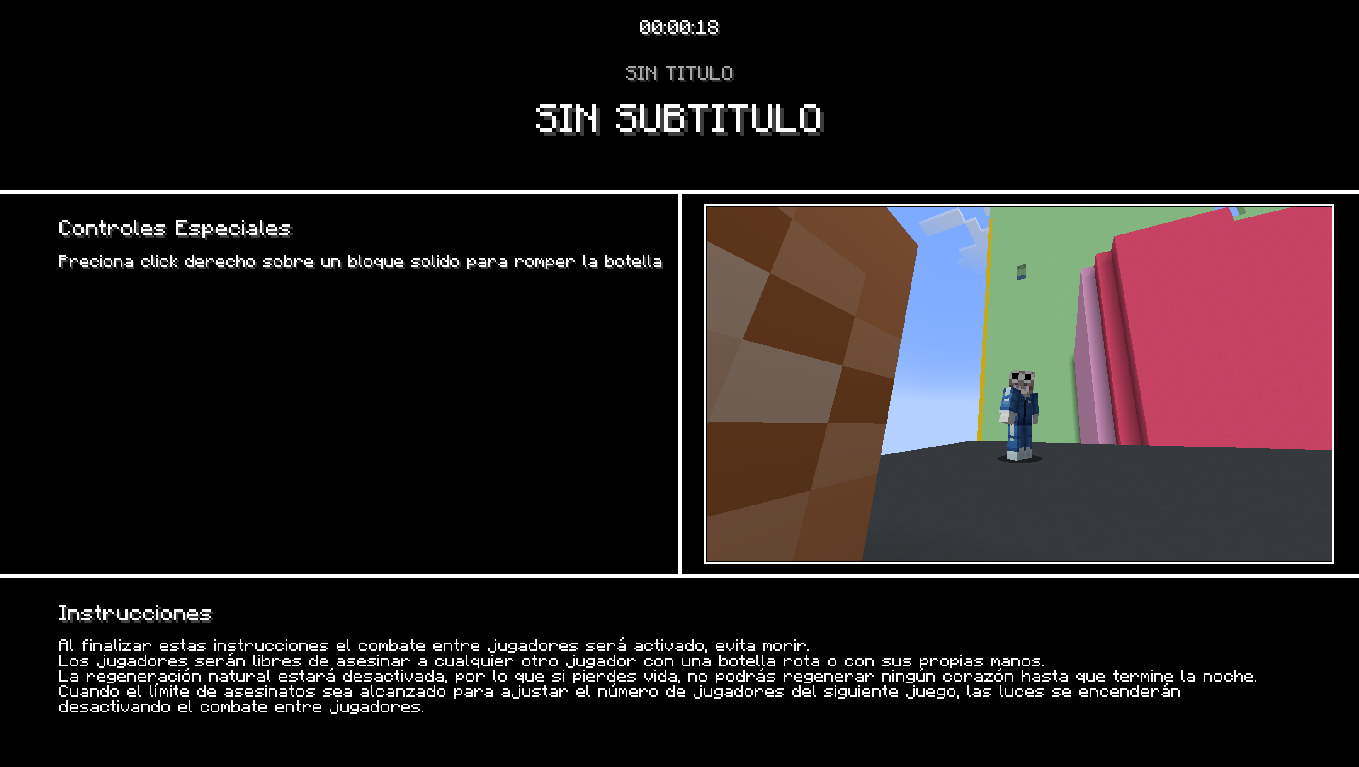 SISTEMA DE INSTRUCCIONES
Versions
Files
Relations
Project Relations
More like this
Similar Mods
Suggestions use data such as tags, dependencies, dependents, descriptions, titles, and more to rank how much they overlap with this mod.
On ModDex
Community snapshot
By the numbers
Statistics

Want to reach Minecraft players?
We're looking for a server hosting partner to feature here and other parts of the site. Interested? Send us a message!
Get in touchGet it on
Available Platforms
On ModDex
Community snapshot
By the numbers
Statistics
Resources