
Community listing page, reviews here may not be monitored by the author.
KubeJS Studio


No reviews yet
A GUI Studio and built-in IDE for KubeJS
Community voices
Reviews
No reviews yet. Be the first to review this project!
Get it on
Available Platforms
Compatibility
Supported Environments
Runs entirely on the client. Works on vanilla servers.
Must be installed on both the client and the server.
Varies by version.
About
Project Details
For authors
Embed Badge
If you're the author of this project, you can embed a live badge anywhere that supports HTML or Markdown. It updates automatically whenever ratings change.
Use HTML for any page that supports it, or Markdown for README files and Markdown-based descriptions.
Identifiers
Platform IDs
About
Description
KubeJS Studio
KubeJS Studio is an in-game front end for KubeJS. Press K and you get a workspace for recipes, tags, loot tables, item and block stats and new registry entries, plus a code editor that knows what is loaded in your pack. Studio writes plain files under kubejs/: scripts, datapack JSON, lang files and models. There is no project format to export, and the generated files keep working without Studio.
Needs KubeJS. On Forge 1.20.1 it also needs Kotlin for Forge. LDLib2 is bundled inside the jar. Client side only, it never has to go on a server.
GUI or code, your call
A GUI can be faster than writing a script by hand. Other times it's just better to edit the script. Studio does both, and you can switch whenever you like, or use both at once.
If you have never written a KubeJS script, start with the five visual tabs. Pick a recipe, a tag, a loot table or an item, change it with real item slots and normal fields, hit Queue. Studio shows you exactly what it is going to write before it touches anything.
If you already write KubeJS, the Files tab is a proper editor. Completion, hover docs and error checking are built from the running instance, not from a typings file that went stale two updates ago. Type event.recipes. and the list is the recipe types loaded in that pack, mods included.
The workspace
Recipes
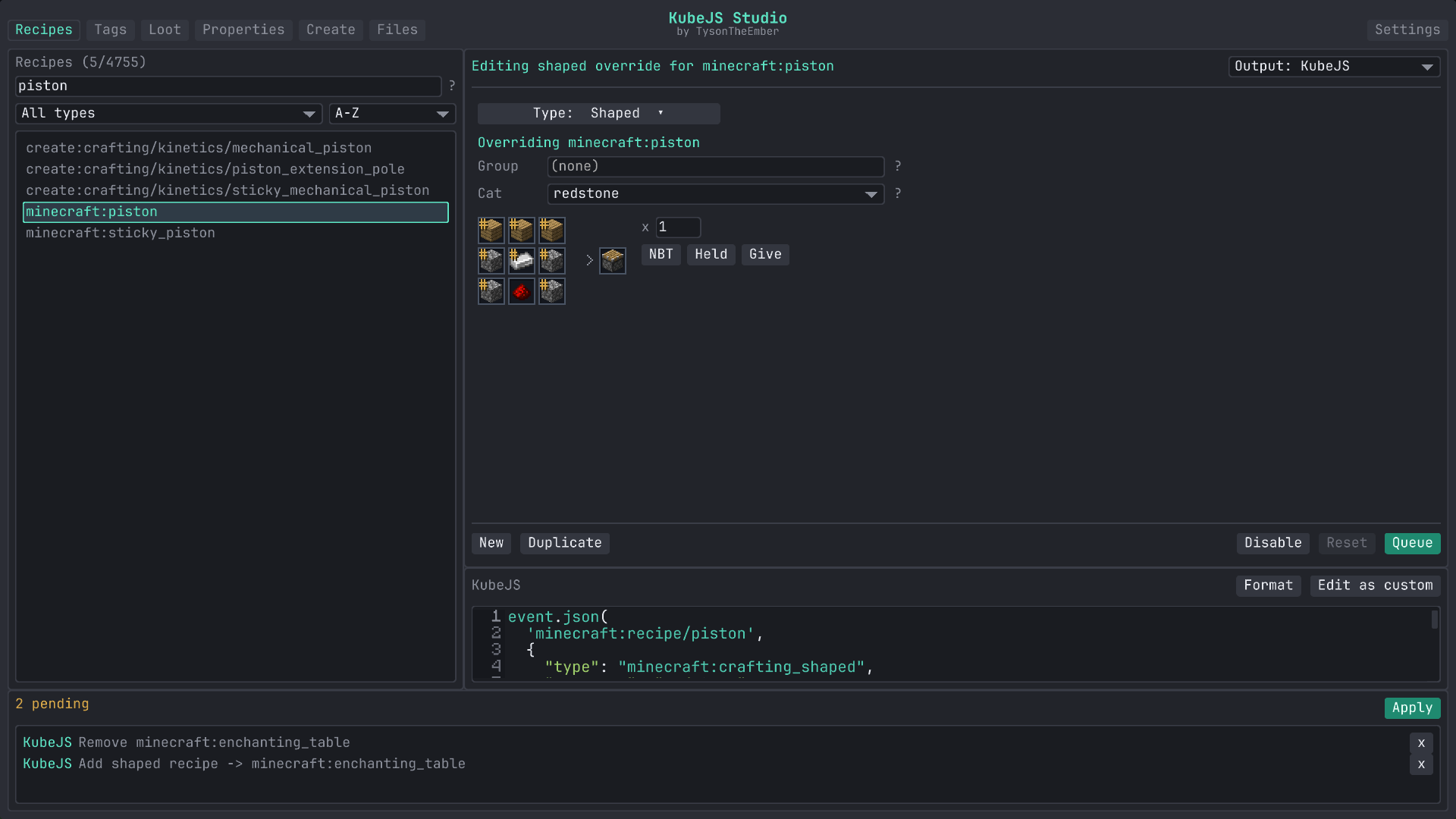
Every loaded recipe is in the browser, filterable by mod, type or item. Supported types open in a form with item slots filled from a picker (or a Held button that copies the stack in your hand into the result), count and category fields, and the generated output shown underneath as you edit. Override a recipe, disable it, duplicate it, or start a blank one.
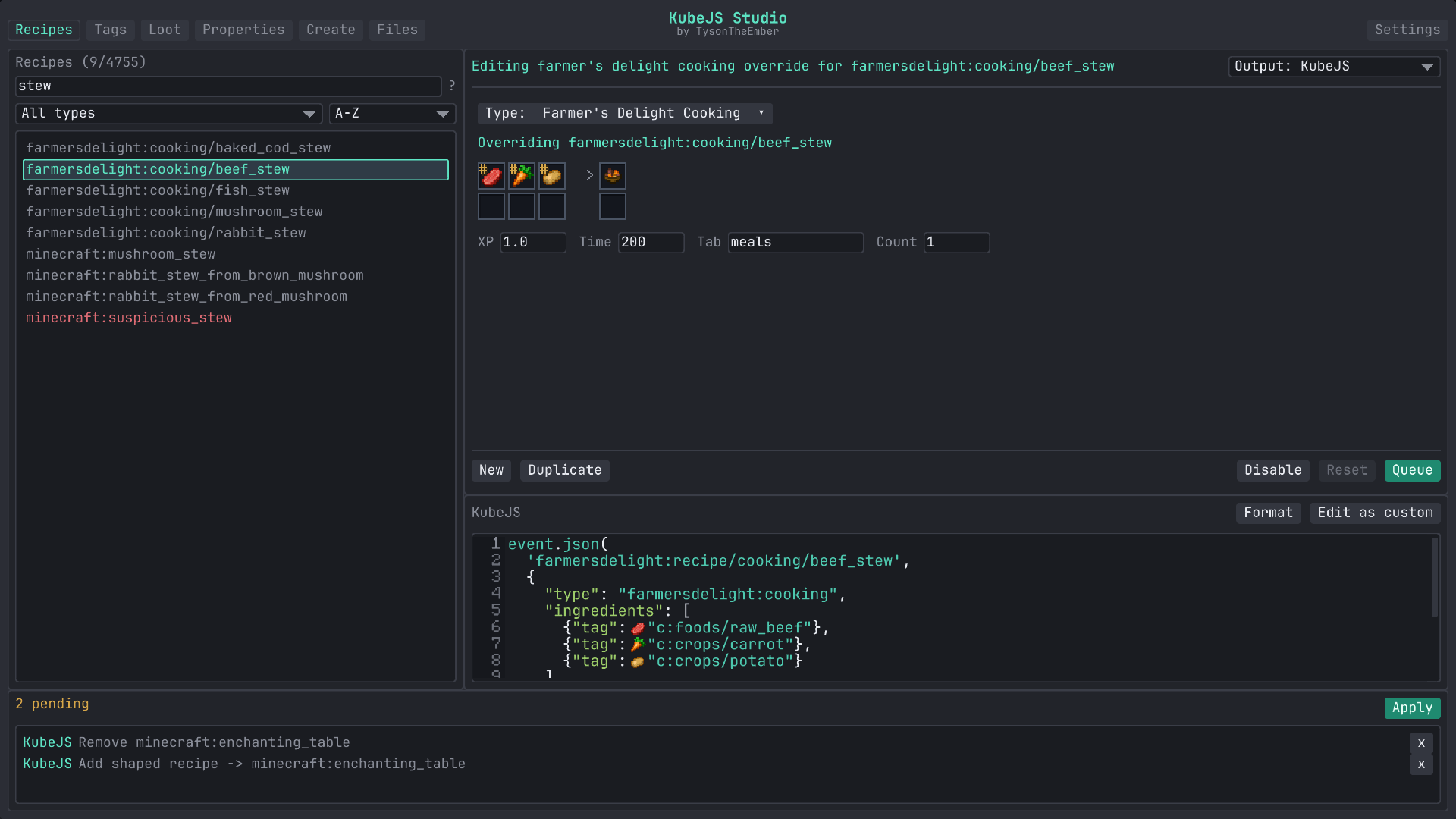
Vanilla crafting, cooking, stonecutting and smithing have hand-built forms. Create's processing recipes do too, including heated mixing and sequenced assembly. Farmer's Delight, Ars Nouveau and the common Mekanism machine types have their own layouts.
For other types, Studio builds a flat form from the recipe schema KubeJS already has for it: item and fluid fields become slots, numbers and flags become fields. That covers a lot of mods with a KubeJS addon without me writing anything per mod. If a type has no schema, or the existing JSON is more complicated than that form can round-trip, it opens as raw JSON and you edit that.
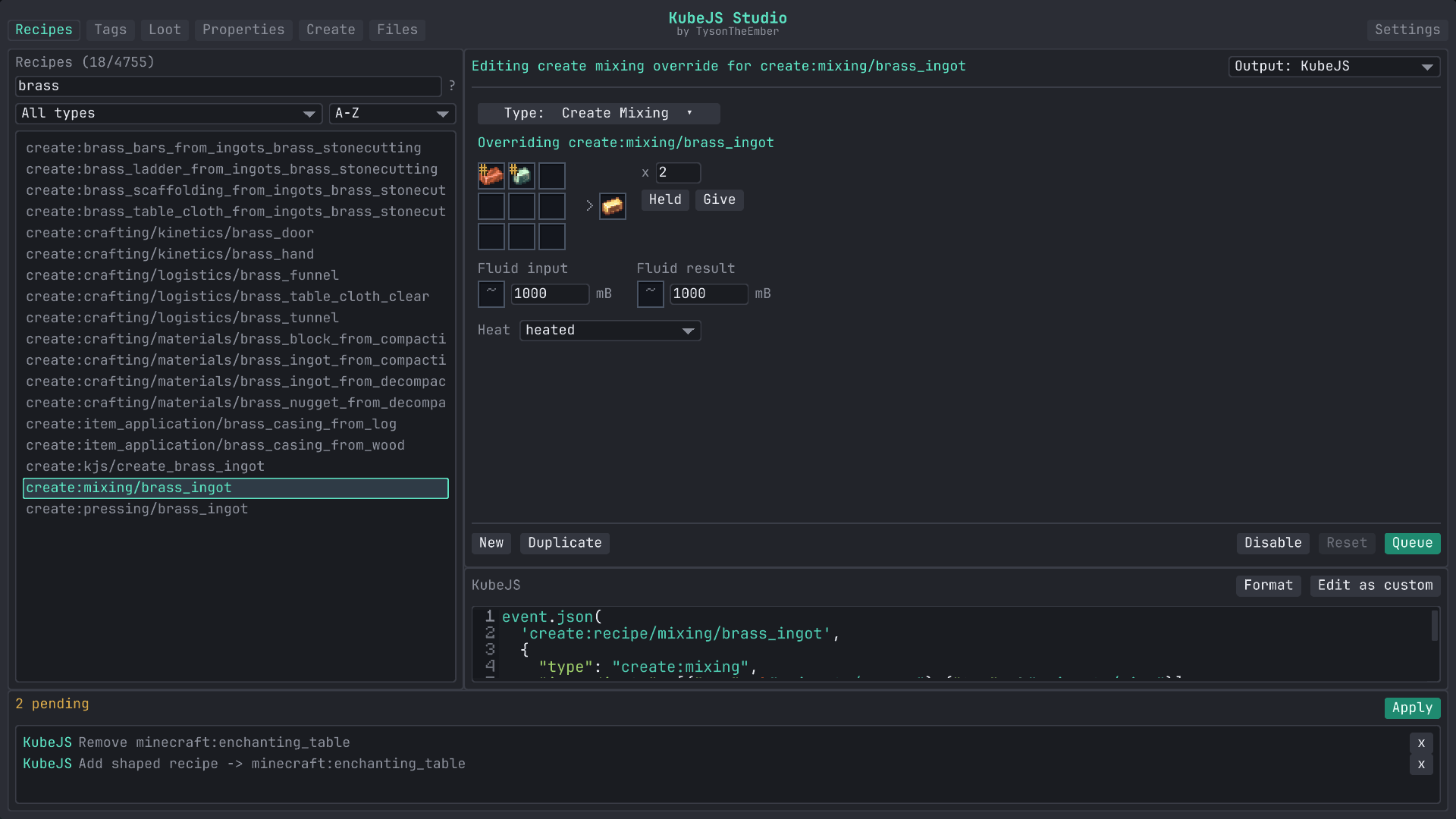
Recipe JSON comes from the running world, so what you see is what the game loaded. JEI and EMI recipe pages get an Edit button that jumps into Studio with that recipe selected (singleplayer, creative mode).
Tags
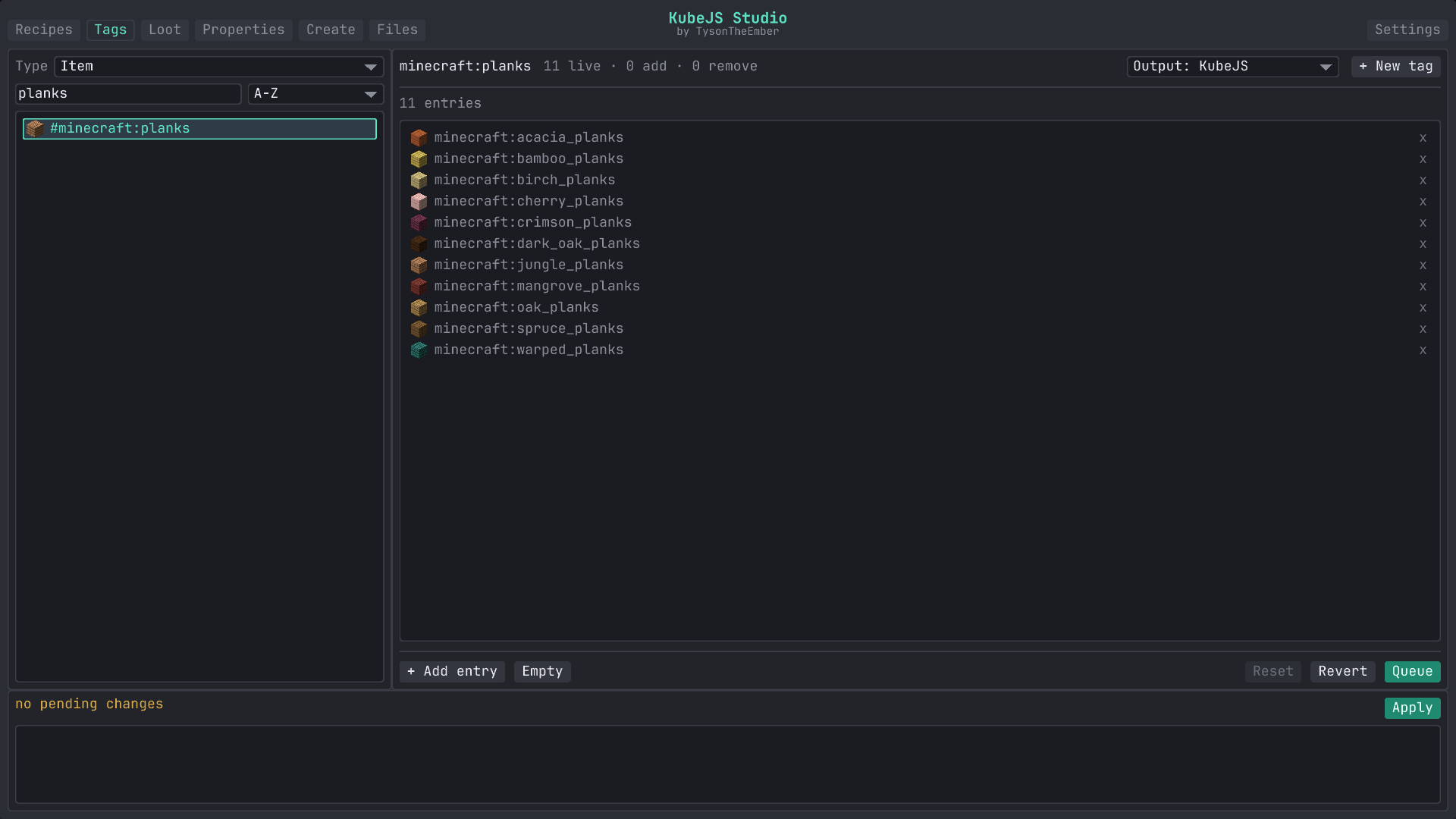
Pick a registry (items, blocks, fluids, entities, and any dynamic registry the game exposes), find the tag, add or remove members. Additions and removals are shown inline against the live contents so you can see the diff before you queue it. This is the quick way to get modded items into #minecraft:planks or #c:ingots/copper so recipes and mechanics pick them up.
Loot
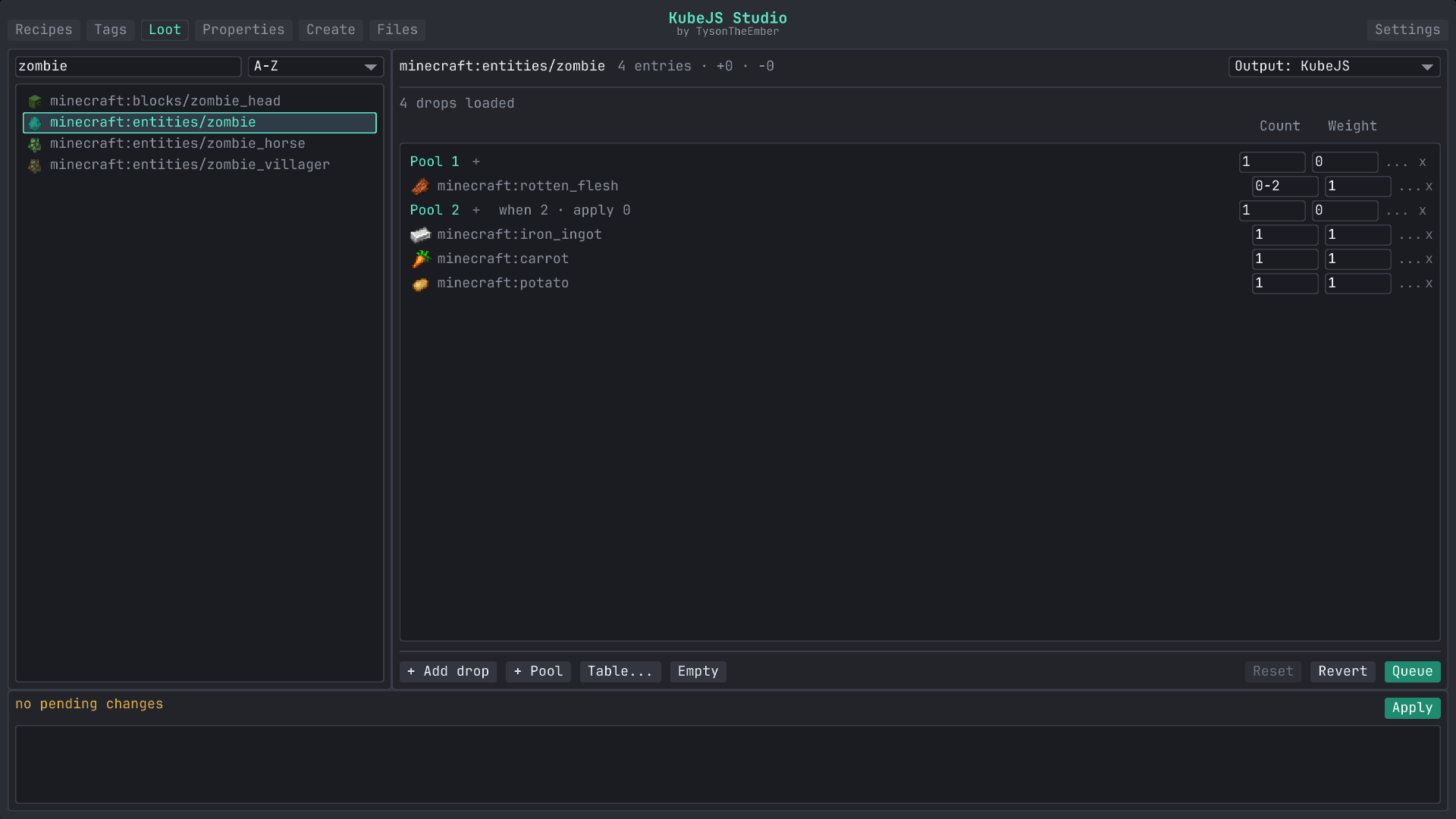
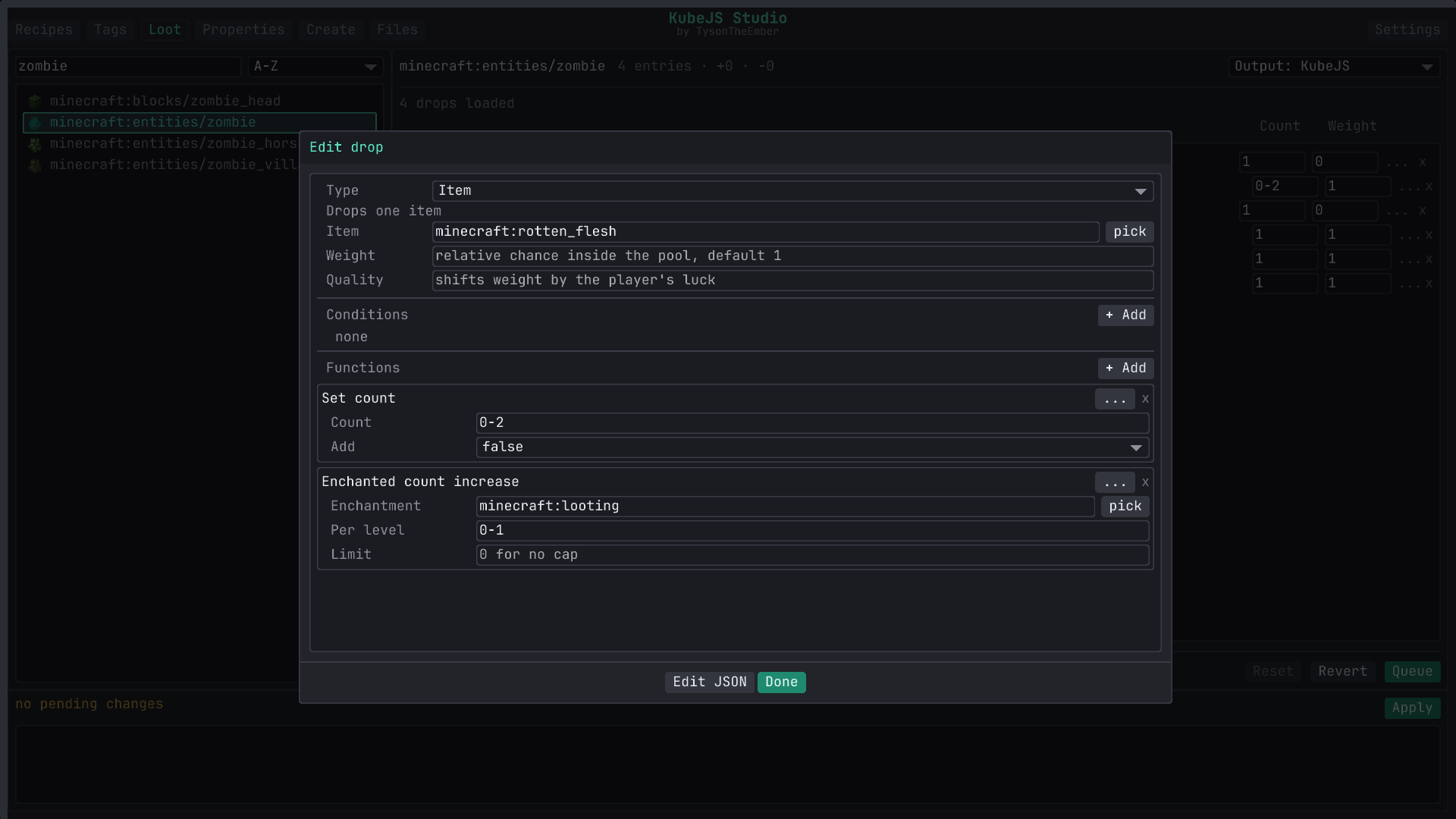
Real loot tables, edited in place as a tree of pools and entries. Rolls, count and weight stay inline. The ... on a row opens the full editor for that entry, which is where conditions and functions live as typed forms: tool checks, random chance, Fortune style bonuses, explosion decay, names, lore, components or NBT, and nested all_of / any_of logic. Table-level settings (context type, random sequence, table-wide functions) are under Table…. The catalog follows the Minecraft version, and anything without a typed form stays editable as raw JSON.
Properties
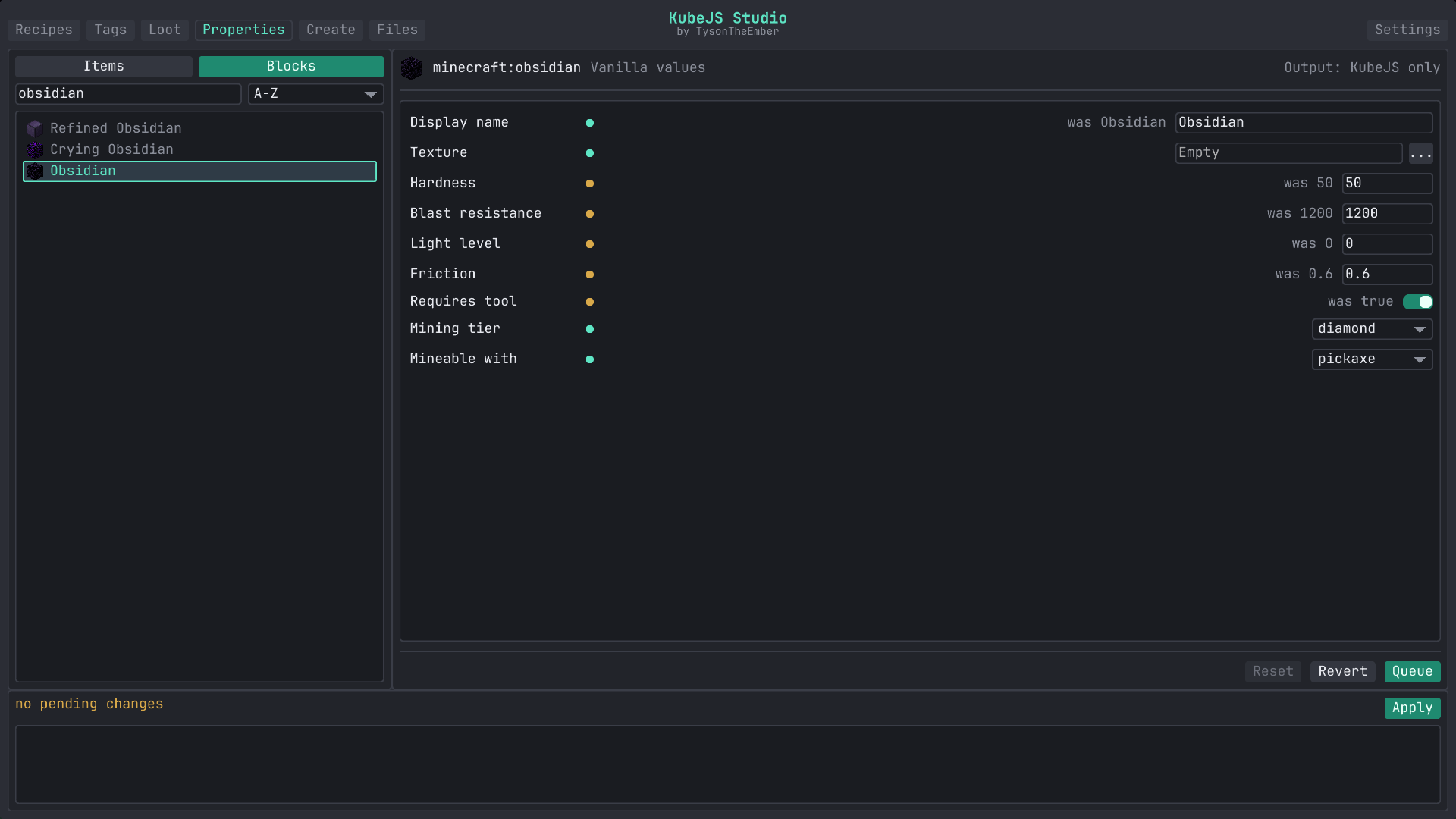
Base stats that no recipe or tag can touch. Items expose stack size, durability, food values, burn time and an enable-only fire resistance flag. Blocks expose hardness, blast resistance, light level, friction, whether a tool is required, mining tier and the tool it is mineable with. Studio writes the matching ItemEvents.modification or BlockEvents.modification startup script.
The same tab renames and retextures anything already in the game, which lands as a lang entry and a model override under kubejs/assets. Stat changes need a game restart, mining tags apply on /reload, names and textures on F3+T. Each row is marked with which one it needs.
Create
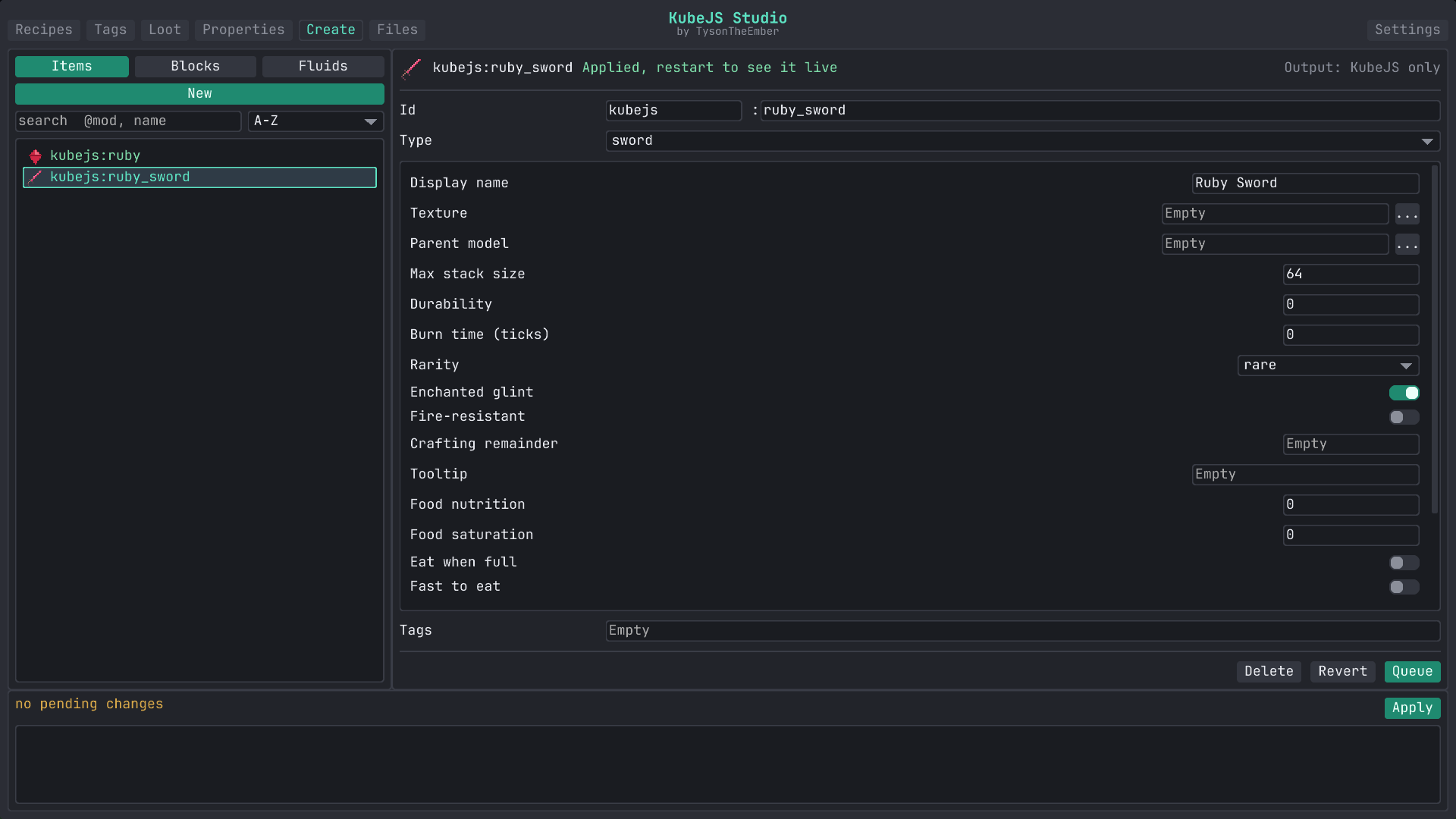
New items, blocks and fluids without touching a startup script. Give it an id, pick one of Studio's builder types (plain item, tools, armor pieces, slab, stairs, door, crop, a fluid with its bucket, among others) and fill in the fields you care about. The field list is version correct, so 1.20.1 only shows what 1.20.1 KubeJS supports. Everything you create stays listed on the left so you can reopen it or delete it later.
The editor
If you have used ProbeJS, the goal will feel familiar. ProbeJS generates typings so an external IDE can help you write KubeJS; I wanted that help inside Minecraft. Studio reflects over the KubeJS runtime you actually have (the event groups and handlers, the globals bound into the script scopes, addons included) and reads recipe schemas and game ids from the open world as completion needs them. There is no typings step and no second window, and a cached copy of the symbol index covers the odd case where live reflection fails.
The Files tab itself is a file explorer and multi-tab editor for your whole instance with syntax highlighting for JS, JSON, TOML and logs. It edits text files (up to 2 MB), previews images, and does create, rename and delete with guard rails. Favorites and pinned folders keep your kubejs/ tree one click away.
Completion
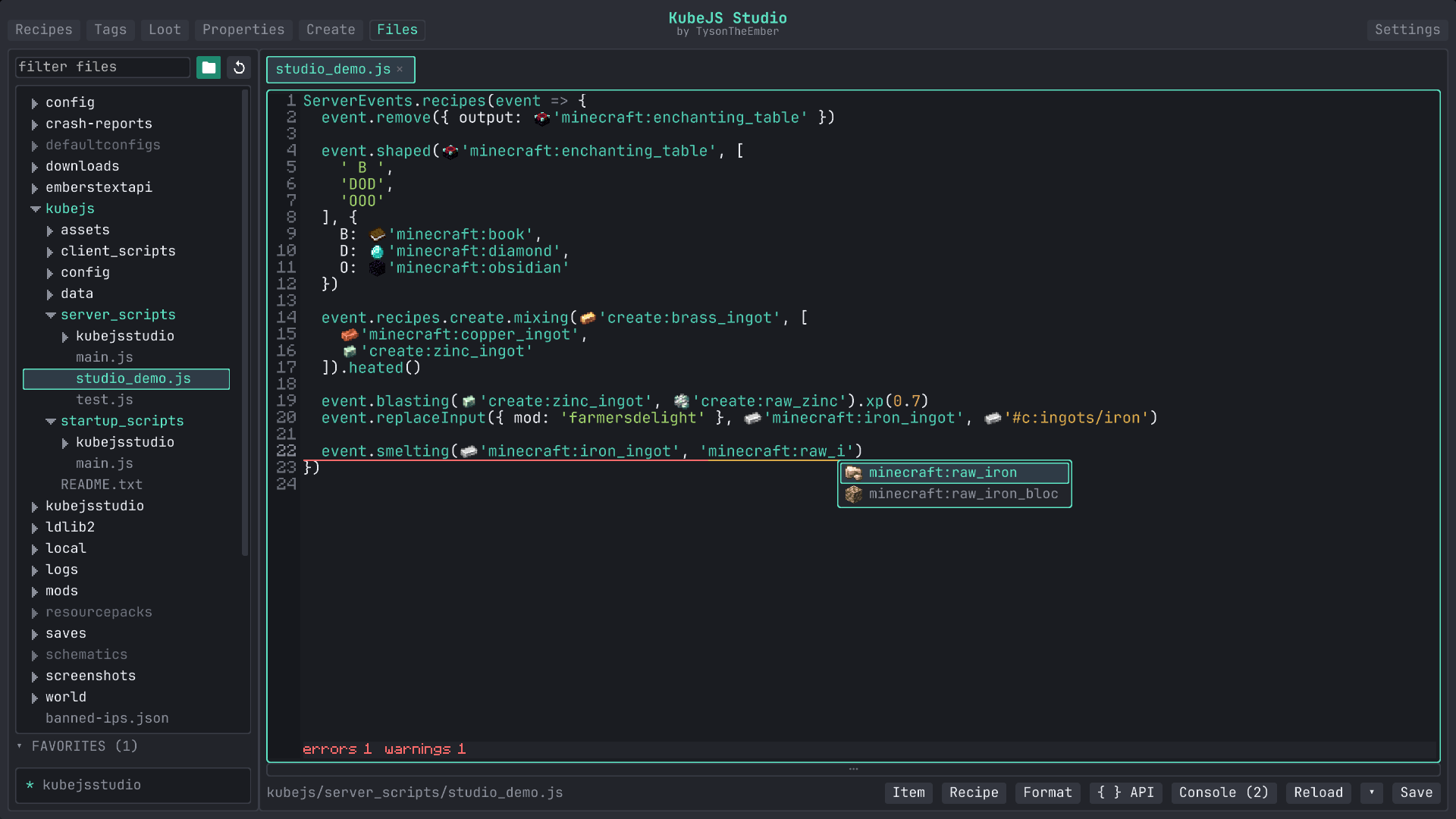
Type event. and you get the members of that event. Type event.recipes. and you get the namespaces of every mod with a KubeJS recipe schema, then the types under them, then the chain methods that type supports (.heated() on Create mixing, .xp() on smelting). String completion follows context: item and tag ids (with icons) where a recipe wants one, mod ids in filters, builder types in registry events, loot table ids and lang keys where they fit. A class loaded through Java.loadClass gets static member completion, and datapack JSON recognizes the common id fields (item, tag, id, type).
Hover docs and signature help
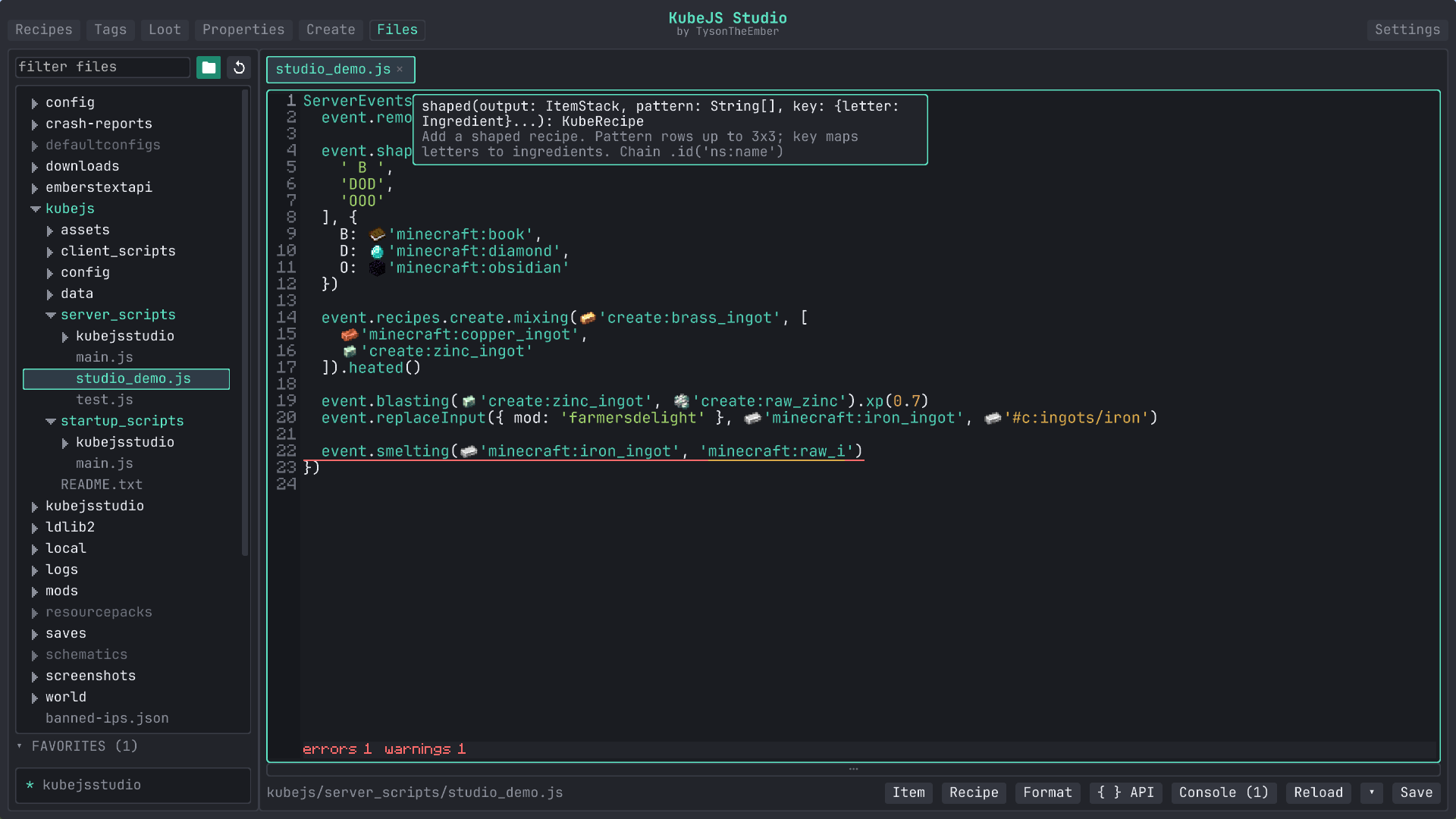
Hover a KubeJS member, a variable, an id or a diagnostic to see what it is: the signature and a short description, the type, the item behind the id, the full message. While the caret sits inside a recognized call, a signature strip appears above it. Docs come from the harvested runtime index (KubeJS's own @Info annotations included) plus a small built-in reference for the parts KubeJS does not describe about itself.
Diagnostics
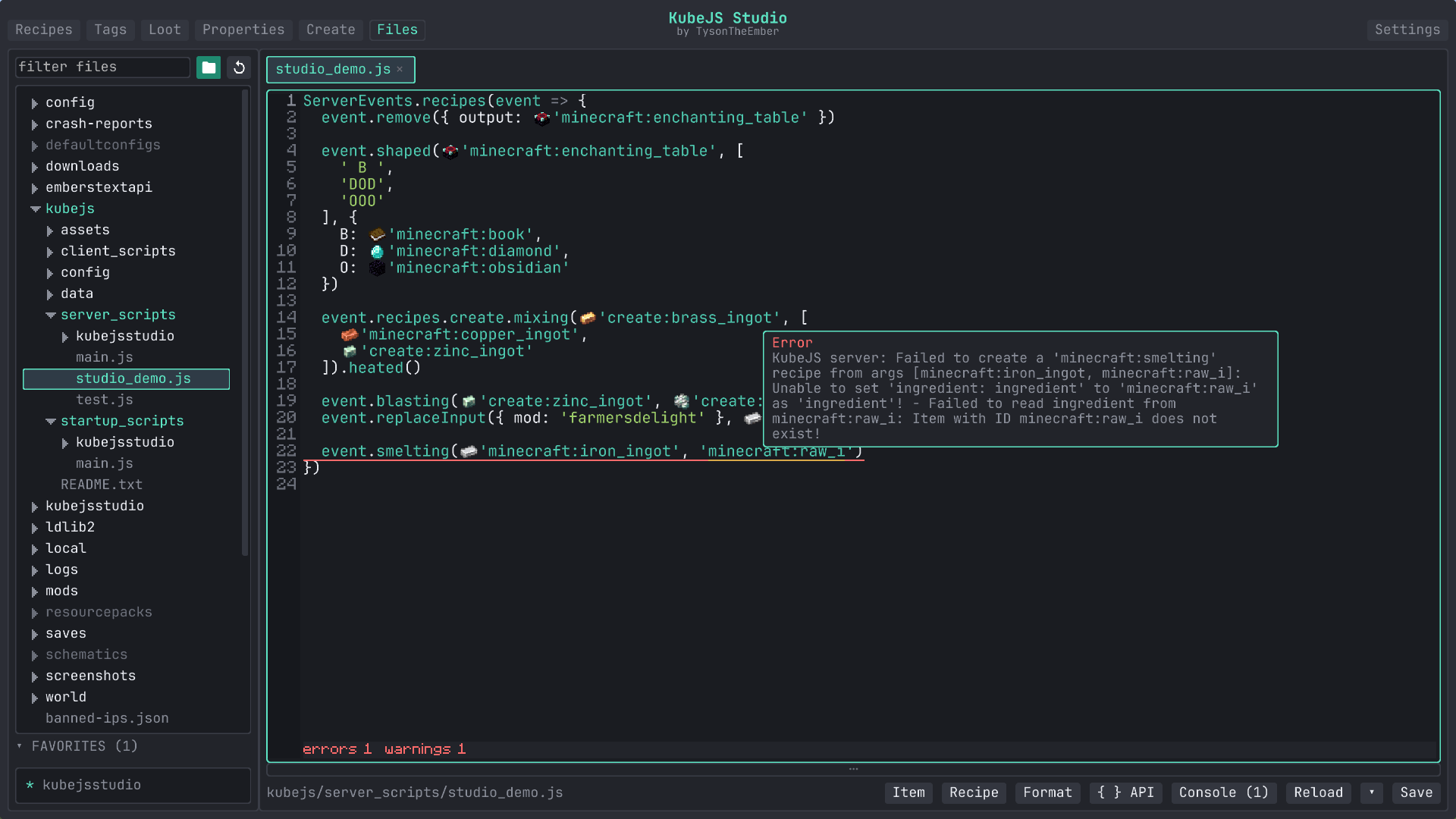
Errors and warnings appear as you type, with a count below the editor and the full message on hover. Unknown members and identifiers, misspelled item, tag, mod and recipe ids, argument counts that do not match the recipe schema, ids in the wrong kind of slot, events used from the wrong script type (ServerEvents in a startup script), malformed // priority and // requires headers, unbalanced brackets and unterminated strings, and Java classes the KubeJS class filter would reject. KubeJS console errors from the last reload that carry a source location land on the offending line as well, so a broken recipe points back at the statement instead of a log file.
Console and reload
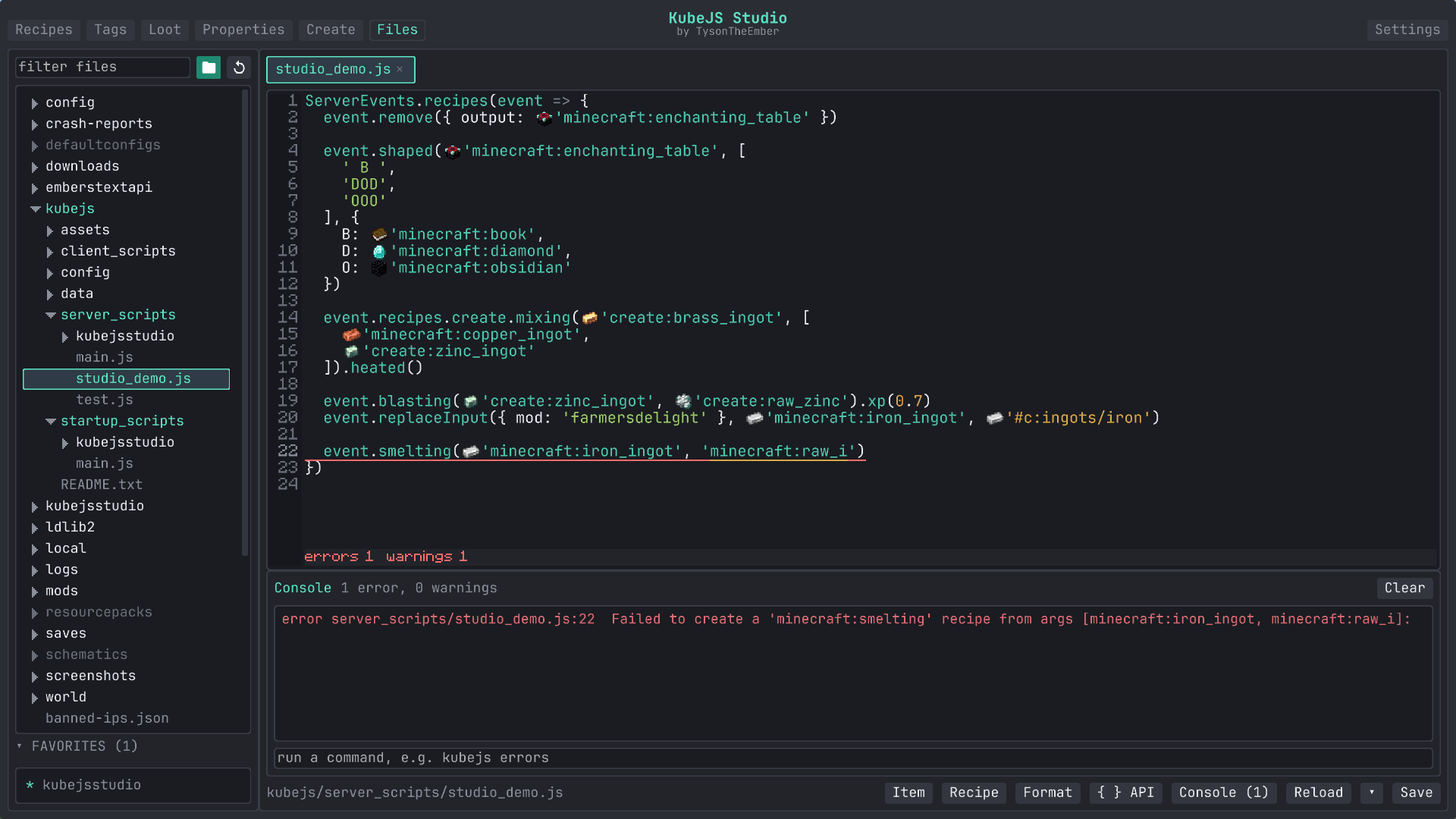
The console panel lists KubeJS errors and warnings from the last reload. Click one to jump to its line, or use the command box to run /kubejs errors, /reload or anything else without leaving the screen. The Reload button reloads the script type of the file you are editing (startup, server or client scripts, or /reload for data), so you are not rebuilding the whole datapack to test a client script.
The rest
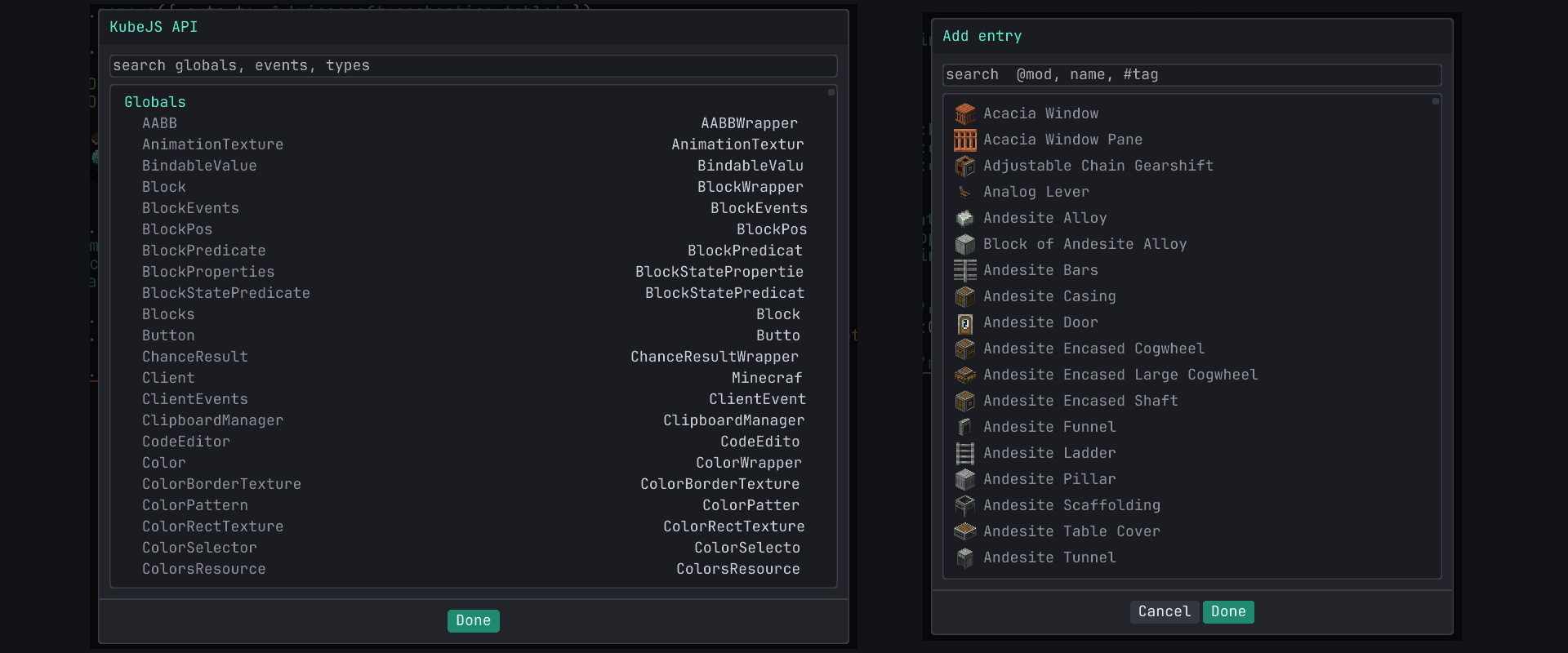
Find and replace with match case, whole word and regex, formatting, a snippet palette, word wrap, bracket closing and auto indent, preview tabs, session restore, and undo that batches nearby typing into single steps. Ctrl+I opens the item picker at the caret and inserts an id (or expands a tag into its member ids), Ctrl+R inserts a recipe's JSON, Ctrl+P searches the harvested KubeJS index, and the { } API button opens the same index grouped into globals, events and types. Lang files get a "Missing keys" button that inserts the block, item, entity, effect and enchantment keys the namespace has not translated yet.
It ships with JetBrains Mono, which on 1.20.1 goes through an SDF pipeline so it stays sharp at any GUI scale. Other fonts from your resource packs can be picked in Settings (Embers Text API widens what is selectable).
Queue, review, apply
Nothing in the visual tabs writes straight to disk. Changes collect in a pending list at the bottom of the screen. By default Apply shows a diff of the files it is about to write, keeps a .bak of the previous version next to each one, and reloads afterwards. All three are settings if you would rather it did not.
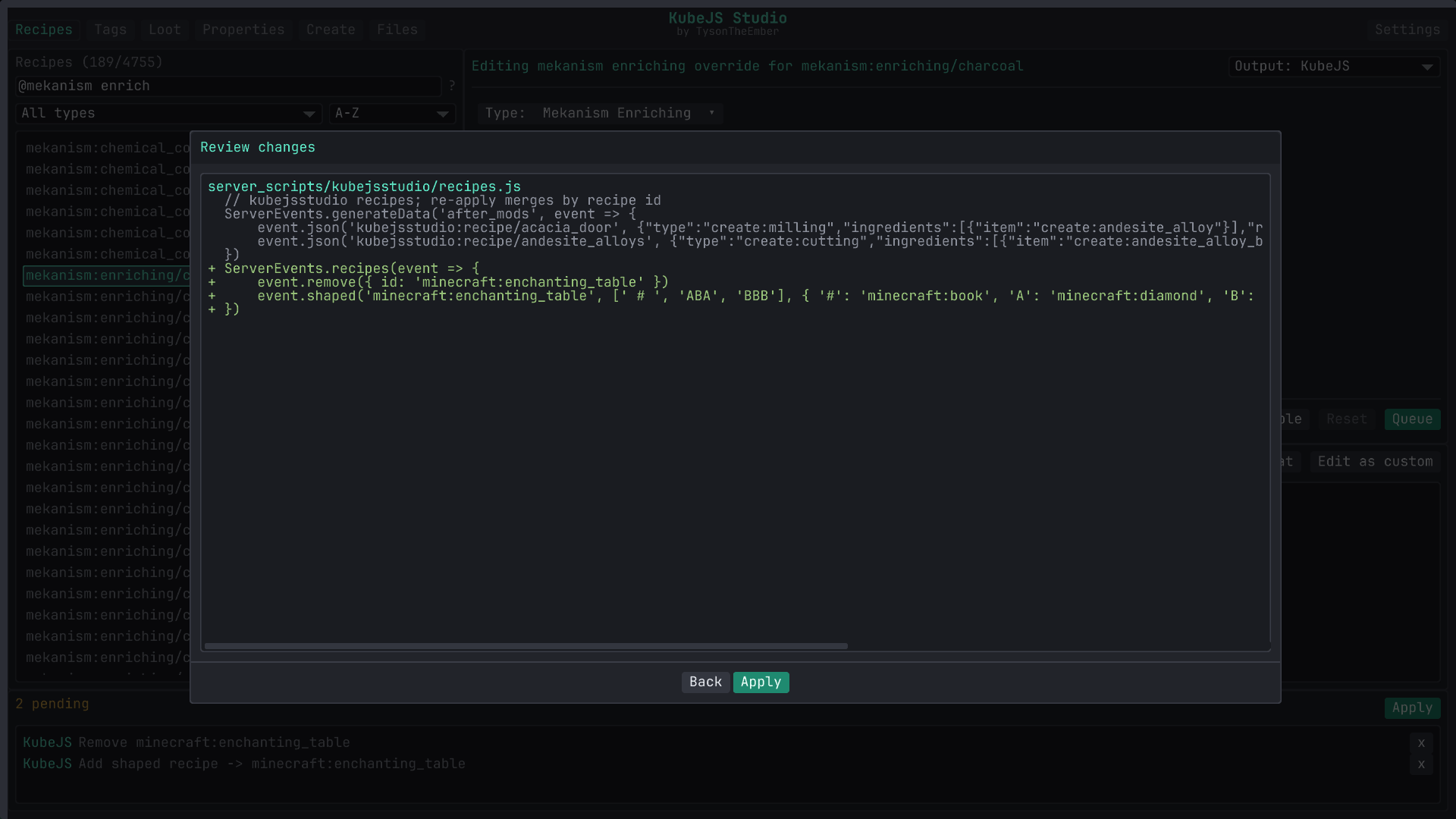
Recipe, tag and loot changes can be written either as KubeJS scripts or as datapack JSON under kubejs/data, per change, and datapack is the default until you flip it. Stat changes and new registry entries are always startup scripts, and names and textures are always resource files. Scripts go under kubejs/server_scripts/kubejsstudio/ and kubejs/startup_scripts/kubejsstudio/, one file per kind of thing. Re-applying merges by id into what Studio wrote before rather than replacing the file wholesale, but treat those files as generated output and keep your own hand-written scripts elsewhere. Anything Studio wrote can be reset from the same tab that made it.
The small stuff
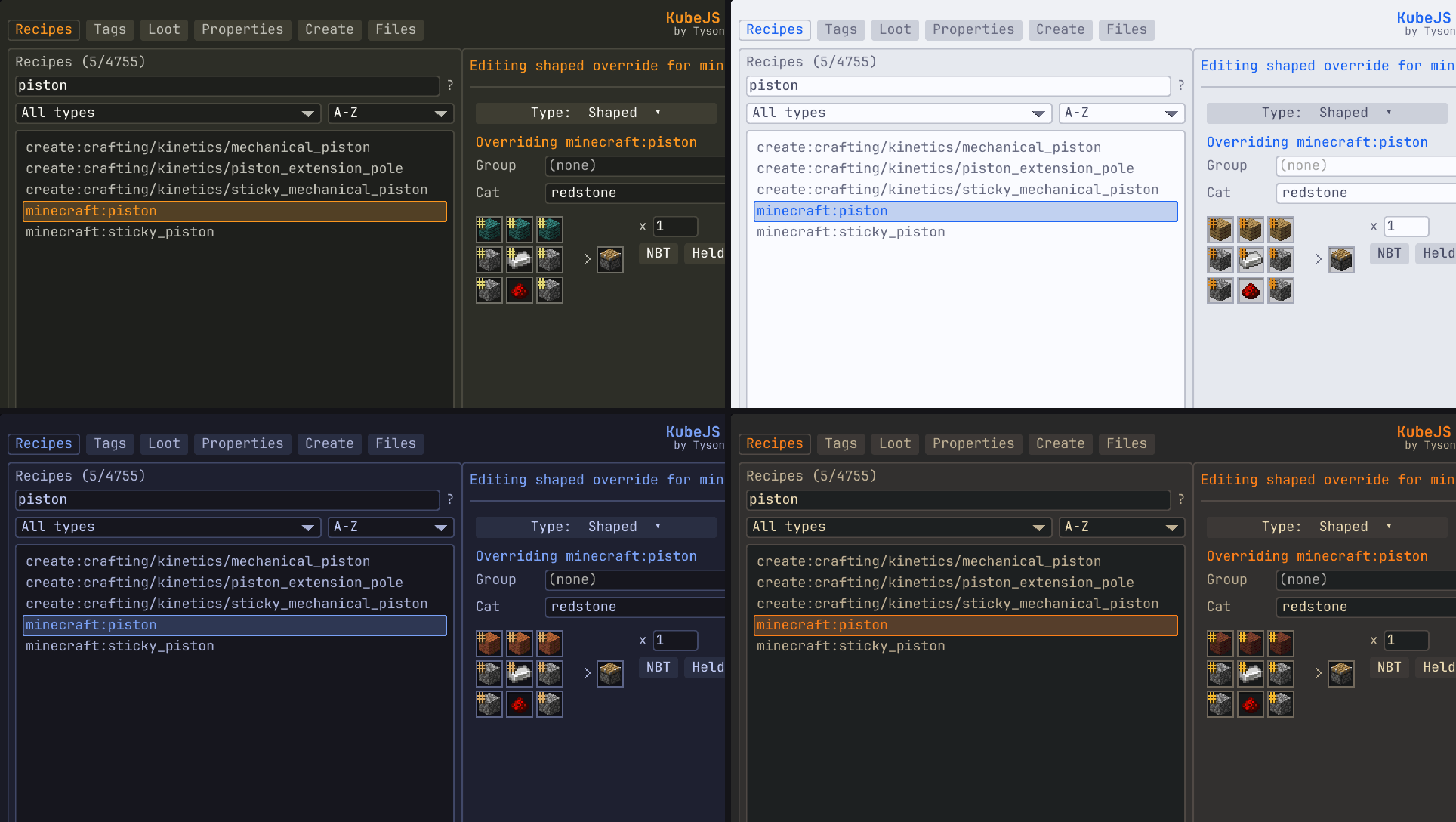
- Themes. Eighteen built in: Studio Dark, Catppuccin in all four flavors, Dracula, Everforest, GitHub dark and light, Gruvbox, Kanagawa, Monokai, Nord, One Dark, Rose Pine, Solarized dark and light, Tokyo Night. Drop a JSON file in
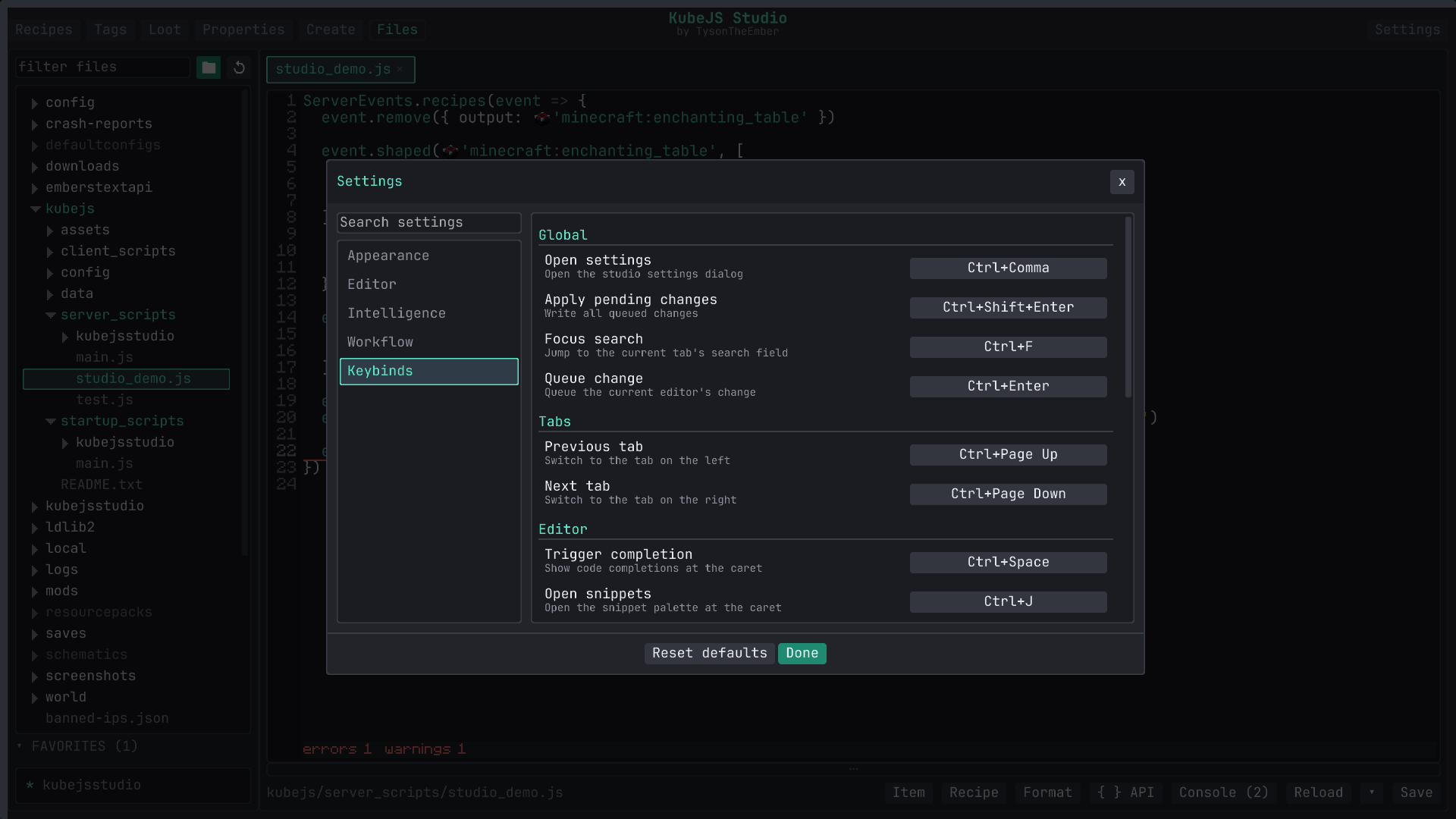
config/kubejsstudio/themesfor your own; an example is written there on first run. - Settings. One searchable dialog covers fonts, editor behavior, which intelligence features are on and how eager they are, and the workflow toggles above.
- Keybinds. Studio shortcuts for tab switching, search, queue and apply, completion, snippets, formatting and file actions are rebound in that same dialog. The K key and optional direct binds for each tab live in Minecraft's Controls screen.
- Layout. The main panels resize and collapse, dialogs remember their size, and Settings has a one-click reset for when you paint yourself into a corner.
/kubejsstudioopens the workspace from chat, with a subcommand per tab.
Compatibility
| Minecraft | Loader | Java | Requires |
|---|---|---|---|
| 1.21.1 | NeoForge 21.1.216+ | 21 | KubeJS |
| 1.20.1 | Forge 47+ | 17 | KubeJS, Kotlin for Forge 4.11+ |
The manifest does not pin a KubeJS version. This release was built against KubeJS 2101.7.2 on 1.21.1 and 2001.6.5 on 1.20.1; other builds will probably work, but those are the ones I test. The NeoForge floor comes from the bundled LDLib2, which is why it is higher than the loader's own baseline.
Optional: Create (unlocks its recipe forms), JEI or EMI (edit button on their recipe screens; JEI 15.17.0.74+ on Forge, 19.27.0.335+ on NeoForge).
Studio is a client-side authoring tool. Install it in the instance you build your pack in, ship the generated files, and it does not need to be on the server or in anyone else's client. The browsers read from the singleplayer server, so open a world before using them.
License
See tysontheember.dev/modding-licence.
Bundled third-party work (JetBrains Mono under the OFL, LDLib2 under the LGPL) is covered by licenses/NOTICE.txt inside the jar, alongside the full license texts.
KubeJS Studio
KubeJS Studio is an in-game front end for KubeJS. Press K and you get a workspace for recipes, tags, loot tables, item and block stats and new registry entries, plus a code editor that knows what is loaded in your pack. Studio writes plain files under kubejs/: scripts, datapack JSON, lang files and models. There is no project format to export, and the generated files keep working without Studio.
Needs KubeJS. On Forge 1.20.1 it also needs Kotlin for Forge. LDLib2 is bundled inside the jar. Client side only, it never has to go on a server.
GUI or code, your call
A GUI can be faster than writing a script by hand. Other times it's just better to edit the script. Studio does both, and you can switch whenever you like, or use both at once.
If you have never written a KubeJS script, start with the five visual tabs. Pick a recipe, a tag, a loot table or an item, change it with real item slots and normal fields, hit Queue. Studio shows you exactly what it is going to write before it touches anything.
If you already write KubeJS, the Files tab is a proper editor. Completion, hover docs and error checking are built from the running instance, not from a typings file that went stale two updates ago. Type event.recipes. and the list is the recipe types loaded in that pack, mods included.
The workspace
Recipes
Every loaded recipe is in the browser, filterable by mod, type or item. Supported types open in a form with item slots filled from a picker (or a Held button that copies the stack in your hand into the result), count and category fields, and the generated output shown underneath as you edit. Override a recipe, disable it, duplicate it, or start a blank one.
Vanilla crafting, cooking, stonecutting and smithing have hand-built forms. Create's processing recipes do too, including heated mixing and sequenced assembly. Farmer's Delight, Ars Nouveau and the common Mekanism machine types have their own layouts.
For other types, Studio builds a flat form from the recipe schema KubeJS already has for it: item and fluid fields become slots, numbers and flags become fields. That covers a lot of mods with a KubeJS addon without me writing anything per mod. If a type has no schema, or the existing JSON is more complicated than that form can round-trip, it opens as raw JSON and you edit that.
Recipe JSON comes from the running world, so what you see is what the game loaded. JEI and EMI recipe pages get an Edit button that jumps into Studio with that recipe selected (singleplayer, creative mode).
Tags
Pick a registry (items, blocks, fluids, entities, and any dynamic registry the game exposes), find the tag, add or remove members. Additions and removals are shown inline against the live contents so you can see the diff before you queue it. This is the quick way to get modded items into #minecraft:planks or #c:ingots/copper so recipes and mechanics pick them up.
Loot
Real loot tables, edited in place as a tree of pools and entries. Rolls, count and weight stay inline. The ... on a row opens the full editor for that entry, which is where conditions and functions live as typed forms: tool checks, random chance, Fortune style bonuses, explosion decay, names, lore, components or NBT, and nested all_of / any_of logic. Table-level settings (context type, random sequence, table-wide functions) are under Table…. The catalog follows the Minecraft version, and anything without a typed form stays editable as raw JSON.
Properties
Base stats that no recipe or tag can touch. Items expose stack size, durability, food values, burn time and an enable-only fire resistance flag. Blocks expose hardness, blast resistance, light level, friction, whether a tool is required, mining tier and the tool it is mineable with. Studio writes the matching ItemEvents.modification or BlockEvents.modification startup script.
The same tab renames and retextures anything already in the game, which lands as a lang entry and a model override under kubejs/assets. Stat changes need a game restart, mining tags apply on /reload, names and textures on F3+T. Each row is marked with which one it needs.
Create
New items, blocks and fluids without touching a startup script. Give it an id, pick one of Studio's builder types (plain item, tools, armor pieces, slab, stairs, door, crop, a fluid with its bucket, among others) and fill in the fields you care about. The field list is version correct, so 1.20.1 only shows what 1.20.1 KubeJS supports. Everything you create stays listed on the left so you can reopen it or delete it later.
The editor
If you have used ProbeJS, the goal will feel familiar. ProbeJS generates typings so an external IDE can help you write KubeJS; I wanted that help inside Minecraft. Studio reflects over the KubeJS runtime you actually have (the event groups and handlers, the globals bound into the script scopes, addons included) and reads recipe schemas and game ids from the open world as completion needs them. There is no typings step and no second window, and a cached copy of the symbol index covers the odd case where live reflection fails.
The Files tab itself is a file explorer and multi-tab editor for your whole instance with syntax highlighting for JS, JSON, TOML and logs. It edits text files (up to 2 MB), previews images, and does create, rename and delete with guard rails. Favorites and pinned folders keep your kubejs/ tree one click away.
Completion
Type event. and you get the members of that event. Type event.recipes. and you get the namespaces of every mod with a KubeJS recipe schema, then the types under them, then the chain methods that type supports (.heated() on Create mixing, .xp() on smelting). String completion follows context: item and tag ids (with icons) where a recipe wants one, mod ids in filters, builder types in registry events, loot table ids and lang keys where they fit. A class loaded through Java.loadClass gets static member completion, and datapack JSON recognizes the common id fields (item, tag, id, type).
Hover docs and signature help
Hover a KubeJS member, a variable, an id or a diagnostic to see what it is: the signature and a short description, the type, the item behind the id, the full message. While the caret sits inside a recognized call, a signature strip appears above it. Docs come from the harvested runtime index (KubeJS's own @Info annotations included) plus a small built-in reference for the parts KubeJS does not describe about itself.
Diagnostics
Errors and warnings appear as you type, with a count below the editor and the full message on hover. Unknown members and identifiers, misspelled item, tag, mod and recipe ids, argument counts that do not match the recipe schema, ids in the wrong kind of slot, events used from the wrong script type (ServerEvents in a startup script), malformed // priority and // requires headers, unbalanced brackets and unterminated strings, and Java classes the KubeJS class filter would reject. KubeJS console errors from the last reload that carry a source location land on the offending line as well, so a broken recipe points back at the statement instead of a log file.
Console and reload
The console panel lists KubeJS errors and warnings from the last reload. Click one to jump to its line, or use the command box to run /kubejs errors, /reload or anything else without leaving the screen. The Reload button reloads the script type of the file you are editing (startup, server or client scripts, or /reload for data), so you are not rebuilding the whole datapack to test a client script.
The rest
Find and replace with match case, whole word and regex, formatting, a snippet palette, word wrap, bracket closing and auto indent, preview tabs, session restore, and undo that batches nearby typing into single steps. Ctrl+I opens the item picker at the caret and inserts an id (or expands a tag into its member ids), Ctrl+R inserts a recipe's JSON, Ctrl+P searches the harvested KubeJS index, and the { } API button opens the same index grouped into globals, events and types. Lang files get a "Missing keys" button that inserts the block, item, entity, effect and enchantment keys the namespace has not translated yet.
It ships with JetBrains Mono, which on 1.20.1 goes through an SDF pipeline so it stays sharp at any GUI scale. Other fonts from your resource packs can be picked in Settings (Embers Text API widens what is selectable).
Queue, review, apply
Nothing in the visual tabs writes straight to disk. Changes collect in a pending list at the bottom of the screen. By default Apply shows a diff of the files it is about to write, keeps a .bak of the previous version next to each one, and reloads afterwards. All three are settings if you would rather it did not.
Recipe, tag and loot changes can be written either as KubeJS scripts or as datapack JSON under kubejs/data, per change, and datapack is the default until you flip it. Stat changes and new registry entries are always startup scripts, and names and textures are always resource files. Scripts go under kubejs/server_scripts/kubejsstudio/ and kubejs/startup_scripts/kubejsstudio/, one file per kind of thing. Re-applying merges by id into what Studio wrote before rather than replacing the file wholesale, but treat those files as generated output and keep your own hand-written scripts elsewhere. Anything Studio wrote can be reset from the same tab that made it.
The small stuff
- Themes. Eighteen built in: Studio Dark, Catppuccin in all four flavors, Dracula, Everforest, GitHub dark and light, Gruvbox, Kanagawa, Monokai, Nord, One Dark, Rose Pine, Solarized dark and light, Tokyo Night. Drop a JSON file in
config/kubejsstudio/themesfor your own; an example is written there on first run. - Settings. One searchable dialog covers fonts, editor behavior, which intelligence features are on and how eager they are, and the workflow toggles above.
- Keybinds. Studio shortcuts for tab switching, search, queue and apply, completion, snippets, formatting and file actions are rebound in that same dialog. The K key and optional direct binds for each tab live in Minecraft's Controls screen.
- Layout. The main panels resize and collapse, dialogs remember their size, and Settings has a one-click reset for when you paint yourself into a corner.
/kubejsstudioopens the workspace from chat, with a subcommand per tab.
Compatibility
| Minecraft | Loader | Java | Requires |
|---|---|---|---|
| 1.21.1 | NeoForge 21.1.216+ | 21 | KubeJS |
| 1.20.1 | Forge 47+ | 17 | KubeJS, Kotlin for Forge 4.11+ |
The manifest does not pin a KubeJS version. This release was built against KubeJS 2101.7.2 on 1.21.1 and 2001.6.5 on 1.20.1; other builds will probably work, but those are the ones I test. The NeoForge floor comes from the bundled LDLib2, which is why it is higher than the loader's own baseline.
Optional: Create (unlocks its recipe forms), JEI or EMI (edit button on their recipe screens; JEI 15.17.0.74+ on Forge, 19.27.0.335+ on NeoForge).
Studio is a client-side authoring tool. Install it in the instance you build your pack in, ship the generated files, and it does not need to be on the server or in anyone else's client. The browsers read from the singleplayer server, so open a world before using them.
License
See tysontheember.dev/modding-licence.
Bundled third-party work (JetBrains Mono under the OFL, LDLib2 under the LGPL) is covered by licenses/NOTICE.txt inside the jar, alongside the full license texts.
Screenshots
Gallery
-
Review Review changes before applying
-
Create Create blocks, items, and fluids easily
-
Files View modpack files easily
-
Console View the KubeJS console and jump to the issue
-
Error Detection See when something isn't correct
-
Tooltips Hover over things to view information about them
-
Tools Easily reference the KubeJS API and view all the items/blocks/tags
-
Loot Easily tweak and add/remove loot tables
-
Andvanced Loot Tweak even advanced parts of loot tables
-
Properties Modify item and block properties easily
-
Recipes Easily create, modify, or remove recipes
-
Create Recipes Create recipes are supported
-
Farmers Delight Recipes Farmers delight recipes are supported too!
-
Settings Modify the UI, Font, Keybinds, Intelligence, and Font
-
Tags Modify, create, and remove tags easily
-
Themes Try the built in themes or make your own!
-
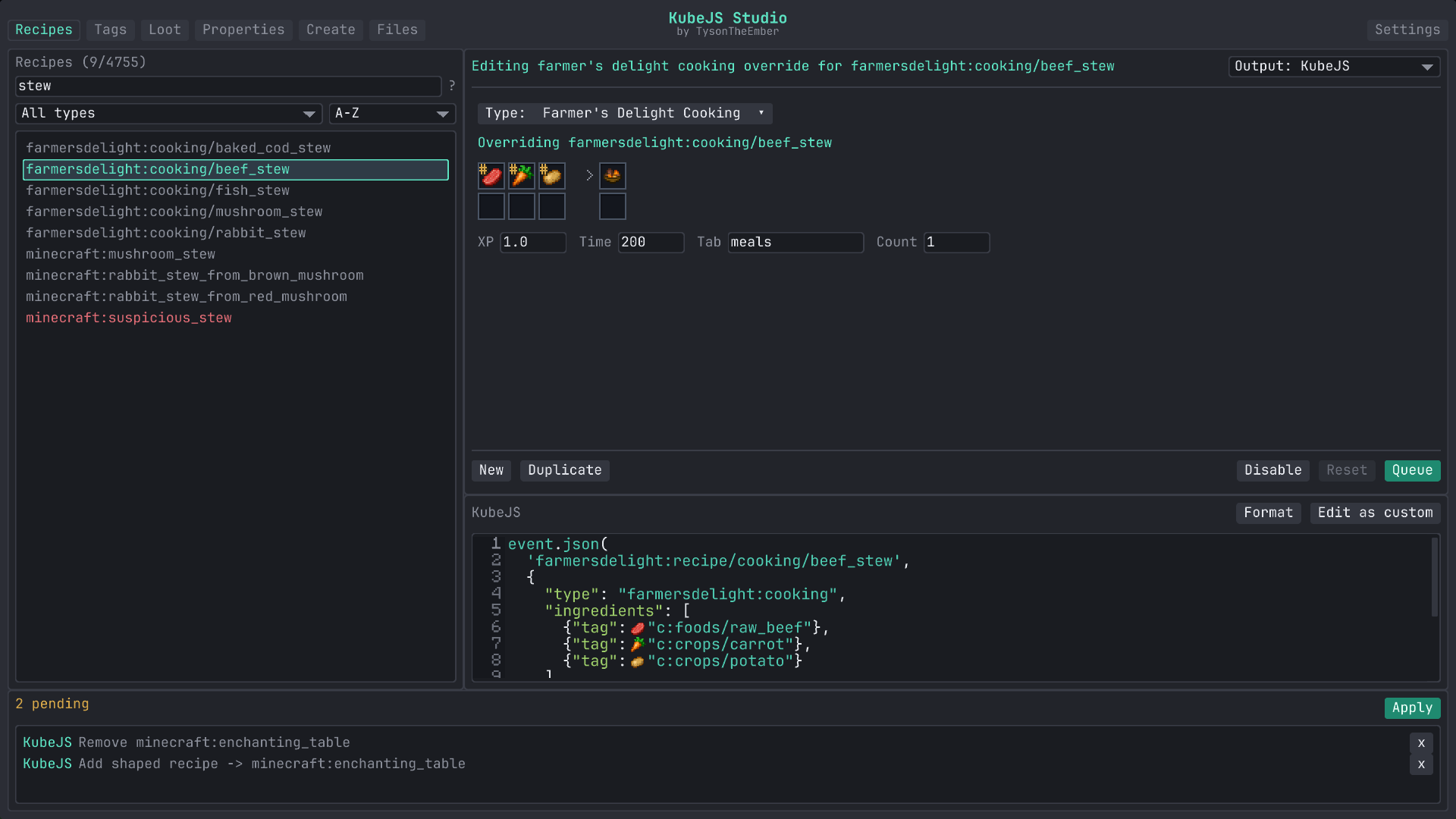 Farmers Delight Recipes Farmers delight recipes are supported too!
 -
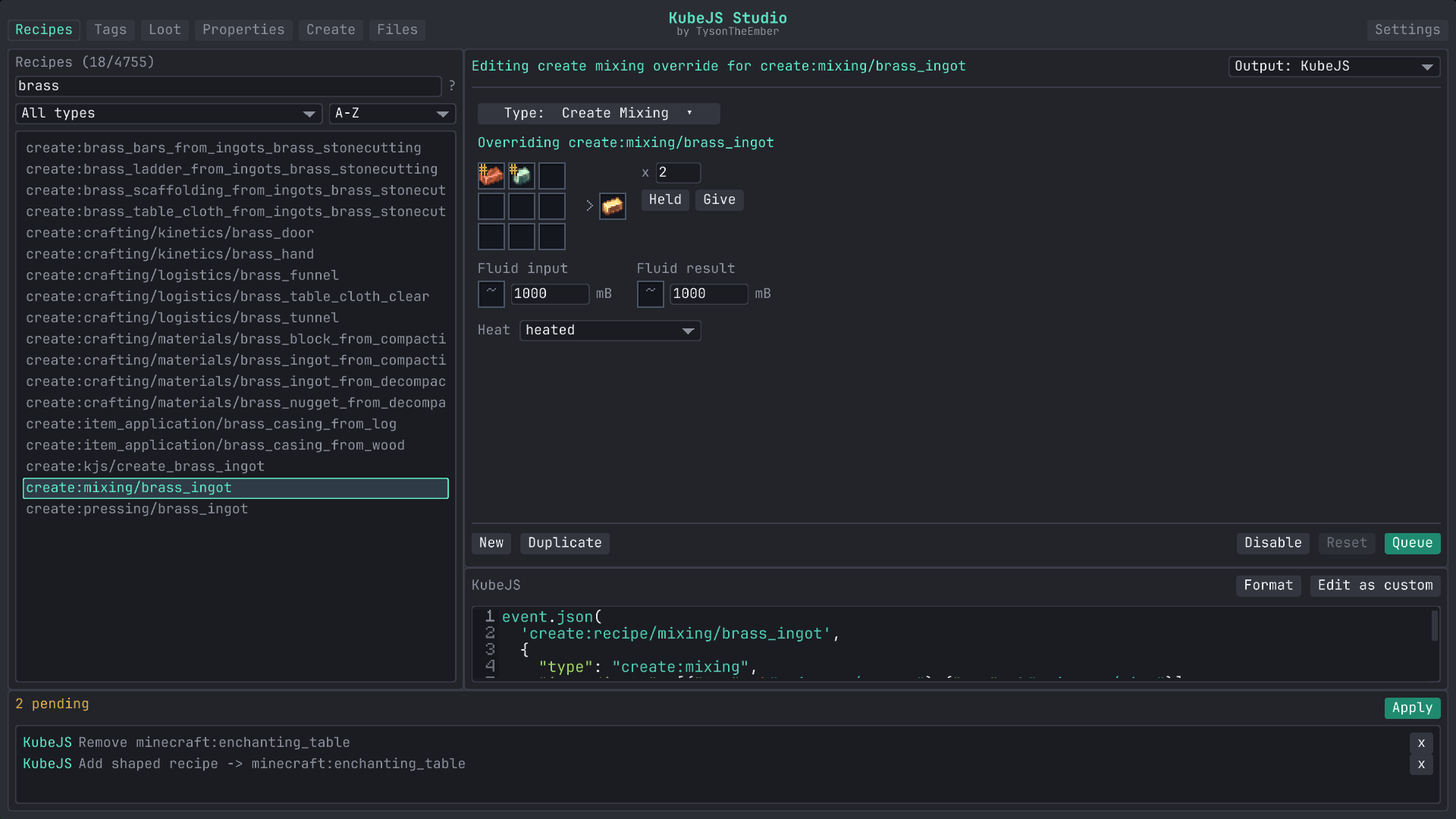 Create Recipes Create recipes are supported
 -
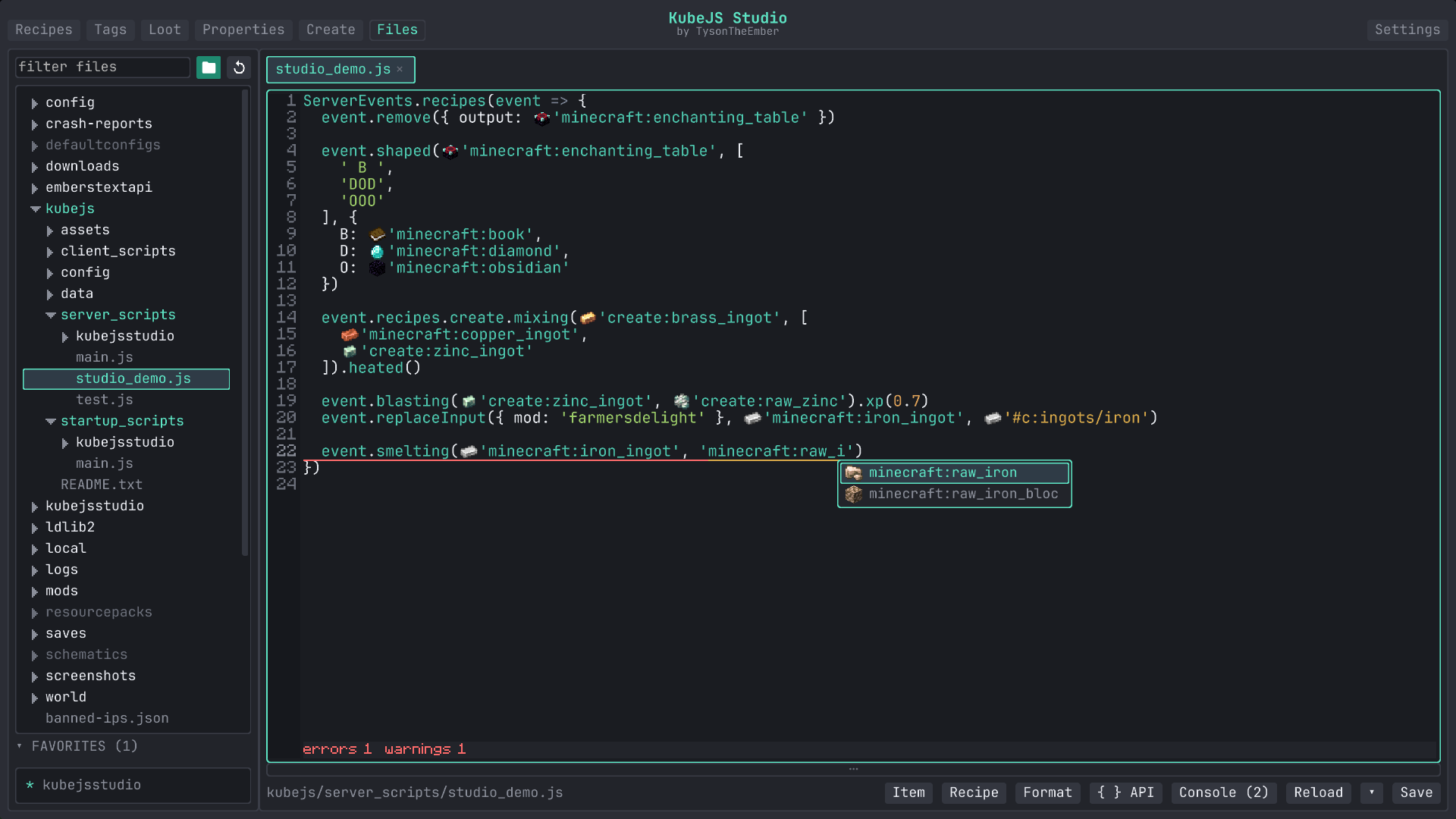 Files View modpack files easily
 -
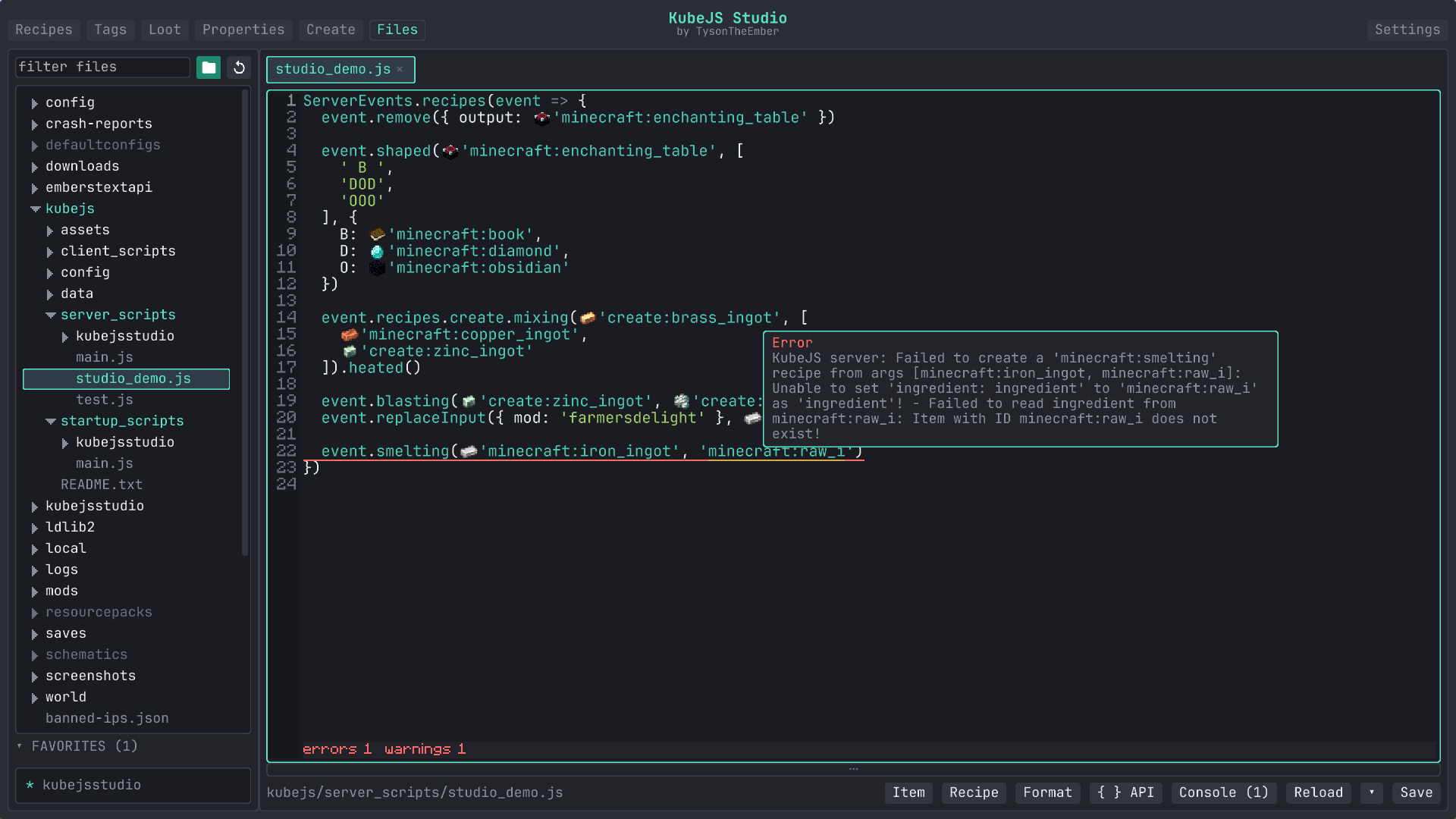 Error Detection See when something isn't correct
 -
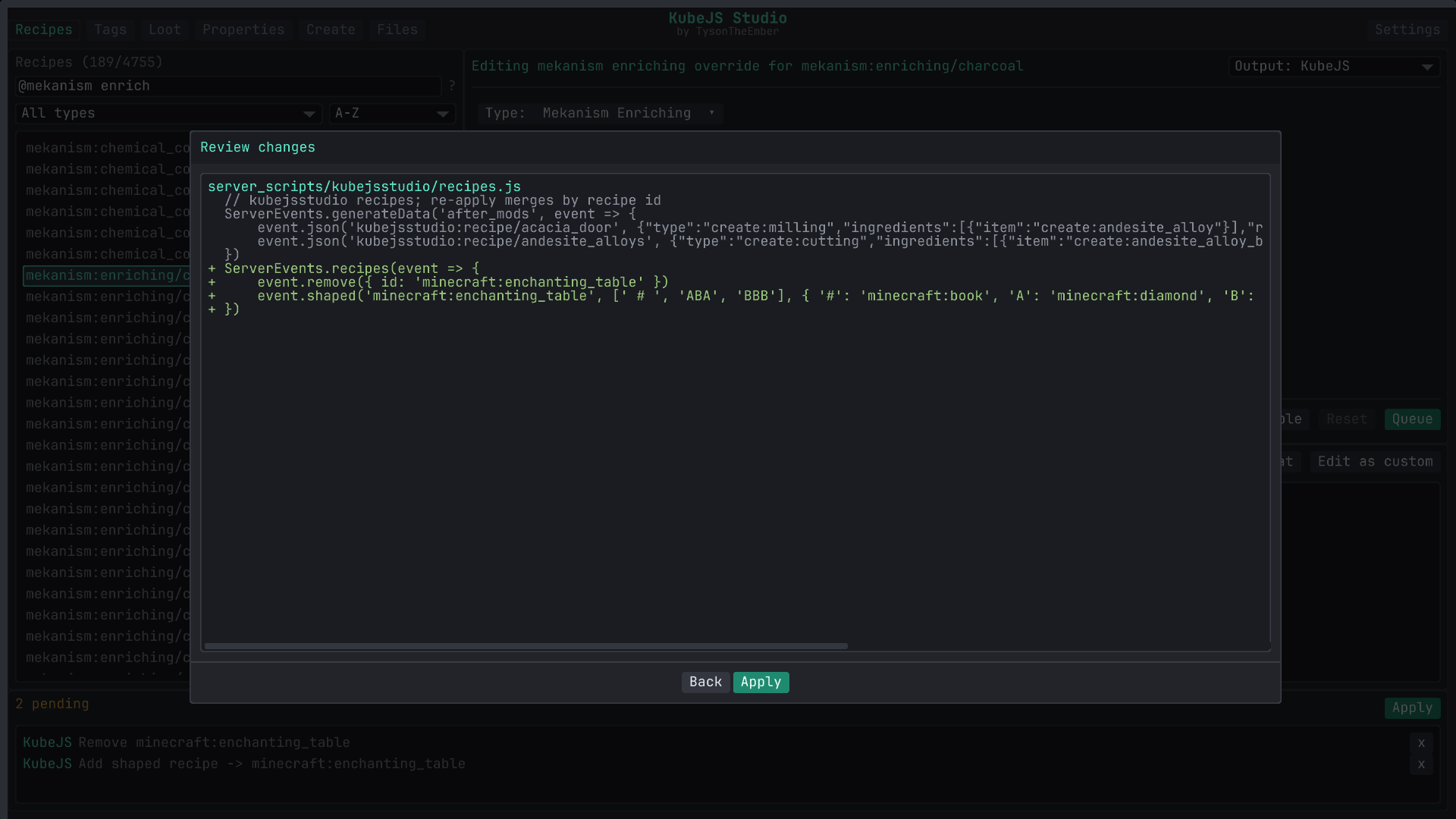 Review Review changes before applying
 -
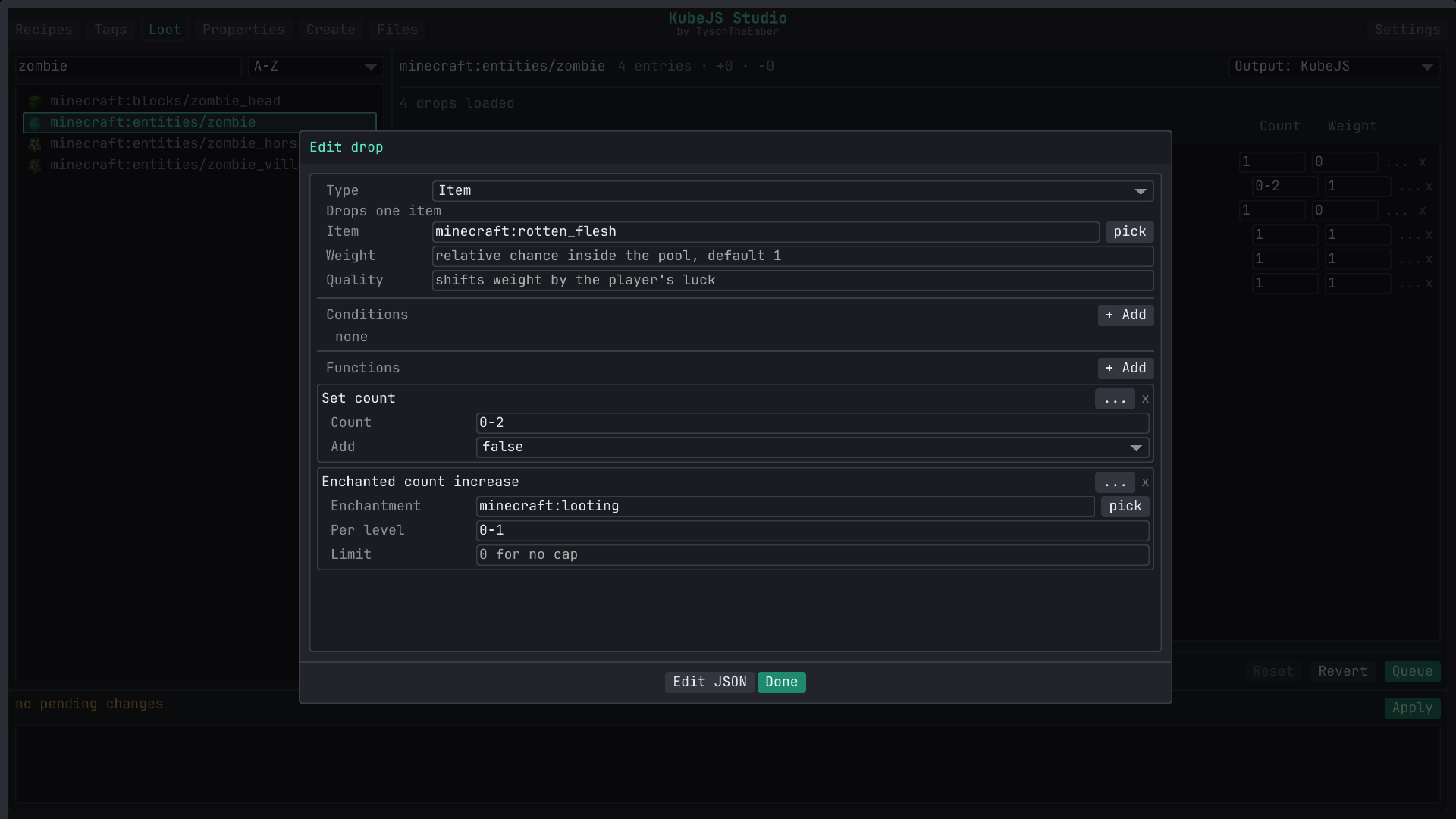 Andvanced Loot Tweak even advanced parts of loot tables
 -
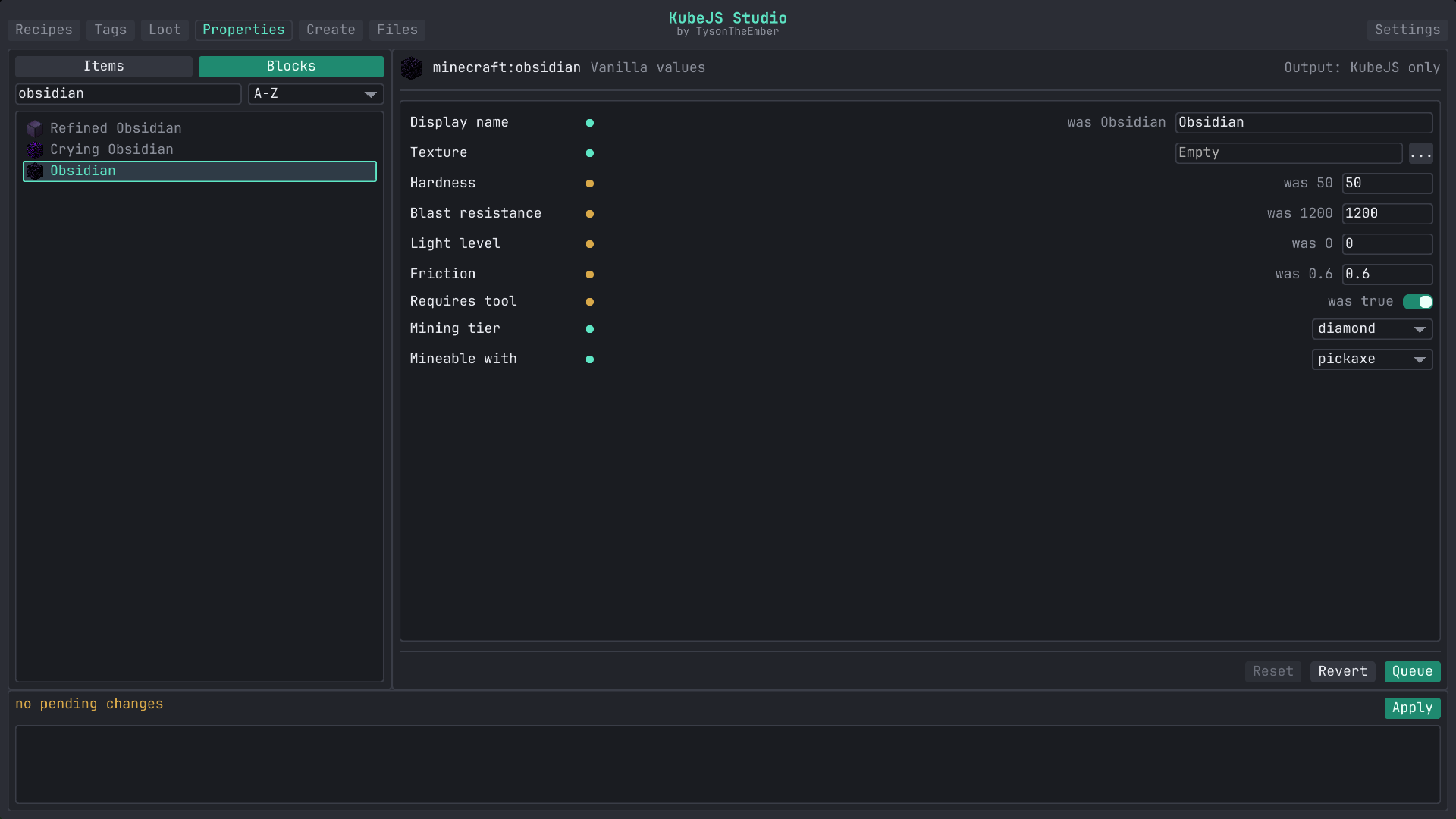 Properties Modify item and block properties easily
 -
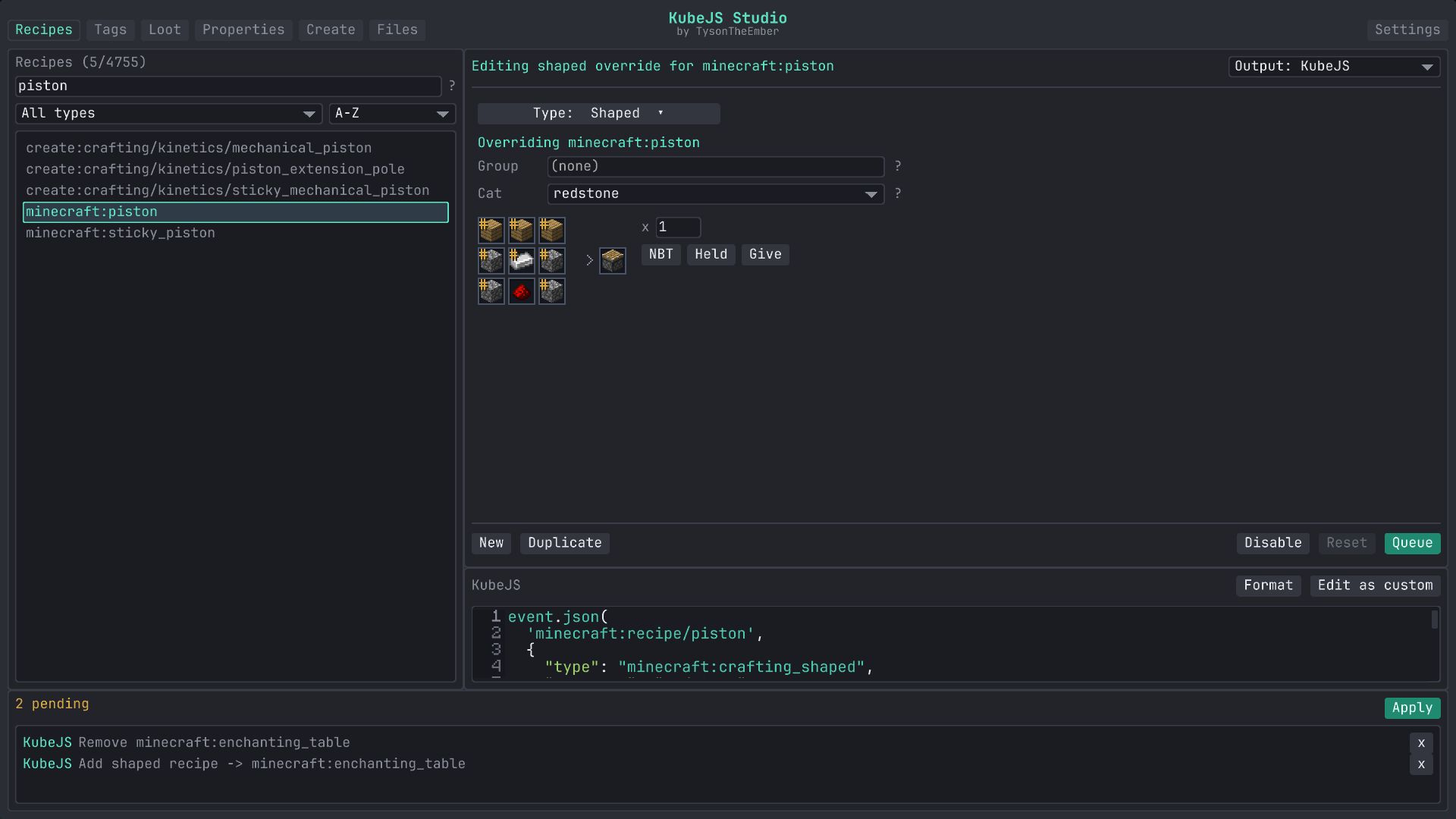 Recipes Easily create, modify, or remove recipes
 -
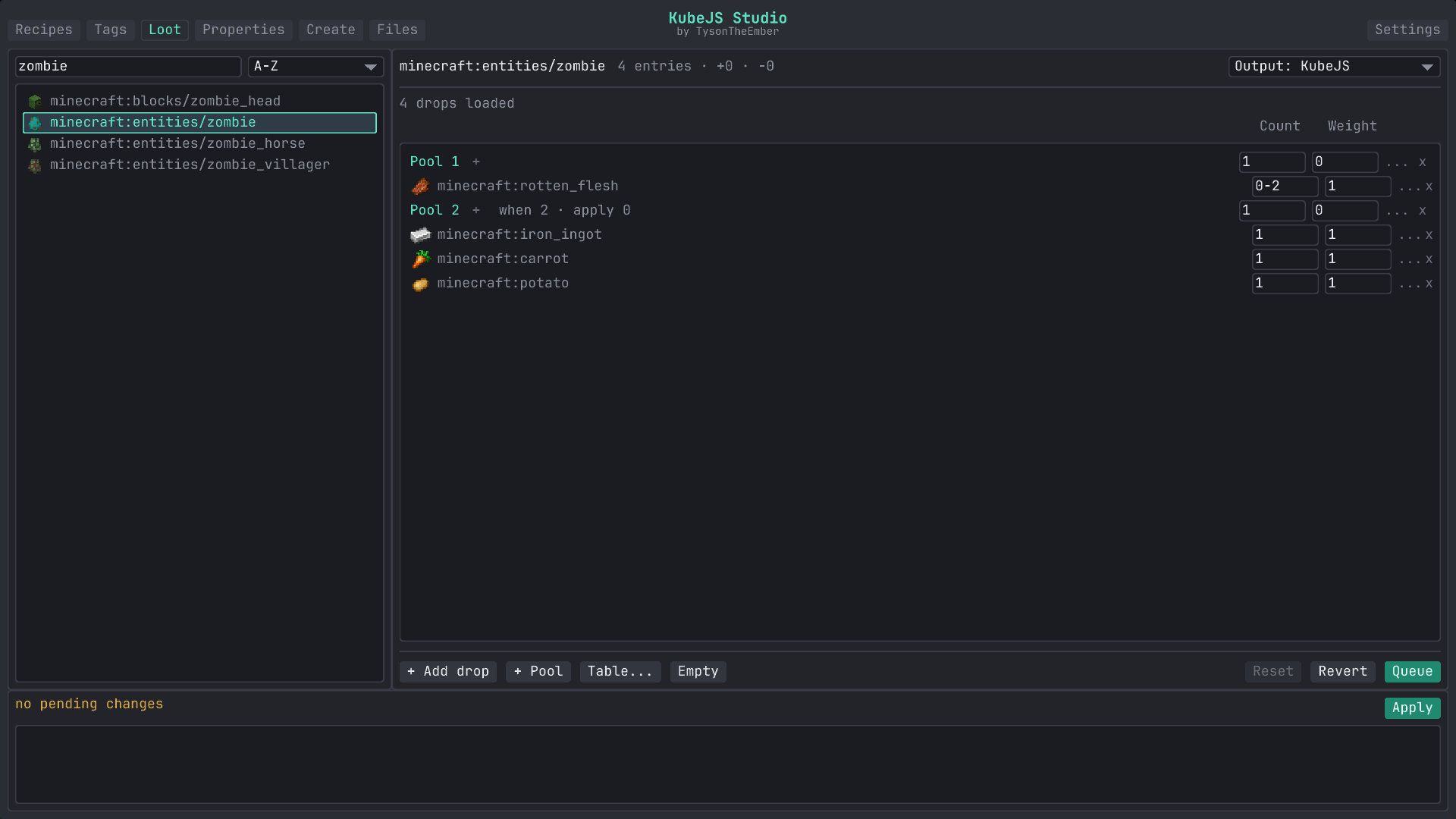 Loot Easily tweak and add/remove loot tables
 -
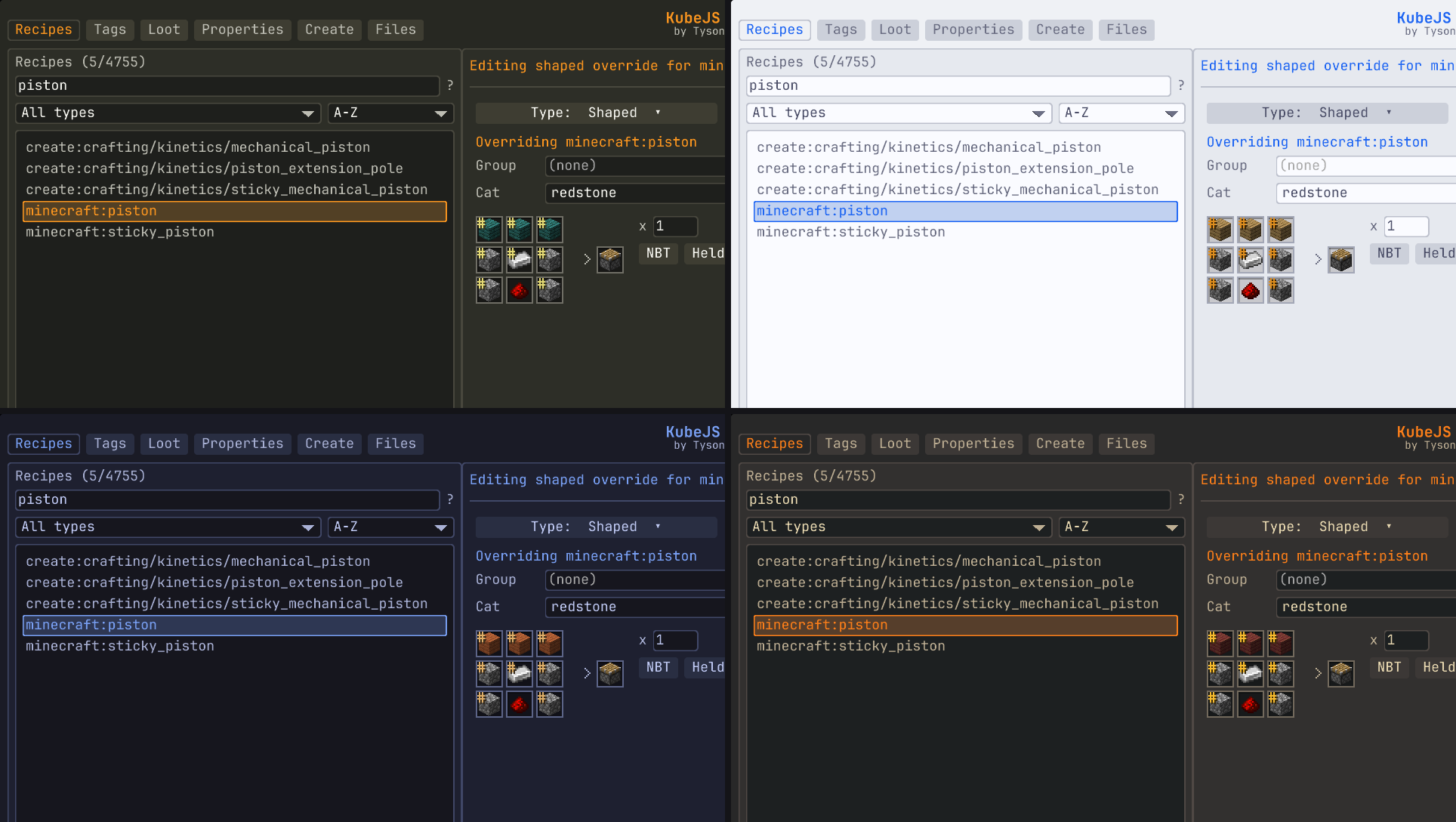 Themes Try the built in themes or make your own!
 -
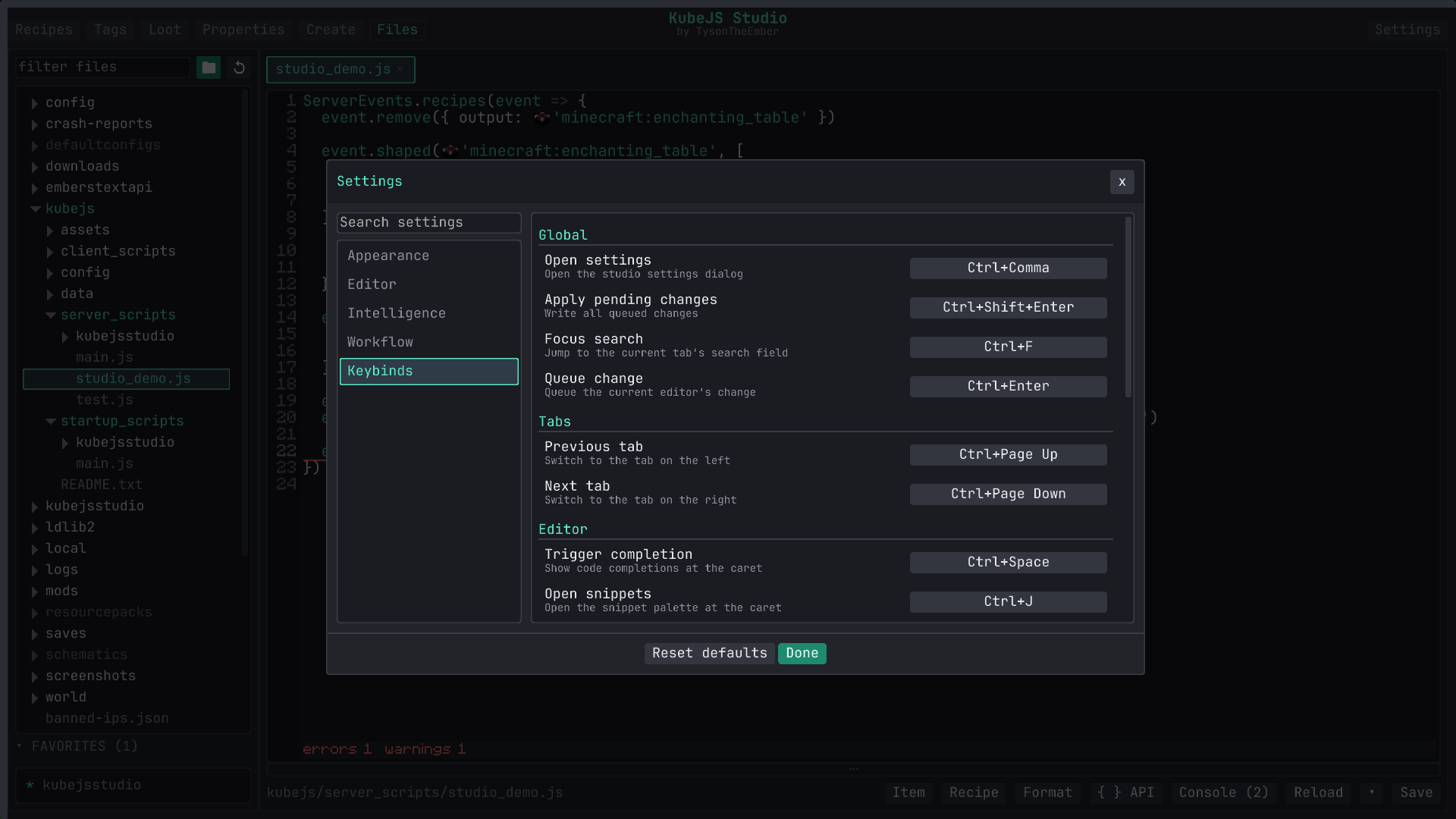 Settings Modify the UI, Font, Keybinds, Intelligence, and Font
 -
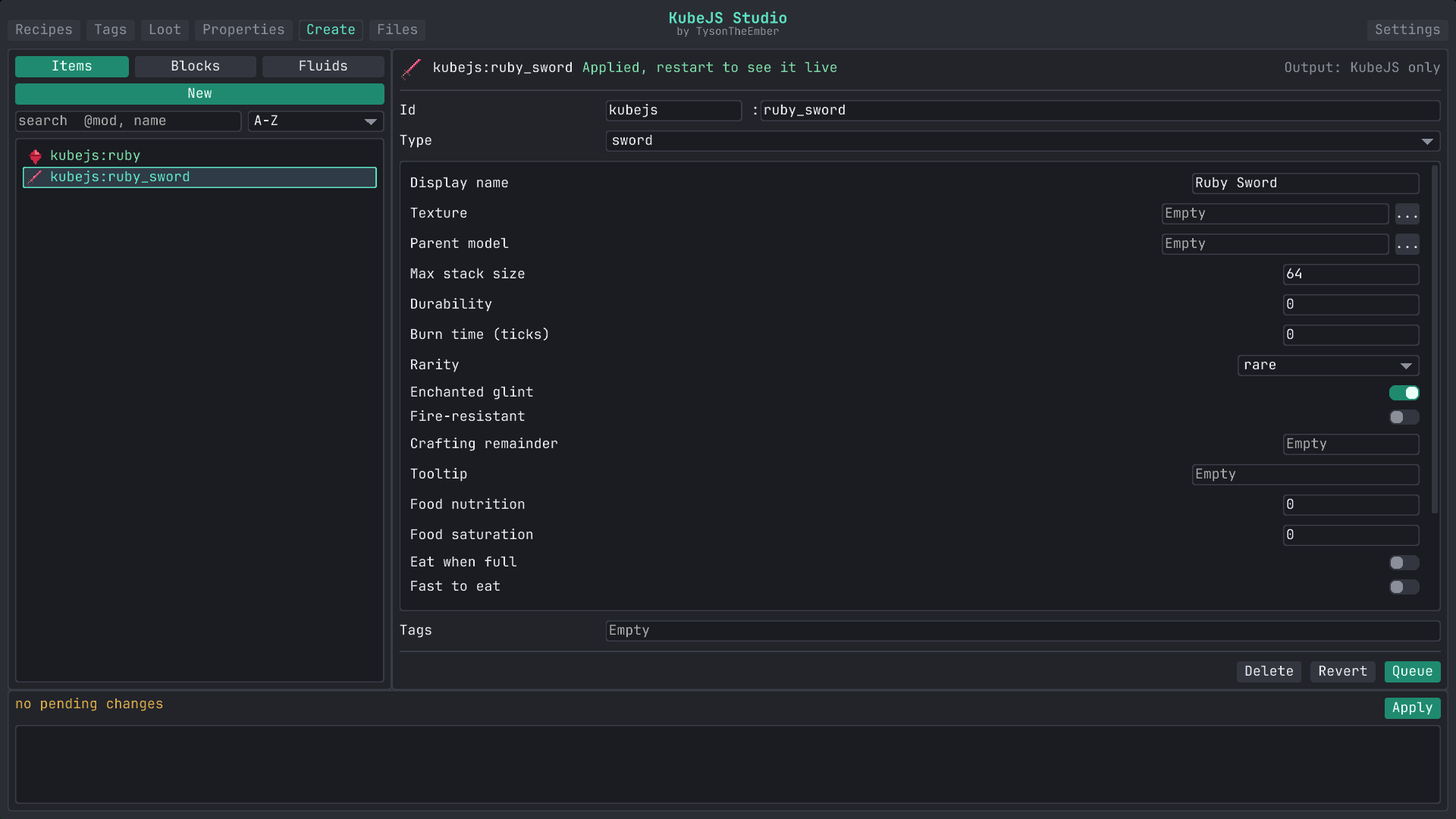 Create Create blocks, items, and fluids easily
 -
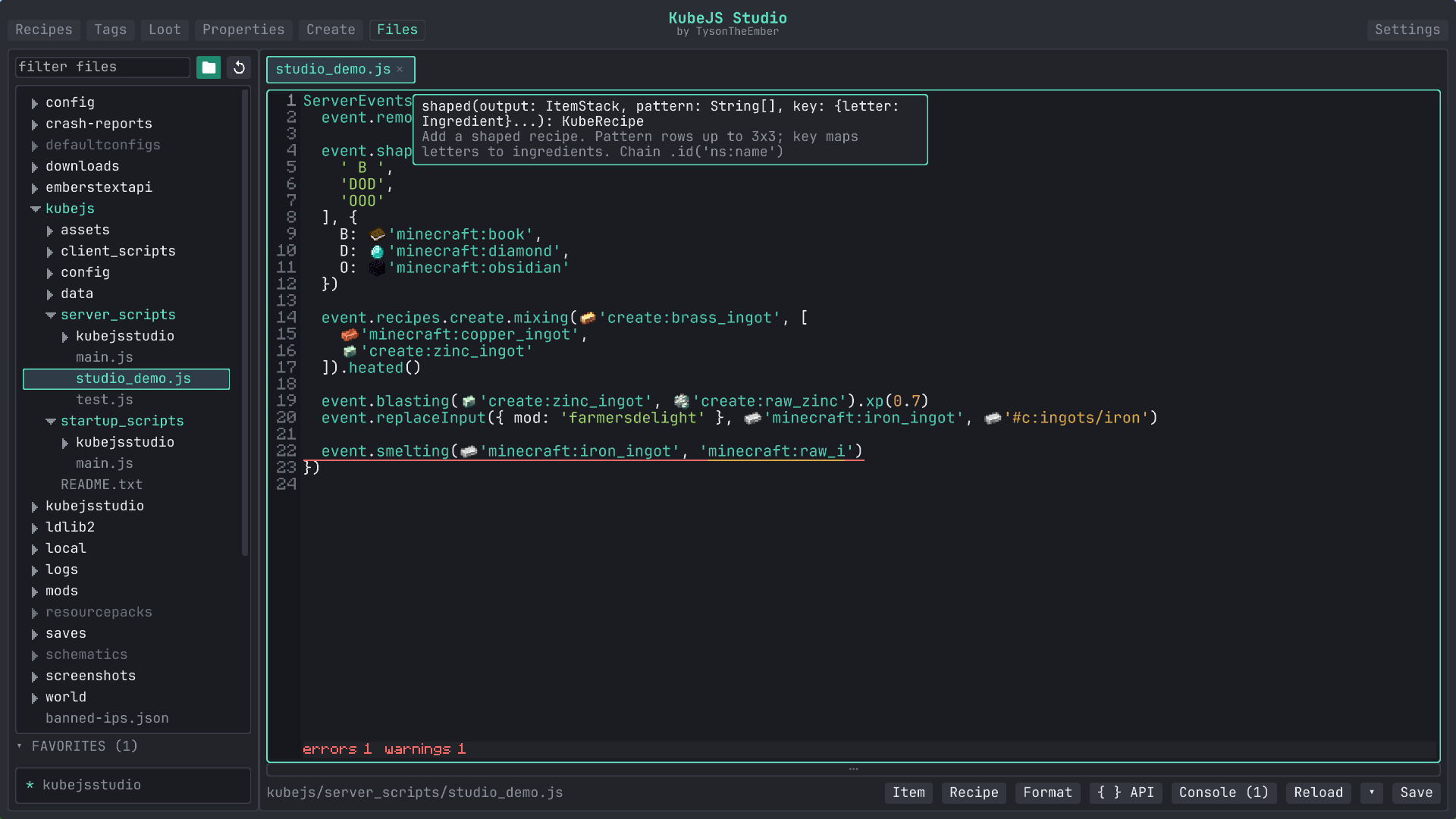 Hover Tooltips Hover over things to view information about them
 -
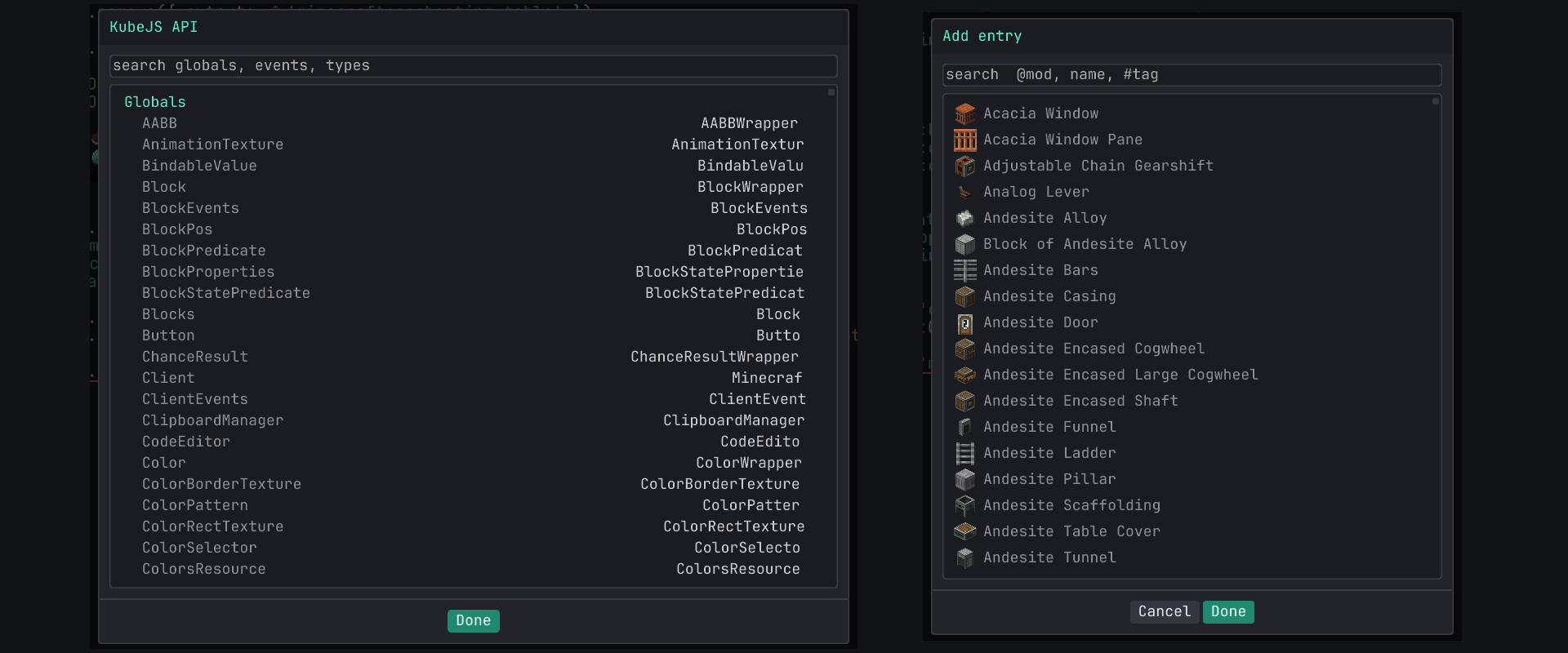 Tools Easily reference the KubeJS API and view all the items/blocks/tags
 -
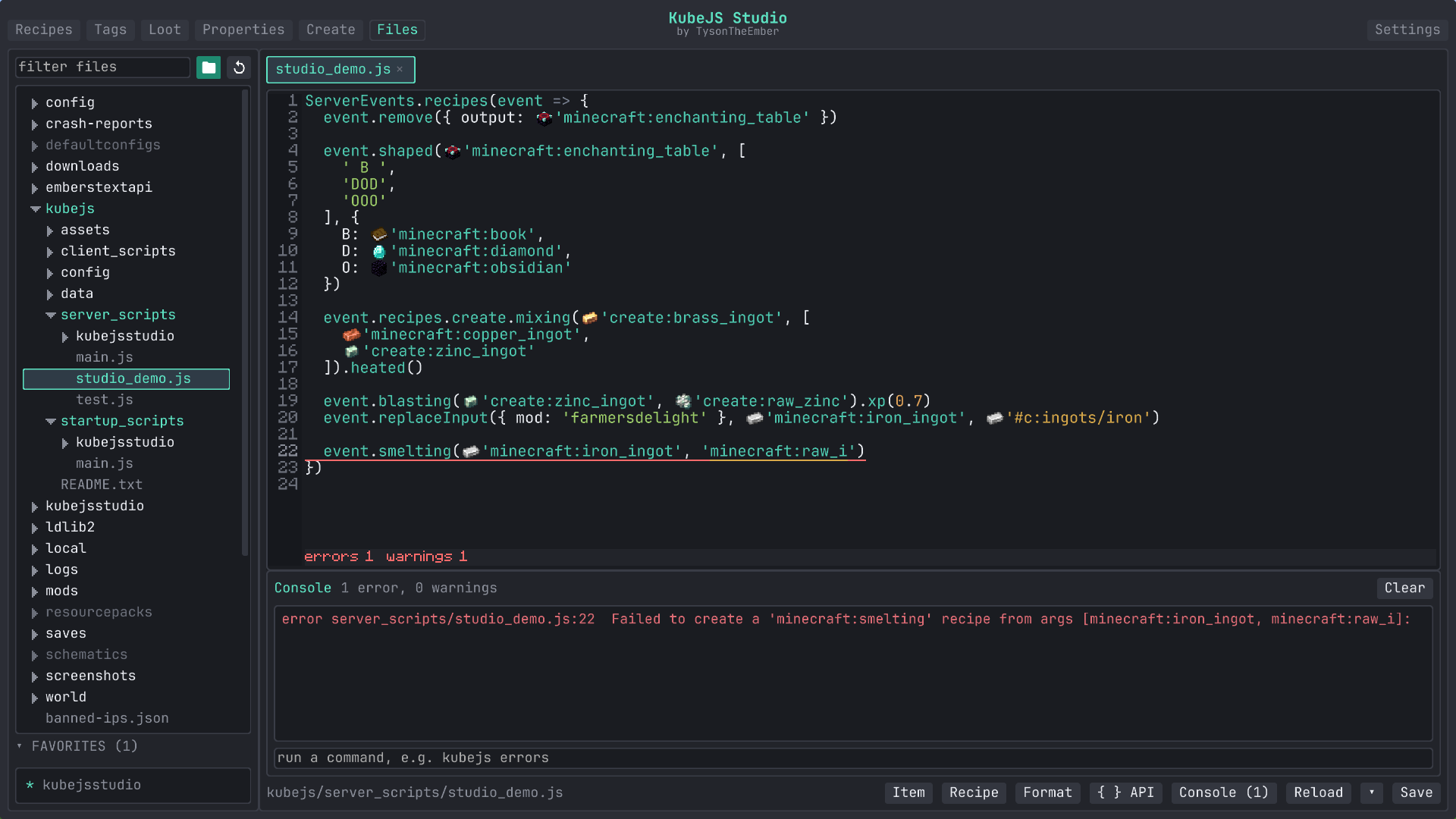 Console View the KubeJS console and jump to the issue
 -
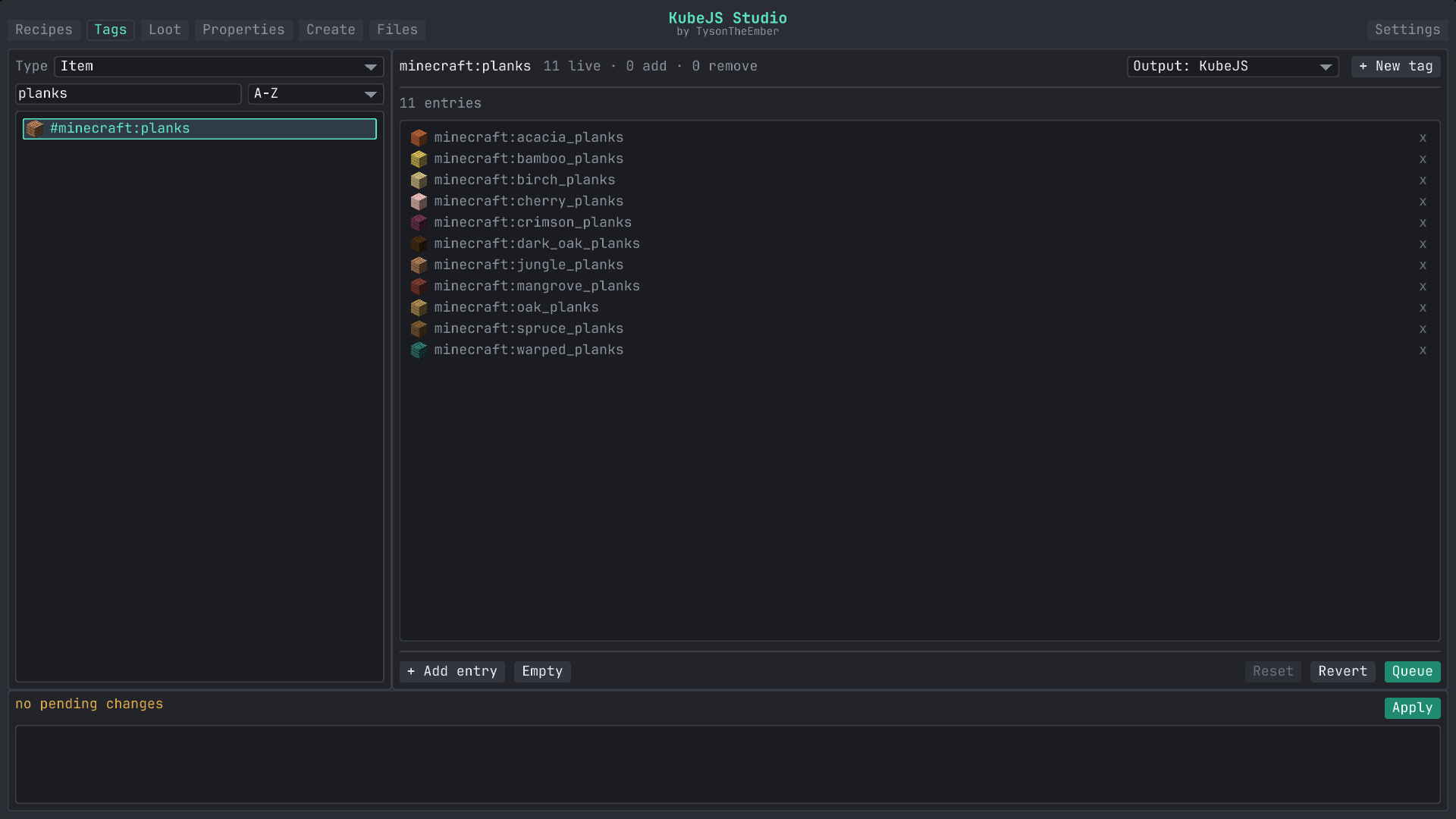 Tags Modify, create, and remove tags easily
Versions
Files
Relations
Project Relations
More like this
Similar Mods
Suggestions use data such as tags, dependencies, dependents, descriptions, titles, and more to rank how much they overlap with this mod.
On ModDex
Community snapshot
By the numbers
Statistics
Want to reach Minecraft players?
We're looking for a server hosting partner to feature here and other parts of the site. Interested? Send us a message!
Get in touchGet it on
Available Platforms
On ModDex
Community snapshot
By the numbers