
Community listing page, reviews here may not be monitored by the author.
Omnilook


No reviews yet
freelook/perspectivemod but cooler
Community voices
Reviews
No reviews yet. Be the first to review this project!
Get it on
Available Platforms
Compatibility
Supported Environments
Runs entirely on the client. Works on vanilla servers.
About
Project Details
For authors
Embed Badge
If you're the author of this project, you can embed a live badge anywhere that supports HTML or Markdown. It updates automatically whenever ratings change.
Use HTML for any page that supports it, or Markdown for README files and Markdown-based descriptions.
Identifiers
Platform IDs
About
Description
Omnilook
A simple freelook/perspective mod for Minecraft.
Omnilook implements a small utility function for your player camera, which lets you rotate which way the third-person camera faces independent of your player's head movement. This lets you take fancy cinematic shots or aim your cursor in a specific direction while not having to be locked to looking in that direction too!
Version Support
Omnilook will support pretty much any and every mod loader and version of Minecraft you can think of. The table for this is kind of big, so please see the GitHub readme for the full thing.
Why Omnilook?
Omnilook is not the first mod to do this. Here's why you should try it out:
- It's lightweight. Unlike other mods, Omnilook is small and lightweight in about every way possible. It depends on other mods minimally, doesn't interrupt your game in the slightest, and the mod jar weighs in at far under 100 kilobytes.
- It's compatible. Omnilook will just work anywhere you put it. It uses as few injections as possible to get the job done, and often uses mod loaders' events and APIs to make sure it functions well with other mods.
- ...that's about it for now.
Configuration
Omnilook at its core is a pretty simple mod, so there aren't too many configuration options right now. Besides the activation key binding (by default bound to the grave key, <kbd>`</kbd>), the one other option to configure is if pressing it toggles the effect, or if holding it keeps it activated.
Issues?
See me on GitHub. I'd love to help!
Omnilook
A simple freelook/perspective mod for Minecraft.
Omnilook implements a small utility function for your player camera, which lets you rotate which way the third-person camera faces independent of your player's head movement. This lets you take fancy cinematic shots or aim your cursor in a specific direction while not having to be locked to looking in that direction too!
Version Support
Omnilook will support pretty much any and every mod loader and version of Minecraft you can think of. The table for this is kind of big, so please see the GitHub readme for the full thing.
Why Omnilook?
Omnilook is not the first mod to do this. Here's why you should try it out:
- It's lightweight. Unlike other mods, Omnilook is small and lightweight in about every way possible. It depends on other mods minimally, doesn't interrupt your game in the slightest, and the mod jar weighs in at far under 100 kilobytes.
- It's compatible. Omnilook will just work anywhere you put it. It uses as few injections as possible to get the job done, and often uses mod loaders' events and APIs to make sure it functions well with other mods.
- ...that's about it for now.
Configuration
Omnilook at its core is a pretty simple mod, so there aren't too many configuration options right now. Besides the activation key binding (by default bound to the grave key, `), the one other option to configure is if pressing it toggles the effect, or if holding it keeps it activated.
Issues?
See me on GitHub. I'd love to help!
Screenshots
Gallery
-
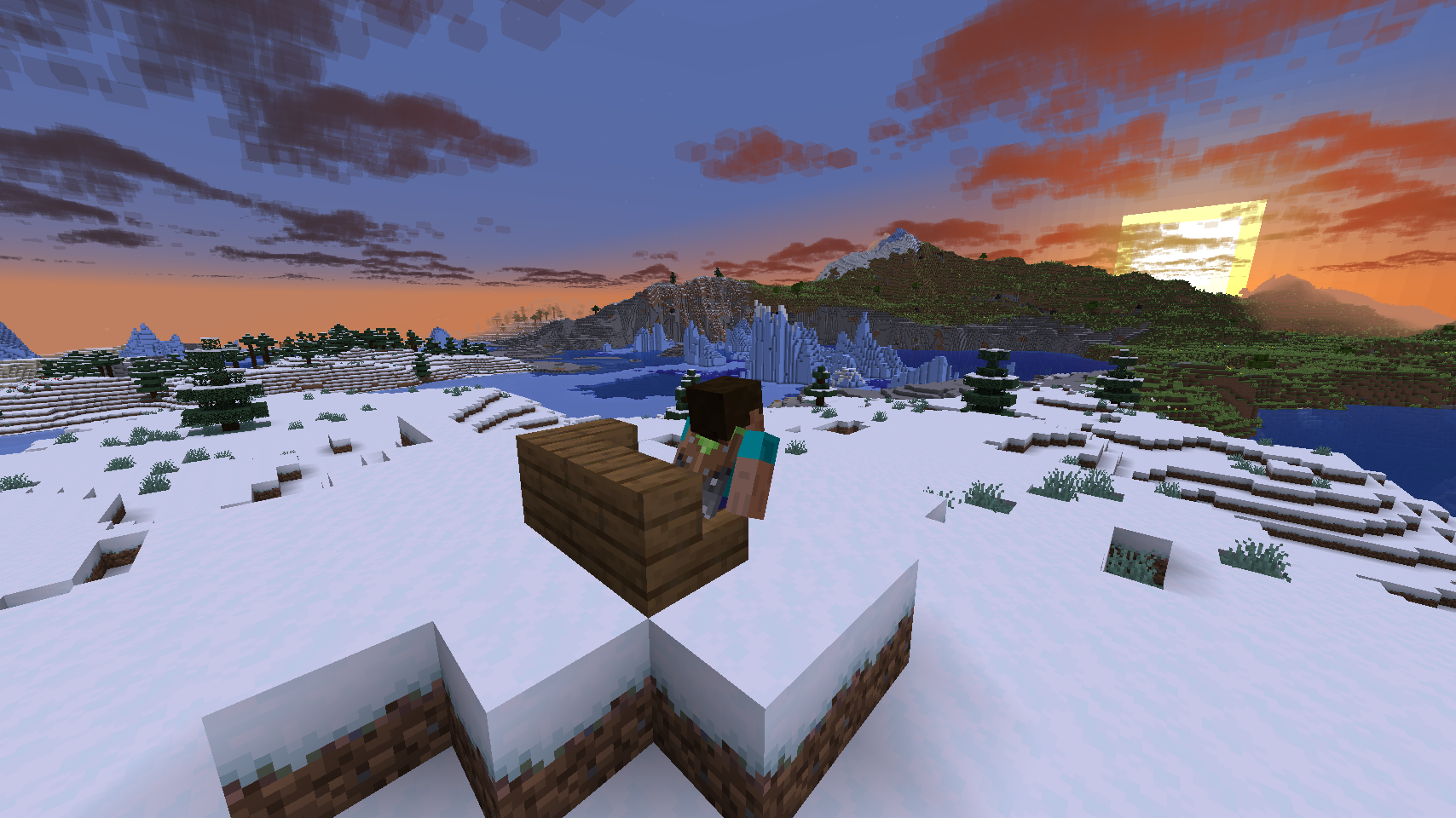 Sunset Steve watching the sunset.
Versions
Files
Relations
Project Relations
More like this
Similar Mods
Suggestions use data such as tags, dependencies, dependents, descriptions, titles, and more to rank how much they overlap with this mod.
On ModDex
Community snapshot
By the numbers
Statistics
Want to reach Minecraft players?
We're looking for a server hosting partner to feature here and other parts of the site. Interested? Send us a message!
Get in touchGet it on
Available Platforms
On ModDex
Community snapshot
By the numbers