
Community listing page, reviews may not be monitored by the author.
sim-chat


No reviews yet
A Minecraft Forge mod that adds a slack/discord-style chat interface for dialogues. Designed for modpack creators to script conversations via datapacks and commands.

Community voices
Reviews
No reviews yet. Be the first to review this project!
Get it on
Available Platforms
Compatibility
Supported Environments
Must be installed on both the client and the server.
About
Project Details
For authors
Embed Badge
If you're the author of this project, you can embed a live badge anywhere that supports HTML or Markdown. It updates automatically whenever ratings change.
Use HTML for any page that supports it, or Markdown for README files and Markdown-based descriptions.
Identifiers
Platform IDs
Resources
External Links
About
Description
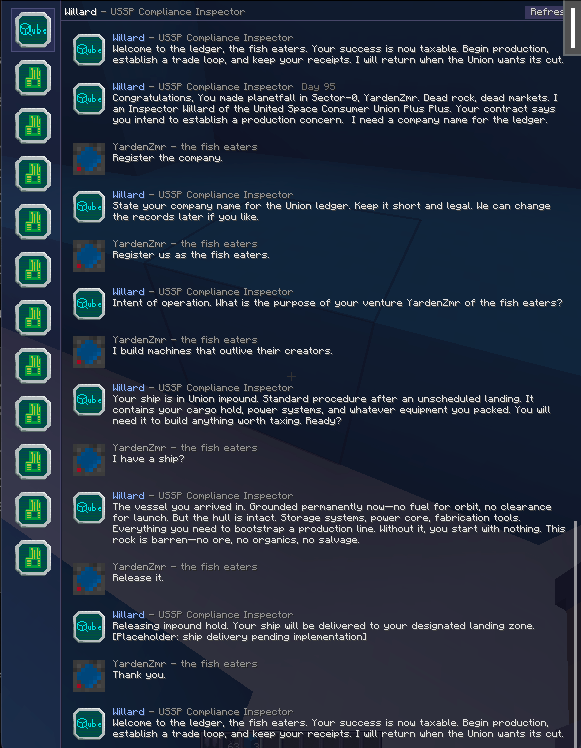
Sim Chat
A Minecraft Forge mod that adds a slack/discord-style chat interface for dialogues. Designed for modpack creators to script conversations via datapacks and commands.
Features
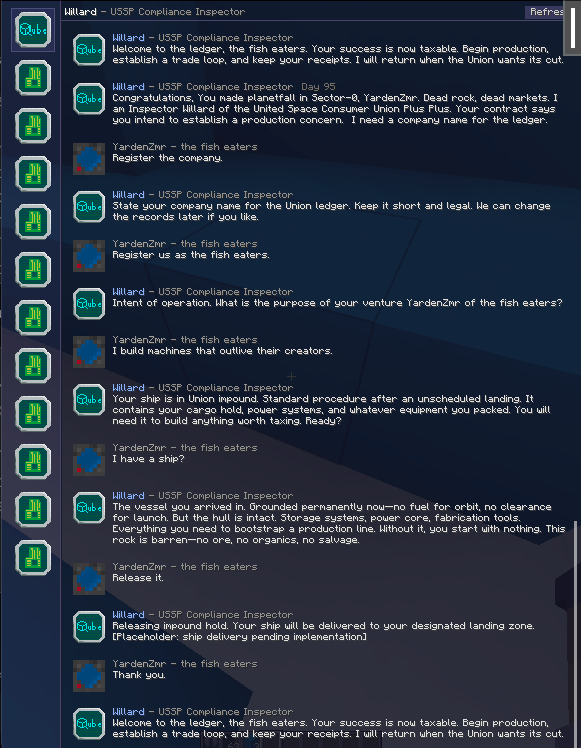
- Slack/Discord-style UI: Sidebar with conversation list, chat history panel with message bubbles
- Team-based conversations: Players share conversation history within their team
- Datapack-driven dialogues: Define dialogue trees in JSON, loaded as datapack resources
- Action buttons: Clickable response options that trigger commands or continue dialogue
- Conditional actions: Show/hide buttons based on data, scores, or KubeJS callbacks
- Template system: Dynamic text with player names, team data, world info
- Typing indicators: Simulated typing delay before messages appear
- Toast notifications: Non-intrusive popups when new messages arrive
- Custom avatars: Load PNG images from config folder for sender portraits
- Team data storage: Store values, states, and scores per-team
- KubeJS integration: Register custom callbacks for conditions and templates
Commands
Basic Commands
/simchat send <player> <dialogueId>    - Send dialogue to player
/simchat system <player> <entityId> <message>  - Send system message
/simchat clear <player> [entityId]     - Clear chat history
/simchat open <player> [entityId]      - Open chat screen for player
/simchat reload                        - Reload KubeJS callbacks
Team Commands
/simchat team create <name>            - Create a new team
/simchat team invite [player]          - Invite player (or broadcast to all if omitted)
/simchat team join <teamId>            - Join a team by ID
/simchat team list                     - List all teams
/simchat team info                     - Show current team info
/simchat team title <newTitle>         - Change team name
/simchat team color <color>            - Change team color (name or 0-15)
Available colors: black (0), dark_blue (1), dark_green (2), dark_aqua (3), dark_red (4), dark_purple (5), gold (6), gray (7), dark_gray (8), blue (9), green (10), aqua (11), red (12), light_purple (13), yellow (14), white (15)
Data Commands
Store values per-team for tracking progress, scores, states. All commands accept an optional [target] parameter (player name or team ID/title) to operate on a specific team:
/simchat data get <key> [target]       - Get value
/simchat data set <key> <value> [target]   - Set value (auto-detects numbers)
/simchat data add <key> <amount> [target]  - Add to numeric value
/simchat data remove <key> [target]    - Remove key
/simchat data list [target]            - List all data
Examples:
/simchat data get gold                 - Get your team's gold
/simchat data get gold Steve           - Get Steve's team's gold
/simchat data set rank vip "Team Alpha"    - Set string on Team Alpha
/simchat data set gold 100             - Set number (auto-detected)
/simchat data add points 10 abc1234    - Add 10 points to team abc1234
Callback Commands
/simchat callback list                 - List registered KubeJS callbacks
/simchat callback run <name> [player]  - Execute callback and show result
Datapack Format
Dialogues are loaded from: data/<namespace>/simchat/<path>.json
Example: data/mypack/simchat/contractor/greeting.json
{
  "entityId": "contractor",
  "entityName": "Director Vex",
  "entitySubtitle": "Helion Industries",
  "text": "Hello {player:name}! Your team ({team:title}) has completed {data:contracts_done} contracts.",
  "actions": [
    {
      "label": "Accept Contract (+{data:reward} credits)",
      "commands": [
        "simchat data add contracts_done 1",
        "give @s emerald 10"
      ],
      "reply": "I'll take the job.",
      "nextState": "mypack:contractor/contract_details",
      "condition": "data:has_clearance"
    },
    {
      "label": "Decline",
      "reply": "Not interested.",
      "condition": "!data:forced_contract"
    }
  ]
}
Dialogue Fields
| Field | Type | Description |
|---|---|---|
entityId |
string | Unique entity identifier (used for avatar lookup and conversation grouping) |
entityName |
string | Display name shown in chat |
entitySubtitle |
string | Optional subtitle (company, title) |
text |
string | Message content (supports templates) |
actions |
array | Response buttons (optional) |
Action Fields
| Field | Type | Description |
|---|---|---|
label |
string | Button text (supports templates) |
commands |
array | Commands to run when clicked |
reply |
string | Player's reply shown in chat (supports templates) |
nextState |
string | Dialogue ID to trigger after this action |
condition |
string | Condition that must be true to show button |
itemsVisual |
array | Items to display on button |
itemsInput |
array | Items required from player (checked before enabling) |
itemsOutput |
array | Items given to player |
Item Format
{
  "item": "minecraft:diamond",
  "count": 5
}
Templates
Use {resolver:name} syntax in text, labels, and replies:
| Template | Description | Example |
|---|---|---|
{player:name} |
Player's username | "Steve" |
{player:uuid} |
Player's UUID | "069a79f4…" |
{team:id} |
Team ID | "a1b2c3d" |
{team:title} |
Team name | "The Builders" |
{team:memberCount} |
Number of team members | "3" |
{team:color} |
Team color index (0-15) | "12" |
{data:keyname} |
Team data value | "42" |
{world:day} |
Current world day | "15" |
{world:time} |
Time of day (0-24000) | "6000" |
{world:dimension} |
Dimension ID | "minecraft:overworld" |
{world:weather} |
Weather state | "clear", "rain", "thunder" |
{kjs:callbackName} |
KubeJS callback result | (any value) |
Example:
{
  "text": "Day {world:day}: Hello {player:name}! You have {data:points} points."
}
Conditions
Use conditions to show/hide action buttons. Prefix with ! to negate.
| Condition | Description |
|---|---|
data:keyname |
True if team data is truthy (exists, non-zero, non-empty) |
kjs:callbackName |
True if KubeJS callback returns truthy |
score:objectiveName |
True if player's scoreboard score > 0 |
permission:level |
True if player has permission level |
Examples:
{
  "actions": [
    {
      "label": "VIP Option",
      "condition": "data:is_vip"
    },
    {
      "label": "Regular Option",
      "condition": "!data:is_vip"
    },
    {
      "label": "Admin Only",
      "condition": "permission:2"
    }
  ]
}
KubeJS Integration
Register callbacks in kubejs/server_scripts/simchat.js:
// Clear old callbacks on reload
SimChat.clearCallbacks()

// Register a condition callback
SimChat.registerCallback('hasEnoughGold', ctx => {
    return ctx.player.persistentData.getInt('gold') >= 100
})

// Register a template callback
SimChat.registerCallback('goldAmount', ctx => {
    return ctx.player.persistentData.getInt('gold')
})

// Register using team data
SimChat.registerCallback('isVeteran', ctx => {
    return ctx.team && ctx.team.data.missions_completed >= 10
})

// Time-based callback
SimChat.registerCallback('greeting', ctx => {
    let time = ctx.player.level.dayTime % 24000
    if (time < 6000) return 'Good morning'
    if (time < 12000) return 'Good afternoon'
    return 'Good evening'
})

SimChat.logStatus() // Log callback count
Callback Context
Available in callbacks via ctx:
// Player (KubeJS wrapped - full access)
ctx.player
ctx.player.persistentData
ctx.player.level.dayTime
ctx.player.inventory

// Team (null if no team)
ctx.team.id
ctx.team.title
ctx.team.memberCount
ctx.team.data           // Map of all team data
ctx.team.data.keyname   // Access specific key
ctx.team.hasData('key') // Boolean check

// Entity (null if no entity context)
ctx.entity.id
ctx.entity.displayName
ctx.entity.messageCount
ctx.entity.lastMessage
ctx.entity.isTyping
Usage in Dialogues
{
  "text": "{kjs:greeting}, {player:name}! You have {kjs:goldAmount} gold.",
  "actions": [
    {
      "label": "Buy Item (100 gold)",
      "condition": "kjs:hasEnoughGold",
      "commands": ["simchat data add purchases 1"]
    }
  ]
}
Entity Files
Place entity configs and avatars in: config/simchat/entities/
Each entity can have:
<entityId>.json- Config with name, subtitle, avatar settings<entityId>.png- Avatar image (any size, displayed at 36x36)
Example: config/simchat/entities/merchant.json
{
  "name": "Merchant Bob",
  "subtitle": "Ironwood Trading Co.",
  "avatar": "merchant"
}| Field | Description |
|---|---|
name |
Default display name |
subtitle |
Default subtitle |
avatar |
Avatar ID (defaults to entityId) |
Defaults
Create default.json and/or default.png as fallbacks for entities without specific files.
All entity files hot-reload when modified.
Configuration
Client Config (simchat-client.toml)
| Option | Default | Description |
|---|---|---|
notificationSound |
minecraft:block.note_block.bell |
Sound on new message |
notificationVolume |
0.5 |
Sound volume (0.0-1.0) |
showToasts |
true |
Show toast popups |
toastDuration |
5.0 |
Toast display time (seconds) |
sidebarWidth |
240 |
Conversation list width |
sidebarSortMode |
0 |
Sort: 0=recent, 1=alphabetical |
Server Config (simchat-common.toml)
| Option | Default | Description |
|---|---|---|
minDelay |
0.3 |
Minimum typing delay (seconds) |
maxDelay |
3.0 |
Maximum typing delay (seconds) |
charsPerSecond |
100.0 |
Simulated typing speed |
commandPermissionLevel |
2 |
Permission for /simchat commands |
Keybinds
| Key | Action |
|---|---|
; (semicolon) |
Open chat screen |
JSON Schema
Validate your dialogues with the JSON schema at schemas/dialogue.schema.json.
VS Code setup:
{
  "$schema": "https://raw.githubusercontent.com/YardenZamir/sim-chat/main/schemas/dialogue.schema.json",
  "entityId": "...",
  ...
}
License
MIT
Sim Chat
A Minecraft Forge mod that adds a slack/discord-style chat interface for dialogues. Designed for modpack creators to script conversations via datapacks and commands.
Features
- Slack/Discord-style UI: Sidebar with conversation list, chat history panel with message bubbles
- Team-based conversations: Players share conversation history within their team
- Datapack-driven dialogues: Define dialogue trees in JSON, loaded as datapack resources
- Action buttons: Clickable response options that trigger commands or continue dialogue
- Conditional actions: Show/hide buttons based on data, scores, or KubeJS callbacks
- Template system: Dynamic text with player names, team data, world info
- Typing indicators: Simulated typing delay before messages appear
- Toast notifications: Non-intrusive popups when new messages arrive
- Custom avatars: Load PNG images from config folder for sender portraits
- Team data storage: Store values, states, and scores per-team
- KubeJS integration: Register custom callbacks for conditions and templates
- SQLite storage: Persistent message history with lazy loading for large conversations
- Scalable: Handles 100k+ messages with smooth scrolling and instant UI response
Dependencies
- Requires the
sqlite_jdbclibrary mod (minecraft-sqlite-jdbc) on both client and server
Storage
Conversation history is stored in a SQLite database at <world>/data/simchat/simchat.db. This provides:
- Scalability: Handles 100k+ messages efficiently with lazy loading
- Persistence: Data survives server restarts and world reloads
- Inspectability: Messages stored as human-readable JSON (viewable in any SQLite browser)
Commands
Basic Commands
/simchat send <player> <dialogueId>    - Send dialogue to player
/simchat system <player> <entityId> <message>  - Send system message
/simchat clear <player> [entityId]     - Clear chat history
/simchat open <player> [entityId]      - Open chat screen for player
/simchat openmessage <messageId>       - Open chat to a specific message
/simchat reload                        - Reload KubeJS callbacks
Team Commands
/simchat team create <name>            - Create a new team
/simchat team invite [player]          - Invite player (or broadcast to all if omitted)
/simchat team join <teamId>            - Join a team by ID
/simchat team list                     - List all teams
/simchat team info                     - Show current team info
/simchat team title <newTitle>         - Change team name
/simchat team color <color>            - Change team color (name only)
Available colors: black, dark_blue, dark_green, dark_aqua, dark_red, dark_purple, gold, gray, dark_gray, blue, green, aqua, red, light_purple, yellow, white
Data Commands
Store values per-team for tracking progress, scores, states. All commands accept an optional [target] parameter (player name or team ID/title) to operate on a specific team:
/simchat data get <key> [target]       - Get value
/simchat data set <key> <value> [target]   - Set value (auto-detects numbers)
/simchat data add <key> <amount> [target]  - Add to numeric value
/simchat data remove <key> [target]    - Remove key
/simchat data list [target]            - List all data
Examples:
/simchat data get gold                 - Get your team's gold
/simchat data get gold Steve           - Get Steve's team's gold
/simchat data set rank vip "Team Alpha"    - Set string on Team Alpha
/simchat data set gold 100             - Set number (auto-detected)
/simchat data add points 10 abc1234    - Add 10 points to team abc1234
Callback Commands
/simchat callback list                 - List registered KubeJS callbacks
/simchat callback run <name> [player]  - Execute callback and show result
Datapack Format
Dialogues are loaded from: data/<namespace>/simchat/<path>.json
Example: data/mypack/simchat/contractor/greeting.json
{
  "entityId": "contractor",
  "entityName": "Director Vex",
  "entitySubtitle": "Helion Industries",
  "text": "Hello {player:name}! Your team ({team:title}) has completed {data:contracts_done} contracts.",
  "actions": [
    {
      "label": "Accept Contract (+{data:reward} credits)",
      "commands": [
        "simchat data add contracts_done 1",
        "give @s emerald 10"
      ],
      "reply": "I'll take the job.",
      "nextState": "mypack:contractor/contract_details",
      "condition": "data:has_clearance"
    },
    {
      "label": "Decline",
      "reply": "Not interested.",
      "condition": "!data:forced_contract"
    }
  ]
}
Dialogue Fields
| Field | Type | Description |
|---|---|---|
entityId |
string | Unique entity identifier (used for avatar lookup and conversation grouping) |
entityName |
string | Display name shown in chat |
entitySubtitle |
string | Optional subtitle (company, title) |
text |
string | Message content (supports templates) |
actions |
array | Response buttons (optional) |
Action Fields
| Field | Type | Description |
|---|---|---|
label |
string | Button text (supports templates) |
commands |
array | Commands to run when clicked |
reply |
string | Player's reply shown in chat (supports templates) |
nextState |
string | Dialogue ID to trigger after this action |
condition |
string | Condition that must be true to show button |
itemsVisual |
array | Items to display on button |
itemsInput |
array | Items required from player (checked before enabling) |
itemsOutput |
array | Items given to player |
Item Format
{
  "item": "minecraft:diamond",
  "count": 5
}
Templates
Templates work in entityName, entitySubtitle, text, label, reply, and commands.
Prefix with {compile:...} (default) to resolve on the server when the message is created, or {runtime:...} to resolve on the client when the message is displayed. Runtime templates are stored and resolved client-side; the server only sees the compiled text. Runtime values refresh when the chat opens, when new messages arrive, or via the Refresh button.
Use {resolver:name} syntax in text, labels, and replies:
| Template | Description | Example |
|---|---|---|
{player:name} |
Player's username | "Steve" |
{player:uuid} |
Player's UUID | "069a79f4..." |
{team:id} |
Team ID | "a1b2c3d" |
{team:title} |
Team name | "The Builders" |
{team:memberCount} |
Number of team members | "3" |
{team:color} |
Team color name | "dark_blue" |
{data:keyname} |
Team data value | "42" |
{world:day} |
Current world day | "15" |
{world:time} |
Time of day (0-24000) | "6000" |
{world:dimension} |
Dimension ID | "minecraft:overworld" |
{world:weather} |
Weather state | "clear", "rain", "thunder" |
{kjs:callbackName} |
KubeJS callback result | (any value) |
Example:
{
  "text": "Day {world:day}: Hello {player:name}! You have {data:points} points."
}
Conditions
Use conditions to show/hide action buttons. Prefix with ! to negate.
| Condition | Description |
|---|---|
data:keyname |
True if team data is truthy (exists, non-zero, non-empty) |
kjs:callbackName |
True if KubeJS callback returns truthy |
score:objectiveName |
True if player's scoreboard score > 0 |
permission:level |
True if player has permission level |
Examples:
{
  "actions": [
    {
      "label": "VIP Option",
      "condition": "data:is_vip"
    },
    {
      "label": "Regular Option",
      "condition": "!data:is_vip"
    },
    {
      "label": "Admin Only",
      "condition": "permission:2"
    }
  ]
}
KubeJS Integration
Register callbacks in kubejs/server_scripts/simchat.js:
// Clear old callbacks on reload
SimChat.clearCallbacks()

// Register a condition callback
SimChat.registerCallback('hasEnoughGold', ctx => {
    return ctx.player.persistentData.getInt('gold') >= 100
})

// Register a template callback
SimChat.registerCallback('goldAmount', ctx => {
    return ctx.player.persistentData.getInt('gold')
})

// Register using team data
SimChat.registerCallback('isVeteran', ctx => {
    return ctx.team && ctx.team.data.missions_completed >= 10
})

// Time-based callback
SimChat.registerCallback('greeting', ctx => {
    let time = ctx.player.level.dayTime % 24000
    if (time < 6000) return 'Good morning'
    if (time < 12000) return 'Good afternoon'
    return 'Good evening'
})

SimChat.logStatus() // Log callback count
Callback Context
Available in callbacks via ctx:
// Player (KubeJS wrapped - full access)
ctx.player
ctx.player.persistentData
ctx.player.level.dayTime
ctx.player.inventory

// Team (null if no team)
ctx.team.id
ctx.team.title
ctx.team.memberCount
ctx.team.data           // Map of all team data
ctx.team.data.keyname   // Access specific key
ctx.team.hasData('key') // Boolean check

// Entity (null if no entity context)
ctx.entity.id
ctx.entity.displayName
ctx.entity.messageCount
ctx.entity.lastMessage
ctx.entity.isTyping
Usage in Dialogues
{
  "text": "{kjs:greeting}, {player:name}! You have {kjs:goldAmount} gold.",
  "actions": [
    {
      "label": "Buy Item (100 gold)",
      "condition": "kjs:hasEnoughGold",
      "commands": ["simchat data add purchases 1"]
    }
  ]
}
Entity Files
Place entity configs and avatars in: config/simchat/entities/
Each entity can have:
<entityId>.json- Config with name, subtitle, avatar settings<entityId>.png- Avatar image (any size, displayed at 36x36)
Example: config/simchat/entities/merchant.json
{
  "name": "Merchant Bob",
  "subtitle": "Ironwood Trading Co.",
  "avatar": "merchant"
}
| Field | Description |
|---|---|
name |
Default display name |
subtitle |
Default subtitle |
avatar |
Avatar ID (defaults to entityId) |
Defaults
Create default.json and/or default.png as fallbacks for entities without specific files.
All entity files hot-reload when modified.
Configuration
Client Config (simchat-client.toml)
| Option | Default | Description |
|---|---|---|
notificationSound |
minecraft:block.note_block.bell |
Sound on new message |
notificationVolume |
0.5 |
Sound volume (0.0-1.0) |
showToasts |
true |
Show toast popups |
toastDuration |
5.0 |
Toast display time (seconds) |
sidebarWidth |
240 |
Conversation list width |
sidebarSortMode |
0 |
Sort: 0=recent, 1=alphabetical |
chatBackgroundColor |
0xDD12121F |
Chat panel background (ARGB hex) |
lazyLoadBatchSize |
30 |
Messages to request when scrolling up |
lazyLoadThreshold |
100 |
Pixels from top before loading older messages |
closedCacheSize |
400 |
Messages to keep cached per conversation when chat closes |
Common Config (simchat-common.toml)
| Option | Default | Description |
|---|---|---|
minDelay |
0.3 |
Minimum typing delay (seconds) |
maxDelay |
3.0 |
Maximum typing delay (seconds) |
charsPerSecond |
100.0 |
Simulated typing speed |
permissions.* |
4 |
Per-command permission levels (0-4) |
permissions.openmessage |
0 |
Allow opening message links |
teamJoin.joinBehavior |
join_largest |
join_largest, join_smallest, join_random, create_new |
teamJoin.joinSizeCap |
-1 |
Auto-join cap (-1 disables, creates new if none eligible) |
initialMessageCount |
30 |
Messages per conversation on initial sync |
maxLazyLoadBatchSize |
100 |
Server-side cap for lazy load requests |
Color Overrides (simchat-client.toml)
Color settings live under the [colors] section and accept ARGB hex strings (e.g. 0xFF88AAFF). Example:
[ui]
chatBackgroundColor = "0x8047BAFF"

[colors]
sidebarBackgroundColor = "0xFF1B2230"
headerTextColor = "0xFFBBD7FF"
messageTextColor = "0xFFE8F1FF"
contextMenuBgColor = "0xFF202030"
toastBackgroundColor = "0xFF243048"
Available color keys (all optional):
sidebarBackgroundColordividerColordividerHoverColorheaderTextColorheaderSubtitleColoremptyStateTextColorheaderSeparatorColorrefreshButtonColorrefreshButtonHoverColorrefreshTextColorsortButtonColorsortButtonHoverColorsortTextColorcompactHintColorscrollbarColorinputBgColoroutputBgColordisabledBgColorplayerNameColorentityNameColorsubtitleColordayTextColormessageTextColordisabledTextColorwhiteTextColorsystemTextColorbuttonDefaultColorbuttonHoverColorborderDisabledColorborderHoverColorborderDefaultColorfocusBorderColorcontextMenuBgColorcontextMenuBorderColorcontextMenuTextColorcontextMenuHighlightColorinputValidColorinputInvalidColorinputFieldBgColorinputFieldBorderColorinputFieldBorderFocusedColorinputCursorColorinputSendEnabledColorinputSendDisabledColortoastSenderColortoastPreviewColortoastBackgroundColortoastBorderColortoastHintColor
Keybinds
| Key | Action |
|---|---|
; (semicolon) |
Open chat screen |
JSON Schema
Validate your dialogues with the JSON schema at schemas/dialogue.schema.json.
VS Code setup:
{
  "$schema": "https://raw.githubusercontent.com/YardenZamir/sim-chat/main/schemas/dialogue.schema.json",
  "entityId": "...",
  ...
}
License
MIT
Screenshots
Gallery
-
 Screenshot 2026-01-21 at 14.28.53.png Screenshot 2026-01-21 at 14.28.53.png
Versions
Files
Relations
Project Relations
More like this
Similar Mods
Suggestions use data such as tags, dependencies, dependents, descriptions, titles, and more to rank how much they overlap with this mod.
On ModDex
Community snapshot
By the numbers
Statistics
 (opens in a new tab)
Get it on
Available Platforms
On ModDex
Community snapshot
By the numbers
Statistics
Resources