Mod

Simple Bucket Mobs
No reviews yet
Scoop up whatever mob you want in a bucket!
Paper is a fork of Spigot that adds its own plugin API on top of the Bukkit API. All Spigot plugins are compatible with paper, not all paper plugins are compatible with Spigot.
Community voices
Reviews
Click once to include, again to exclude, again to clear
No reviews yet. Be the first to review this project!
Get it on
Available Platforms
 Modrinth
Compatibility
Supported Environments
About
Project Details
For authors
Embed Badge
If you're the author of this project, you can embed a live badge anywhere that supports HTML or Markdown. It updates automatically whenever ratings change.
Use HTML for any page that supports it, or Markdown for README files and Markdown-based descriptions.
Identifiers
Platform IDs
About
Description
SimpleBucketMobs

Throw mobs into buckets! :D
Permissions
| Permission | What it do | Default |
|---|---|---|
simplebucketmobs.bucket.<mob> |
Allows the user to bucket the specified mob | false |
simplebucketmobs.bucket.all |
Allows the user to bucket all enabled mobs | op |
simplebucketmobs.reload |
Reload plugin configuration files | op |
simplebucketmobs.debucket |
Dump saved mob NBT data from Mob Bucket to chat. | op |
The following information about texture configuration, is for if you want to edit the textures. All released vanilla mobs have been configured to use the Accompanying resource pack
Texture Configuration
This configuration is texture.yml which is specifically used for custom model data. Currently, the custom model data is applied to a bucket.
The texture configuration is made to be customizable in the event you wanted to make special textures for each variant of a mob.
For example, if you wanted to set a special blue sheep texture, rather than just having a generic texture for all sheep.
Using "default"
The simplest way to assign custom model data is to use the default option.
SHEEP:
  default: 1
PIG:
  default: 2
This is the easiest way to set it and will set it to all mobs of that type. In the above example, all sheep will have custom model data 1 and all pigs will have custom model data 2.
Using the nbtKey and nbtValue
nbtKey and nbtValue are the ways I will be referring to the NBT Tags. nbtValue is our "goal". The examples are simplified by removing the extra JSON.
Consider a villager's profession...
{ "VillagerData": {"level":1, "profession":"minecraft:none", "type":"minecraft:desert"} }
If we want to differentiate custom model data based on a villager's profession, our nbtValue will be "minecraft:none" in this example.
You would get to the nbtValue using all the nbtKeys along the way. This will look like this in your texture.yml...
VILLAGER:
  VillagerData:
    profession:
      "minecraft:none": 1
As shown above, you can use any information stored in the NBT tags to differentiate specific variants of a mob. Here are a few more examples...
Parrot (Variant)
{ "Variant": 1 }
PARROT:
  default: 0
  Variant:
    1: 1
Sheep (Color)
{ "Color": "2b" }
SHEEP:
  default: 0
  Color:
    0b: 0
    1b: 1
    2b: 2
Note
You can only use one set of nbtValues (in the villager example, profession).
The method used to search for the desired nbtValue is not recursive and will not find all possible values.
Screenshots
Gallery
-
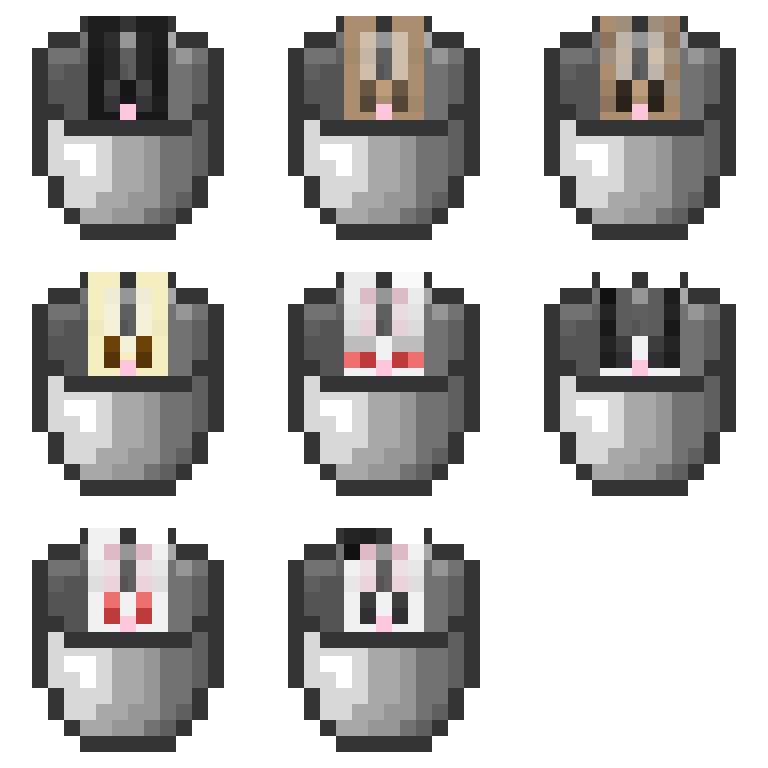 Rabbits in Buckets Rabbits in buckets
 -
 Cats in Buckets Cats in a bucket
Versions
Files
Relations
Project Relations
More like this
Similar Mods
Suggestions use data such as tags, dependencies, dependents, descriptions, titles, and more to rank how much they overlap with this mod.
On ModDex
Community snapshot
By the numbers
Statistics

Want to reach Minecraft players?
We're looking for a server hosting partner to feature here and other parts of the site. Interested? Send us a message!
Get in touchGet it on
Available Platforms
On ModDex
Community snapshot
By the numbers