
Community listing page, reviews here may not be monitored by the author.
Sort It Out!


No reviews yet
A capable inventory sorting mod that works either client-side or server-side
Community voices
Reviews
No reviews yet. Be the first to review this project!
Get it on
Available Platforms
Compatibility
Supported Environments
Works on the client or the server alone, but does more when on both.
About
Project Details
For authors
Embed Badge
If you're the author of this project, you can embed a live badge anywhere that supports HTML or Markdown. It updates automatically whenever ratings change.
Use HTML for any page that supports it, or Markdown for README files and Markdown-based descriptions.
Identifiers
Platform IDs
Resources
External Links
About
Description
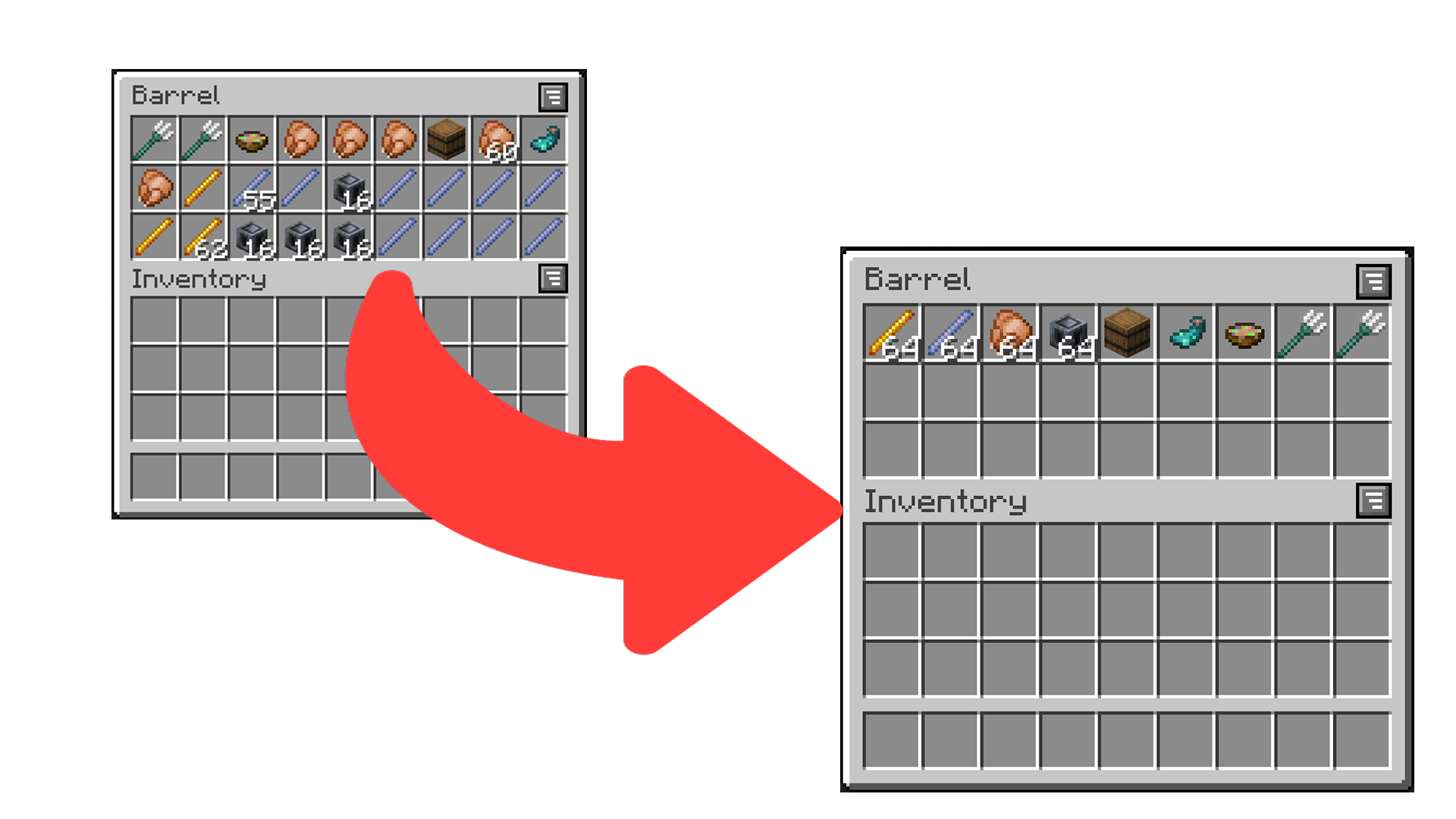
Sort It Out! is an inventory sorting mod that:
- has configurable sorting;
- works when installed only on the server (even with vanilla clients!);
- works when installed only on the client;
- and allows data-driven custom sort button locations.
How to Use
There are multiple ways to trigger sorting:
- Double-click an empty slot (configurable) (client or server).
- Click the sort button (client only).
- Press the sort keybind (default is
I) (client only).
How to Configure
Sort It Out! can be configured via an in-game configuration screen which can be accessed in Mod Menu (Fabric/Quilt) or the mods screen (Forge/NeoForge). In the case that the mod is not installed on the clientside, players can use the /sortitout preferences command to view and update their preferences (which will persist across rejoins and server restarts).
Packet Send Interval: defines the interval, in ticks, at which packets are sent when sorting on the client side (this will not take effect if the mod is installed on the serverside). Too low of an interval may cause a server to kick you.Invert Sorting: whether to invert the sorting order.Comparators: a list of comparators to use when comparing item stacks. If the first comparator states that the stacks are equal, the second will be used to break the tie (and so on).Slot Sorting Trigger: the action to use to trigger a sort by clicking on a slot. Defaults to double clicking an empty slot, but can be set to clicking the offhand key when hovering a slot.
FAQ
Does this need to be installed on the server/client?
Sort It Out! works in any configuration - as long as the mod is installed on one of the server or the client.
- Server only: any player without the mod (even vanilla clients) will be able to double-click to sort (by default) and use
/sortitoutto change their preferences. - Client only: players can join any server regardless of whether the server has the mod and will be able to double-click or use the sort buttons to sort. The config screen can be used to change preferences.
- Server and Client (recommended): players can sort using double-click or the sort buttons. The command or config screen can be used to change preferences.
How do I configure the location of sort buttons in screens?
See the docs page here.
I think I found a bug!
Report any issues you find on the GitHub issue tracker.



Sort It Out! is an inventory sorting mod that:
- has configurable sorting;
- works when installed only on the server (even with vanilla clients!);
- works when installed only on the client;
- and allows data-driven custom sort button locations.
How to Use
There are multiple ways to trigger sorting:
- Double-click an empty slot (configurable) (client or server).
- Click the sort button (client only).
- Press the sort keybind (default is
I) (client only).
How to Configure
Sort It Out! can be configured via an in-game configuration screen which can be accessed in Mod Menu (Fabric/Quilt) or the mods screen (Forge/NeoForge). In the case that the mod is not installed on the clientside, players can use the /sortitout preferences command to view and update their preferences (which will persist across rejoins and server restarts).
Packet Send Interval: defines the interval, in ticks, at which packets are sent when sorting on the client side (this will not take effect if the mod is installed on the serverside). Too low of an interval may cause a server to kick you.Invert Sorting: whether to invert the sorting order.Comparators: a list of comparators to use when comparing item stacks. If the first comparator states that the stacks are equal, the second will be used to break the tie (and so on).Slot Sorting Trigger: the action to use to trigger a sort by clicking on a slot. Defaults to double clicking an empty slot, but can be set to clicking the offhand key when hovering a slot.
FAQ
Does this need to be installed on the server/client?
Sort It Out! works in any configuration - as long as the mod is installed on one of the server or the client.
- Server only: any player without the mod (even vanilla clients) will be able to double-click to sort (by default) and use
/sortitoutto change their preferences. - Client only: players can join any server regardless of whether the server has the mod and will be able to double-click or use the sort buttons to sort. The config screen can be used to change preferences.
- Server and Client (recommended): players can sort using double-click or the sort buttons. The command or config screen can be used to change preferences.
How do I configure the location of sort buttons in screens?
See the docs page here.
I think I found a bug!
Report any issues you find on the GitHub issue tracker.

Screenshots
Gallery
Versions
Files
Relations
Project Relations
More like this
Similar Mods
Suggestions use data such as tags, dependencies, dependents, descriptions, titles, and more to rank how much they overlap with this mod.
On ModDex
Community snapshot
By the numbers
Statistics
Want to reach Minecraft players?
We're looking for a server hosting partner to feature here and other parts of the site. Interested? Send us a message!
Get in touchGet it on
Available Platforms
On ModDex
Community snapshot
By the numbers
Statistics
Resources