
Community listing page, reviews here may not be monitored by the author.

Community voices
Reviews
No reviews yet. Be the first to review this project!
Get it on
Available Platforms
Compatibility
Supported Environments
Runs entirely on the client. Works on vanilla servers.
About
Project Details
For authors
Embed Badge
If you're the author of this project, you can embed a live badge anywhere that supports HTML or Markdown. It updates automatically whenever ratings change.
Use HTML for any page that supports it, or Markdown for README files and Markdown-based descriptions.
Identifiers
Platform IDs
Resources
External Links
About
Description
Hypixel QOL mod that adds small features:
-
Fullbright
-
Zoom (hold a key to zoom in - eases in and out, and you can scroll to zoom further or back out while you're holding it)
-
Chat highlighting and message stacking
-
Custom capes (pick a built-in one, or drop your own PNG into the capes folder)
-
Boss bar in any colour (every real boss and miniboss, including slayer bosses and minibosses that only have a name over their head and the real Livid on Floor 5, each with its own death message and any game sound you choose - search, preview, volume and pitch)
-
Zone Alerts (draw boxes in the world that show your own message when you walk in or out, pinned to an island/floor if you like)
-
Death tracker for dungeons (follows Hypixel's own team death count, so falls out of the map are counted, nobody is counted twice, and it keeps going if you get disconnected and rejoin)
-
Drop Tracker (get alerted when a watched item drops nearby in a dungeon)
-
Dungeon Map (the dungeon floor drawn as you uncover it - only ground your party has actually revealed, never the whole floor - with room names, secret counts, a colour per room type, cleared/failed marks, and every party member's head facing the way they're facing with a ring in their class colour. Optional live score readout underneath: secrets, crypts, score, deaths and the mimic/prince/bat bonuses - the mimic is spotted by the mod itself, so it counts even if nobody in your party announces it, and the first death is checked for a Spirit pet so it costs the right number of points. It can also tell your party when you kill the Mimic, a Prince or a Bat, and give you a party message, a title and a sound at 270 and 300. Hides itself in the boss room by default)
-
Wheel Leap (F7/M7: calls out who Necron grabbed for the pre-mid leap, by name or by class, with an optional party message. Includes a glowing see-through marker on the pre-mid stand block, on its own switch and with its own colour picker)
-
Simon Says (F7/M7: boxes the device's buttons in the order you need them and blocks any click that isn't next, so you can just hold right-click and drag across the wall. Shift - or whatever key you pick - clicks through it)
-
M7 Relics (blocks the click that would drop a relic in the wrong cauldron, the one mistake that ends a run on the spot, and tells you which relic that cauldron actually wants)
-
Sound alert on direct message
-
Twitch integration (chat, alerts, viewer count, moderation)
-
Item animations
-
Post-process glow: a screen-wide shader effect with 28 color presets plus a live color picker
-
Connection stall indicator
-
Player model and inventory HUD elements (draggable)
-
Custom skybox
-
Block Editor (custom block tint and model overrides, including fluids like water/lava)
-
Player Outline (a glow-style outline around your own character, including held items and armor, with its own color picker; optional toggle to show it on other players too, never through walls)
-
Deployables (power orbs, flares, mining lanterns and the Umberella show how far they reach as a see-through bubble, so you can see whether you're inside one - everyone's, not just yours - with a colour picker for each kind)
-
Waypoints (mark a spot, get a block box and optional beam to the sky, scoped to the island/floor you made it on, with an optional see-through-walls toggle; optional distance-scaled name labels, plus temp markers auto-created from coordinates posted in chat, and /abm coords to share your own position)
-
Slayer Egg Sacs (highlight the egg sacs spawned by the Tarantula Broodfather through walls, with a colour picker, the hits left written over each one in text you can read from across the arena, and an optional guess box showing where the next lot will land before they spawn, based only on your own boss)
-
Key Command Binds (bind a key to any command) and Command Shortcuts (type a short alias in chat that expands to a full command)
-
Module keybinds (bind almost any module to a key that toggles it on and off, set straight from the settings menu; they stay quiet while you're typing in chat, a sign, an anvil or any other screen)
-
Item rarity background circle (color-coded by Hypixel rarity, on inventory and hotbar items)
-
Party Finder (marks any listing with someone you've ignored in it - owner or member - with a purple circle; the marking and the optional auto-kick/leave are separate toggles. Works on Kuudra listings as well as dungeon ones)
-
Party Requirements (NOTE: the API key shipped with the mod is still waiting on Hypixel's approval, so these checks may not work yet. Set what people joining your party need to bring - items by name, stars, master stars, ultimate enchants, reforges, runs of the floor or Kuudra tier, total runs, Catacombs level, class level - and the mod checks whoever joins and tells you exactly what they're short of. Kick, leave or just warn, your choice. Reads their wardrobe, ender chest, storage backpacks and personal vault as well as what they're wearing, and counts Kuudra armour stars (up to fifteen). Only ever looks at people in your own party, never at Party Finder listings)
-
Auto Sprint
-
Sign Math (type a sum like 3*64 or 1.5m into a sign and the answer is sent)
-
Badpixel (what your client says about itself: pick the launcher name you announce when you join - vanilla, Fabric, Forge or your own - and stop servers reading your mod list off hidden translation keys tucked into signs and anvils. There's an optional plugin-channel hider too, off by default; Hypixel's own channel keeps working, but other mods that need one of their own will break while it's on)
-
Optional auto-updater (checks periodically and asks before it downloads anything; fully toggleable; works on Lunar Client as well as normal Fabric launchers)
-
Cross-account DM and group chat, end-to-end encrypted
-
Presence (recognize other players running AbdiksMod)
-
Player Size (set your own X/Y/Z scale, synced so every AbdiksMod user sees the same size for everyone else)
-
Chat message coloring
-
DM filter (hide direct messages from players you choose)
-
Auction House price tracker (watch items, get notified when a Buy It Now listing drops under your price - updates arrive as soon as they're found)
-
Price Tooltips (lowest BIN, average BIN and Bazaar buy/sell prices under every SkyBlock item, with stack totals)
-
Bazaar Tracker (get a chat message and sound when a Bazaar item hits your buy or sell price, with its own HUD element)
-
AI Chat Responder (connect your own Gemini or ChatGPT API key; ask it privately with /abm ai, or use a chat trigger. By default it only answers your own messages; turning that off lets anyone who types the trigger get an AI reply sent from your account use at your own discretion, as automated chat replies may be against some servers' rules. Remembers recent messages so you can ask follow-ups, and conversations can be named, saved and loaded again later. Can also read and answer in your AbdiksMod DMs and group chats, with a Send Back toggle for whether those answers go back to the person who asked or into your own chat. Optional Unsafe mode (off by default) lets it run in-game commands you register - e.g. "warp me" -> /warp. It can also close the game, but only if you register a command whose command is <<QUIT>> (there's no built-in close - you pick the phrase, e.g. "byebye" -> <<QUIT>>); each command owner-restrictable; use at your own discretion)
-
Shape Spin (experimental): a selectable spinning shape (cube/octahedron/pyramid) in your off-hand, with adjustable size, speed, and color, including a rainbow mode
-
Custom Mesh (experimental): attach your own self-only model to a bone (head, off-hand, etc.), imported directly from a Blender glTF/GLB export - mesh, texture and object-transform animation all supported. Make a project in the in-game menu, then drop your export into the folder it makes for you, named exactly .glb. A texture, a UV map and normals are all optional: a model with no image just renders in its own material colour. The project screen warns you when a model is detailed enough to lower your FPS
-
Player Stats HUD: draggable Health, Mana, Overflow Mana, Defense, Vitality, Effective Health (EHP), and Speed displays, each independently toggleable; optionally hide Hypixel's own stat numbers and/or the vanilla health, hunger, armor, and mount health bars
-
/abm command
-
Draggable settings panels that open on top of anything else on screen, with a search box, a short description when you hover any setting, right-click to step back through options, and a drag-and-drop HUD layout editor (/abm hud) - elements keep their proportions when you resize them instead of stretching, and keep their size when you switch to fullscreen and back
-
No Mouse Reset (keep the cursor where it was when one menu closes and another opens right after)
Main keybind for GUI: RIGHT BRACKET ]
Chat, Presence, Player Size, the Auction House tracker, Price Tooltips, the Bazaar Tracker and Party Requirements connect through a relay server the author runs and pays for. This infrastructure is provided solely for use through the official, unmodified AbdiksMod client. Any other use including through a modified or reverse-engineered client, a third-party script, or an automated tool is strictly prohibited and unauthorized. Such use may constitute unauthorized access to a computer system under applicable law, and the author reserves the right to pursue civil remedies, including legal action, for confirmed abuse.
The AI Chat Responder connects directly to Google's Gemini API or OpenAI's API, whichever one you pick, using your own personal API key. It never goes through the author's relay, and the author has no access to your key, your prompts, or the AI's replies.
Licensed under the PolyForm Strict License 1.0.0. This software may be used for personal, noncommercial purposes only; redistribution, modification, and the creation of derivative works are not authorized under this license. The full license text is available at https://polyformproject.org/licenses/strict/1.0.0.
Contact Mail: [email protected]
Screenshots
Gallery
-
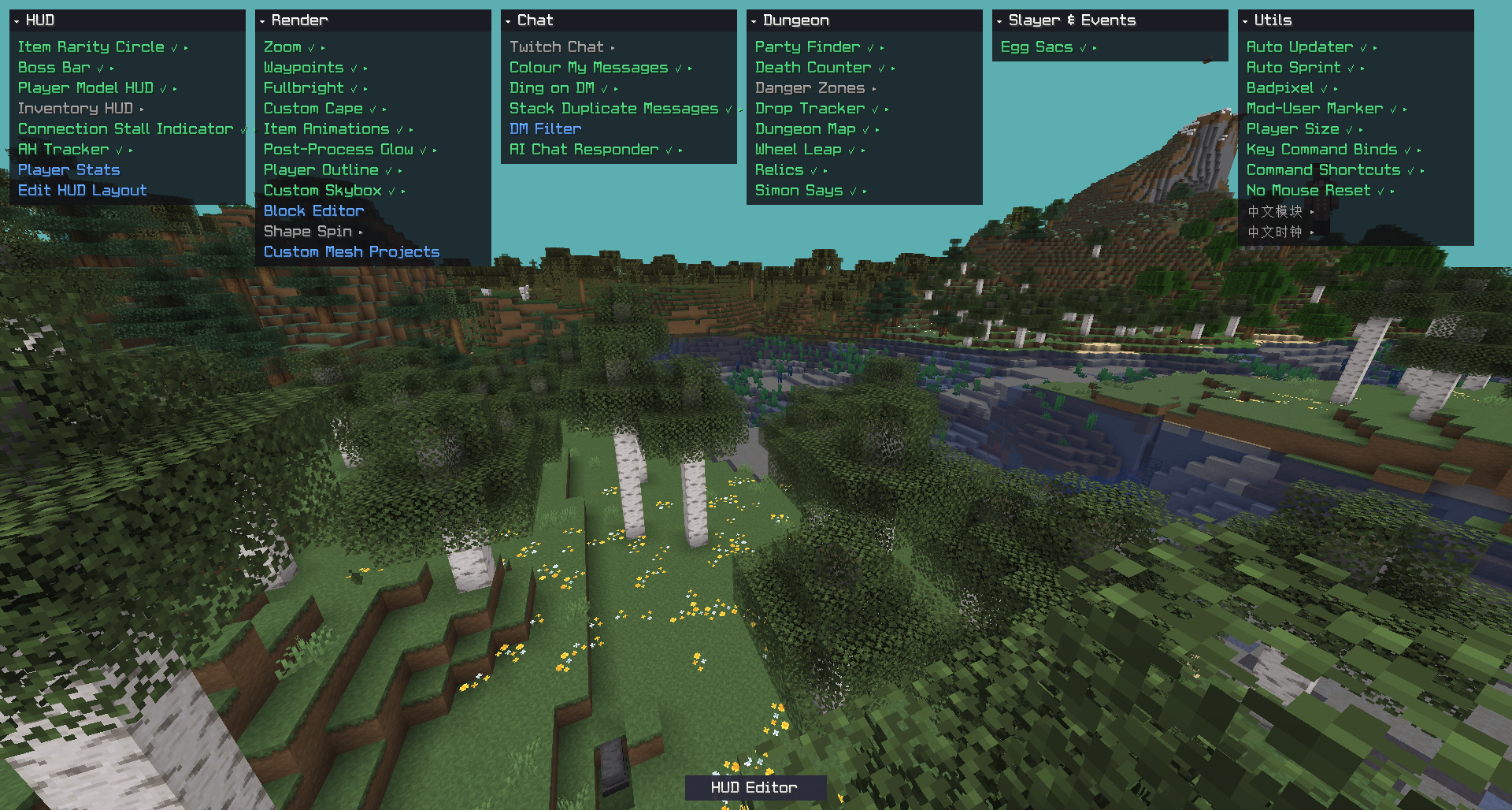 GUI
GUI -
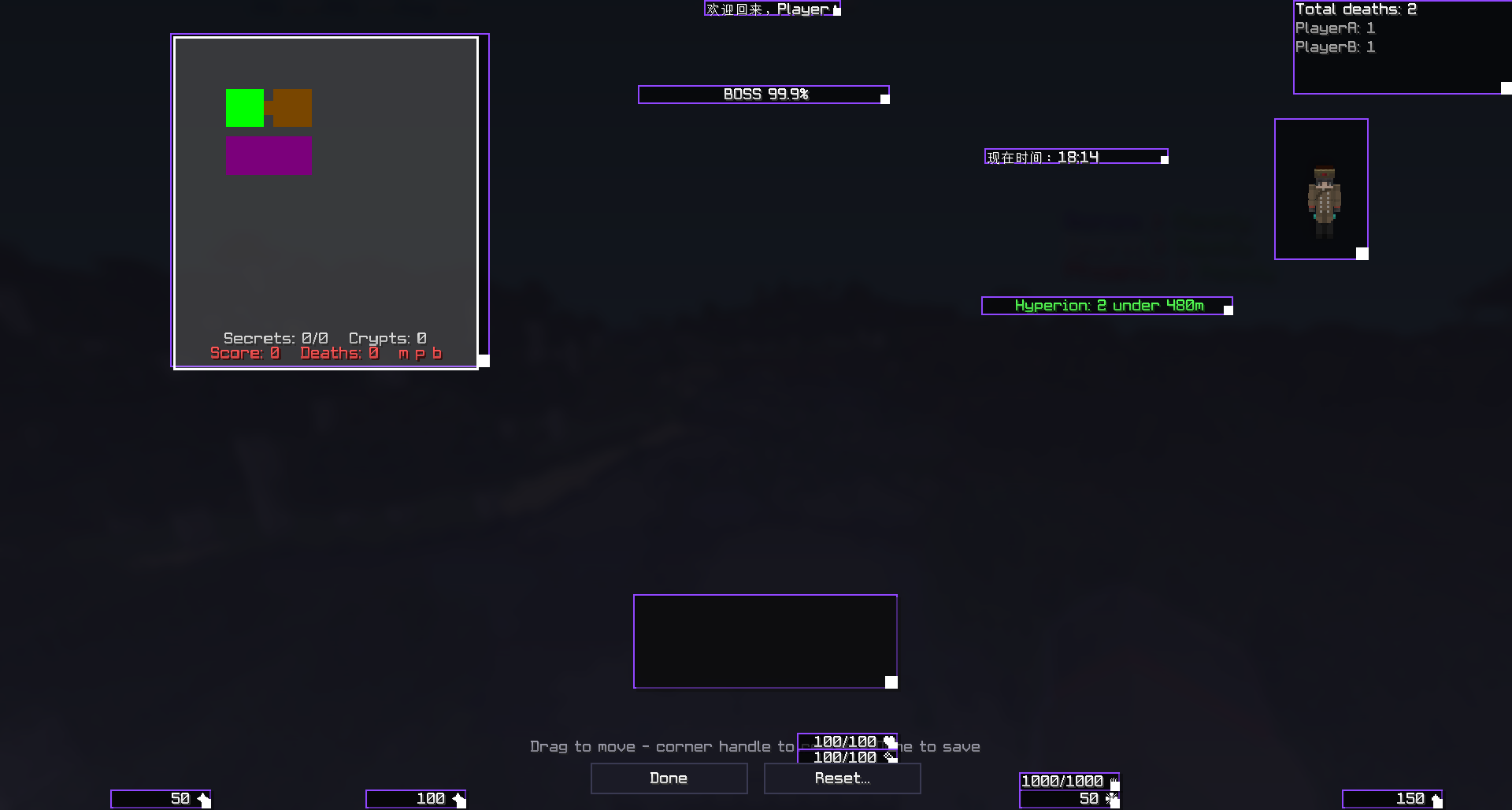 Hud Editor
Versions
Files
Relations
Project Relations
More like this
Similar Mods
Suggestions use data such as tags, dependencies, dependents, descriptions, titles, and more to rank how much they overlap with this mod.
On ModDex
Community snapshot
By the numbers
Statistics

Want to reach Minecraft players?
We're looking for a server hosting partner to feature here and other parts of the site. Interested? Send us a message!
Get in touchGet it on
Available Platforms
On ModDex
Community snapshot
By the numbers
Statistics
Resources