
Adaptive Graphics
No reviews yet
Automatically adjusts Minecraft graphics settings to maintain stable FPS.
Fabric is a mod loader for versions 1.14+ of Minecraft, particularly popular for client side and optimization mods.
Community voices
Reviews
Click once to include, again to exclude, again to clear
No reviews yet. Be the first to review this project!
Get it on
Available Platforms
 Modrinth
Compatibility
Supported Environments
About
Project Details
For authors
Embed Badge
If you're the author of this project, you can embed a live badge anywhere that supports HTML or Markdown. It updates automatically whenever ratings change.
Use HTML for any page that supports it, or Markdown for README files and Markdown-based descriptions.
Identifiers
Platform IDs
Resources
External Links
About
Description

Adaptive Graphics
💥 READ CHANGELOG
⚠️ IMPORTANT: THIS MOD IS IN ACTIVE DEVELOPMENT
Features may be incomplete, buggy, or behave unexpectedly. Any issues, glitches, or unbalanced behavior you encounter will be addressed in future updates. Thank you for your patience!
A Minecraft Fabric mod that automatically adjusts graphics settings in real-time to maintain a stable target framerate.
Overview
Adaptive Graphics monitors your FPS and dynamically adjusts visual settings when performance drops below your target. When FPS recovers, settings are gradually restored to their original values. This allows you to set high-quality graphics without worrying about performance drops in demanding areas.
Features
The mod adjusts the following settings based on configurable priorities:
Render Distance, Simulation Distance, Entity Distance, Cloud Quality, Biome Blend Radius
Each setting can be assigned a priority value. Higher priority settings are reduced first when FPS drops, and restored last when FPS recovers.
Configuration
Settings are accessible through the Sodium video settings menu. From there you can set your target FPS, adjustment speed, and priority values for each graphics setting.
The mod waits 10 seconds after loading a world before making adjustments, allowing chunks to load and FPS to stabilize. Similarly, after exiting the pause menu, there is a 5 second delay before adjustments resume.
Requirements
Minecraft 1.21.11 with Fabric Loader, Fabric API, and Sodium.
License
All Rights Reserved. This software and its source code are proprietary. You may not copy, modify, distribute, or use any part of this code. See LICENSE file for details.
Screenshots
Gallery
-
 For Modrinth
 -
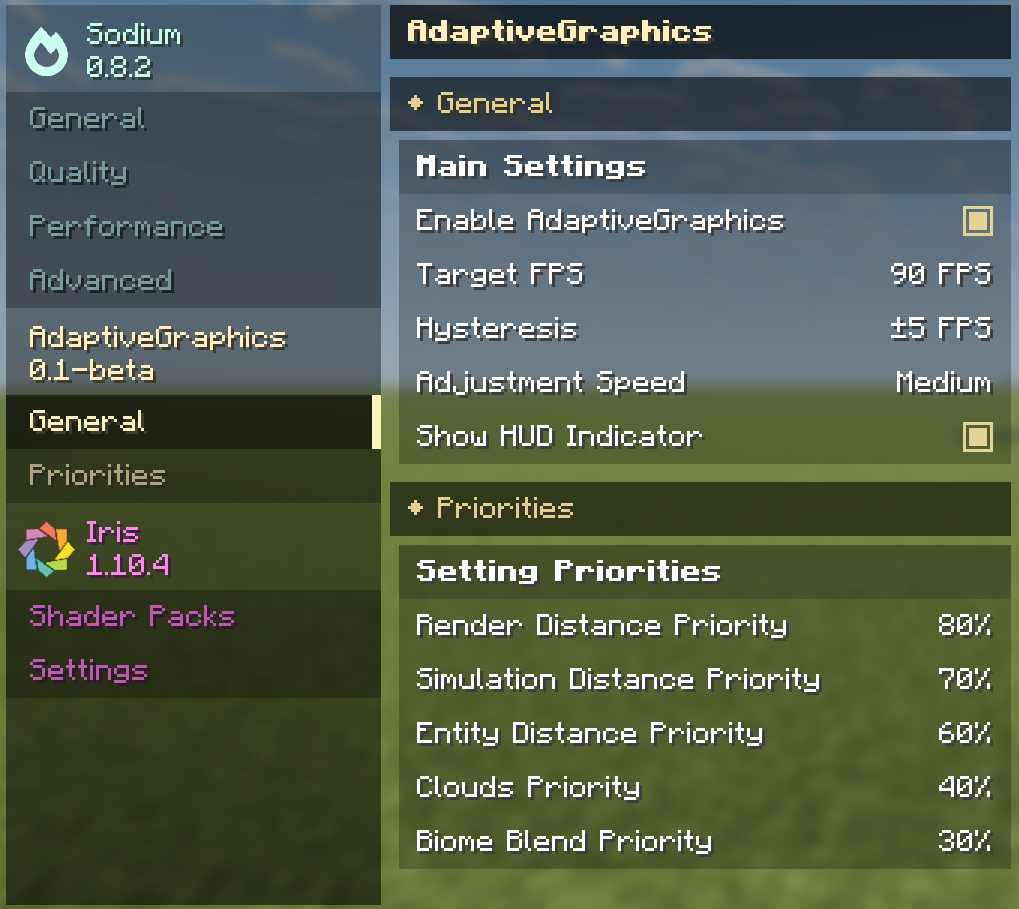 The way it looks in the Graphics menu Full integration of the mod in the Sodium menu, with descriptions for each parameter
Versions
Files
Relations
Project Relations
More like this
Similar Mods
Suggestions use data such as tags, dependencies, dependents, descriptions, titles, and more to rank how much they overlap with this mod.
On ModDex
Community snapshot
By the numbers
Statistics

Want to reach Minecraft players?
We're looking for a server hosting partner to feature here and other parts of the site. Interested? Send us a message!
Get in touchGet it on
Available Platforms
On ModDex
Community snapshot
By the numbers
Statistics
Resources