
Community listing page, reviews may not be monitored by the author.
AdvancedReplay

No reviews yet
Minecraft Replay Plugin to record players on your server

Community voices
Reviews
No reviews yet. Be the first to review this project!
Get it on
Available Platforms
About
Project Details
For authors
Embed Badge
If you're the author of this project, you can embed a live badge anywhere that supports HTML or Markdown. It updates automatically whenever ratings change.
Use HTML for any page that supports it, or Markdown for README files and Markdown-based descriptions.
Identifiers
Platform IDs
About
Description

AdvancedReplay
AdvancedReplay is a Replay system for Spigot 1.8 & 1.21. It can record players on your Server and save the recorded data to a file or database, so you can watch the replays at any time. Currently it records almost every action a player does and can be easily controlled with the commands.
⚠️ This Plugin needs ProtocolLib to run.
Features
Replaying: When watching a replay you have a variety of tools to control the replay. For example, you can pause it, change the speed, teleport to one of the players and more.
Easy to use API: AdvancedReplay comes with a lot of possibilities for customization with the api, including a way to change how replays are saved and a possibility to add and replay your own data. For more details take look at the API section.
Recorded Data:
AdvancedReplay is currently able to record players, living entities, items and Projectiles.
- Player movements
- Player actions (Eating, Arm animations & more)
- Inventory changes
- Metadata updates
- Projectiles
- Dropped Items
- Block changes by players
- Chat messages
If you encounter any bugs please report them in Github.
Configuration
In the config.yml you can configure some general settings about the plugin and the recorded data If you want to use a database you also need to set up the mysql.yml. If you want to disable a notification or message just leave it empty.
Spoiler
# General plugin settings
general:

  # Maximum length of a replay in seconds
  max_length: 3600

  # Create a new recording on startup
  # save_on_stop and add_new_players should be enabled
  record_on_startup: false

  # Should the Replay be saved on shutdown/when the maximum length is exceeded?
  save_on_stop: false

  # Should the plugin save the Replays to a mysql database?
  # If enabled you need to configure the mysql.yml
  use_mysql: false

  # Save the Replays to an S3 compatible Storage
  # If enabled you need to configure s3.yml
  use_s3: false

  # If enabled in offline mode, the plugin will fetch the skin data from Mojang
  # Can slow down the server when recording a lot of players
  use_offline_skins: true

  # Change how detailed movement is recorded. Better quality results in larger replays
  # Options: high, medium, low
  quality: high

  # Automatically delete replays after a specific amount of time (days)
  # Use -1 to disable
  cleanup_replays: -1

  # Hide all players that are not participating in a replay
  hide_players: false

  # Should players when they join after a recording started be added to all running recordings
  add_new_players: false

  # Should AdvancedReplay check for new updates?
  update_notifications: true

  # This message is displayed when a player dies
  death_message: '&6{name} &7died.'

  # This message is displayed when a player leaves the game
  quit_message: '&6{name} &7left the game.'

  # This message is displayed when a player joins the game
  join_message: '&6{name} &7joined the game.'

# Configuration of the replaying settings
replaying:
  world:
    # Reset block changes after watching a replay?
    reset_changes: false

  # How should the replay progress be displayed
  # Options: action_bar, xp_bar, none
  progress_display: action_bar

# Configuration of the recording data
recording:
  blocks:

    # Enable recording of block changes?
    enabled: true

    # Use real block changes when replaying?
    real_changes: true

  entities:
    # Enable recording of all living entities?
    enabled: true
    items:

      # Enable recording of items?
      enabled: true
  chat:

    # Enable recording of chat messages?
    enabled: true
    # Format of recorded chat messages
    format:  '&r<{name}> {message}'
Videos
Commands/Permissions
/replay - Overview of all commands
/replay start [Name]:[Duration] [<Players ...>] - Starts recording a new Replay
/replay stop [-nosave|-force] - Stops and saves a Replay
/replay play - Starts a recorded Replay
/replay jump - Jump to a specific moment
/replay leave - Leave your Replay
/replay info - Information about a Replay
/replay delete - Deletes an existing Replay
/replay list [Page] - Lists all available Replays
/replay reload - Reloads the configuration
replay.command. - Permission for the specific command
API Examples
Register a custom ReplaySaver
ReplayAPI.getInstance().registerReplaySaver(new IReplaySaver() {

    @Override
    public void saveReplay(Replay replay) {
        ReplayData data = replay.getData();
        // Will be called to save a new replay

    }

    @Override
    public boolean replayExists(String replayName) {
        // Return true if the replay exists
        return false;
    }

    @Override
    public void loadReplay(String replayName, Consumer<Replay> consumer) {

        // Load the ReplayData and return a new replay to the consumer
        consumer.accept(new Replay(replayName, new ReplayData()));
    }

    @Override
    public void deleteReplay(String replayName) {
        // Will be called to delete an existing replay

    }

    @Override
    public List<String> getReplays() {
        // Return all available replays
        return null;
    }
});
Register your own ReplayHook
        ReplayAPI.getInstance().registerHook(new IReplayHook() {

            @Override
            public PacketData onRecord(String playerName) {
                /*
                 * Will be called every tick for every player that is being recorded.
                 * Return a PacketData containing the data that you want to add.
                 */

                return null;
            }

            @Override
            public void onPlay(ActionData data, Replayer replayer) {
                String name = data.getName();
                PacketData packetData = data.getPacketData();
                // Will be called whenever a previous recorded action should be played

            }
        });
Replay Events
public void onReplayFinished(ReplaySessionFinishEvent e) {
    Player player = e.getPlayer();
    Replay replay = e.getReplay();
Screenshots
Gallery
-
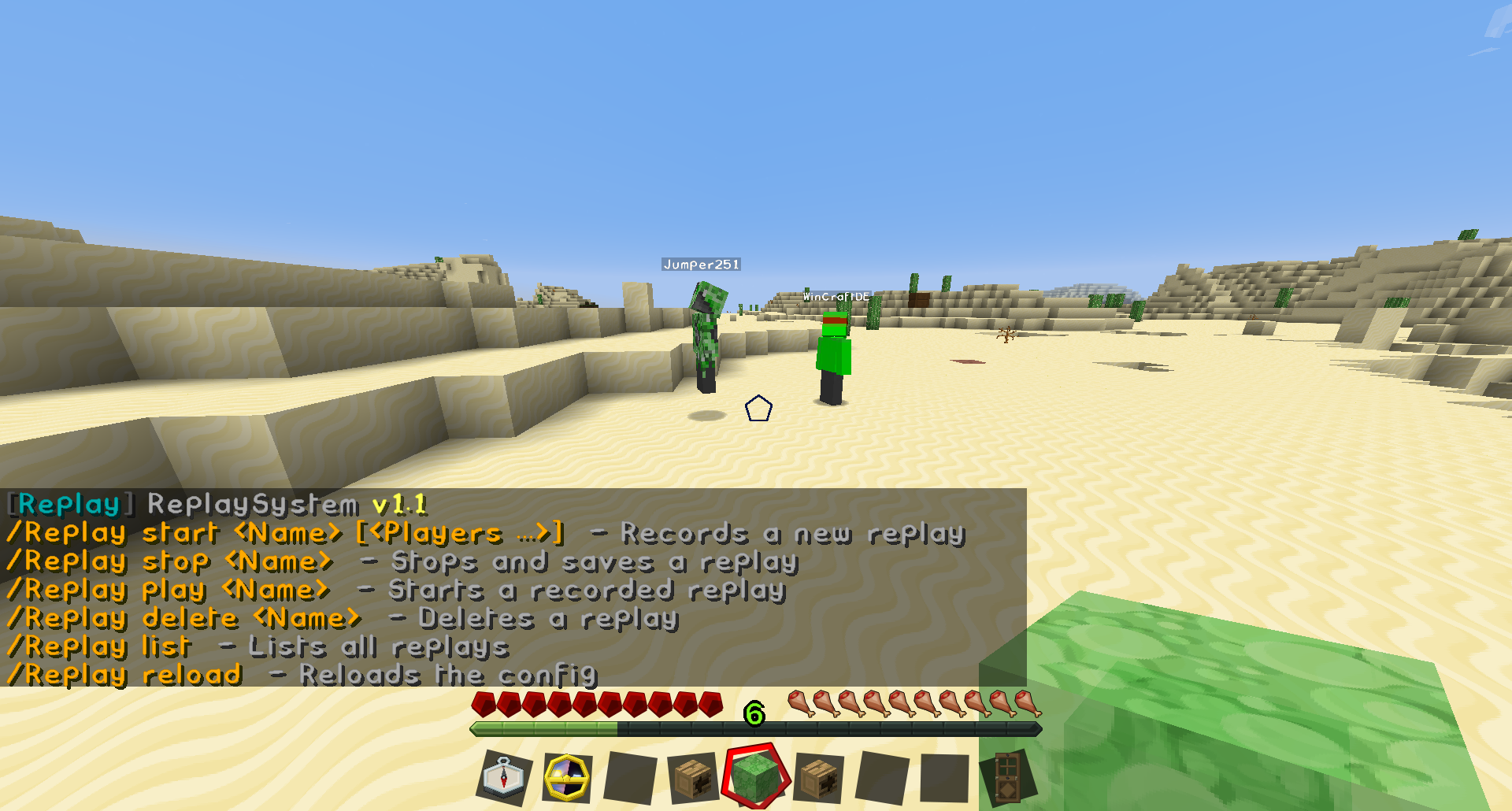 AdvancedReplay AdvancedReplay overview
Versions
Files
Relations
Project Relations
More like this
Similar Mods
Suggestions use data such as tags, dependencies, dependents, descriptions, titles, and more to rank how much they overlap with this mod.
On ModDex
Community snapshot
By the numbers
Statistics


Get it on
Available Platforms
On ModDex
Community snapshot
By the numbers