Community listing page, reviews here may not be monitored by the author.
AE2 Crafting Priority


No reviews yet
Adds per-job crafting priority to Applied Energistics 2's autocrafting, so higher-priority jobs claim crafting machines first.
Community voices
Reviews
No reviews yet. Be the first to review this project!
Get it on
Available Platforms
Compatibility
Supported Environments
Must be installed on both the client and the server.
About
Project Details
For authors
Embed Badge
If you're the author of this project, you can embed a live badge anywhere that supports HTML or Markdown. It updates automatically whenever ratings change.
Use HTML for any page that supports it, or Markdown for README files and Markdown-based descriptions.
Identifiers
Platform IDs
Resources
External Links
About
Description
This mod's development is assisted by Anthropic's AI assistant "Claude."
AE2 Crafting Priority
An addon mod that adds "priority" to Applied Energistics 2 (AE2)'s autocrafting.
In AE2's autocrafting, multiple crafting jobs can end up competing for the same machine (a compressor, furnace, etc. connected via a Pattern Provider). With this mod, you can set a "priority" per job, so that when a machine becomes free, the job with the higher priority gets to use it first.
- It never interrupts a machine that's already processing a job — it only controls which job gets priority the next time the machine becomes free
- This is a best-effort, network-wide adjustment, not a strict guarantee
Key Features
Priority starts at 0 by default, and higher numbers mean higher priority. It's set using AE2's own "priority" screen (the one with +1/+10/+100/+1000 buttons and a numeric input field). There are three ways to set it.
- Set it when starting a craft: The item crafting request flow changes to "set amount → set priority → select CPU / start." The priority you set is applied to whichever Crafting CPU actually gets picked when the craft starts
- Change it from the Crafting CPU screen: A wrench icon in the top right of the CPU screen lets you change that CPU's priority directly
- Change it from the terminal's Crafting Status tab: Select a CPU in AE2's Crafting Status tab, then use the wrench icon button to change that CPU's priority
Any CPU that's currently active shows its priority next to its name, e.g. CPU #1@1000, and the priority automatically resets to 0 once the crafting task ends.
Compatible Addon Mods
The following AE2 addon mods have been confirmed to work correctly alongside this mod.
- AdvancedAE: Priority is also applied to the execution order between Quantum Computers
- Mega Cells: Priority works with no extra configuration
- ExtendedAE: Works as-is since it's a standard Pattern Provider extension
- Applied Mekanistics: Works as-is since it's a standard Pattern Provider extension
Requirements
- Minecraft 1.20.1
- Minecraft Forge 47.4.6 or later (confirmed working on 47.4.10)
- Applied Energistics 2, 1.20.1 branch, 15.x series (confirmed working on 15.4.10; AE2 must be installed separately)
Installation
- Install Forge
- Put the Applied Energistics 2 jar in your
modsfolder - Put this mod's jar in your
modsfolder too - Launch Minecraft
Known Limitations
- "Complete jobs in priority order as much as possible" is best-effort — in some situations, completion order may not follow priority exactly
- The effect of priority is only visible when multiple crafting jobs are competing for the same machine (Pattern Provider)
- If "Blocking Mode" is not enabled on the Pattern Provider, this mod may not work correctly due to how the internal inventory behaves
Credits
Author: yuuhamu
Applied Energistics 2 (AE2) is a required separate dependency. This mod does not bundle AE2.
For source code and detailed documentation, see GitHub. To report an issue, please use Issues.
本MODの開発にはAnthropicのAIアシスタント「Claude」を活用しています。 AE2 Crafting Priority AE2(Applied Energistics 2)の自動クラフトに 「優先度」 を追加するアドオンMODです。 AE2の自動クラフトでは、複数のクラフトジョブが同じ機械(圧縮機・溶鉱炉など、Pattern Provider経由で繋がった実機械)を取り合うことがあります。このMODを入れると、ジョブごとに「優先度」を設定でき、機械が空いたときに優先度の高いジョブから先にその機械を使えるようになります。
処理中の機械から横取りすることはありません。 あくまで「次に空いたときにどちらを優先するか」を制御します ネットワーク全体に対するベストエフォートの調整であり、厳密な保証があるわけではありません
主な機能 優先度は初期値0、数値が高いほど優先されます。 設定はAE2純正の「優先度」画面(+1/+10/+100/+1000 ボタンと数値入力欄のある画面)で行います。 設定方法は3通りあります。
クラフト開始時に設定: アイテムのクラフト要求フローが「個数設定 → 優先度設定 → CPU選択・開始」に変わります。設定した優先度は、開始時に実際に選ばれたCrafting CPUへ適用されます Crafting CPU画面から変更: CPU画面右上のレンチアイコンから、そのCPUの優先度を直接変更できます クラフト状況タブから変更: AE2端末のクラフト状況タブでCPUを選択し、レンチアイコンのボタンから優先度を変更できます
実行中(アクティブ)のCPUには CPU #1@1000 のように優先度が表示され、クラフトタスクが終了すると優先度は自動的に0へリセットされます。 対応アドオンMOD 以下のAE2アドオンMODを同時に導入しても問題なく動作することを確認しています。
AdvancedAE: Quantum Computer同士の実行順序にも優先度が適用されます Mega Cells: 追加設定なしで優先度が適用されます ExtendedAE: 標準のPattern Provider拡張のため、そのまま動作します
必要環境
Minecraft 1.20.1 Minecraft Forge 47.4.6以降(47.4.10で動作確認済み) Applied Energistics 2 15.x系列(15.4.10で動作確認済み、AE2は別途導入が必要です)
導入方法
Forgeをインストールする Applied Energistics 2 の jar を mods フォルダに入れる 本MODの jar も mods フォルダに入れる Minecraftを起動する
既知の制限
「できるだけ優先度順に完了させる」はベストエフォートです。状況によっては優先度通りにならないことがあります 優先度の効果は、複数のクラフトジョブが同じ機械(Pattern Provider)を取り合っている場合のみ目に見える形で現れます Pattern Providerの「ブロックモード」が有効でない場合、内部インベントリの関係でうまく動作しない場合があります
クレジット 作者: yuuhamu
Applied Energistics 2 (AE2) は別途必要な依存MODです。このMODはAE2を同梱していません。 ソースコード・詳細なドキュメントは GitHub を参照してください。問題を報告する場合は Issuesからお願いします。
This mod's development is assisted by Anthropic's AI assistant "Claude."
AE2 Crafting Priority
An addon mod that adds "priority" to Applied Energistics 2 (AE2)'s autocrafting.
In AE2's autocrafting, multiple crafting jobs can end up competing for the same machine (a compressor, furnace, etc. connected via a Pattern Provider). With this mod, you can set a "priority" per job, so that when a machine becomes free, the job with the higher priority gets to use it first.
- It never interrupts a machine that's already processing a job — it only controls which job gets priority the next time the machine becomes free
- This is a best-effort, network-wide adjustment, not a strict guarantee
Key Features
Priority starts at 0 by default, and higher numbers mean higher priority. It's set using AE2's own "priority" screen (the one with +1/+10/+100/+1000 buttons and a numeric input field). There are three ways to set it.
- Set it when starting a craft: The item crafting request flow changes to "set amount → set priority → select CPU / start." The priority you set is applied to whichever Crafting CPU actually gets picked when the craft starts
- Change it from the Crafting CPU screen: A wrench icon in the top right of the CPU screen lets you change that CPU's priority directly
- Change it from the terminal's Crafting Status tab: Select a CPU in AE2's Crafting Status tab, then use the wrench icon button to change that CPU's priority
Any CPU that's currently active shows its priority next to its name, e.g. CPU #1@1000, and the priority automatically resets to 0 once the crafting task ends.
Compatible Addon Mods
The following AE2 addon mods have been confirmed to work correctly alongside this mod.
- AdvancedAE: Priority is also applied to the execution order between Quantum Computers
- Mega Cells: Priority works with no extra configuration
- ExtendedAE: Works as-is since it's a standard Pattern Provider extension
- Applied Mekanistics: Works as-is since it's a standard Pattern Provider extension
Requirements
- Minecraft 1.20.1
- Minecraft Forge 47.4.6 or later (confirmed working on 47.4.10)
- Applied Energistics 2, 1.20.1 branch, 15.x series (confirmed working on 15.4.10; AE2 must be installed separately)
Installation
- Install Forge
- Put the Applied Energistics 2 jar in your
modsfolder - Put this mod's jar in your
modsfolder too - Launch Minecraft
Known Limitations
- "Complete jobs in priority order as much as possible" is best-effort — in some situations, completion order may not follow priority exactly
- The effect of priority is only visible when multiple crafting jobs are competing for the same machine (Pattern Provider)
- If "Blocking Mode" is not enabled on the Pattern Provider, this mod may not work correctly due to how the internal inventory behaves
Credits
Author: yuuhamu
Applied Energistics 2 (AE2) is a required separate dependency. This mod does not bundle AE2.
For source code and detailed documentation, see GitHub. To report an issue, please use Issues.
本MODの開発にはAnthropicのAIアシスタント「Claude」を活用しています。 AE2 Crafting Priority AE2(Applied Energistics 2)の自動クラフトに 「優先度」 を追加するアドオンMODです。 AE2の自動クラフトでは、複数のクラフトジョブが同じ機械(圧縮機・溶鉱炉など、Pattern Provider経由で繋がった実機械)を取り合うことがあります。このMODを入れると、ジョブごとに「優先度」を設定でき、機械が空いたときに優先度の高いジョブから先にその機械を使えるようになります。
処理中の機械から横取りすることはありません。あくまで「次に空いたときにどちらを優先するか」を制御します ネットワーク全体に対するベストエフォートの調整であり、厳密な保証があるわけではありません
主な機能 優先度は初期値0、数値が高いほど優先されます。設定はAE2純正の「優先度」画面(+1/+10/+100/+1000 ボタンと数値入力欄のある画面)で行います。設定方法は3通りあります。
クラフト開始時に設定: アイテムのクラフト要求フローが「個数設定 → 優先度設定 → CPU選択・開始」に変わります。設定した優先度は、開始時に実際に選ばれたCrafting CPUへ適用されます Crafting CPU画面から変更: CPU画面右上のレンチアイコンから、そのCPUの優先度を直接変更できます クラフト状況タブから変更: AE2端末のクラフト状況タブでCPUを選択し、レンチアイコンのボタンから優先度を変更できます
実行中(アクティブ)のCPUには CPU #1@1000 のように優先度が表示され、クラフトタスクが終了すると優先度は自動的に0へリセットされます。 対応アドオンMOD 以下のAE2アドオンMODを同時に導入しても問題なく動作することを確認しています。
AdvancedAE: Quantum Computer同士の実行順序にも優先度が適用されます Mega Cells: 追加設定なしで優先度が適用されます ExtendedAE: 標準のPattern Provider拡張のため、そのまま動作します Applied Mekanistics: 標準のPattern Provider拡張のため、そのまま動作します
必要環境
Minecraft 1.20.1 Minecraft Forge 47.4.6以降(47.4.10で動作確認済み) Applied Energistics 2 15.x系列(15.4.10で動作確認済み、AE2は別途導入が必要です)
導入方法
Forgeをインストールする Applied Energistics 2 の jar を mods フォルダに入れる 本MODの jar も mods フォルダに入れる Minecraftを起動する
既知の制限
「できるだけ優先度順に完了させる」はベストエフォートです。状況によっては優先度通りにならないことがあります 優先度の効果は、複数のクラフトジョブが同じ機械(Pattern Provider)を取り合っている場合のみ目に見える形で現れます Pattern Providerの「ブロックモード」が有効でない場合、内部インベントリの関係でうまく動作しない場合があります
クレジット
作者: yuuhamu
Applied Energistics 2 (AE2) は別途必要な依存MODです。このMODはAE2を同梱していません。 ソースコード・詳細なドキュメントは GitHub を参照してください。問題を報告する場合は Issuesからお願いします。
Screenshots
Gallery
-
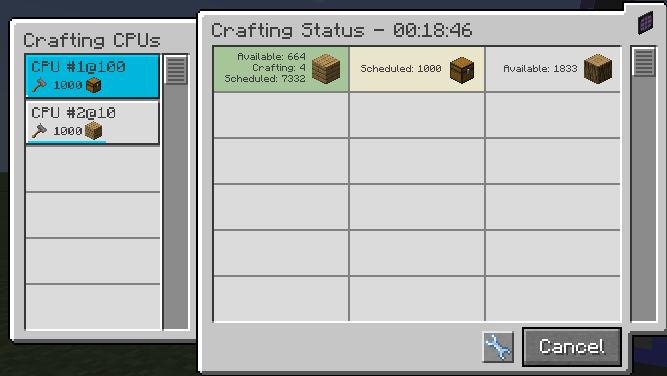 Priority in Action: Two CPUs, Two Priorities CPU #1 (priority 100) and CPU #2 (priority 10) each processing their own job. The higher-priority CPU claims the next available Pattern Provider first.
 -
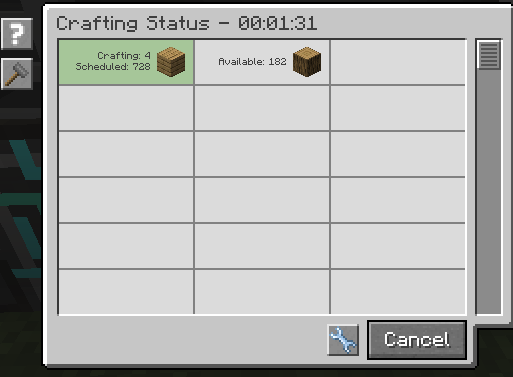 Live Crafting Status Track scheduled and available item counts in real time from AE2's Crafting Status tab, right alongside your priority settings.
 -
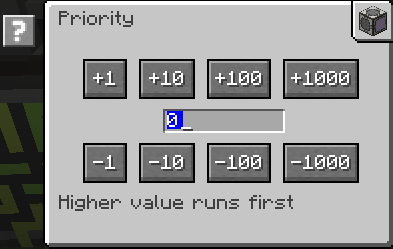 Set Priority from the CPU Screen Click the wrench icon on any Crafting CPU to open this screen and adjust its priority directly. Higher value runs first.
 -
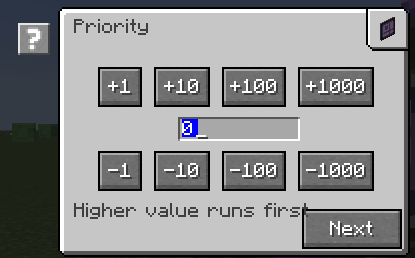 Set Priority When Starting a Craft The crafting request flow now includes a priority step between amount and CPU selection — set it once, right when you queue the job.
Versions
Files
Relations
Project Relations
More like this
Similar Mods
Suggestions use data such as tags, dependencies, dependents, descriptions, titles, and more to rank how much they overlap with this mod.
- MEGA Ender Drives
- Programmed Circuit Card
- AdvancedAE Addon
- BuildingGadgetsAE2Request
- AE2 Crafting Scheduler — Pause & Resume Crafting Jobs
- Assembler Matrix Prioritization
- AE2: Crafting Tree
- AE2 Crafting Tree - Legacy
- AE2 Crafting Optimizer
- AE2: Crafting Tree Refreshed
- AE2 Crafting Time
- AE2 Crafting Plan Improve
On ModDex
Community snapshot
By the numbers
Statistics
Want to reach Minecraft players?
We're looking for a server hosting partner to feature here and other parts of the site. Interested? Send us a message!
Get in touchGet it on
Available Platforms
On ModDex
Community snapshot
By the numbers
Statistics
Resources