
Community listing page, reviews may not be monitored by the author.
AE2 MonitorNet

No reviews yet
Monitoring tools and monitoring terminals for Applied Energistics 2

Community voices
Reviews
No reviews yet. Be the first to review this project!
Get it on
Available Platforms
About
Project Details
For authors
Embed Badge
If you're the author of this project, you can embed a live badge anywhere that supports HTML or Markdown. It updates automatically whenever ratings change.
Use HTML for any page that supports it, or Markdown for README files and Markdown-based descriptions.
Identifiers
Platform IDs
Resources
External Links
About
Description
AE MonitorNet
Throughput monitoring and monitoring terminals for Applied Energistics 2.
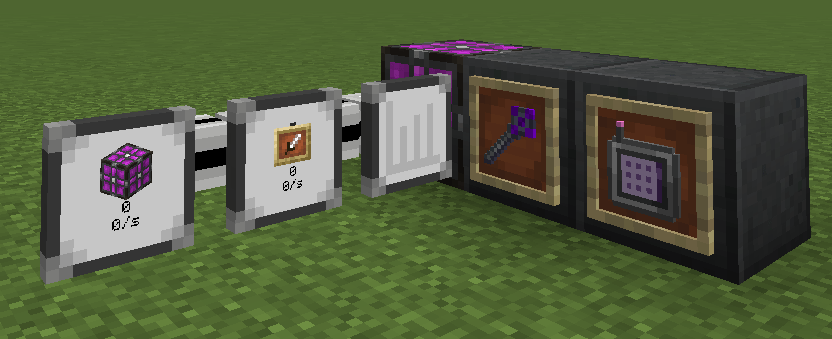
AE MonitorNet adds cable parts that watch how items and fluids actually move through your ME network — and terminals that show every monitor in one place, with live charts.
Features
| Item | What it does |
|---|---|
| ME Throughput Monitor | Cable part. Watches one item or fluid, and shows its icon, the stored amount and the transfer rate on its face. Rate tier: per tick / second / minute / 10 minutes. |
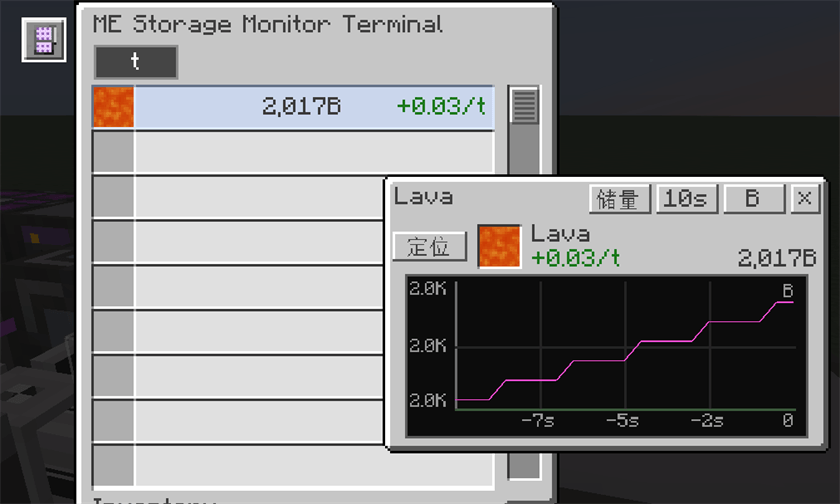
| Advanced ME Throughput Monitor | The same part plus an in-GUI configuration slot, a sample history and a line chart (storage / flow / acceleration) with a selectable time window. Only advanced monitors record history — a terminal row shows a chart only when an advanced monitor contributes to it. |
| ME Storage Monitor Terminal | Cable part. Lists every throughput monitor on the network, merges monitors watching the same key into one row (icon + amount + rate), and opens draggable per-target chart windows on double-click. |
| Wireless ME Storage Monitor Terminal | The same terminal as an AE2 wireless terminal: link it in a Security Terminal and use it inside a Wireless Access Point's range. It also registers into AE2WTLib's Universal Terminal when that mod is installed. |
| Throughput Monitor Configurator | Hand-held tool: right-click a monitor to cycle its rate tier without opening any GUI. |
Each chart window can be dragged by its title bar and has its own time window, metric (storage / flow / acceleration) and fluid unit (mB / B). Locate highlights the monitor in the world.
Supported versions
| Minecraft | Loader | Applied Energistics 2 | Optional |
|---|---|---|---|
| 1.19.2 | Forge 43 | 12.9.9 | AE2WTLib 12.9.7, JEI, Jade |
| 1.20.1 | Forge 47 | 15.4.10 (plus GuideME 20.1.x, a dependency of AE2 itself) | AE2WTLib 15.3.3, JEI, Jade |
Java 17. Separate files are published for each Minecraft version — pick the one that matches your pack. Nothing besides AE2 is mandatory.
In-game guide (1.20.1)
A GuideME page covers every item: /guideme open @s ae_monitornet:guide, or hold G in a container with one of the items under the cursor.
Configuration
<save>/serverconfig/ae_monitornet-server.toml (hot-reloaded):
samplingIntervalTicks— how often monitors read the network (default 10 ticks = 0.5 s)historyCapacity— samples kept per monitor (default 3600)chartRefreshMultiplier— how often chart windows request a fresh curve, as a multiple of the sampling interval (default 1.0, up to 4.0)
Compatibility
- Applied Energistics 2 is required (see the version table above).
- AdvancedAE: when installed, its throughput monitor is read through a reflection bridge and appears in our terminal; our basic monitor is then hidden from the creative tab and has no recipe, so only one kind of throughput monitor exists in-game.
- AE2WTLib: the wireless terminal appears in the Universal Terminal.
- JEI / Jade: they coexist with the mod (no extra plugins are shipped).
A note on the name
The mod used to be called AE Throughput Monitor (aetm) and was renamed to AE MonitorNet (ae_monitornet) in 1.1.0. Item ids changed; settings stored in item NBT are still read, but aetm-server.toml has to be copied to ae_monitornet-server.toml.
Credits and license
Licensed under GNU LGPL-3.0. The monitor parts are ported from AdvancedAE by Pedroksl (LGPL-3.0); the sampling history, the charts, the terminals and their chart windows are original work. See NOTICE.txt for the full attribution.
Source code and issue tracker: https://github.com/cheesexiaolv/ae-monitornet
AE MonitorNet(中文)
为 Applied Energistics 2 提供吞吐量监控与监控终端。
本模组增加了一组线缆部件,用来观察物品/流体在 ME 网络里实际流动的速度;以及一个终端,把网络上所有监控器列在同一张表里,并能打开实时曲线。
新增内容
| 物品 | 说明 |
|---|---|
| ME 吞吐量监控器 | 线缆部件:监控某一种物品或流体,在表面显示图标、存量与传输速率。速率档位:每 tick / 每秒 / 每分钟 / 每 10 分钟。 |
| 高级 ME 吞吐量监控器 | 在基础版上增加界面内配置槽、采样历史,以及可选时间窗口的折线图(存量 / 流量 / 加速度)。只有高级监控器记录历史,因此只有高级监控器参与的行才有曲线。 |
| ME 存储监控终端 | 线缆部件:列出网络上所有吞吐量监控器,把监控同一对象的监控器合并成一行(图标 + 存量 + 速率),双击某一行打开该行可拖动的独立曲线子窗口。 |
| 无线 ME 存储监控终端 | 与上面相同的终端,做成 AE2 无线终端:在安全终端里链接,待在无线访问点范围内使用;装了 AE2WTLib 时会注册进通用终端。 |
| 吞吐量监控配置器 | 手持工具:右键监控器即可循环切换速率档位,不用打开界面。 |
每个曲线子窗口都能按住标题栏拖动,并有自己的时间窗口、指标(存量 / 流量 / 加速度)和流体单位(mB / B);「定位」会在世界里高亮对应的监控器。
版本支持
| Minecraft | 加载器 | AE2 | 可选 |
|---|---|---|---|
| 1.19.2 | Forge 43 | 12.9.9 | AE2WTLib 12.9.7、JEI、Jade |
| 1.20.1 | Forge 47 | 15.4.10(另需 GuideME 20.1.x,AE2 自身的依赖) | AE2WTLib 15.3.3、JEI、Jade |
Java 17。每个 Minecraft 版本单独发布 jar,请选与整合包对应的那个。 除 AE2 外没有必需前置。
游戏内指南(1.20.1)
1.20.1 版包含一页 GuideME 指南,覆盖全部物品:/guideme open @s ae_monitornet:guide,或在容器界面里对着本模组的物品按住 G。
配置
<存档>/serverconfig/ae_monitornet-server.toml(支持热重载):
samplingIntervalTicks—— 监控器读取网络的间隔(默认 10 tick = 0.5 秒)historyCapacity—— 每个监控器保留的采样点数量(默认 3600)chartRefreshMultiplier—— 曲线窗口请求新曲线的频率,按采样间隔的倍数计(默认 1.0,上限 4.0)
兼容性
- 必需:Applied Energistics 2(版本见上表)。
- AdvancedAE:装有时会通过反射读取它的吞吐量监控器并列入本终端;同时本模组的基础监控器不再出现在创造标签、也没有配方,保证游戏里只有一种吞吐量监控器。
- AE2WTLib:无线终端会出现在通用终端(Universal Terminal)里。
- JEI / Jade:与本模组共存,不需要额外插件。
关于改名
本模组原名 AE Throughput Monitor(aetm),1.1.0 起更名为 AE MonitorNet(ae_monitornet)。物品 id 已改变;物品 NBT 里的设置仍可读取,但旧的 aetm-server.toml 需要把值抄到 ae_monitornet-server.toml。
署名与许可
以 GNU LGPL-3.0 发布。监控器系列部件移植自 AdvancedAE(作者 Pedroksl,LGPL-3.0);采样历史、图表、终端及其曲线子窗口为原创实现。完整署名见 NOTICE.txt。
Screenshots
Gallery
Versions
Files
Relations
Project Relations
More like this
Similar Mods
Suggestions use data such as tags, dependencies, dependents, descriptions, titles, and more to rank how much they overlap with this mod.
On ModDex
Community snapshot
By the numbers
Statistics

Get it on
Available Platforms
On ModDex
Community snapshot
By the numbers
Statistics
Resources