
Affix
No reviews yet
A mod that let you rip through the fabric of reality!
Fabric is a mod loader for versions 1.14+ of Minecraft, particularly popular for client side and optimization mods.
Community voices
Reviews
Click once to include, again to exclude, again to clear
No reviews yet. Be the first to review this project!
Get it on
Available Platforms
 Modrinth
Compatibility
Supported Environments
About
Project Details
For authors
Embed Badge
If you're the author of this project, you can embed a live badge anywhere that supports HTML or Markdown. It updates automatically whenever ratings change.
Use HTML for any page that supports it, or Markdown for README files and Markdown-based descriptions.
Identifiers
Platform IDs
About
Description
Affix is an experimental mod that showcases new mechanics added to Minecraft in combination with new visual effects made possible by Veil API
Affix is a mod dedicated to players who enjoy the feeling of fast-paced movement and exploration through the world, while also trying to maintain a somewhat balanced gameplay!
WARNING : Affix uses Veil API, using other mods that modify/change the Minecraft rendering, such as Sodium, may result in the visual effects present in the Mod not to work correctly!!! ALSO, make sure that your settings allow for big distances to render entities, especially on server!
Getting started
Affix begins to have an effect on the Minecraft experience at the end-game, in the end cities. There, players may find a special item, the "Heavy Mirror" which is an item that should be used to locate and destroy anomalies (new entity) found in the overworld, in exchange for loot that can be used in crafting new gear! The mirror when used, will have on screen to display 5 numbers, divided in 3 sections:
-
Top number : Represent the cooldown on which players can find new anomalies! -
The middle two numbers : Represent the coordinates where the player can find the anomaly! -
The bottom two numbers : Represents the players current position in the Overworld for easier locating the anomalies!
Once the player succesfully found an anomaly, they should use the Heavy Mirror to use the "Interdimensional Vision" so Players can actually see the anomaly. Once spotted, looking directly at the anomaly's core, will damage it, damage indicated by the particles that will start to show up!
Recipies
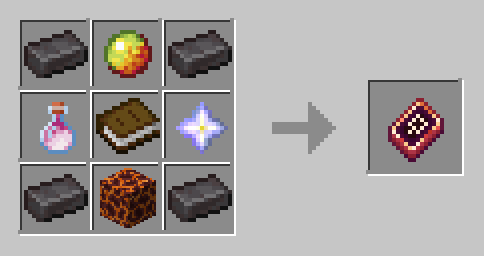
The materials dropped by the anomalies can be used to craft 2 new gear items!
The Refractor :
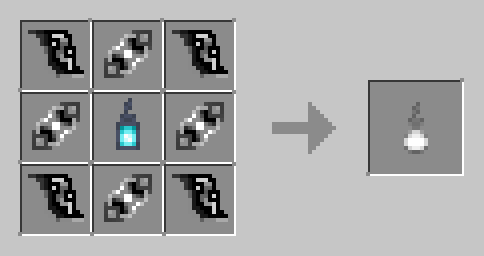
**The Accelerator : **
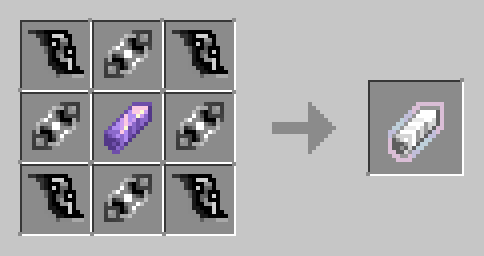
The Infernal Tome :
New Mechanics
The two new gear items offer new movement mechanics, for traveling and for combat!
The refractor : This item is not consumable! It can be used ONLY in the Overworld to phase through the ground, adding momentum for a satisfying launch at the end of the phasing!
The Accelerator : This item is a consumable! When used, the player will be granted an Accelerated effect! While in this effect the player can only see in a Dark/White vision simmilar to the Heavy Mirror Vision, and the player now has the ability to dash/dodge in the direction they are moving based on their keyboard input, while glyphs will start to show up on the screen!
WARNING : If the player dashes too frequently, the Glyphs will turn from white to red, If this persists, the player will be granted a debuff called in-game "behind you". This effect will make the player hear things happening near them while they actually are not happening at all, and they may suffer random damage (2 hearts at random time intervals)!
The Quasar Caller : This item is a weapon designed to make "stars" fall from to sky in a special manner! You can find it in bastion treasure chests!
The Infernal Tome : A book to cast spells, maybe you should try it first, you may enjoy it more if you experience it freshly!
FAQ
Q : Will the mod be downgraded to other Versions?
A : No, the mod will only be updated for newer versions of Minecraft!
Q : Will the mod be on other mod loaders such as forge?
A : No, the mod will only be available on fabric!
Q : Will the mod be on Minecraft Bedrock
A : No, the mod will only be available for Minecraft Java Edition!
Q : Will the mod have new content added to it?
A : Yes, with time, the mod will have more content!
Dependencies
Before launching the mod please make sure that :
-
GeckoLib is installed -
Fabric API is installed
The making of the mod!
If by any chance someone is curious about how this mod was made, here is a video that shows the making of the mod!
Screenshots
Gallery
-
 Dark clouds How clouds look like while in the Accelerated effect!
 -
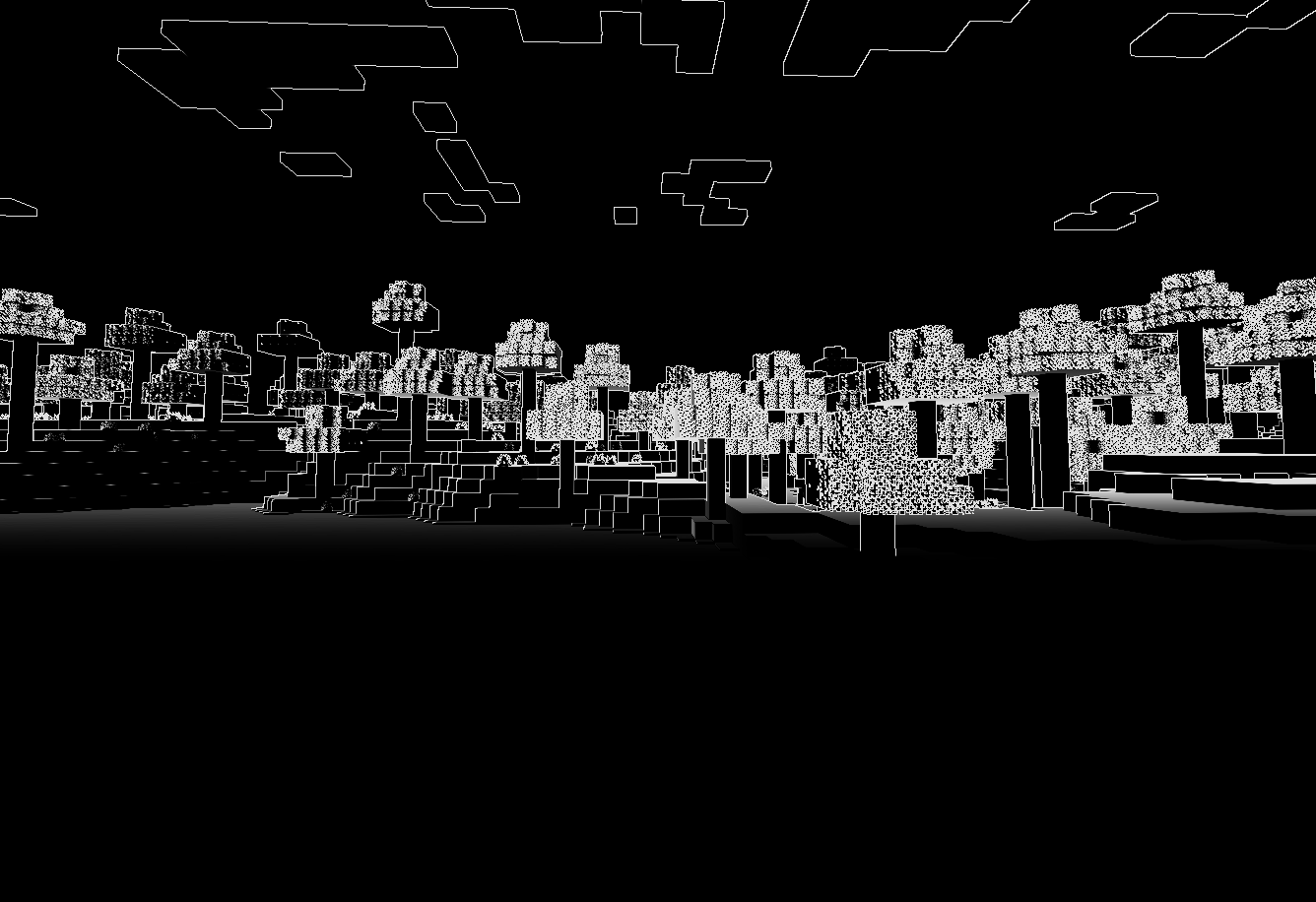 Accelerated vision This is how the players will see in the Accelerated effect!
Versions
Files
Relations
Project Relations
More like this
Similar Mods
Suggestions use data such as tags, dependencies, dependents, descriptions, titles, and more to rank how much they overlap with this mod.
On ModDex
Community snapshot
By the numbers
Statistics

Want to reach Minecraft players?
We're looking for a server hosting partner to feature here and other parts of the site. Interested? Send us a message!
Get in touchGet it on
Available Platforms
On ModDex
Community snapshot
By the numbers