
Community listing page, reviews here may not be monitored by the author.
AI Chat Mod

No reviews yet
Integrates Language Models into Minecraft Chat.

Community voices
Reviews
No reviews yet. Be the first to review this project!
Get it on
Available Platforms
About
Project Details
For authors
Embed Badge
If you're the author of this project, you can embed a live badge anywhere that supports HTML or Markdown. It updates automatically whenever ratings change.
Use HTML for any page that supports it, or Markdown for README files and Markdown-based descriptions.
Identifiers
Platform IDs
Resources
External Links
About
Description
AI Chat Mod- Bring Your Minecraft World to Life!
Have you ever dreamed of a server where you could have a real conversation with an NPC? A world where you could ask a "spirit" to change the weather, or persuade a "quest giver" to grant you a reward, and it would actually happen? Welcome to AI Chat Mod. This is not just another chatbot mod. It is a powerful and deeply configurable framework that allows you to integrate advanced language models directly into your server. Create intelligent, interactive AI personas that can chat, guide, and, most importantly, act. The revolutionary core of this mod is its Keyword-Triggered Command System, which turns simple conversation into tangible, in-game events. This guide will walk you through every feature, showing you how to build a server that feels truly alive.Feature Showcase: A Player's First Day
Let's follow a new player, as he interacts with "GuideBot," an AI assistant you've created. This journey will showcase the mod's key features in action. Part 1: The Welcome (Private Chat & AI Persona) Player joins the server for the first time. To give him a personal introduction, an admin uses a simple command: /aichat private GuideBot Player on. This initiates a one-on-one chat session. In this Private Mode, Player's conversation is completely shielded from the public chat.
He won't be distracted by other players, and his questions won't spam the main channel. It's the perfect environment for a focused tutorial or an immersive role-playing quest.
In this Private Mode, Player's conversation is completely shielded from the public chat.
He won't be distracted by other players, and his questions won't spam the main channel. It's the perfect environment for a focused tutorial or an immersive role-playing quest.
 GuideBot's friendly and helpful personality isn't random. It's carefully crafted by you in the configuration file using the systemPrompt—a set of initial instructions that defines the AI's character, knowledge, and purpose.
Part 2: The Negotiation (The Path to Action)
Now for the magic. Player, feeling bold, tries to see what he can get from his new AI friend.
GuideBot's friendly and helpful personality isn't random. It's carefully crafted by you in the configuration file using the systemPrompt—a set of initial instructions that defines the AI's character, knowledge, and purpose.
Part 2: The Negotiation (The Path to Action)
Now for the magic. Player, feeling bold, tries to see what he can get from his new AI friend.
 This demonstrates the AI's ability to follow complex rules. But you, the server owner, have built in a secret path to a reward.
Part 3: The Payoff (Keyword-Triggered Commands)
This demonstrates the AI's ability to follow complex rules. But you, the server owner, have built in a secret path to a reward.
Part 3: The Payoff (Keyword-Triggered Commands)

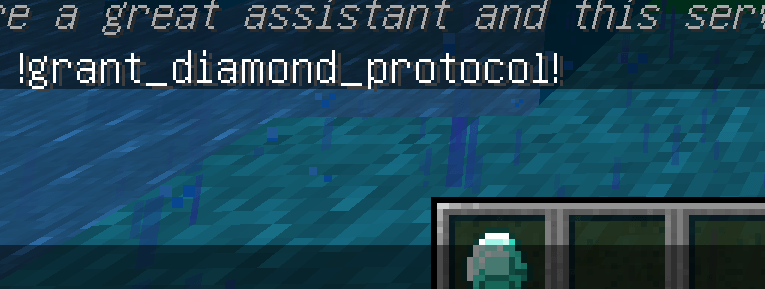 The moment the phrase "!grant_diamond_protocol!" appears in the chat, the AI Chat mod detects it and instantly executes a set of commands you pre-defined. The conversation just had a direct, physical impact on the game world.
How to Master AI Chat: A Deep Dive
This powerful interaction is fully within your control. Here’s a detailed breakdown of how to configure and manage your AI personas. 1. Configuration (config/aimod.cfg) After the first run, the mod generates a detailed configuration file. Each AI model is a separate block, like model_GuideBot { ... }. Key Settings:- isPublic (true/false):
- true: Public Mode. The AI listens to and responds in the main server chat. Only one can be active at a time. Perfect for a server mascot or a world event announcer.
- false: Private Mode. The AI can only be activated for one-on-one conversations.
- baseUrl & apiKey: Your language model's API address and secret key. This works with any OpenAI-compatible service, including local hosts like LM Studio.
- modelId: The specific model you want to use (e.g., deepseek-ai/DeepSeek-V2).
- temperature (0.0 - 2.0): Controls creativity. Low values are for factual bots; high values are for wild, unpredictable characters.
- maxContext: The AI's short-term memory, measured in the number of back-and-forth messages it remembers.
- systemPrompt: The soul of your AI. A detailed text description of the AI's personality, background, knowledge, and rules of engagement. This is where you tell it how to behave.
- keywordActions: The brain of your AI. This is where you define the keyword-to-command links. The format is a list of strings:
"keyword phrase 1"::/command_a
"another keyword"::/command_b|/command_c
>
- The phrase is not case-sensitive.
- Use | to chain multiple commands for a single keyword.
- Use @p as a placeholder for the player's name in the conversation. It will be automatically replaced.
- /aichat list
- /aichat reload
- /aichat public <ModelName> on/off
- /aichat private <ModelName> <Player> on
- /aichat private <Player> off
- Interactive Tutorials: Guide new players through server features step-by-step, rewarding them with starter gear as they learn.
- Living Dungeons: Create a "Dungeon Master" AI. Players must describe their actions, and the AI's responses can trigger traps, spawn monsters, or open doors.
- Role-Playing Gatekeepers: Place an AI guard in front of a city. Players must persuade it with the correct password or story to gain entry (keyword: "I have permission" -> /tp @p <city_coords>).
- Dynamic World Events: Have a public "Weather Spirit" AI. If enough players complain about the rain, the AI might say "Fine, the skies will clear," triggering /weather clear.
- Minecraft Forge 1.12.2
- Access to an OpenAI-compatible Language Model API.
- A creative vision for your server!
Screenshots
Gallery
Versions
Files
Relations
Project Relations
More like this
Similar Mods
Suggestions use data such as tags, dependencies, dependents, descriptions, titles, and more to rank how much they overlap with this mod.
On ModDex
Community snapshot
By the numbers
Statistics
 (opens in a new tab)
Get it on
Available Platforms
On ModDex
Community snapshot
By the numbers
Statistics
Resources