
Albumize
No reviews yet
your screenshots, finally in their right place, easily accessible from the in-game gallery/library
Fabric is a mod loader for versions 1.14+ of Minecraft, particularly popular for client side and optimization mods.
Community voices
Reviews
Click once to include, again to exclude, again to clear
No reviews yet. Be the first to review this project!
Get it on
Available Platforms
 Modrinth
Compatibility
Supported Environments
About
Project Details
For authors
Embed Badge
If you're the author of this project, you can embed a live badge anywhere that supports HTML or Markdown. It updates automatically whenever ratings change.
Use HTML for any page that supports it, or Markdown for README files and Markdown-based descriptions.
Identifiers
Platform IDs
Resources
External Links
About
Description
Albumize
A sleek, high-performance screenshot management suite for the modern explorer.



✨ Overview
Albumize completely transforms your Minecraft screenshot experience. No more digging through messy file directories. Albumize provides a high-performance, fully customizable in-game suite to view, tag, organize, and share your memories instantly.
📸 Powerful Gallery Features
- In-Game Viewer: Browse your entire collection without ever leaving the game.
- Full Preview Suite: High-fidelity preview area with a dedicated Fullscreen mode.
- Smart Meta Display: View file size, dimensions, and capture dates at a glance.
- Discord Ready: Copy the actual image data directly to your system clipboard for instant sharing.
🏷️ Advanced Organization
- Dynamic Tagging: Add custom tags to your shots for deep organization.
- Favorites System: Star your best moments (★) to keep them front and center.
- Auto-Sort: Automatically organizes new captures into Singleplayer and Multiplayer folders.
- Robust Search: Real-time search by filename with comprehensive filters for tags and favorites.
- History Tracking: Quick access to your last 50 viewed screenshots.
🎨 Fully Customizable UI
- Custom Accent Colors: Match the UI to your style with RGB sliders and preset color themes.
- Modern Dark Theme: A sleek, responsive interface designed for clarity and speed.
- Context Menus: Right-click any screenshot for a quick-action menu (Copy, Rename, Delete, Open).
- Toast Notifications: Real-time feedback for all actions like copying or file management.
🛠️ Controls & Navigation
Open your gallery by pressing the [G] key (configurable in controls).
| Feature | Action / Key |
|---|---|
| Navigate | Arrow Keys to browse / Scroll Wheel |
| Open Image | Enter or Double-Click to open in system viewer |
| Manage Tags | Open the dedicated Tags Dialog to bulk manage labels |
| Fast Copy | Click Copy Image or use the Context Menu |
| System Access | Click Open Folder to jump to the file location on your PC |
🧩 Compatibility & Technicals
- ✅ Cross-Platform: Full clipboard and file support for Windows, macOS, and Linux.
- ✅ Sodium & Iris: Optimized for high-performance rendering and shader screenshots.
- ✅ Mod Menu: Fully persistent configuration saved to
albumize.json. - ✅ Real-Time Detection: Automatically detects and organizes new screenshots as you take them.
🗨️ Community & Support
Need help? Found a bug? Join our community or report issues on our tracker!
Screenshots
Gallery
-
 Creator :D ITS ME
 -
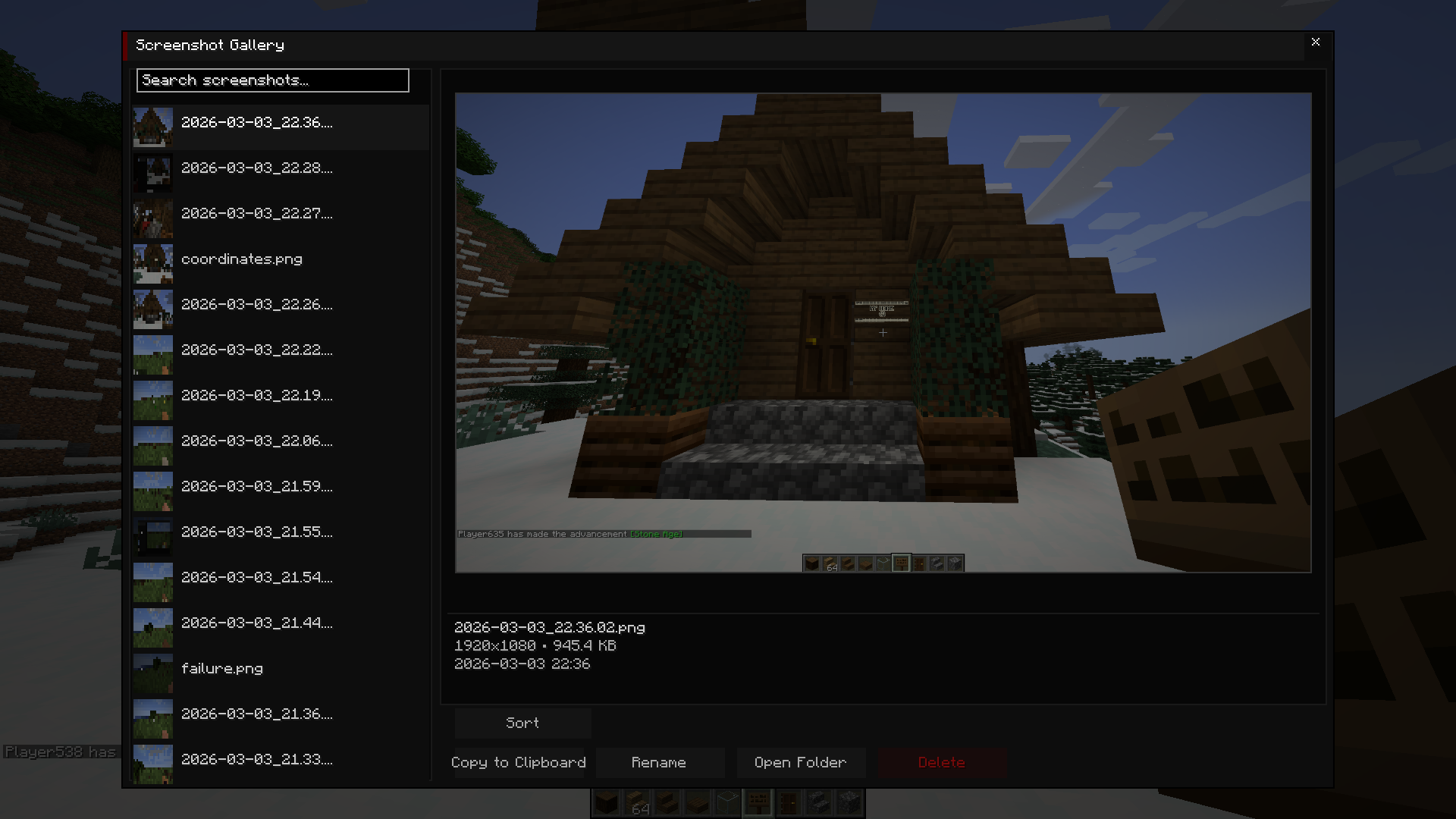 screen shot gallery
 -
 icon :)
Versions
Files
Relations
Project Relations
More like this
Similar Mods
Suggestions use data such as tags, dependencies, dependents, descriptions, titles, and more to rank how much they overlap with this mod.
On ModDex
Community snapshot
By the numbers
Statistics

Want to reach Minecraft players?
We're looking for a server hosting partner to feature here and other parts of the site. Interested? Send us a message!
Get in touchGet it on
Available Platforms
On ModDex
Community snapshot
By the numbers
Statistics
Resources