
ALL Death Messages
No reviews yet
Category-based death messages for every entity.
Fabric is a mod loader for versions 1.14+ of Minecraft, particularly popular for client side and optimization mods.
Community voices
Reviews
Click once to include, again to exclude, again to clear
No reviews yet. Be the first to review this project!
Get it on
Available Platforms
 Modrinth
Compatibility
Supported Environments
About
Project Details
For authors
Embed Badge
If you're the author of this project, you can embed a live badge anywhere that supports HTML or Markdown. It updates automatically whenever ratings change.
Use HTML for any page that supports it, or Markdown for README files and Markdown-based descriptions.
Identifiers
Platform IDs
About
Description
All Death Messages
Overview
Enables death messages for several categories of mobs, and add colours to their names in death messages. Messages use the same texts as vanilla death messages.
For each category, separate kill and death gamerules are generated.
Custom mob categories must be defined in a config file. There is currently no config screen.
Message Triggers
Built-in categories based on mob properties. Custom categories are based on entity types.
A death message will appear if its victim belongs to an enabled death rule, or if any of its recent assailant has an enabled kill rule. A mob may belong to multiple categories; it will trigger a death message if any of them has its rule enabled.
Built-in categories
all: Applies to everything. When enabled, this overrules all other categories.player: Players are excluded from every other built-in categories below.named: Mobs that have been given a custom name.tamed: Includes both tamed pets and tamed mounts. Messages will still be broadcast to all players regardless of ownership.ephemeral/persistent: Mobs that will/won't naturally despawn.passive/hostile: Mobs that are allowed/disallowed in Peaceful difficulty.
Custom categories
Custom categories are defined in .minecraft/config/alldeath-rules.json.
Each key in the root object is used as a category name. The associated value is an array of strings, representing the entity types that can trigger the gamerule.
This example is provided as the default config file:
{
	"utility": [
		"minecraft:allay",
		"minecraft:iron_golem",
		"minecraft:snow_golem",
		"minecraft:villager",
		"minecraft:wandering_trader"
	],
	"boss": [
		"minecraft:ender_dragon",
		"minecraft:elder_guardian",
		"minecraft:warden",
		"minecraft:wither"
	]
}
Name Styling
Mob names in death messages can have different colours and styling applied. Styles can be based on the same categories used in gamerules (both built-in and user-defined), or can be based on anonymous lists of entity types that don't correspond to any gamerule.
The way styles are applied is similar to CSS stylesheets, except in Json and in reverse order. When multiple styles match a mob, they will all be combined, and the topmost style takes priority in case of conflicts.
Styles are defined in the config file .minecraft/config/alldeath-styles.json, as an array of Json Object.
Each object may contain the following properties:
- (Mandatory)
rule: The mobs that will have the style applied- If it is a string, it will be treated as the name of a mob category. (Either built-in or custom.)
- If it is an array of strings, it will be treated as a list of entity types.
- (Optional)
color: A string. Can be either a hex code formatted as#rrggbb, or a built-in colour name. - (Optional)
bold: A boolean - (Optional)
italic: A boolean - (Optional)
underline: A boolean - (Optional)
strikethrough: A boolean - (Optional)
obfuscated: A boolean

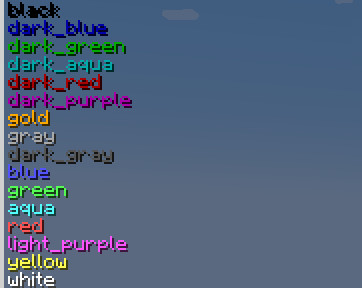
Styling Example
[
	{
		"rule": [
			"minecraft:wolf"
		],
		"color": "yellow",
		"italic": false
	},
	{
		"rule": "named",
		"italic": true,
		"underline": true
	}
]
Walkthrough
The topmost style defines an anonymous category for entities of type "wolf". The bottom one refers to the built-in "named" category.
If a wolf is given a name, both styles will be applied:
The "italic" property is taken from the topmost style; its names will not be italicized.
The topmost style does not define a "underline" property, so the lower property is used, and its name will be underlined.

Commands
/alldeathmsg is the root for all subcommands. It requires a permision level of at least 2.
test <entities>Checks which rules apply to the given entities, and preview their styled names.see-enabledLists all currently enabled rulesdisable-all <confirm>Disables all death message rules.set <rule name> <rule type> <boolean>Equivalent to thegamerulecommand, but with a more convenient auto-complete.reload-stylesReloads styles from the config file.
Related mods
 Gamerule Menu
Makes the Gamerule menu accessible from singleplayer worlds
 Preferred Gamerules
Lets you choose the default values of gamerules
Screenshots
Gallery
-
 Entity Coordinates Requires Advanced Tooltips to be enabled.
 -
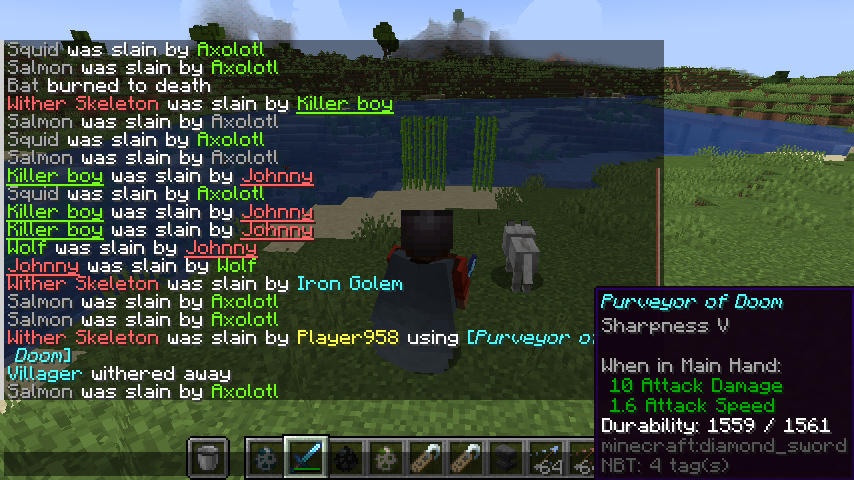 Coloured death messages Different mob types shown in different colours. Underlined names are custom names. Grey axolotls may despawns, green ones are presistent.
 -
Built-in colour names Hex codes are also supported.
-
Text effects
-
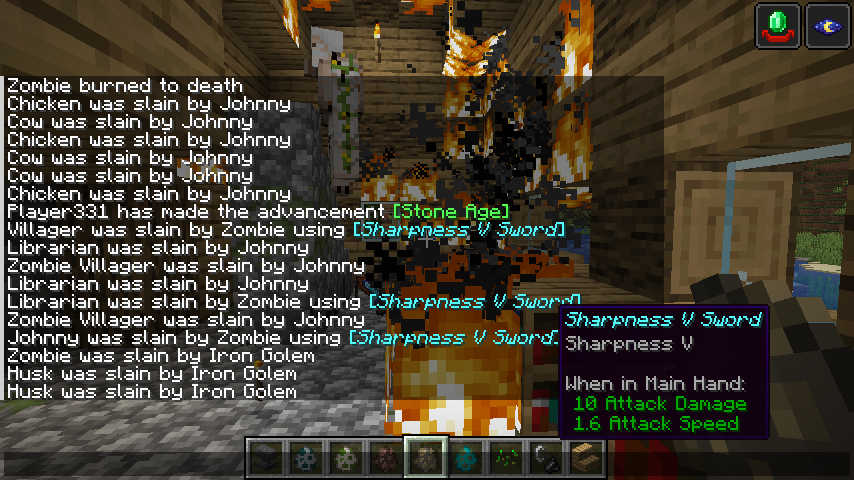 <=v1.3 New death messages are generated and displayed the same way as regular death messages
Versions
Files
Relations
Project Relations
More like this
Similar Mods
Suggestions use data such as tags, dependencies, dependents, descriptions, titles, and more to rank how much they overlap with this mod.
On ModDex
Community snapshot
By the numbers
Statistics

Want to reach Minecraft players?
We're looking for a server hosting partner to feature here and other parts of the site. Interested? Send us a message!
Get in touchGet it on
Available Platforms
On ModDex
Community snapshot
By the numbers