
All Items
No reviews yet
Collect all items in Minecraft, one at a time - Multiplayer compatible
Fabric is a mod loader for versions 1.14+ of Minecraft, particularly popular for client side and optimization mods.
Community voices
Reviews
Click once to include, again to exclude, again to clear
No reviews yet. Be the first to review this project!
Get it on
Available Platforms
 Modrinth
Compatibility
Supported Environments
About
Project Details
For authors
Embed Badge
If you're the author of this project, you can embed a live badge anywhere that supports HTML or Markdown. It updates automatically whenever ratings change.
Use HTML for any page that supports it, or Markdown for README files and Markdown-based descriptions.
Identifiers
Platform IDs
Resources
External Links
About
Description
All Items
Collect all items in Minecraft, one at a time.

The mod randomly selects an item from all obtainable items and displays it in the bossbar. Players must find and collect that item before moving on to the next one. The mod is multiplayer compatible and designed to be played on a multiplayer server, but can also be played without a server.
Getting Started
- Install Fabric
- Download Fabric API and put it in the mods folder
- Download All Items from Modrinth and put it in the mods folder
Commands
/all-items- Show all obtained items in a custom dialog (see below)/timer- Pause or resume the game timer
All Items Dialog

Config
The mod saves all progress in a config file located at config/all-items.json.
The config file contains the following options:
showIcons(boolean, default: false)
Show item icons in the bossbar and in chat messages. This feature requires the All-Icons resource pack.timerCommandRequiresOperator(boolean, default: true)
Whether the/timercommand requires operator permissions.timerSeconds(integer)
Stores the timer value in seconds.activeItem(string)
Stores the current active item id.obtainedItems(array of strings)
Stores the list of obtained item ids.unobtainableItems(array of strings)
Stores the list of unobtainable item ids.
FAQ
- How can I skip the current Item?
Use the/givecommand to give yourself the item you want to skip. - Do I need to install the mod on the client side?
No, the mod is server-side only and does not require the client to have it installed if it's already installed on the server.
The mod is designed to be played on a server with vanilla clients and does not require any client-side mods.
Screenshots
Gallery
-
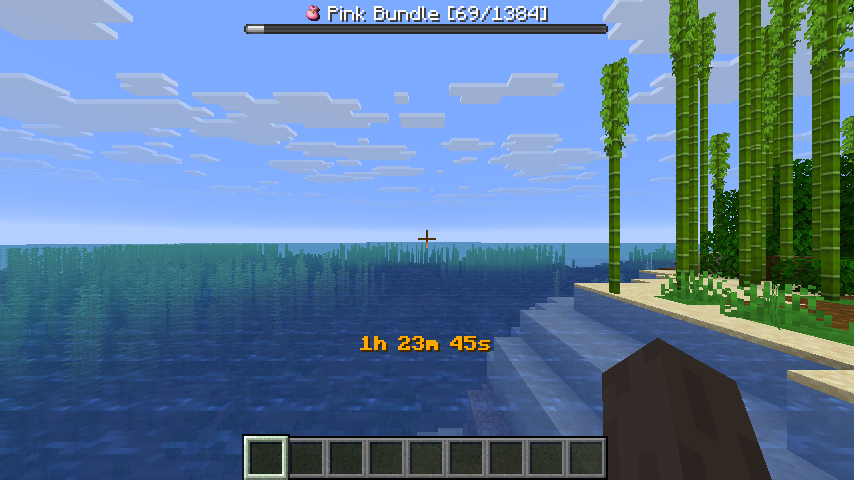 All Items HUD All Items displays a timer and the bossbar with the current item and progress to each player
 -
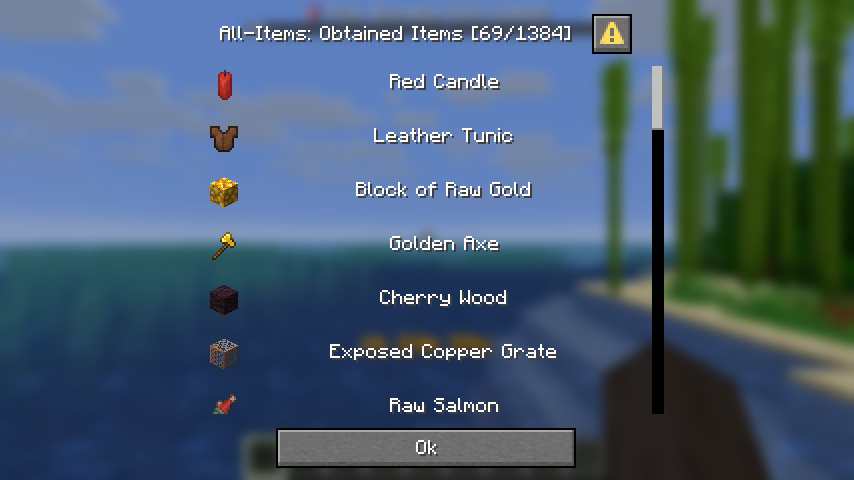 All Items Dialog The list of all obtained items can be shown with the command /all-items
Versions
Files
Relations
Project Relations
More like this
Similar Mods
Suggestions use data such as tags, dependencies, dependents, descriptions, titles, and more to rank how much they overlap with this mod.
On ModDex
Community snapshot
By the numbers
Statistics

Want to reach Minecraft players?
We're looking for a server hosting partner to feature here and other parts of the site. Interested? Send us a message!
Get in touchGet it on
Available Platforms
On ModDex
Community snapshot
By the numbers
Statistics
Resources