
Community listing page, reviews here may not be monitored by the author.
Anon Chat


No reviews yet
Advanced Fabric chat mod for Minecraft — multi-window chat, LabyMod-compatible filters, profiles, macros & chat logging. MC 1.21.1–1.21.5 & 26.x
Community voices
Reviews
No reviews yet. Be the first to review this project!
Get it on
Available Platforms
Compatibility
Supported Environments
Runs entirely on the client. Works on vanilla servers.
About
Project Details
For authors
Embed Badge
If you're the author of this project, you can embed a live badge anywhere that supports HTML or Markdown. It updates automatically whenever ratings change.
Use HTML for any page that supports it, or Markdown for README files and Markdown-based descriptions.
Identifiers
Platform IDs
About
Description
🗨️ AnonChat Mod
Advanced chat customization for Minecraft 1.21.1 – 1.21.5, 26.1.2 & 26.2
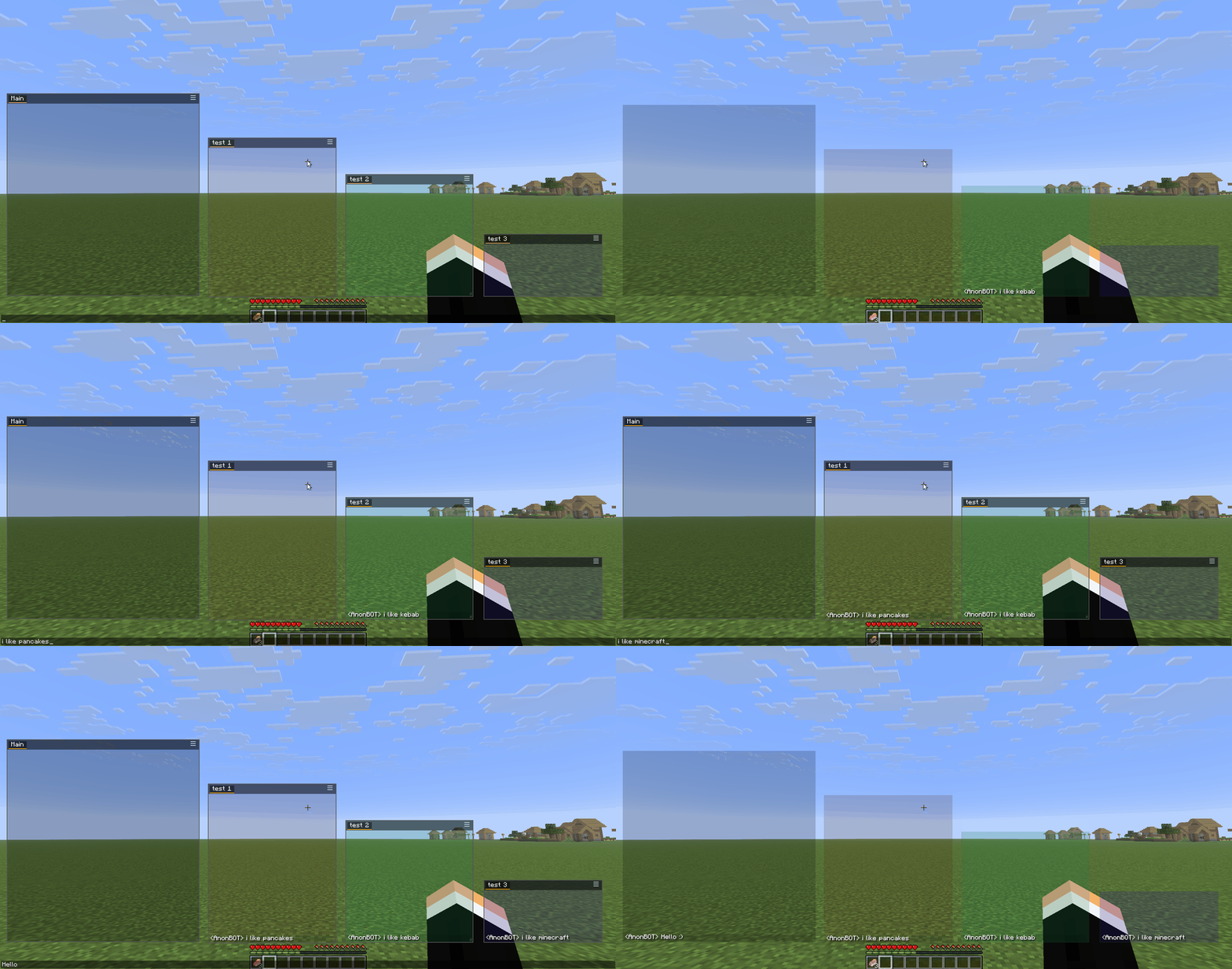
Take full control of your chat experience. Organize messages into separate windows, filter out noise, highlight player mentions, save chat history, and switch between complete configuration profiles — all without leaving the game.
✨ Features
📑 Multi-Window Chat
- Create unlimited chat windows — drag, resize, position anywhere on screen
- Each window holds multiple tabs for organizing different chat topics
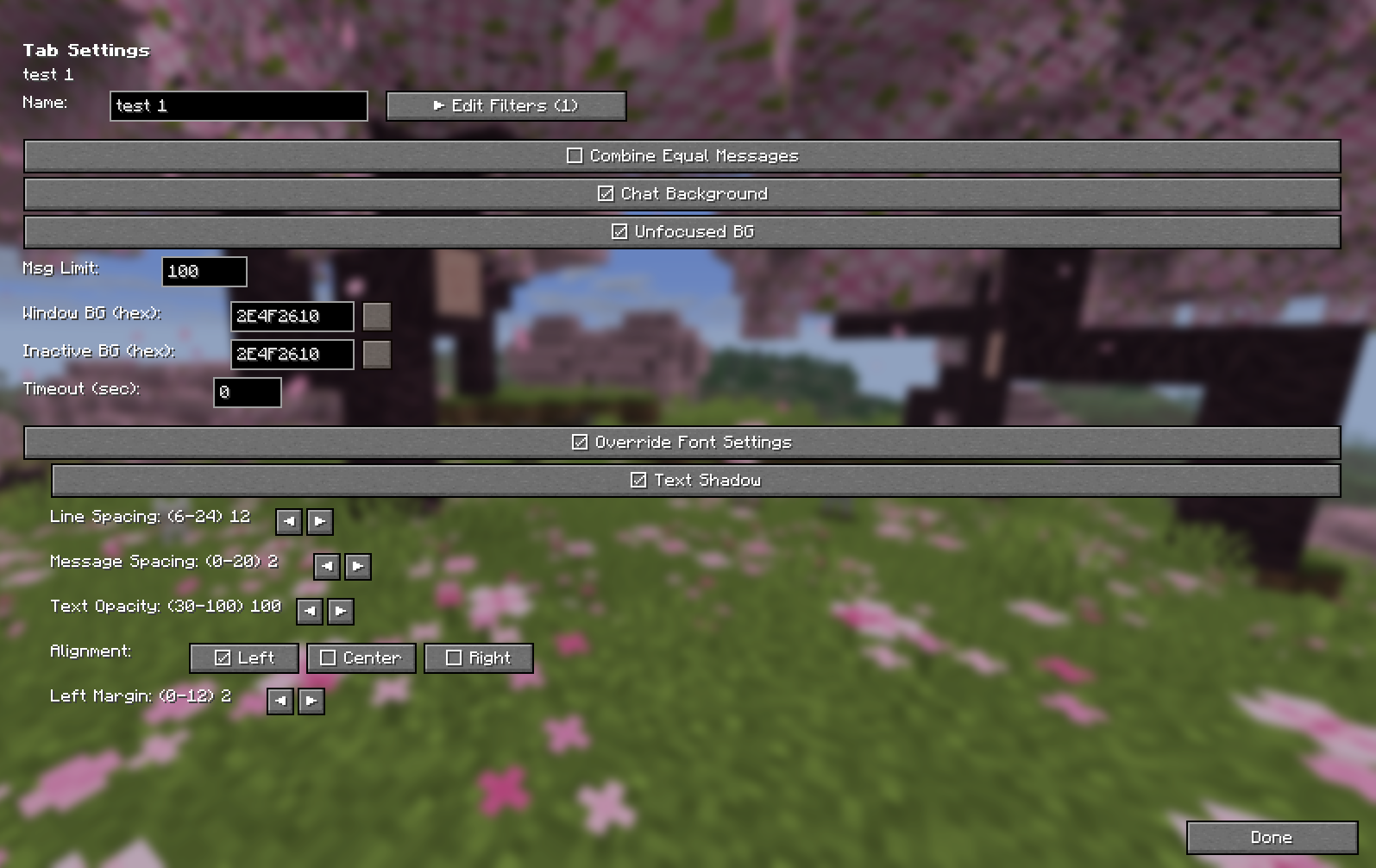
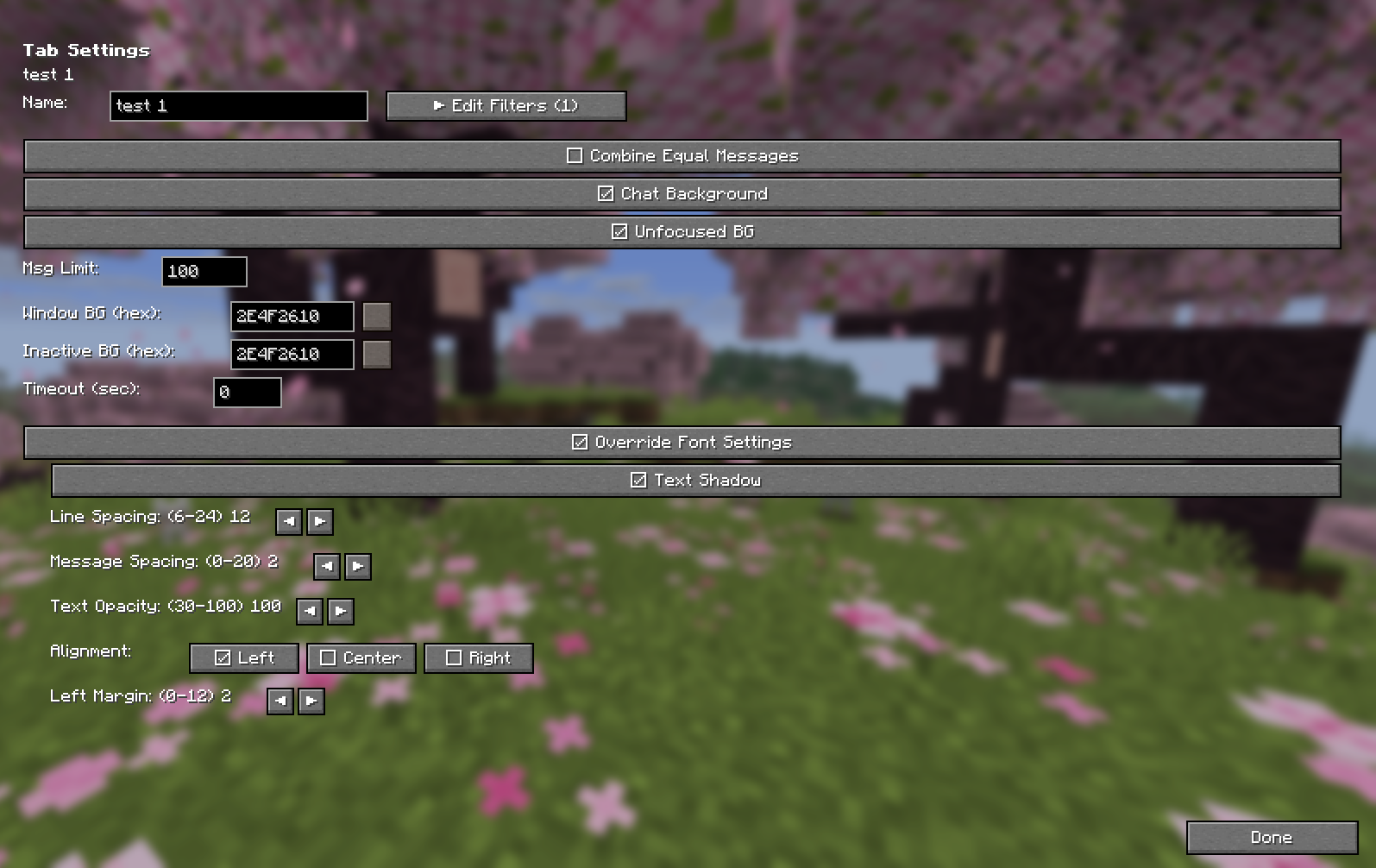
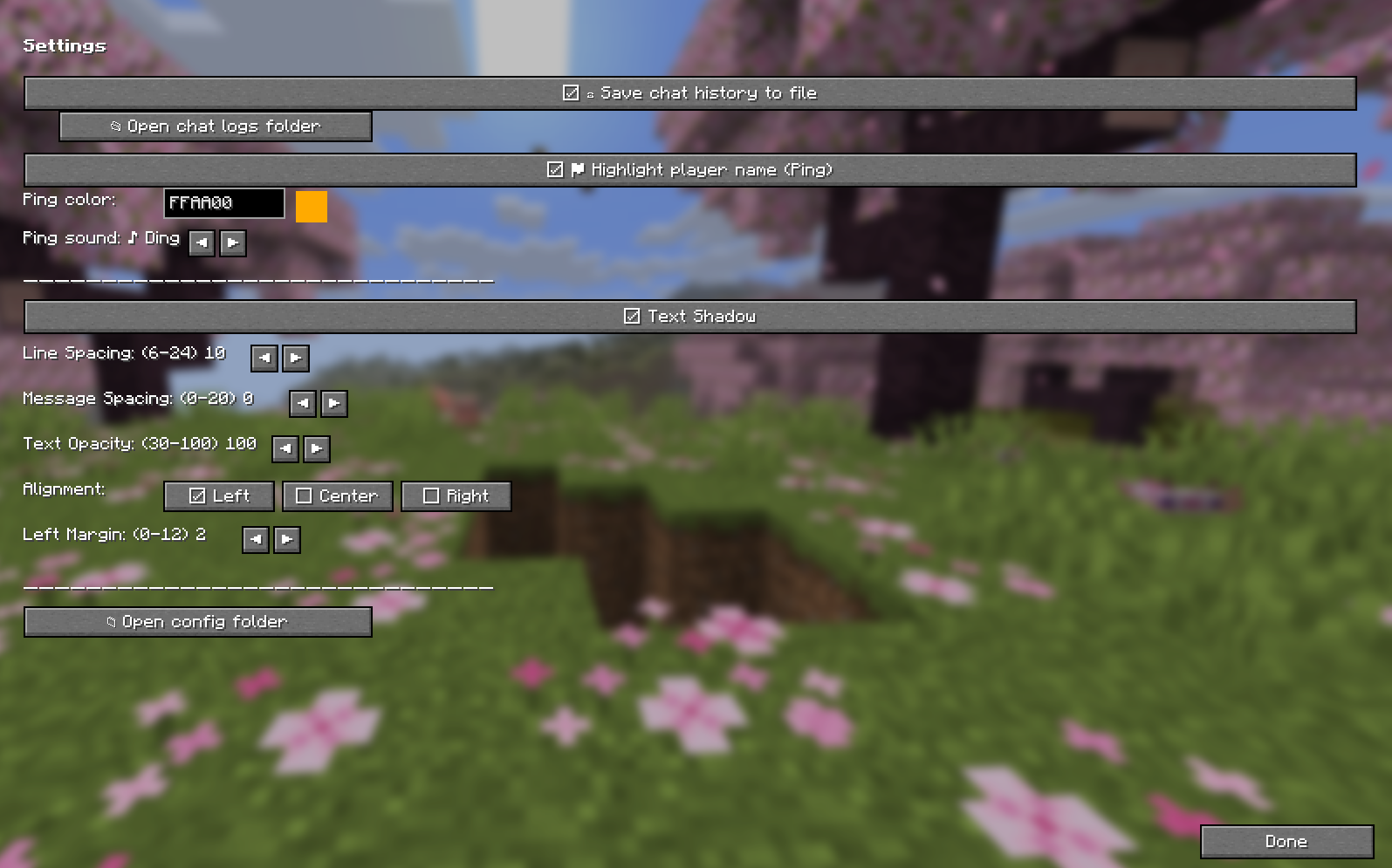
- Independent font settings per tab (size, spacing, alignment, shadow)
- Smart edge snapping — windows snap to screen edges when dragged close
🔍 Advanced Filters
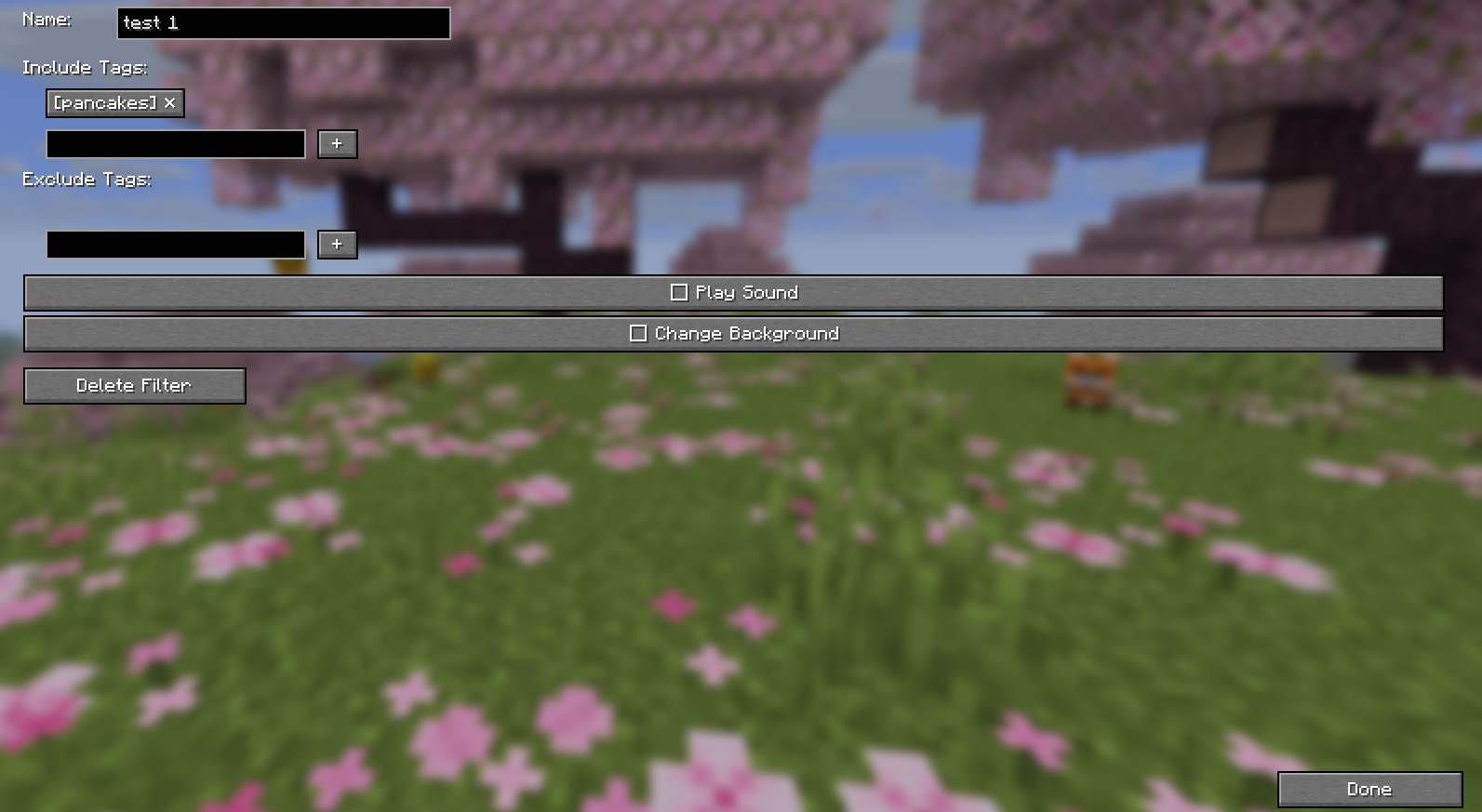
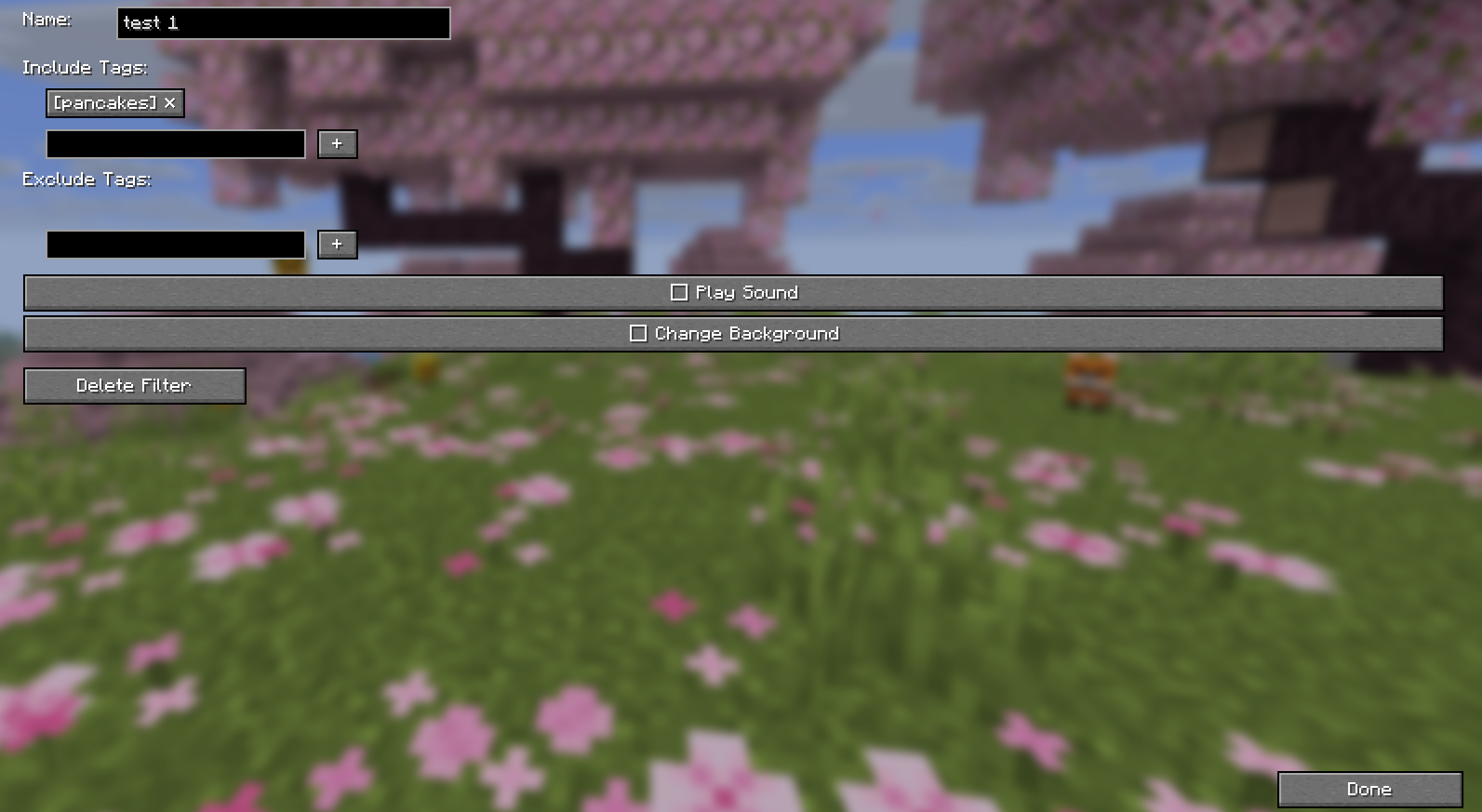
Define include and exclude tags for each tab to route messages exactly where you want them:
- Include tags — only messages containing these words appear in this tab
- Exclude tags — messages with these words are blocked from this tab
- Filters work with LabyMod's JSON format — you can migrate your existing filter setup
- Optional: play a sound, change background color, or highlight on match
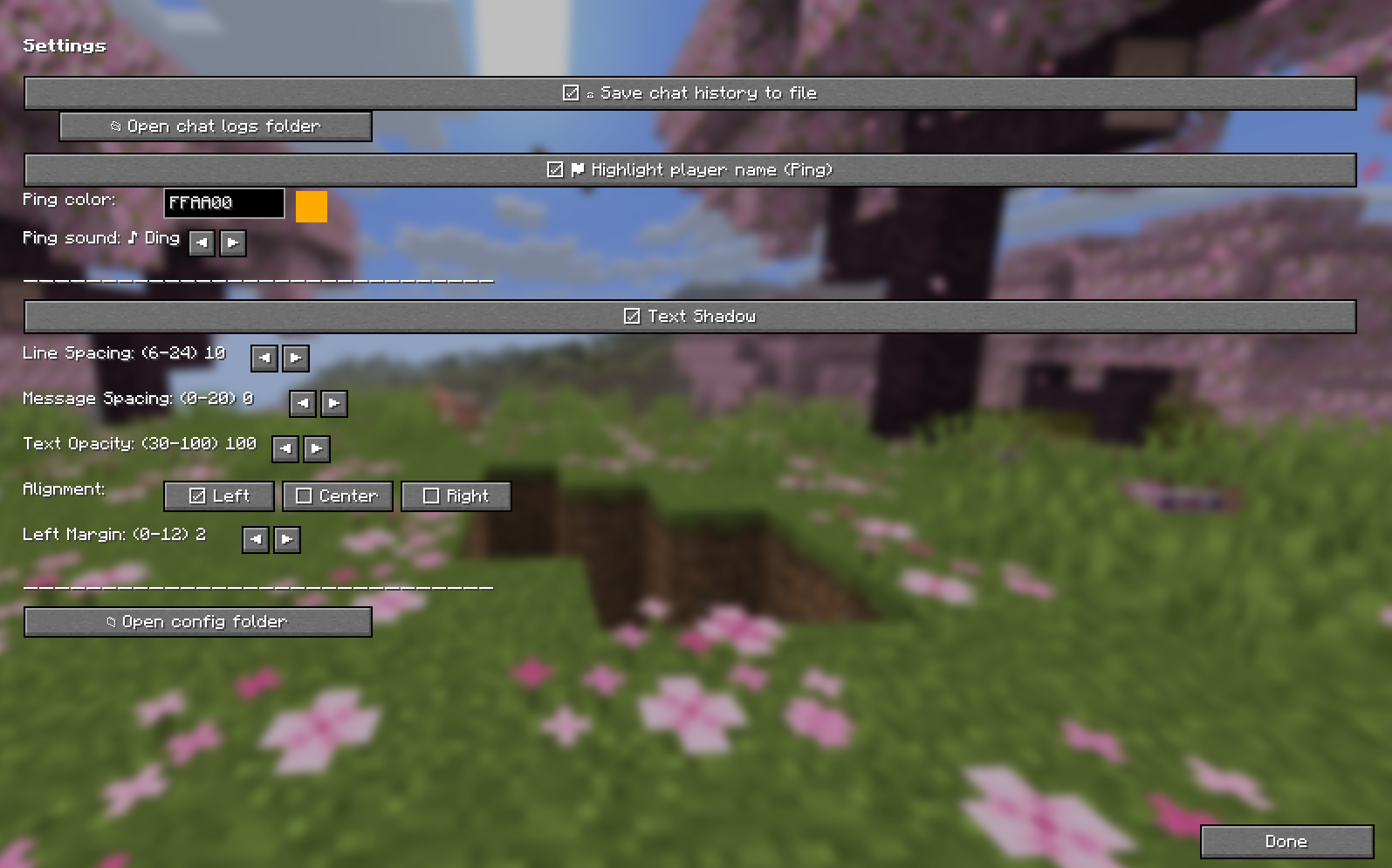
🔔 Player Mention (Ping)
- Automatically highlights your username in chat messages when someone mentions you
- Choose your highlight color and notification sound (6 sounds to pick from)
- Your own messages never trigger a ping — only others mentioning you
💾 Configuration Profiles
- Save your entire setup (windows, tabs, filters, macros, font settings) as named profiles
- Switch between profiles instantly — great for different servers or playstyles
- Export/import by copying profile files from
profiles/folder - "default" profile is always available and protected from deletion
⌨️ Autotext (Macros)
- Assign keyboard shortcuts to send messages or execute commands
- Perfect for frequently used commands or chat responses
📝 Chat Log
- Automatically saves all chat messages to daily text files
- Located in the
chatlog/folder next to your config - Enable/disable toggle in Settings
🌐 Internationalization
- Full English and Polish language support
- Language auto-detects from your Minecraft game settings
📦 Installation
- Install Fabric Loader —
0.16.9+for 1.21.1–1.21.5,0.19.3+for 26.1.2/26.2 - Install Fabric API —
0.110.0+1.21.1for 1.21.x,0.154.2+26.1.2/0.154.2+26.2for 26.x - Make sure you have the required Java version —
Java 21+for 1.21.x,Java 25+for 26.x - Download the AnonChat Mod JAR for your version
- Place the JAR in your
mods/folder - (Optional) Install ModMenu for an additional config entry point
🛠 Companion Tool: Filter Editor
The AnonChat Filter Editor is a standalone Windows app that lets you manage your filter tags outside the game.
The problem it solves: Minecraft's in-game text field strips the § color code, so you can't type precise tags like Money§8. The editor writes the JSON directly with literal §, so color-precise tags work.
What it does:
- Browse your profiles from
%APPDATA%/AnonChatMC/profiles/(the mainchat.jsonis protected) - Load daily chat logs or raw Minecraft logs (
latest.log) and see unique messages with occurrence counters - Add any log message as a tag to a filter with one click
- Bilingual UI (English/Polish) — language auto-detected and remembered
➡️ Download the latest version: GitHub Releases → download AnonChatFilterEditor-0.2.4.exe (no Python required)
🎮 How to Use
First Launch
- Press the hamburger icon (☰) on any chat window
- Click > Settings to open the configuration screen
- Or press the keybind (if set via ModMenu)
Creating Windows & Tabs
- Use the hamburger menu on any window to add/remove tabs or create new windows
- In Settings → left panel, expand/collapse windows and manage individual tabs
Setting Up Filters
- Select a tab in the left panel
- Click ▶ Edit Filters
- Add Include tags — messages with these words go to this tab only
- Add Exclude tags — messages with these words are blocked everywhere
- Configure additional actions: play sound, change background
Using Profiles
- In Settings → ☰ Profiles
- Click ■ Save to save your current setup as a profile
- Click ▶ Load to switch to a different profile
- Use the ✕ button to delete custom profiles
Migrating from LabyMod
Your existing chat.json from LabyMod is fully compatible. Simply:
- Copy your
chat.jsonto%APPDATA%/AnonChatMC/chat.json(Windows) - Or use the profiles feature to import specific filter configurations
- All your filters, windows, and settings will work immediately
🖥️ Configuration File Location
| OS | Path |
|---|---|
| Windows | %APPDATA%/AnonChatMC/chat.json |
| macOS | ~/Library/Application Support/AnonChatMC/chat.json |
| Linux | ~/.local/share/AnonChatMC/chat.json |
Tip: Use the "Open config folder" button in Settings → Appearance to quickly access your files.
📜 License
This project is licensed under the GNU Affero General Public License v3.0 (AGPL-3.0).
TL;DR: You are free to use, modify, and distribute this mod. If you modify it and provide a service using it (e.g., a server or launcher), you must make your modified source code available to users.
🤝 Credits
- Author: AnonBOTpl
- Built with: Fabric Loom, Minecraft mappings
- Special thanks to: The LabyMod team for their excellent chat filter system which inspired this mod's design. AnonChat is fully compatible with LabyMod's
chat.jsonformat for easy migration.
🗨️ AnonChat Mod
Advanced chat customization for Minecraft 1.21.1 – 1.21.5, 26.1.2 & 26.2
Take full control of your chat experience. Organize messages into separate windows, filter out noise, highlight player mentions, save chat history, and switch between complete configuration profiles — all without leaving the game.
✨ Features
📑 Multi-Window Chat
- Create unlimited chat windows — drag, resize, position anywhere on screen
- Each window holds multiple tabs for organizing different chat topics
- Independent font settings per tab (size, spacing, alignment, shadow)
- Smart edge snapping — windows snap to screen edges when dragged close
🔍 Advanced Filters
Define include and exclude tags for each tab to route messages exactly where you want them:
- Include tags — only messages containing these words appear in this tab
- Exclude tags — messages with these words are blocked from this tab
- Filters work with LabyMod's JSON format — you can migrate your existing filter setup
- Optional: play a sound, change background color, or highlight on match
🔔 Player Mention (Ping)
- Automatically highlights your username in chat messages when someone mentions you
- Choose your highlight color and notification sound (6 sounds to pick from)
- Your own messages never trigger a ping — only others mentioning you
💾 Configuration Profiles
- Save your entire setup (windows, tabs, filters, macros, font settings) as named profiles
- Switch between profiles instantly — great for different servers or playstyles
- Export/import by copying profile files from
profiles/folder - "default" profile is always available and protected from deletion
⌨️ Autotext (Macros)
- Assign keyboard shortcuts to send messages or execute commands
- Perfect for frequently used commands or chat responses
📝 Chat Log
- Automatically saves all chat messages to daily text files
- Located in the
chatlog/folder next to your config - Enable/disable toggle in Settings
🌐 Internationalization
- Full English and Polish language support
- Language auto-detects from your Minecraft game settings
📦 Installation
- Install Fabric Loader —
0.16.9+for 1.21.1–1.21.5,0.19.3+for 26.1.2/26.2 - Install Fabric API —
0.110.0+1.21.1for 1.21.x,0.154.2+26.1.2/0.154.2+26.2for 26.x - Make sure you have the required Java version —
Java 21+for 1.21.x,Java 25+for 26.x - Download the AnonChat Mod JAR for your version
- Place the JAR in your
mods/folder - (Optional) Install ModMenu for an additional config entry point
🛠 Companion Tool: Filter Editor
The AnonChat Filter Editor is a standalone Windows app that lets you manage your filter tags outside the game.
The problem it solves: Minecraft's in-game text field strips the § color code, so you can't type precise tags like Money§8. The editor writes the JSON directly with literal §, so color-precise tags work.
What it does:
- Browse your profiles from
%APPDATA%/AnonChatMC/profiles/(the mainchat.jsonis protected) - Load daily chat logs or raw Minecraft logs (
latest.log) and see unique messages with occurrence counters - Add any log message as a tag to a filter with one click
- Bilingual UI (English/Polish) — language auto-detected and remembered
➡️ Download the latest version: GitHub Releases → download AnonChatFilterEditor-0.2.4.exe (no Python required)
🎮 How to Use
First Launch
- Press the hamburger icon (☰) on any chat window
- Click > Settings to open the configuration screen
- Or press the keybind (if set via ModMenu)
Creating Windows & Tabs
- Use the hamburger menu on any window to add/remove tabs or create new windows
- In Settings → left panel, expand/collapse windows and manage individual tabs
Setting Up Filters
- Select a tab in the left panel
- Click ▶ Edit Filters
- Add Include tags — messages with these words go to this tab only
- Add Exclude tags — messages with these words are blocked everywhere
- Configure additional actions: play sound, change background
Using Profiles
- In Settings → ☰ Profiles
- Click ■ Save to save your current setup as a profile
- Click ▶ Load to switch to a different profile
- Use the ✕ button to delete custom profiles
Migrating from LabyMod
Your existing chat.json from LabyMod is fully compatible. Simply:
- Copy your
chat.jsonto%APPDATA%/AnonChatMC/chat.json(Windows) - Or use the profiles feature to import specific filter configurations
- All your filters, windows, and settings will work immediately
🖥️ Configuration File Location
| OS | Path |
|---|---|
| Windows | %APPDATA%/AnonChatMC/chat.json |
| macOS | ~/Library/Application Support/AnonChatMC/chat.json |
| Linux | ~/.local/share/AnonChatMC/chat.json |
Tip: Use the "Open config folder" button in Settings → Appearance to quickly access your files.
📜 License
This project is licensed under the GNU Affero General Public License v3.0 (AGPL-3.0).
TL;DR: You are free to use, modify, and distribute this mod. If you modify it and provide a service using it (e.g., a server or launcher), you must make your modified source code available to users.
🤝 Credits
- Author: AnonBOTpl
- Built with: Fabric Loom, Minecraft mappings
- Special thanks to: The LabyMod team for their excellent chat filter system which inspired this mod's design. AnonChat is fully compatible with LabyMod's
chat.jsonformat for easy migration.
Screenshots
Gallery
-
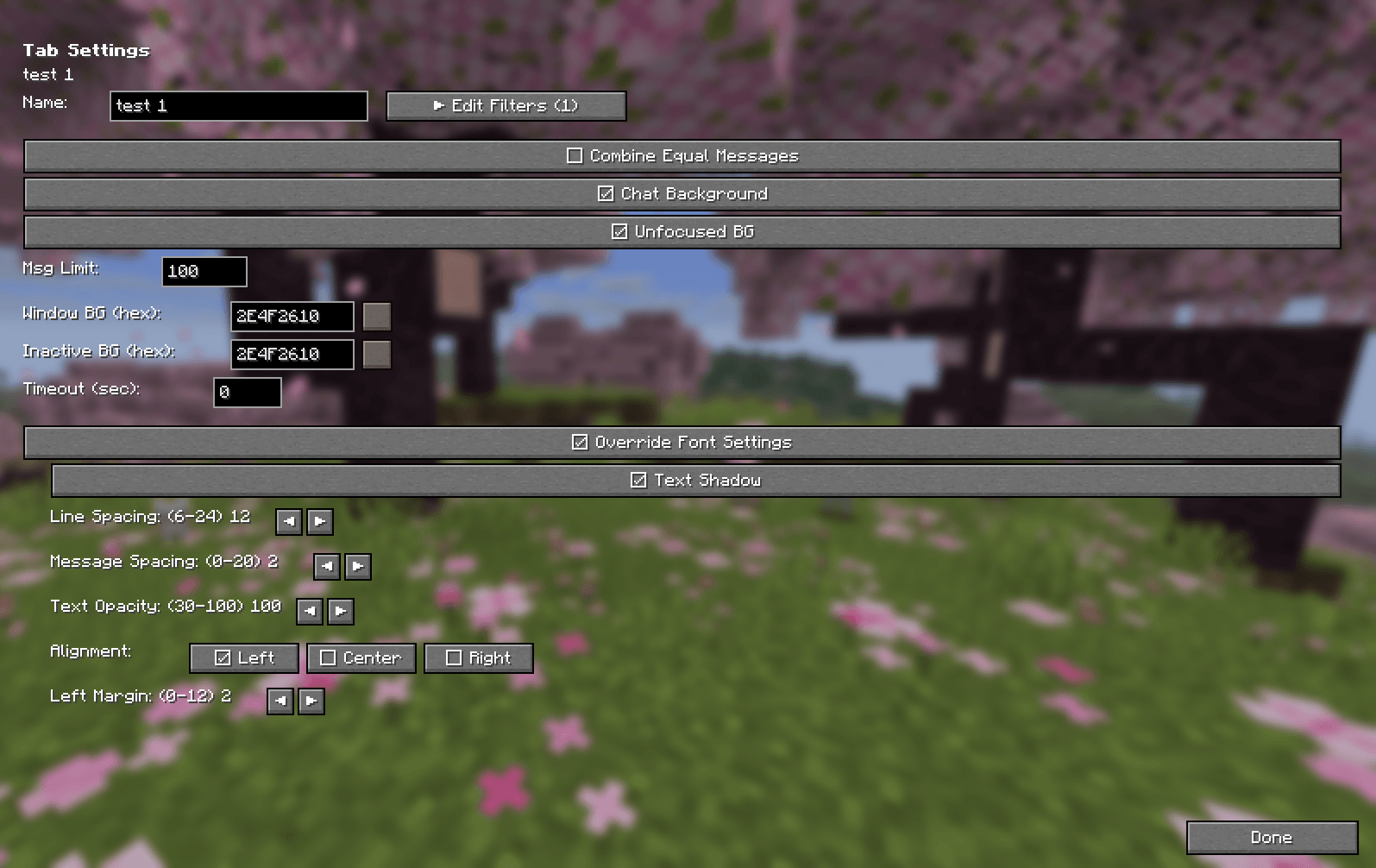 tab-settings.png tab-settings.png
 -
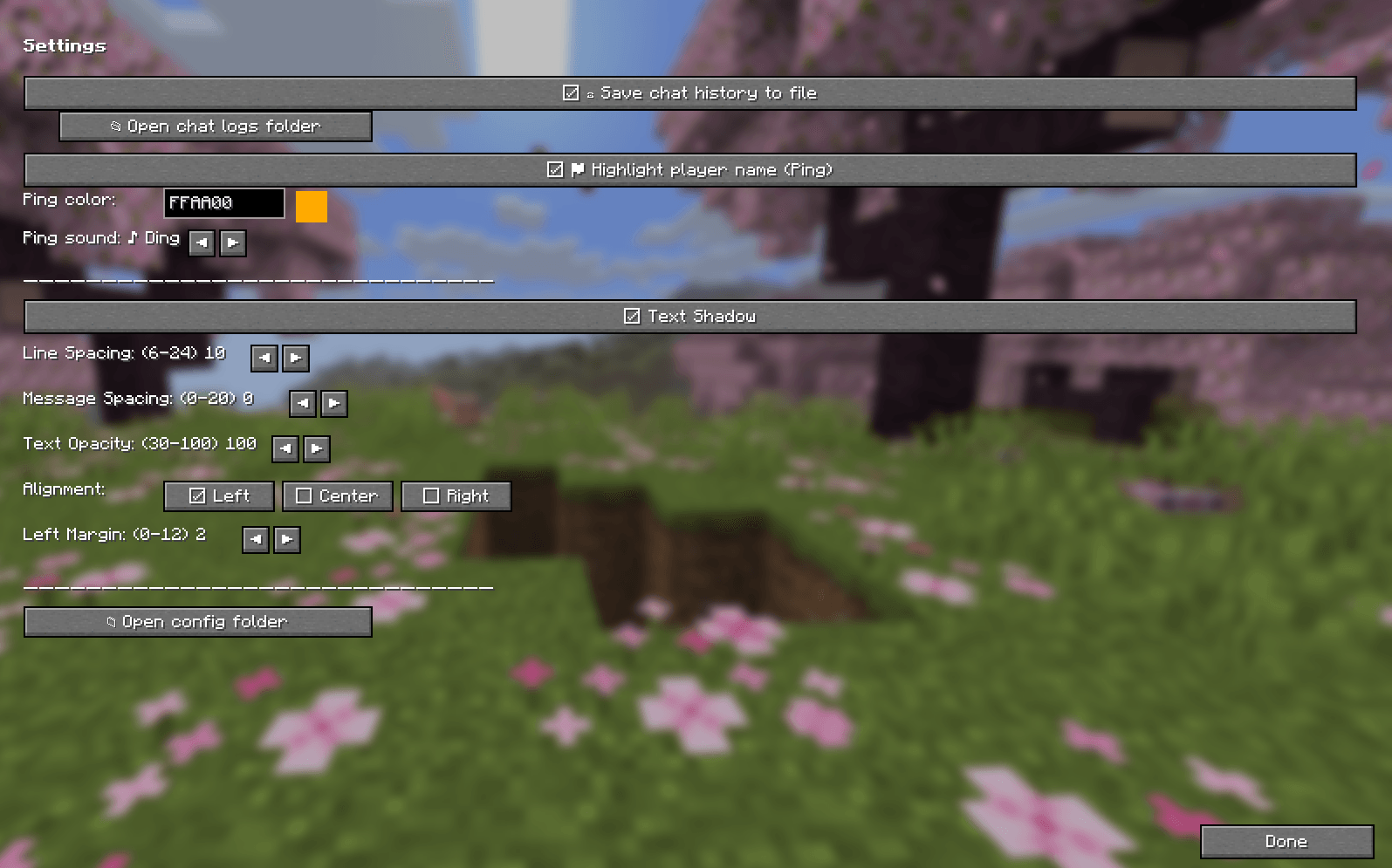 settings.png settings.png
 -
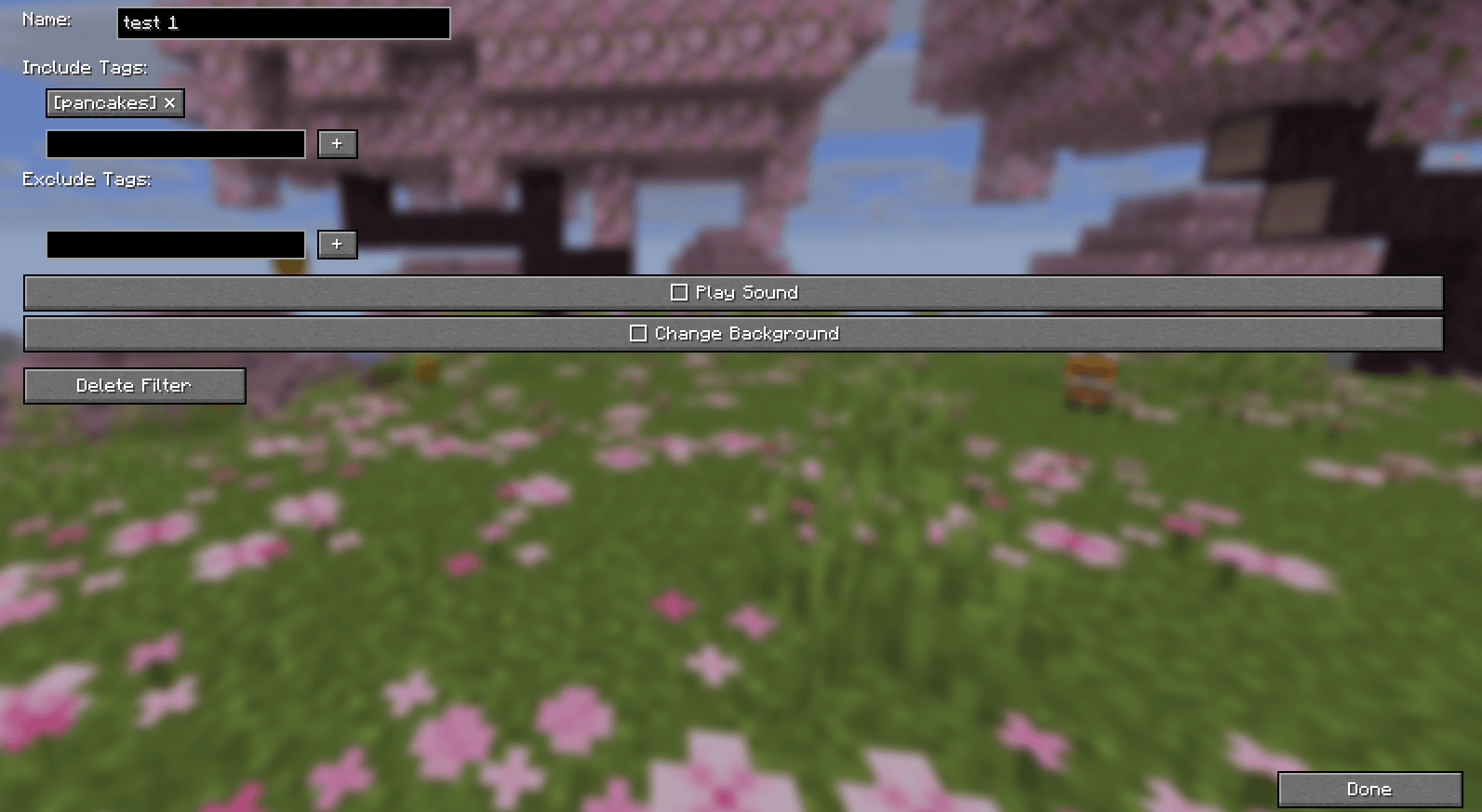 filters.png filters.png
Versions
Files
Relations
Project Relations
More like this
Similar Mods
Suggestions use data such as tags, dependencies, dependents, descriptions, titles, and more to rank how much they overlap with this mod.
- Anon's Enchantment Banner
- The Ores of Anon
- The Speed Swords of Anon
- The Drinks of Anon
- The Eggs of Anon
- Oak's Simple Ores and More than just a non-functional chair mod compat
- JABV : Just A Big Void
- More Than Just A Non Functional Chair Mod
- MonoLib
- Rockhounding Mod: Ore Tiers
- Better Falling Block Particles
- Hell dweller
On ModDex
Community snapshot
By the numbers
Statistics
Want to reach Minecraft players?
We're looking for a server hosting partner to feature here and other parts of the site. Interested? Send us a message!
Get in touchGet it on
Available Platforms
On ModDex
Community snapshot
By the numbers