
Community listing page, reviews here may not be monitored by the author.
AntiAfk


No reviews yet
A mod that prevents players from going AFK.
Community voices
Reviews
No reviews yet. Be the first to review this project!
Get it on
Available Platforms
Compatibility
Supported Environments
Runs entirely on the client. Works on vanilla servers.
About
Project Details
For authors
Embed Badge
If you're the author of this project, you can embed a live badge anywhere that supports HTML or Markdown. It updates automatically whenever ratings change.
Use HTML for any page that supports it, or Markdown for README files and Markdown-based descriptions.
Identifiers
Platform IDs
About
Description
if this doesn't get updated here check on
https://modrinth.com/mod/antiafk
AntiAfk Mod
The AntiAFK mod is a very lightweight Fabric mod that prevents players from going AFK.
How to set up
- Open Minecraft and navigate to Settings > Controls > Key Bindings.
- Search for AntiAfk and set a keybind to toggle the mod on and off.
- Use the assigned keybind to toggle the mod on. The commands and features will only work when the mod is toggled on.
Features
- Customizable Jump Interval: Set the interval between auto-jumps.
- Swing Action: Optionally enable swinging of the player's hand at regular intervals.
- Auto-Jump: Toggle automatic jumping at specified intervals.
- Auto-Spin: Toggle spin to automatically spin your character 360 degrees with custom speed.
- Auto-Sneak: Toggle automatic sneaking (Note: when enabled along with the mod, manual sneaking will be disabled).
- Mouse Movement: Toggle random movement of the player's camera.
- Player Movement: Toggle the character to move left and right.
Gui for versions above 1.2.1
- First u will need to set a keybind in the settings for the gui then open it
- You will also need a bind to toggle the mod if the mod is not enabled by the bind it won't work
Commands for versions below 1.20
- /antiafk interval set <seconds> – Set the jump interval in seconds (decimals like 1.2, 1.3, etc. are allowed)
- /antiafk interval random <minSeconds> <maxSeconds> – Set a random interval between the specified seconds
- /antiafk swing – Toggle swinging action
- /antiafk jump – Toggle auto-jump
- /antiafk spin – Toggle auto-spin
- /antiafk spin <seconds> – Set the speed at which the character spins
- /antiafk sneak – Toggle auto-sneak
- /antiafk mousemovement <horizontalMultiplier> <verticalMultiplier> – Toggle random mouse movement (use "/antiafk mousemovement" to enable/disable)
- /antiafk movement – Move the player character left and right
Contributing
Feel free to contribute to AntiAfk by opening issues for bug fixes or suggestions, or by submitting pull requests with improvements.
☕ Support My Work
If you would like to support me and my projects, feel free to buy me a coffee!


AntiAfk Mod
The AntiAFK mod is a very lightweight fabric mod that prevents players from going AFK.
How to set up
- Open Minecraft and navigate to Settings > Controls > Key Bindings or open the gui and toggle it from there.
- Search for AntiAfk and set a keybind to toggle the mod on and off.
- Use the assigned keybind to toggle the mod on. The commands and features will only work when the mod is toggled on.
Features
Player Actions
- Auto Jump — Automatically jumps at configurable intervals
- Sneak Mode — Automatically toggles sneaking (note: you wont be able sneak while active)
- Swing Hand — Swings the player's hand.
- Random Pause — Randomly pauses actions.
Movement & Behavior
- Player Movement — Moves the player in a repeating WASD cycle
- Mouse Movement — Randomly moves the camera with configurable range
- Auto Spin — Rotates the player 360° with configurable speed
- Random Interval — Randomizes the delay between timed actions (min/max configurable)
Inventory & Eating
- Auto Eat — Automatically eats food from the hotbar when hunger drops below a configurable threshold
- Random Hotbar — Randomly switches between hotbar slots at configurable intervals
- Offhand Swap — Swaps items between main hand and offhand, holds briefly, then swaps back
- Open Inventory — Randomly opens and closes the inventory for a configurable duration
Advanced Timing
- Action Delay — Global delay between timed actions (seconds)
- Min / Max Secs — When Random Interval is on, sets the range of random delays
Chat Messages
- Auto Chat Messages — Sends a random message at set intervals
- Messages are semicolon-separated (e.g.
Hey!;Still here!;Just farming!) - Chat Min / Max Secs — Controls how often a message is sent
Reconnect & Disconnect
- Auto Reconnect — Automatically reconnects to the last server after being disconnected
- Reconnect Delay — How many seconds to wait before reconnecting
- Auto Disconnect — Disconnects from the server if any player enters a configurable radius around you
- Disconnect Radius — The block radius to disconnect at
- Ignored Players — Semicolon-separated list of player names to ignore for the disconnect check (e.g.
Steve;Alex;Notch)
Feature Timing
- Eat Below HungerLevel — Hunger level (out of 20) at which auto-eat triggers
- Hotbar Min / Max Secs — How often the hotbar slot switches
- Offhand Min / Max Secs — How often the offhand swap triggers
- Offhand Hold Secs — How long the item stays in offhand before swapping back
- Inv Min / Max Secs — How often the inventory opens
- Inv Hold Secs — How long the inventory stays open
- Reconnect Delay — How long to wait before auto-reconnecting after a disconnect
Gui for versions above 1.2.1
- First u will need to set a keybind in the settings for the gui then open it
- You will also need a bind to toggle the mod if the mod is not enabled by the bind it won't work
Commands for versions under 1.2.0
/antiafk interval set <seconds>: Set the jump interval in seconds you can also use Decimals (like 1.2 , 1.3 etc)./antiafk interval random <minSeconds> <maxSeconds>: to set a random interval between set seconds like 1 and 7 seconds./antiafk swing: Toggle swinging action./antiafk jump: Toggle auto-jump./antiafk spin: Toggle auto-spin./antiafk spin <seconds>: To set the speed which the character will spin/antiafk sneak: Toggle auto-sneak./antiafk mousemovement <horizontalMultiplier> <verticalMultiplier>: Toggle mousemovement that will move the player camera randomly.use this to disable/enable :"/antiafk mousemovement"/antiafk movement: to move player character left and right.
Contributing
Feel free to contribute to AntiAfk by opening issues for bug fixes or suggestions, or by submitting pull requests with improvements.
Screenshots
Gallery
-
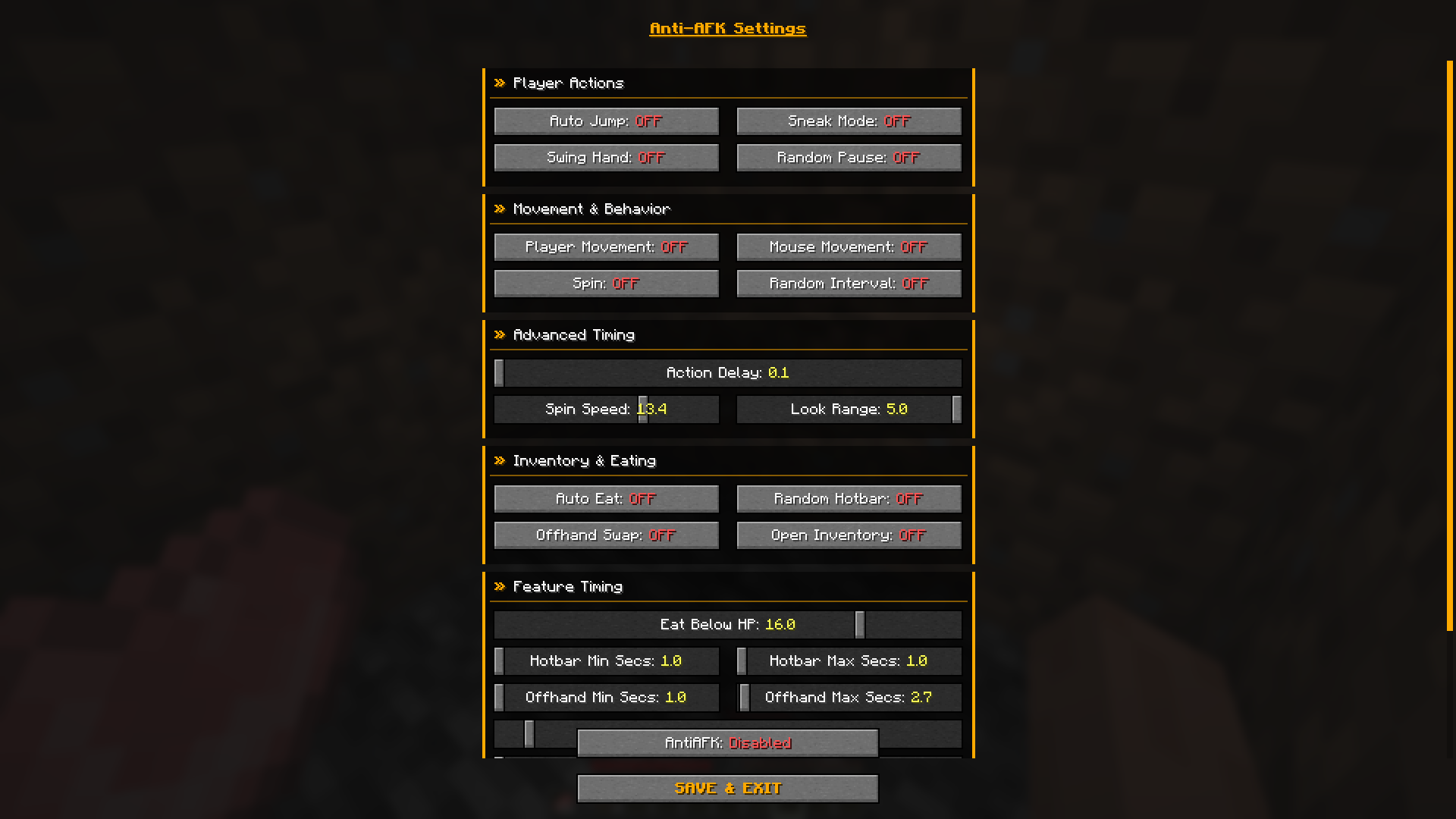 Gui AntiAfk gui for versions above 1.2.1
Versions
Files
Relations
Project Relations
More like this
Similar Mods
Suggestions use data such as tags, dependencies, dependents, descriptions, titles, and more to rank how much they overlap with this mod.
On ModDex
Community snapshot
By the numbers
Statistics
Want to reach Minecraft players?
We're looking for a server hosting partner to feature here and other parts of the site. Interested? Send us a message!
Get in touchGet it on
Available Platforms
On ModDex
Community snapshot
By the numbers