Community listing page, reviews may not be monitored by the author.
Any block portal

No reviews yet
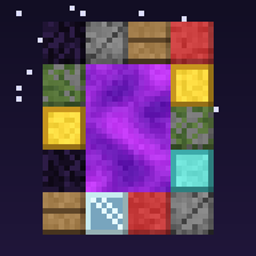
Choose which blocks can build nether portal frames. Mix several, or remove obsidian entirely, from the in-game config screen. Defaults to vanilla obsidian; changes apply instantly.

Community voices
Reviews
No reviews yet. Be the first to review this project!
Get it on
Available Platforms
About
Project Details
For authors
Embed Badge
If you're the author of this project, you can embed a live badge anywhere that supports HTML or Markdown. It updates automatically whenever ratings change.
Use HTML for any page that supports it, or Markdown for README files and Markdown-based descriptions.
Identifiers
Platform IDs
Resources
External Links
About
Description
Any Portal Block
Choose which blocks can build a nether portal frame.
By default, nothing changes: only obsidian works, just like vanilla. Open the config and add any blocks you like, such as cobblestone, planks, wool, glass or gold. Mix several in one frame, or remove obsidian entirely.
How to use
- Open Mods → Any Block Portal → Config
- Edit Portal Frame Blocks: click + and type a block ID, e.g.
minecraft:cobblestone - Build the usual portal rectangle out of any of your listed blocks
- Light it with flint and steel or a fire charge
Changes apply instantly, with no restart needed.
Features
- Pick any number of frame blocks, and mix them freely in one frame
- Remove obsidian if you want portals to need something else
- An empty list disables nether portals completely
- Same portal sizes as vanilla (2–21 wide, 3–21 tall inside)
- Everything else stays vanilla: Nether travel, linked portals, particles, sounds, zombified piglins
- A misspelled block ID is skipped with a log warning instead of crashing
Config file
The setting is also stored in config/anyportal-common.toml:
portalFrameBlocks = ["minecraft:obsidian", "minecraft:cobblestone"]Notes
- If you remove a block from the list, existing portals built with it break the next time a neighboring block changes, just like vanilla when a frame becomes invalid.
- Air, fluids, fire and portal blocks can never be used as frame blocks.
- Install on both client and server. The config screen is client-side, and the portal logic runs on the server.
Requires: NeoForge for Minecraft 1.21.1
Screenshots
Gallery
Versions
Files
Relations
Project Relations
More like this
Similar Mods
Suggestions use data such as tags, dependencies, dependents, descriptions, titles, and more to rank how much they overlap with this mod.
On ModDex
Community snapshot
By the numbers
Statistics

Get it on
Available Platforms
On ModDex
Community snapshot
By the numbers
Statistics
Resources