
Community listing page, reviews here may not be monitored by the author.


Community voices
Reviews
No reviews yet. Be the first to review this project!
Get it on
Available Platforms
Compatibility
Supported Environments
Runs entirely on the client. Works on vanilla servers.
About
Project Details
For authors
Embed Badge
If you're the author of this project, you can embed a live badge anywhere that supports HTML or Markdown. It updates automatically whenever ratings change.
Use HTML for any page that supports it, or Markdown for README files and Markdown-based descriptions.
Identifiers
Platform IDs
Resources
External Links
About
Description

Apex Cobblemon Integration


This mod introduces a variety of features designed specifically for the Apex Cobblemon server, and is included in the Official Apex Cobblemon Modpack.
Modpack Rewards
Players using the latest version of the Official Apex Cobblemon Modpack receive several exclusive rewards and bonuses, which are granted automatically when the server detects that you are playing with the current official modpack.

Emoji Suggestions
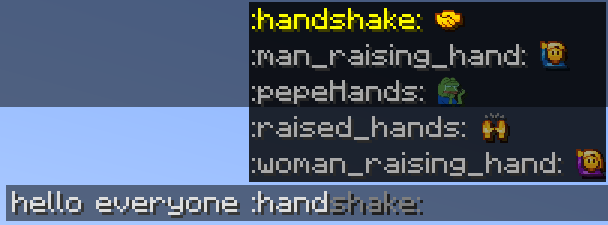
Apex Integration automatically suggests any unlocked Emojis while typing in chat. When you begin typing an emoji code, a suggestion menu will appear above the chat box, allowing you to quickly select matching Emojis without needing to memorize every available code.
Cosmetic Previews
Apex Integration allows you to preview wearable cosmetics directly from the /cosmetics menu. Hovering over wearable cosmetics will display a preview, making it easier to see how a cosmetic looks before equipping it.

Discord Presence
Apex Integration can update your Discord status with your current activity on Apex Cobblemon. Depending on what you are doing in-game, your Discord Rich Presence may show activity such as:
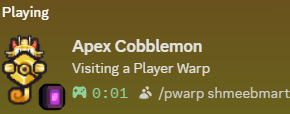
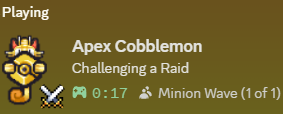
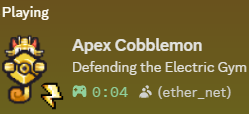
This feature requires the following launcher settings to be adjusted:
- Modrinth: Settings → Privacy → Disable Discord RPC
- CurseForge: Settings → Privacy → Disable Discord Rich Presence
Nameplates
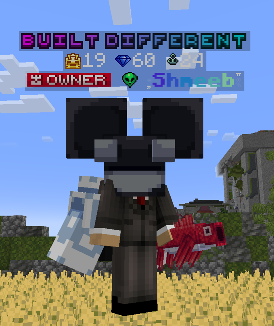
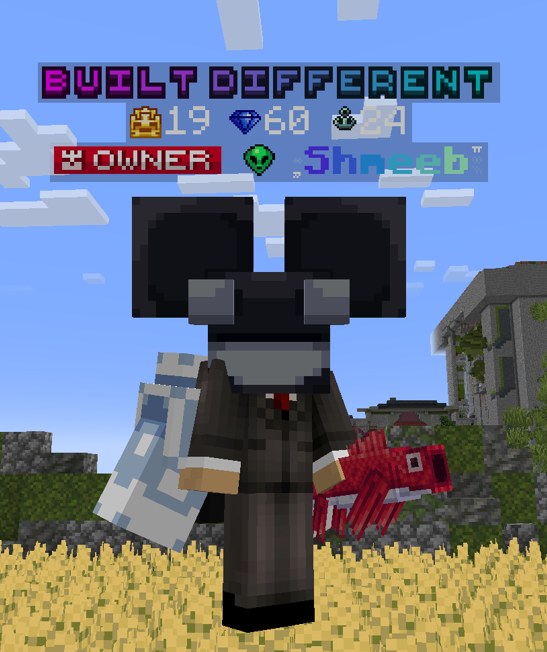
Apex Integration improves the vanilla Minecraft nameplate system with custom Apex Cobblemon nameplates. These enhanced nameplates allow the server to display additional player information above characters, including Titles, Crown Level, Style Level, and Fishing Level.
Modpack users can also view their own nameplate while in third-person mode, making it easier to see how their title, levels, and tags appear to other players. Only players using the official modpack can see the full enhanced nameplate display.
Channel Buttons
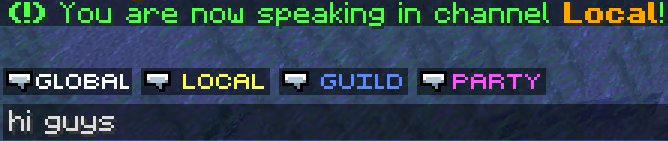
Apex Integration adds clickable channel buttons next to the chat box, allowing you to switch chat channels without typing a command. Clicking a channel button instantly changes your active chat channel, making it easier to move between conversations while playing.
PC Hotkey
Apex Integration adds a dedicated hotkey for quickly opening your PC. By default, pressing P will open your PC from anywhere, allowing you to manage your Pokémon without needing to run a command or visit a PC block.
Config Menu
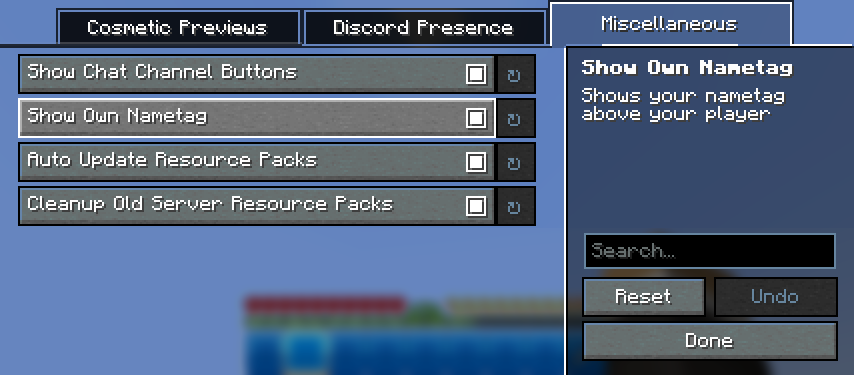
Apex Integration includes an in-game configuration menu powered through ModMenu. This menu allows you to adjust supported client-side settings directly in-game. Available options include visual preferences, quality-of-life settings, and other Apex Integration features.
Quickly access this menu with the shortcut button in the top left of the Minecraft Options menu.
Render Fixes
Apex Integration includes several client-side render fixes designed to improve visual consistency.
| Fix | Description |
|---|---|
| Text Background Transparency | Ensures supported text backgrounds render with proper transparency instead of appearing fully opaque |
| Item Stack Labels | Fixes cases where item stack labels, such as damage indicators, could render incorrectly over containers with font-image titles |
Resource Pack Updates
Apex Integration automatically keeps supported resource packs up to date while using the Official Apex Cobblemon Modpack. When a new version of a resource pack is installed, the updated version is automatically enabled for you, so you do not need to manually adjust your resource pack list.
Bundled Software
This mod bundles a modified version of Cobblenav by gatekeep06, included as a jar-in-jar dependency.
- Original project: https://github.com/gatekeep06/cobblenav
- Our modified source: https://github.com/Shmeeb-Inc/cobblenav
- License: Mozilla Public License 2.0 (MPL-2.0)
The Cobblenav portions remain licensed under MPL-2.0; all other Apex Integration code is ©Shmeeb Inc. and not covered by that license.
Apex Cobblemon Integration
This mod introduces a variety of features designed specifically for the Apex Cobblemon server, and is included in the Official Apex Cobblemon Modpack.
Modpack Rewards
Players using the latest version of the Official Apex Cobblemon Modpack receive several exclusive rewards and bonuses, which are granted automatically when the server detects that you are playing with the current official modpack.
Emoji Suggestions
Apex Integration automatically suggests any unlocked Emojis while typing in chat. When you begin typing an emoji code, a suggestion menu will appear above the chat box, allowing you to quickly select matching Emojis without needing to memorize every available code.
Cosmetic Previews
Apex Integration allows you to preview wearable cosmetics directly from the /cosmetics menu. Hovering over wearable cosmetics will display a preview, making it easier to see how a cosmetic looks before equipping it.
Discord Presence
Apex Integration can update your Discord status with your current activity on Apex Cobblemon. Depending on what you are doing in-game, your Discord Rich Presence may show activity such as:
This feature requires the following launcher settings to be adjusted:
- Modrinth: Settings → Privacy → Disable Discord RPC
- CurseForge: Settings → Privacy → Disable Discord Rich Presence
Nameplates
Apex Integration improves the vanilla Minecraft nameplate system with custom Apex Cobblemon nameplates. These enhanced nameplates allow the server to display additional player information above characters, including Titles, Crown Level, Style Level, and Fishing Level.
Modpack users can also view their own nameplate while in third-person mode, making it easier to see how their title, levels, and tags appear to other players. Only players using the official modpack can see the full enhanced nameplate display.
Channel Buttons
Apex Integration adds clickable channel buttons next to the chat box, allowing you to switch chat channels without typing a command. Clicking a channel button instantly changes your active chat channel, making it easier to move between conversations while playing.
PC Hotkey
Apex Integration adds a dedicated hotkey for quickly opening your PC. By default, pressing P will open your PC from anywhere, allowing you to manage your Pokémon without needing to run a command or visit a PC block.
Config Menu
Apex Integration includes an in-game configuration menu powered through ModMenu. This menu allows you to adjust supported client-side settings directly in-game. Available options include visual preferences, quality-of-life settings, and other Apex Integration features.
Quickly access this menu with the shortcut button in the top left of the Minecraft Options menu.
Render Fixes
Apex Integration includes several client-side render fixes designed to improve visual consistency.
| Fix | Description |
|---|---|
| Text Background Transparency | Ensures supported text backgrounds render with proper transparency instead of appearing fully opaque |
| Item Stack Labels | Fixes cases where item stack labels, such as damage indicators, could render incorrectly over containers with font-image titles |
Resource Pack Updates
Apex Integration automatically keeps supported resource packs up to date while using the Official Apex Cobblemon Modpack. When a new version of a resource pack is installed, the updated version is automatically enabled for you, so you do not need to manually adjust your resource pack list.
Bundled Software
This mod bundles a modified version of Cobblenav by gatekeep06, included as a jar-in-jar dependency.
- Original project: https://github.com/gatekeep06/cobblenav
- Our modified source: https://github.com/Shmeeb-Inc/cobblenav
- License: Mozilla Public License 2.0 (MPL-2.0)
The Cobblenav portions remain licensed under MPL-2.0; all other ApexIntegration code is ©Shmeeb Inc. and not covered by that license.
Screenshots
Gallery
-
Cosmetic Previews
-
 Nameplates
 -
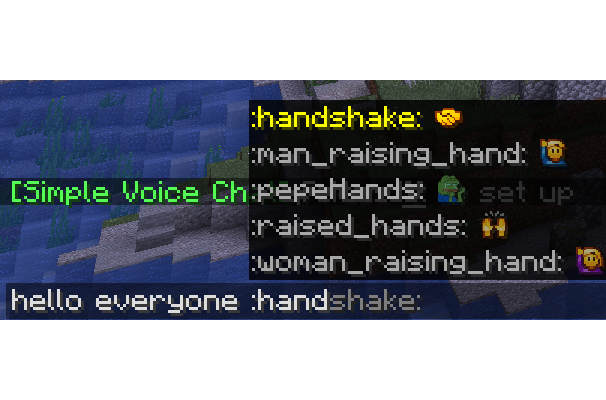 Emoji Suggestions
 -
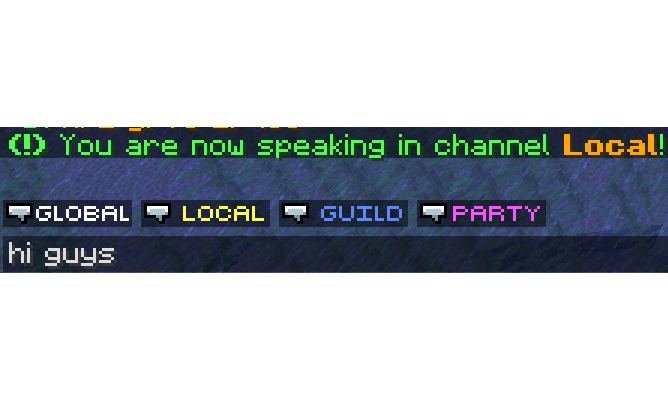 Channel Buttons
 -
 Discord Presence
 -
 Discord Presence
 -
 Discord Presence
 -
 Discord Presence
 -
 Discord Presence
Versions
Files
Relations
Project Relations
More like this
Similar Mods
Suggestions use data such as tags, dependencies, dependents, descriptions, titles, and more to rank how much they overlap with this mod.
On ModDex
Community snapshot
By the numbers
Statistics
Want to reach Minecraft players?
We're looking for a server hosting partner to feature here and other parts of the site. Interested? Send us a message!
Get in touchGet it on
Available Platforms
On ModDex
Community snapshot
By the numbers
Statistics
Resources