
Community listing page, reviews here may not be monitored by the author.
Live Whitelist

No reviews yet
A mod that allows you to connect your server to an api or discord bot to allow or disallow connections based on uuid

Community voices
Reviews
No reviews yet. Be the first to review this project!
Get it on
Available Platforms
Compatibility
Supported Environments
Runs on a dedicated server only; does not work in singleplayer.
About
Project Details
For authors
Embed Badge
If you're the author of this project, you can embed a live badge anywhere that supports HTML or Markdown. It updates automatically whenever ratings change.
Use HTML for any page that supports it, or Markdown for README files and Markdown-based descriptions.
Identifiers
Platform IDs
About
Description
A mod by cyber.98
This very simple mod allows you to connect to an api running somewhere on the internet (or on your machine) to validate or invalidate minecraft UUIDS. This was originally intended to be used with a discord bot running an api, but is completely valid outside of that use case. If you'd like to use the discord bot to make sure specific people have a role before joining, please skip to that section.
Configuration settings
The mod has two configuration settings:
api:[a url by default]
message:[a string by default]
- The api url is what defines the base of where all requests should go. This can be a site, or an ip, but the server must allow for http connections.
- The message string is what is shown to the player if the api is online, and responds with a false verification for that uuid.
Setting up an API
API setup is super simple. It should meet the following guidelines:
- Have at least one endpoint, being at '/verify'
- Respond within about 2 seconds to ensure no progress can be made by players before being kicked
- follow this json guide for urls and responses:
URLS:
[base url defined in config]/[minecraft uuid sent from the server] // make sure you have something to parse the url bar, as the server sends get requests, not post requests.

Responses:

{
  "verified":boolean
}
It's that easy (at least for this version)
Discord bot setup
This mod comes feature complete with a discord bot! Follow these steps to allow users to authenticate using the discord bot instead of having to make your own api!
Prerequisites
- Script running is enabled on your system (see microsoft's page on this)
- You have nodeJS and npm installed (I'm a js developer idk what you want me to do)
Usage:
/link uuid:[uuid] -> will link your discord account to your mojang account. if you don't know your uuid, try joining the server first, the server will tell it to you (assumming the api is running already). /unlink -> pretty self-explanatory, will remove your entry from the database, allowing you to relink it /ping -> gets the status of the api and some response times
setup guide
Head to The github page for the bot and download the source code as a zip. extract it, and open the root folder and run
npm install
and wait a few moments for it to get the required packages. afterwards, create a config.json file with the following information (fill in the fields)
{
    "token":"discord bot token",
    "botname":"a name you wanna see in the terminal for the bot",
    "author":"your name",
    "clientId":"the bots client id",
    "adminids":["your user id"],
    "authorid":"your user id",
    "roleID":"the id of the role you want to look for"
}
your discord bot will need:
Guild install only.
Public bot off (unless you are not discord server admin)
Server members intent.
These permissions:
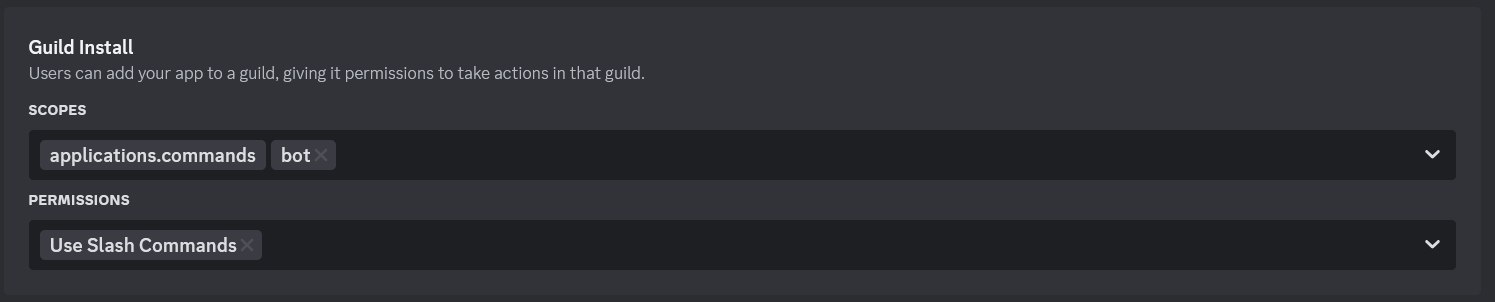
Add in your token, and you're ready to hit the ground running! To run the script, open the folder and run
npm start
Screenshots
Gallery
-
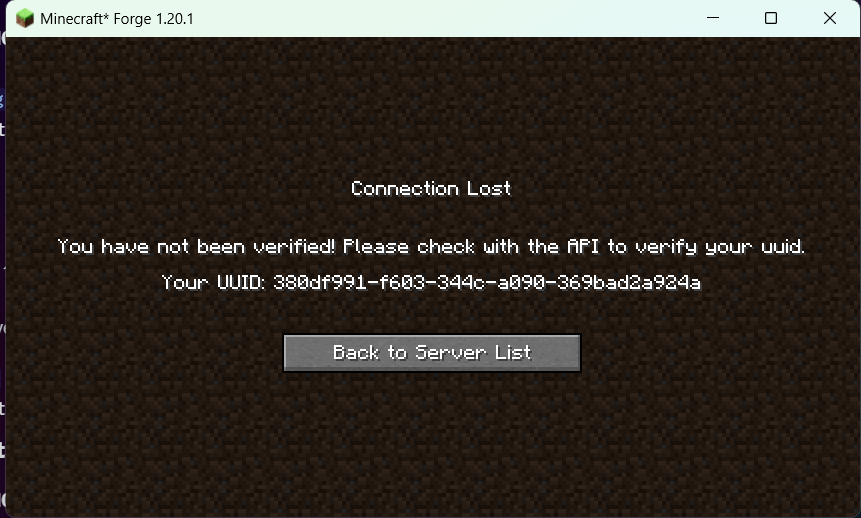 Connection lost screen An image featuring the screen you can customize for players to see when they are not verified.
Versions
Files
Relations
Project Relations
More like this
Similar Mods
Suggestions use data such as tags, dependencies, dependents, descriptions, titles, and more to rank how much they overlap with this mod.
On ModDex
Community snapshot
By the numbers
Statistics

 (opens in a new tab)
Get it on
Available Platforms
On ModDex
Community snapshot
By the numbers