
Community listing page, reviews here may not be monitored by the author.
AposaBackup

No reviews yet
A Fabric mod for automated Minecraft world backups with local storage and S3 API(e.g. Cloudflare R2) cloud backup support. Works on both dedicated servers and single-player worlds.
Community voices
Reviews
No reviews yet. Be the first to review this project!
Get it on
Available Platforms
Compatibility
Supported Environments
Runs entirely on the server. Also works in singleplayer.
About
Project Details
For authors
Embed Badge
If you're the author of this project, you can embed a live badge anywhere that supports HTML or Markdown. It updates automatically whenever ratings change.
Use HTML for any page that supports it, or Markdown for README files and Markdown-based descriptions.
Identifiers
Platform IDs
About
Description
AposaBackup
A Fabric mod for automated Minecraft world backups with local storage and S3 API(e.g. Cloudflare R2) cloud backup support. Works on both dedicated servers and single-player worlds.
Features
- Scheduled Automatic Backups — Configurable interval (default: 60 min)
- Manual Backups —
/backup createwith optional comments - Shutdown Backups — Automatic backup when server stops
- Local Backup — Full ZIP archives with rotation policy (recent N + daily snapshots)
- Cloud Backup — Differential upload to Cloudflare R2 via S3 API with content-addressable deduplication
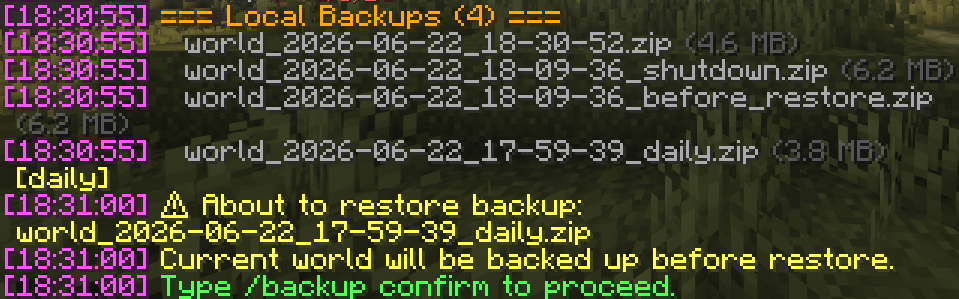
- Restore — Two-step restore with confirmation, auto-backup before restore
- Download — Export cloud backup as local ZIP
- In-game Notifications — Action bar messages for backup status
- Hot Configuration — All settings changeable via commands, no restart required
Installation
- Download the mod JAR from releases
- Place it in your server's or client's
mods/directory - Start the server — default config will be generated at
config/aposabackup.json
Quick Start
# Create a manual backup
/backup create

# Create a backup with comment
/backup create before big build

# List local backups
/backup list

# Check backup system status
/backup status
Commands
All commands require OP level 3 (admin) permission.
| Command | Description |
|---|---|
/backup create [comment] |
Create a local backup |
/backup cloud |
Create a cloud backup (differential upload) |
/backup list [local|cloud] |
List backups |
/backup restore <id> |
Prepare restore (requires confirmation) |
/backup confirm |
Confirm and execute restore |
/backup download <id> |
Download cloud backup as local ZIP |
/backup delete <id> [local|cloud] |
Delete a backup |
/backup info <id> |
Show backup details |
/backup status |
Show system status |
/backup interval <min> |
Set backup interval |
/backup config <key> <value> |
Change configuration |
/backup config show |
Show current configuration |
/backup config reload |
Reload from file |
See github/docs/COMMANDS.md for full command reference.
Configuration
The config file is at config/aposabackup.json. All options can also be changed via /backup config.
{
  "version": 1,
  "local": {
    "enabled": true,
    "backupDir": "./backups",
    "format": "ZIP",
    "compressionLevel": 6,
    "intervalMinutes": 60,
    "recentBackups": 10,
    "dailyKeepDays": 7,
    "shutdownBackup": true,
    "excludePatterns": ["session.lock", "*.tmp"]
  },
  "cloud": {
    "enabled": false,
    "maxBackups": 30,
    "dailyKeepDays": 7,
    "uploadTimeoutSeconds": 300,
    "retryCount": 3,
    "r2": {
      "accountId": "",
      "accessKeyId": "",
      "secretAccessKey": "",
      "bucketName": "mc-server-backups",
      "region": "auto",
      "pathPrefix": "my-server/",
      "customEndpoint": ""
    }
  },
  "notification": {
    "enabled": true,
    "style": "ACTION_BAR"
  }
}
See github/docs/CONFIGURATION.md for detailed configuration reference.
Cloud Backup (e.g. Cloudflare R2)
AposaBackup supports differential cloud backups using Cloudflare R2's S3-compatible API.
How it works:
- Only changed
.mcaregion files are uploaded (SHA-256 content addressing) - Files are gzip-compressed and stored as content-addressed chunks
- Each backup creates a manifest referencing the chunks
- Unreferenced chunks are garbage-collected when old manifests are deleted
Setup: See github/docs/CLOUD_SETUP.md for step-by-step instructions.
Backup Rotation Policy
Local Backups
- Recent backups: Keeps the last N backups (default: 10)
- Daily snapshots: Automatically preserves the last backup of each day for N days (default: 7)
Cloud Backups
- Manifest retention: Keeps the last N manifests (default: 30)
- Daily snapshots: Preserves daily manifests for N days (default: 7)
- Garbage collection: Deletes unreferenced chunks after manifest cleanup
Restore Flow
/backup restore world_2026-06-22_14-00-00.zip
→ "About to restore backup. Current world will be backed up first."

/backup confirm
→ Creates pre-restore backup → Saves pending restore → Stops server

[Server restarts]
→ Detects pending restore → Decompresses backup → World restored
Screenshots
Gallery
-
 Usage photo Usage photo
Versions
Files
Relations
Project Relations
More like this
Similar Mods
Suggestions use data such as tags, dependencies, dependents, descriptions, titles, and more to rank how much they overlap with this mod.
On ModDex
Community snapshot
By the numbers
Statistics

Want to reach Minecraft players?
We're looking for a server hosting partner to feature here and other parts of the site. Interested? Send us a message!
Get in touchGet it on
Available Platforms
On ModDex
Community snapshot
By the numbers