Community listing page, reviews here may not be monitored by the author.



Community voices
Reviews
No reviews yet. Be the first to review this project!
Get it on
Available Platforms
Compatibility
Supported Environments
Required on the server. Installing it on the client adds functionality.
About
Project Details
For authors
Embed Badge
If you're the author of this project, you can embed a live badge anywhere that supports HTML or Markdown. It updates automatically whenever ratings change.
Use HTML for any page that supports it, or Markdown for README files and Markdown-based descriptions.
Identifiers
Platform IDs
About
Description
AquaGuard
AquaGuard is a powerful server administration mod for Minecraft Forge, designed to help server owners track and manage in-game activities with ease. It logs player actions, block changes, fluid placements, and more, while providing robust tools for inspection, rollback, and log pruning to maintain a fair and secure server environment.
Features
- Comprehensive Logging: Tracks block placements, breaks, fluid interactions, container access, player deaths, logins, logouts, chat, commands, and more.
- Inspect Tool: Use a special stick to inspect block history with detailed logs (left/right-click blocks).
- Rollback & Restore: Revert or restore changes by player or radius, supporting blocks and fluids, with customizable timeframes.
- Prune Logs: Clean up old logs to keep your database lean and efficient.
- Customizable: Enable or disable specific logging options via the config file.
Commands
/ag inspector/ag i: Toggle the inspect mode to view block history./ag lookup <user/radius/position> ...: Search logs by player, radius, or specific position./ag rollback <user/radius> ...: Revert changes made by a player or within a radius./ag restore <user/radius> ...: Restore changes to their original state./ag prune <time>: Remove logs older than the specified time (e.g.,7dfor 7 days).
Installation
- Ensure you have Minecraft Forge installed for your Minecraft version (e.g., 1.20.1).
- Download the latest AquaGuard release from Curseforge.
- Place the
.jarfile in your server'smodsfolder. - Start the server to generate the
aquaguardconfig folder inconfig/. - (Optional) Edit
config/aquaguard/aquaguard_logs.jsonto customize logging settings.
Requirements
- Minecraft: 1.20.1 (or compatible version)
- Forge: Latest for your Minecraft version
- Server-side: Works on servers, no client mod required
Support
Dm me on Telegram for help, or report issues on GitHub.
License
AquaGuard is licensed under the MIT License. See GitHub for details.

AquaGuard
Server-side audit logging, investigation, and rollback for modded Minecraft servers.
AquaGuard records what happens on your server in SQLite or MySQL without running database writes on the server thread. Moderators can inspect a block, trace a player's actions, preview a rollback, and restore damaged areas with in-game commands.
It is built for modded servers: block entities, container changes, NBT, automated actors, and actions reported by other mods share one audit trail with vanilla events.
One version, three loaders. Every release ships Fabric, NeoForge, and Forge builds for Minecraft 1.21.1, built from the same source with the same version number.
Features
- Audit trail: block breaks and placements, containers, signs, entity interactions, deaths, logins and logouts, explosions, and natural changes such as fire spread, leaf decay, and falling blocks.
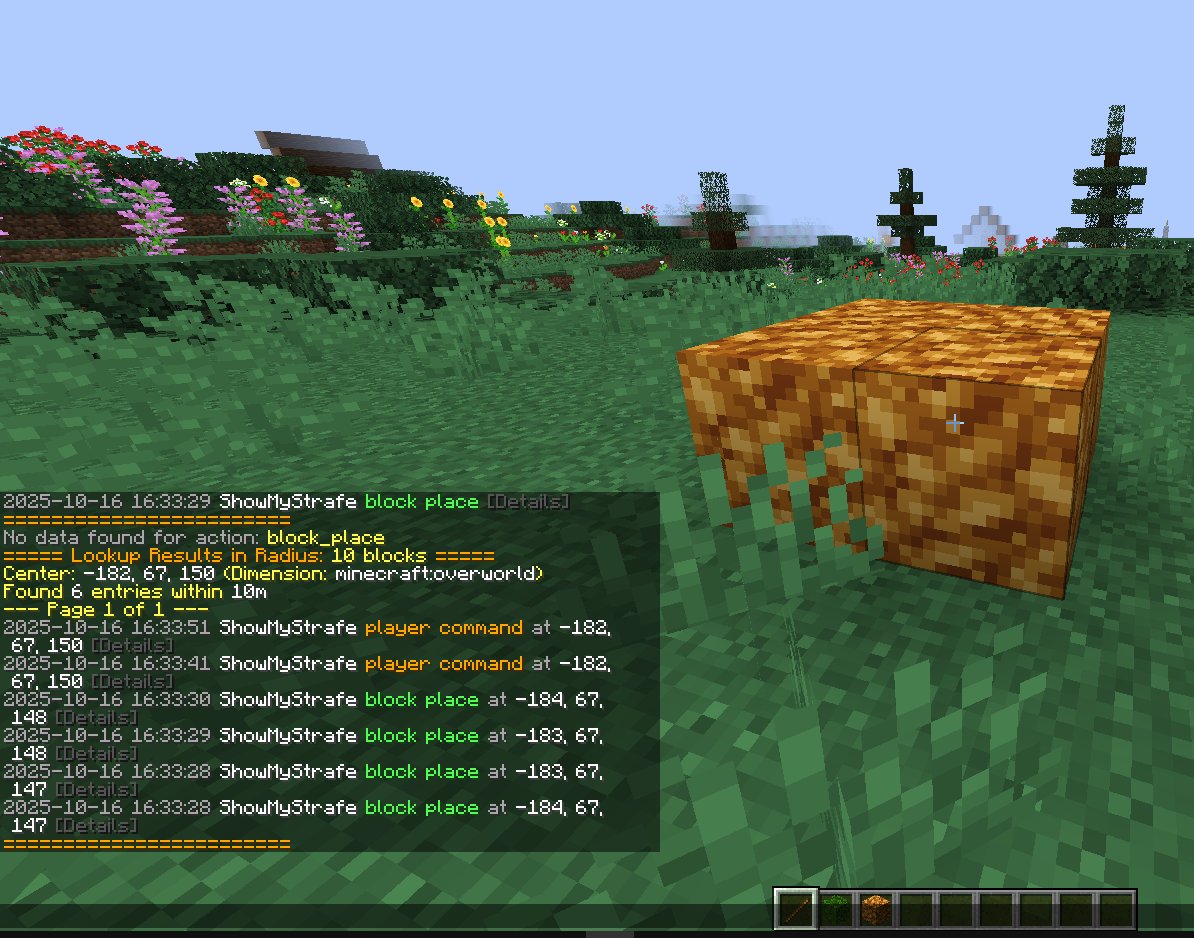
- In-world inspection: toggle inspect mode and click a block to see its recent history with timestamps, players, states, and stored details.
- Rollback and restore: preview and reverse changes by player or area, then re-apply a rollback if needed. Rollbacks run in small batches on the server tick to avoid lag spikes.
- NBT-aware history: keeps container contents, sign text, furnace state, item components, and supported block-entity data.
- SQLite or MySQL/MariaDB: SQLite works with no setup. MySQL or MariaDB lets several servers share one database.
- Asynchronous pipeline: writes go through a bounded queue and a dedicated database thread in batches. Lookups run on separate worker threads.
- Operations tools: Discord grief alerts, automatic pruning, CSV exports for moderation evidence, and a database health check.
- Developer API: other mods can log their own attributed actions through
AquaGuardAPI.
Chat, command, and item pickup/drop logging is planned.
Commands
All commands live under /ag and use vanilla operator levels.
| Command | Purpose |
|---|---|
/ag inspect (/ag i) |
Toggle block inspection mode |
/ag area ... |
Get the selection wand and set area corners |
/ag lookup ... (/ag l) |
Search by player, radius, position, action, or page |
/ag rollback ... |
Preview or reverse recorded changes |
/ag restore ... |
Re-apply changes from a previous rollback |
/ag status |
Show log count, database state, and active settings |
/ag export ... |
Export a player's history to CSV |
/ag prune <time> |
Permanently delete history older than the given time |
Inspect, lookup, status, and area need permission level 2. Rollback, restore, prune, and export need level 3.
Full syntax and examples are in the command reference.
Installation
- Download the file for your loader:
aquaguard-fabric-<version>.jar,aquaguard-neoforge-<version>.jar, oraquaguard-forge-<version>.jar. - On Fabric, also install Fabric API. NeoForge and Forge need no other mods.
- Put the jar in the server's
mods/folder and start the server once. - Review
config/aquaguard/aquaguard-common.tomland restart after changing it.
AquaGuard runs on the server only. Players do not need it on their clients. It also works in singleplayer and on LAN worlds.
| Loader | Minecraft | Minimum loader version |
|---|---|---|
| Fabric | 1.21.1 | Fabric Loader 0.16.9, Fabric API |
| NeoForge | 1.21.1 | NeoForge 21.1.93 |
| Forge | 1.21.1 | Forge 52.0.16 |
Configuration
Every logging category can be turned off on its own. Database, maintenance, alert, and telemetry settings each have their own section. Read the configuration guide before enabling MySQL or Discord alerts.
Telemetry is off by default. Nothing is sent unless a server owner enables it and sets an endpoint. It never includes player names, UUIDs, chat, or coordinates.
Links
- Source code and documentation
- Report a bug or request a feature
- Changelog
- Developer API
- Contact: Telegram
AquaGuard is released under the MIT License.
Screenshots
Gallery
-
 AquaGuard
 -
Versions
Files
Relations
Project Relations
More like this
Similar Mods
Suggestions use data such as tags, dependencies, dependents, descriptions, titles, and more to rank how much they overlap with this mod.
On ModDex
Community snapshot
By the numbers
Statistics
 (opens in a new tab)
Get it on
Available Platforms
On ModDex
Community snapshot
By the numbers