
Community listing page, reviews here may not be monitored by the author.
ArabicType


No reviews yet
Fixes broken Arabic text in chat input and proper letter connection and right-to-left order

Community voices
Reviews
No reviews yet. Be the first to review this project!
Get it on
Available Platforms
Compatibility
Supported Environments
Runs entirely on the client. Works on vanilla servers.
About
Project Details
For authors
Embed Badge
If you're the author of this project, you can embed a live badge anywhere that supports HTML or Markdown. It updates automatically whenever ratings change.
Use HTML for any page that supports it, or Markdown for README files and Markdown-based descriptions.
Identifiers
Platform IDs
Resources
External Links
About
Description
Arabic Input Fix
IMPORTANT! To have the text look good, download the resourcepack that changes the font
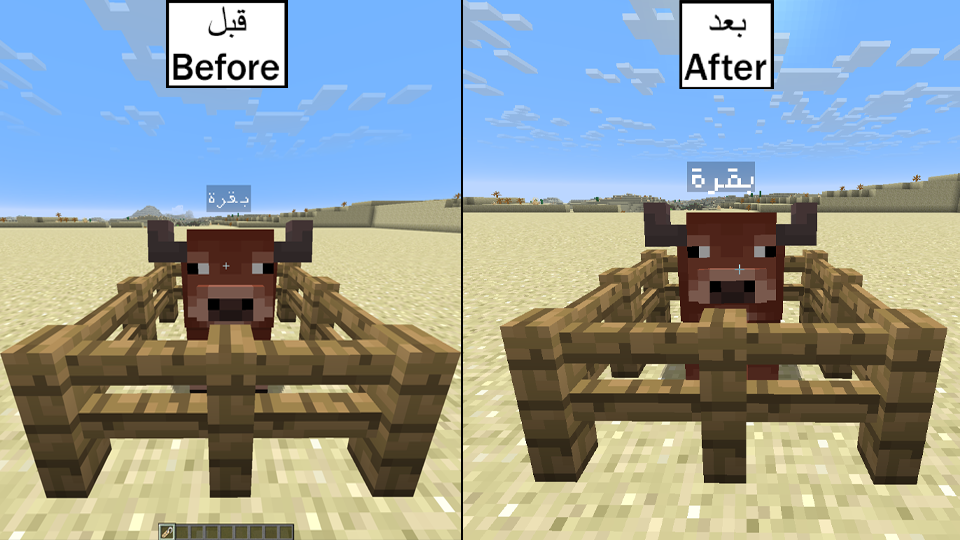
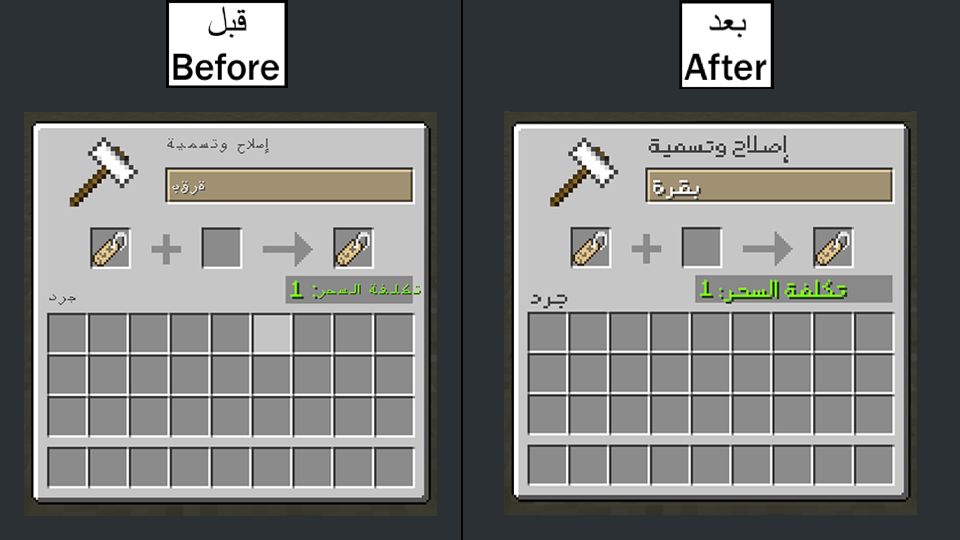
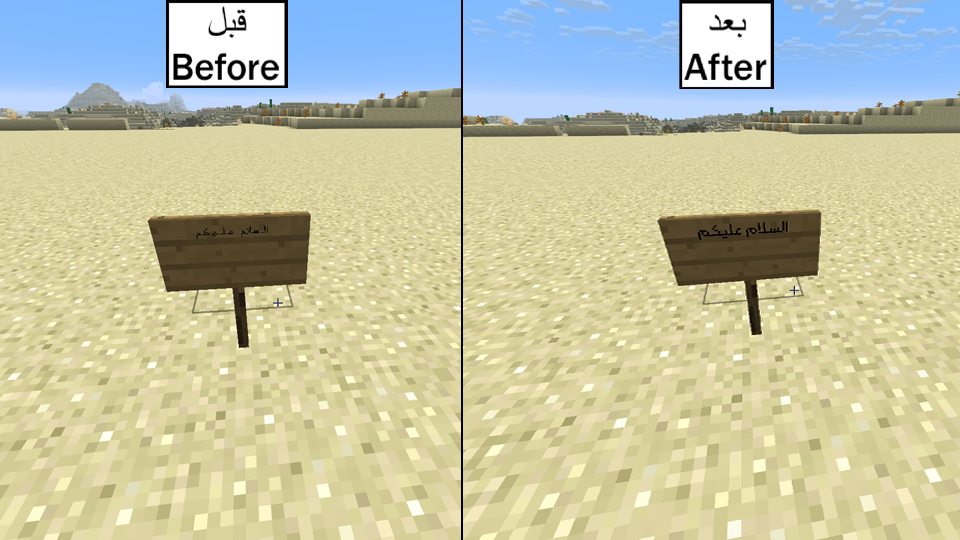
To get the Arabic letters looking like the screenshots, download the Rooyin font resourcepack, re-packaged to work on 26.1.2:
https://github.com/VikRezn/Rooyin-Arabic-Font-26.1.2/raw/main/Rooyin-Arabic-Font-26.1.2.zip
Original font and full credit go to Mohammad Darvishi (licensed under GPLv3):
https://github.com/MDarvishi5124/Rooyin-for-Minecraft
Put the font file in your resourcepacks folder and enable it in Options > Resource Packs.
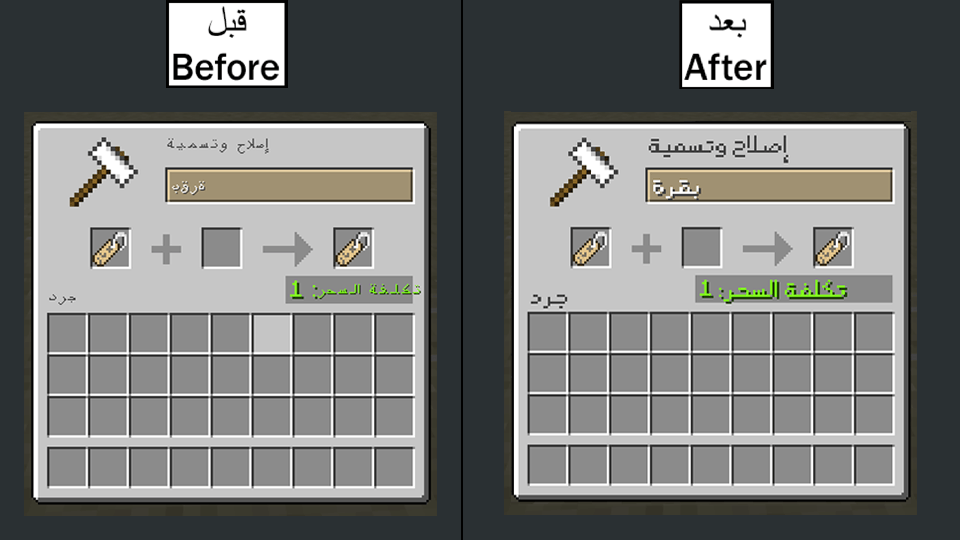
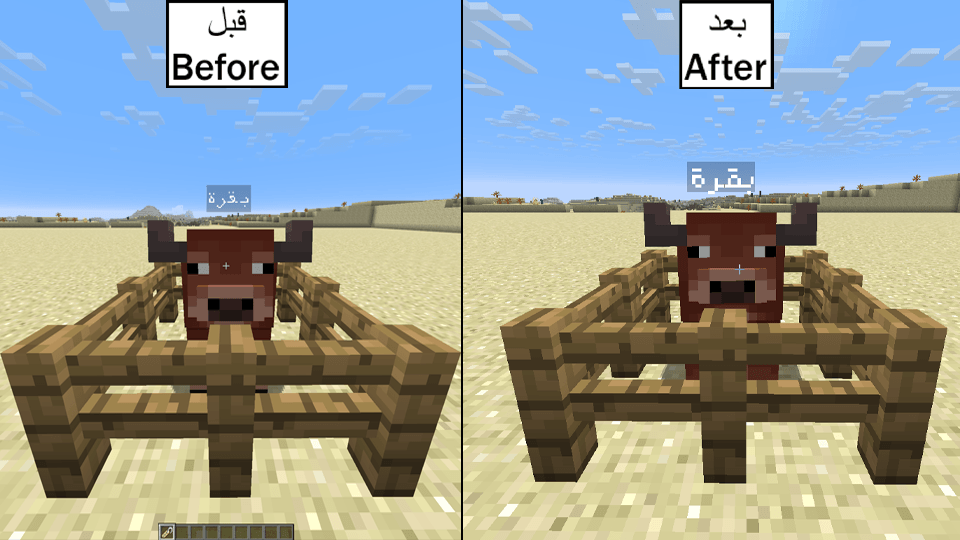
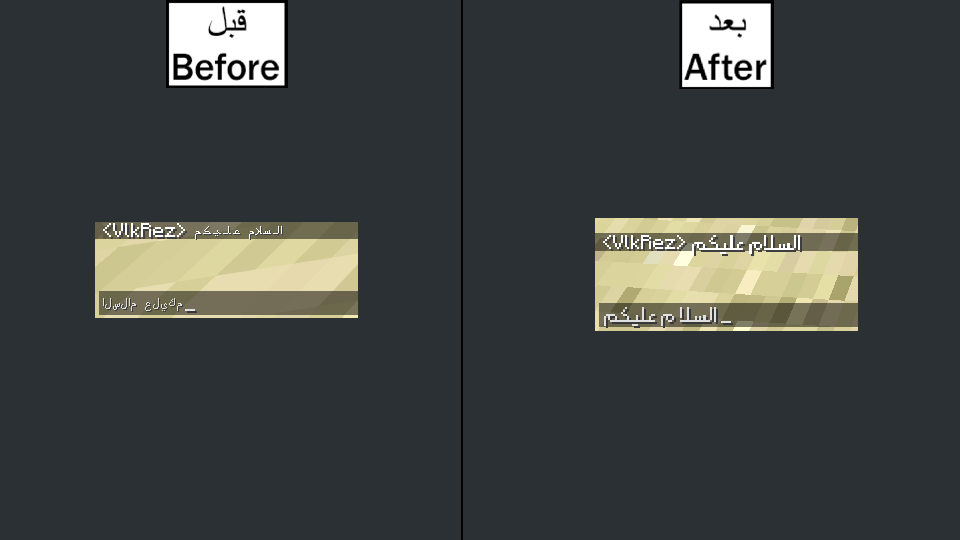
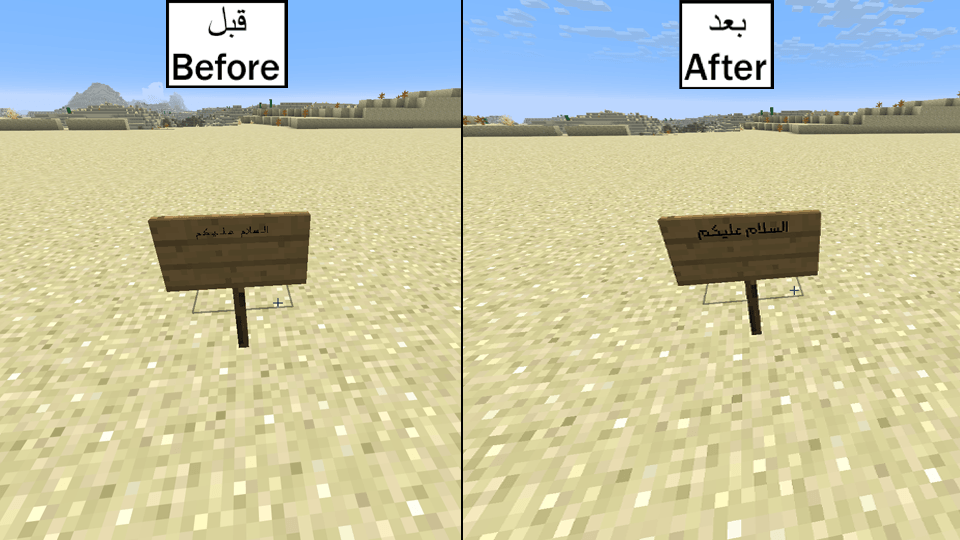
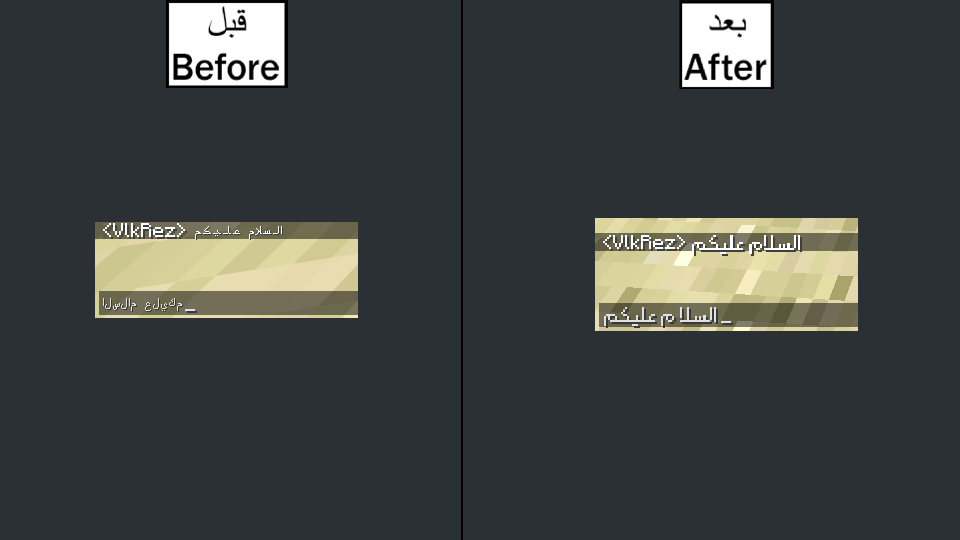
Fixes broken Arabic text in Minecraft's chat input box. Normally when you type Arabic in chat, the letters appear disconnected and reversed, so it's unreadable while you type, even though the message looks fine once it's sent. This mod reshapes the live input so you see proper connected, right to left Arabic as you type, using the ICU library for correct contextual letter forms.
Features
Fixes the Arabic font in the chat input box (connected letters, not isolated)
Correct right to left (RTL) order while typing
Works in singleplayer and on any server
Client side only, the server doesn't need it
Requirements
Minecraft 26.1.2
Fabric Loader plus Fabric API, or NeoForge (pick the matching download)
ICU4J is bundled inside the mod, nothing else to install
Installation
Drop the .jar into your client's mods folder alongside your loader (and Fabric API if on Fabric). Launch and type Arabic in chat.
إصلاح الكتابة العربية (Arabic Input Fix)
مهم! لكي يظهر النص بشكل صحيح، حمّل الريسورس باك الي يغير لك الخط
لكي تظهر الحروف العربية مثل الصور، حمّل الريسورس باك الخط رويين (Rooyin) المعدّل ليعمل على نسخة 26.1.2:
https://github.com/VikRezn/Rooyin-Arabic-Font-26.1.2/raw/main/Rooyin-Arabic-Font-26.1.2.zip
الخط الأصلي وكامل الحقوق تعود لمحمد درويشي (مرخّص تحت GPLv3):
https://github.com/MDarvishi5124/Rooyin-for-Minecraft
ضع ملف الخط في مجلد resourcepacks وفعّله من إعدادات حزم الموارد.
يُصلح هذا المود مشكلة ظهور النص العربي بشكل خاطئ في خانة كتابة الدردشة في ماين كرافت. عادةً عندما تكتب بالعربية في الدردشة، تظهر الحروف منفصلة ومعكوسة، فيصعب قراءتها أثناء الكتابة، رغم أن الرسالة تظهر بشكل صحيح بعد إرسالها. يقوم هذا المود بإعادة تشكيل النص أثناء الكتابة ليظهر بالعربية الصحيحة، حروف متصلة ومن اليمين إلى اليسار، باستخدام مكتبة ICU لإظهار أشكال الحروف الصحيحة.
المميزات
إصلاح شكل الخط العربي في خانة كتابة الدردشة (حروف متصلة وليست منفصلة)
ترتيب صحيح من اليمين إلى اليسار (RTL) أثناء الكتابة
يعمل في اللعب الفردي وعلى أي سيرفر
يعمل من جهة العميل فقط، لا يحتاجه السيرفر
المتطلبات
ماين كرافت 26.1.2
Fabric Loader مع Fabric API، أو NeoForge (حمّل النسخة المناسبة)
مكتبة ICU4J مدمجة داخل المود، لا تحتاج لتثبيت أي شيء آخر
التثبيت
ضع ملف الـ .jar في مجلد mods الخاص بالعميل بجانب اللودر (و Fabric API إذا كنت تستخدم Fabric). شغّل اللعبة واكتب بالعربية في الدردشة.
إصلاح الكتابة العربية (Arabic Input Fix)
مهم! لكي يظهر النص بشكل صحيح، حمّل الخط
لكي تظهر الحروف العربية مثل الصور، حمّل خط رويين (Rooyin) المعدّل ليعمل على نسخة 26.1.2: https://github.com/VikRezn/Rooyin-Arabic-Font-26.1.2/raw/main/Rooyin-Arabic-Font-26.1.2.zip
الخط الأصلي وكامل الحقوق تعود لمحمد درويشي (مرخّص تحت GPLv3): https://github.com/MDarvishi5124/Rooyin-for-Minecraft
ضع ملف الخط في مجلد resourcepacks وفعّله من إعدادات حزم الموارد.
يُصلح هذا المود مشكلة ظهور النص العربي بشكل خاطئ في خانة كتابة الدردشة في ماين كرافت. عادةً عندما تكتب بالعربية في الدردشة، تظهر الحروف منفصلة ومعكوسة، فيصعب قراءتها أثناء الكتابة، رغم أن الرسالة تظهر بشكل صحيح بعد إرسالها. يقوم هذا المود بإعادة تشكيل النص أثناء الكتابة ليظهر بالعربية الصحيحة، حروف متصلة ومن اليمين إلى اليسار، باستخدام مكتبة ICU لإظهار أشكال الحروف الصحيحة.
المميزات
- إصلاح شكل الخط العربي في خانة كتابة الدردشة (حروف متصلة وليست منفصلة)
- ترتيب صحيح من اليمين إلى اليسار (RTL) أثناء الكتابة
- يعمل في اللعب الفردي وعلى أي سيرفر
- يعمل من جهة العميل فقط، لا يحتاجه السيرفر
المتطلبات
- ماين كرافت 26.1.2
- Fabric Loader مع Fabric API، أو NeoForge (حمّل النسخة المناسبة)
- مكتبة ICU4J مدمجة داخل المود، لا تحتاج لتثبيت أي شيء آخر
التثبيت
ضع ملف الـ .jar في مجلد mods الخاص بالعميل بجانب اللودر (و Fabric API إذا كنت تستخدم Fabric). شغّل اللعبة واكتب بالعربية في الدردشة.
tags: عربي, إصلاح العربية, دردشة عربية, نص عربي مكسور, حروف منفصلة, عربي معكوس ,RTL ,من اليمين لليسار
Arabic Input Fix
IMPORTANT! To have the text look good, download the font
To get the Arabic letters looking like the screenshots, download the Rooyin font, re-packaged to work on 26.1.2: https://github.com/VikRezn/Rooyin-Arabic-Font-26.1.2/raw/main/Rooyin-Arabic-Font-26.1.2.zip
Original font and full credit go to Mohammad Darvishi (licensed under GPLv3): https://github.com/MDarvishi5124/Rooyin-for-Minecraft
Put the font file in your resourcepacks folder and enable it in Options > Resource Packs.
Fixes broken Arabic text in Minecraft's chat input box. Normally when you type Arabic in chat, the letters appear disconnected and reversed, so it's unreadable while you type, even though the message looks fine once it's sent. This mod reshapes the live input so you see proper connected, right to left Arabic as you type, using the ICU library for correct contextual letter forms.
Features
- Fixes the Arabic font in the chat input box (connected letters, not isolated)
- Correct right to left (RTL) order while typing
- Works in singleplayer and on any server
- Client side only, the server doesn't need it
Requirements
- Minecraft 26.1.2
- Fabric Loader plus Fabric API, or NeoForge (pick the matching download)
- ICU4J is bundled inside the mod, nothing else to install
Installation
Drop the .jar into your client's mods folder alongside your loader (and Fabric API if on Fabric). Launch and type Arabic in chat.
Tags: arabic, arabic fix, arabic chat, broken arabic, reversed arabic, disconnected arabic letters, RTL, right to left, arabic text minecraft, fix arabic
Screenshots
Gallery
-
 anvilb.png
 -
 cowb.png
 -
 chatb.png
 -
 signb.png
Versions
Files
Relations
Project Relations
More like this
Similar Mods
Suggestions use data such as tags, dependencies, dependents, descriptions, titles, and more to rank how much they overlap with this mod.
On ModDex
Community snapshot
By the numbers
Statistics
 (opens in a new tab)
Get it on
Available Platforms
On ModDex
Community snapshot
By the numbers
Statistics
Resources