
Community listing page, reviews here may not be monitored by the author.
Architect's Delight


No reviews yet
Transform almost any vanilla block into stairs, slabs, vertical slabs, walls, fences, doors, trapdoors and more, with advanced placement tools, live previews, post-placement editing and full resource pack compatibility.
Community voices
Reviews
No reviews yet. Be the first to review this project!
Get it on
Available Platforms
Compatibility
Supported Environments
Must be installed on both the client and the server.
About
Project Details
For authors
Embed Badge
If you're the author of this project, you can embed a live badge anywhere that supports HTML or Markdown. It updates automatically whenever ratings change.
Use HTML for any page that supports it, or Markdown for README files and Markdown-based descriptions.
Identifiers
Platform IDs
Resources
External Links
About
Description
🏛️ Architect’s Delight
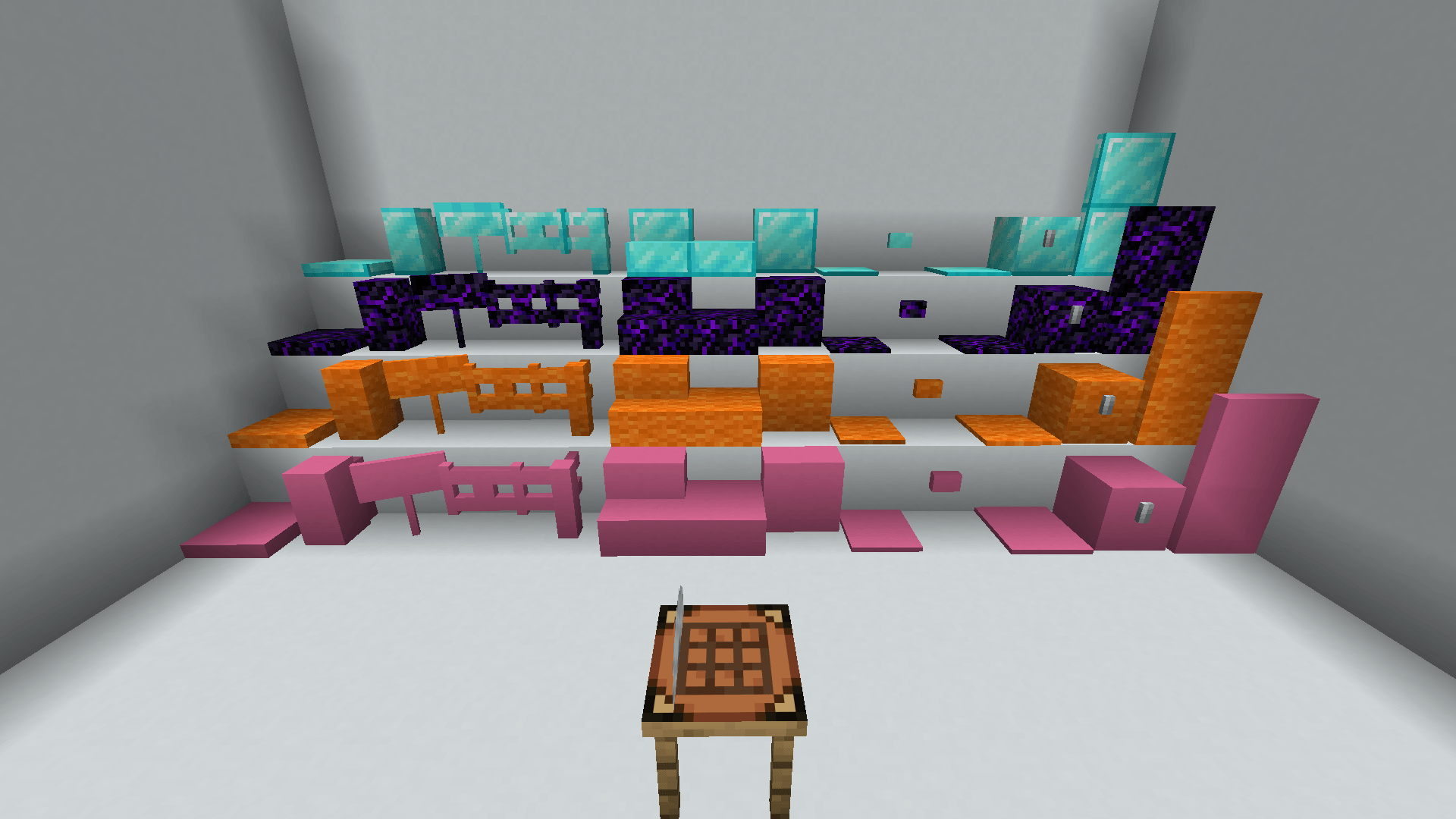
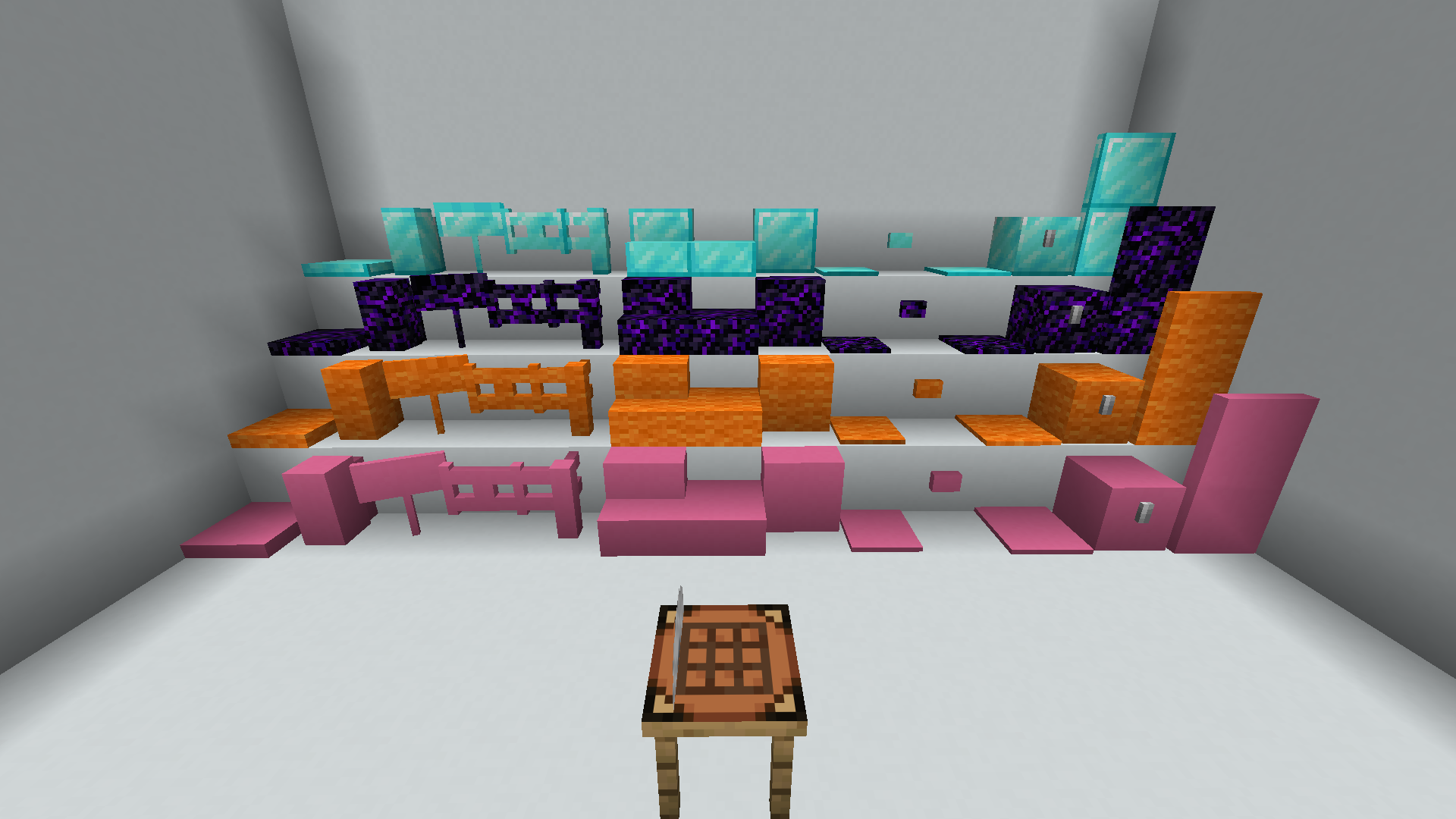
Architect’s Delight lets you transform almost any vanilla block into new architectural variants while keeping its original texture.
Use the Architect’s Table to create:
🧱 Stairs, slabs and vertical slabs
🚪 Doors, trapdoors and reinforced variants
🪵 Walls, fences and fence gates
📦 Chests, signs, buttons, pressure plates, carpets
👁️ Visual Placement
A transparent preview shows exactly how the block will be placed before you click.
Press the configurable placement key to cycle through or rotate the available states:
- Choose top or bottom slabs
- Rotate stairs and vertical slabs
- Select specific wall or fence connections
- Disable automatic connections
- Lock a precise shape before placing it
Each item remembers its own placement mode, so you can keep several versions of the same block in your hotbar and switch between them instantly.
✂️ Architect’s Chisel
Already placed the block?
Use the Architect’s Chisel to change its state without breaking it:
- Right-click: next state
- Sneak + right-click: previous state
🧩 Mixed Slabs
Combine two slabs made from different materials inside the same block.
This also works with vertical slabs, opening up many new building possibilities.
🎨 Resource Pack Compatible
Architect’s Delight uses vanilla textures only.
Every architectural variant automatically inherits the texture of its original block, allowing it to work naturally with resource packs.
Available for Fabric and NeoForge.
🏛️ Architect’s Delight
Architect’s Delight lets you transform almost any vanilla block into new architectural variants while keeping its original texture.
Use the Architect’s Table to create:
🧱 Stairs, slabs and vertical slabs 🚪 Doors, trapdoors and reinforced variants 🪵 Walls, fences and fence gates 📦 Chests, signs, buttons, pressure plates, carpets
👁️ Visual Placement
A transparent preview shows exactly how the block will be placed before you click.
Press the configurable placement key to cycle through or rotate the available states:
Choose top or bottom slabs Rotate stairs and vertical slabs Select specific wall or fence connections Disable automatic connections Lock a precise shape before placing it
Each item remembers its own placement mode, so you can keep several versions of the same block in your hotbar and switch between them instantly.
✂️ Architect’s Chisel
Already placed the block?
Use the Architect’s Chisel to change its state without breaking it:
Right-click: next state Sneak + right-click: previous state
🧩 Mixed Slabs
Combine two slabs made from different materials inside the same block.
This also works with vertical slabs, opening up many new building possibilities.
🎨 Resource Pack Compatible
Architect’s Delight uses vanilla textures only.
Every architectural variant automatically inherits the texture of its original block, allowing it to work naturally with resource packs.
Available for Fabric and NeoForge.
Screenshots
Gallery
-
 2026-07-25_18.25.57.png 2026-07-25_18.25.57.png
Versions
Files
Relations
Project Relations
More like this
Similar Mods
Suggestions use data such as tags, dependencies, dependents, descriptions, titles, and more to rank how much they overlap with this mod.
On ModDex
Community snapshot
By the numbers
Statistics
Want to reach Minecraft players?
We're looking for a server hosting partner to feature here and other parts of the site. Interested? Send us a message!
Get in touchGet it on
Available Platforms
On ModDex
Community snapshot
By the numbers
Statistics
Resources