
Area Hints
No reviews yet
A mod that displays the domain name which could be written by players when you enters an area
Includes a large focus on traversing worlds with enhanced world generation, structures, dungeons, and more for players to find unique loot.
Community voices
Reviews
Click once to include, again to exclude, again to clear
No reviews yet. Be the first to review this project!
Get it on
Available Platforms
 Modrinth
Compatibility
Supported Environments
About
Project Details
For authors
Embed Badge
If you're the author of this project, you can embed a live badge anywhere that supports HTML or Markdown. It updates automatically whenever ratings change.
Use HTML for any page that supports it, or Markdown for README files and Markdown-based descriptions.
Identifiers
Platform IDs
About
Description
🏷️ Area Hints Mod
Add immersive area name popups to your Minecraft world! When entering custom regions, elegant area titles appear at the top of your screen. Supports multi-level nesting, dimension default names, and easy creation tools—making exploration feel truly meaningful.
📖 Overview
Areas Hint allows players to define regions (called “domains”) using polygons and display custom names upon entry. All calculations are handled client-side with multithreaded optimization, placing almost zero load on the server. Say goodbye to complex commands and use intuitive tools to mark your world with ease.
✨ Features
- Player Customization: Freely name regions, define boundaries and height.
- High Performance: Zero server load, with client-side optimization and multithreading.
- Automatic Area Titles: Enter places like “Elven Forest” or “Dark Castle” and see smooth title animations appear on screen.
- Multi-level Regions: Supports nested regions (e.g., “Kingdom” → “Throne Room”) with elegant transitions or combined displays.
- Dimension Default Names: Displays the dimension name (e.g., “Wilderness Continent”) when outside all regions.
- Easy Creation Tool: Use
/areahint easyaddfor an interactive setup—just walk and click to create areas. - Fully Customizable: Modify names, colors, heights, split or merge regions anytime.
- Beautiful & Smooth UI: RPG-style title display (inspired by Genshin Impact), with adjustable styles and smooth animations.
- No Claim Restrictions: Mark any place freely—explore without limits.
🎯 Why Choose Areas Hint?
- Player-Friendly: No admin permissions required for creating area markers.
- Optimized Performance: Client-side processing keeps multiplayer smooth.
- Plug and Play: Install and start marking areas with simple commands.
- Highly Compatible: Works seamlessly with minimaps, shaders, and optimization mods.
🛠️ Features Overview
- Polygon-based region definition with multi-level domains (top-level / subdomains).
- Ray-casting detection to determine player position.
- Multiple rendering methods (CPU, OpenGL, Vulkan).
- Rich subtitle style customization.
- Full command system for configuration and management.
- Interactive domain creation tool EasyAdd, designed for ease of use.
📋 Command System
Basic Commands
| Command | Description | Common Permission |
|---|---|---|
/areahint help |
Show all commands and usage | Everyone |
/areahint reload |
Reload configuration and area files | Admin |
/areahint on |
Enable client-side area hints | Everyone |
/areahint off |
Disable client-side area hints | Everyone |
Area Viewing & Management
| Command | Description | Common Permission |
|---|---|---|
/areahint check |
List all joint areas | Everyone |
/areahint check <joint area> |
View details of a specific joint area | Everyone |
/areahint delete |
Start interactive area deletion | Everyone (usually only for areas you can operate) |
/areahint tcp [area] |
Teleport to a safe location near the area's center | Teleport permission |
/areahint udp [area] |
Teleport to a random safe location inside the area | Teleport permission |
/areahint settp [command prefix] |
Set the command prefix used for teleporting, e.g., tp or minecraft:tp |
Teleport settings permission |
Area Creation & Editing
| Command | Description | Common Permission |
|---|---|---|
/areahint add <JSON> |
Add an area via JSON (kept for compatibility; easyadd recommended) |
Admin |
/areahint easyadd |
Start interactive area addition | Everyone |
/areahint addarea |
Full alias for easyadd, supports the same interactive subcommands |
Everyone |
/areahint rename |
Start interactive area renaming | Everyone |
/areahint addsignature |
Add an extended signature to an area | Admin or signature operators |
/areahint deletesignature |
Delete an area's extended signature | Admin or signature operators |
Area Geometry Editing
| Command | Description | Common Permission |
|---|---|---|
/areahint expandarea |
Select an area from a list to expand | Everyone |
/areahint expandarea <area> |
Directly specify an area to expand (recommended) | Everyone |
/areahint shrinkarea |
Select an area from a list to shrink | Everyone |
/areahint shrinkarea <area> |
Directly specify an area to shrink (recommended) | Everyone |
/areahint dividearea |
Start interactive area division | Everyone |
Single Vertex Editing
| Command | Description | Common Permission |
|---|---|---|
/areahint addhint |
Start interactive vertex addition | Everyone |
/areahint deletehint |
Start interactive vertex deletion | Everyone |
Style & Display Settings
| Command | Description | Common Permission |
|---|---|---|
/areahint recolor |
Start interactive area recoloring | Everyone |
/areahint sethigh |
Start interactive area height setting | Everyone |
/areahint hintrender |
View current rendering mode | Everyone |
/areahint hintrender <cpu|opengl|vulkan> |
Set rendering mode | Everyone |
/areahint titlestyle |
Start interactive area title style selection | Everyone |
/areahint titlesize |
Start interactive area title size selection | Everyone |
/areahint addsubtitle |
Add or replace the area subtitle | Admin or signature operators |
/areahint replacesubtitle |
Alias for addsubtitle with replace semantics |
Admin or signature operators |
/areahint deletesubtitle |
Delete the area subtitle | Admin or signature operators |
/areahint replacesubtitlecolor |
Change the area subtitle color | Admin or signature operators |
/areahint replacesubtitlesize |
Change subtitle size for this client | Everyone |
/areahint frequency |
Show current detection frequency | Everyone |
/areahint frequency <1-60> |
Set detection frequency (supports decimals) | Everyone |
Description System
| Command | Description | Common Permission |
|---|---|---|
/areahint adddescription |
Add a normal area description | Admin or signature operators |
/areahint replacedescription |
Replace a normal area description | Admin or signature operators |
/areahint deletedescription |
Delete a normal area description (only deletes the description file) | Admin or signature operators |
/areahint adddimensionalitydescription |
Add a dimension area description | Admin or dimension area signers |
/areahint replacedimensionalitydescription |
Replace a dimension area description | Admin or dimension area signers |
/areahint deletedimensionalitydescription |
Delete a dimension area description (only deletes the description file) | Admin or dimension area signers |
Dimension Area Management
| Command | Description | Common Permission |
|---|---|---|
/areahint dimensionalityname |
Start interactive dimension area name management | Depends on server configuration |
/areahint dimensionalitycolor |
Start interactive dimension area color management | Depends on server configuration |
/areahint firstdimname <name> |
Set the dimension area name when entering a new unnamed dimension for the first time | Everyone |
/areahint firstdimname_skip |
Skip the first-time dimension area name setting | Everyone |
Other Features
| Command | Description | Common Permission |
|---|---|---|
/areahint replacebutton |
Start interactive key binding replacement | Everyone |
/areahint boundviz |
Toggle boundary visualization | Everyone |
/areahint language |
Start interactive language selection | Everyone |
/areahint debug |
Toggle debug mode | Admin |
/areahint debug on |
Enable debug mode | Admin |
/areahint debug off |
Disable debug mode | Admin |
/areahint debug status |
View debug status | Admin |
/areahint serverlanguage <language code> |
Set server-side log language | Console / High permission |
🏰 Use Cases
- RPG Servers: Name towns, dungeons, and wilderness areas to enhance immersion.
- Adventure Maps: Add story-driven area titles or hidden location names.
- Building Servers: Label large builds with names or authors.
- Singleplayer Worlds: Mark your base, farms, mines—create your own journey log.
✅ Compatibility
Areas Hint is fully compatible with the following mods (tested):
(Keep your original compatibility list as-is, since mod names remain unchanged.)
🌟 Final Words
Areas Hint is more than just a mod—it’s the “place naming system” of your Minecraft world. It makes every journey feel meaningful and immersive. Whether you're building an epic RPG server or documenting your personal creations, it adds a whole new layer of experience.
Try it now and give your world its own identity!
Screenshots
Gallery
-
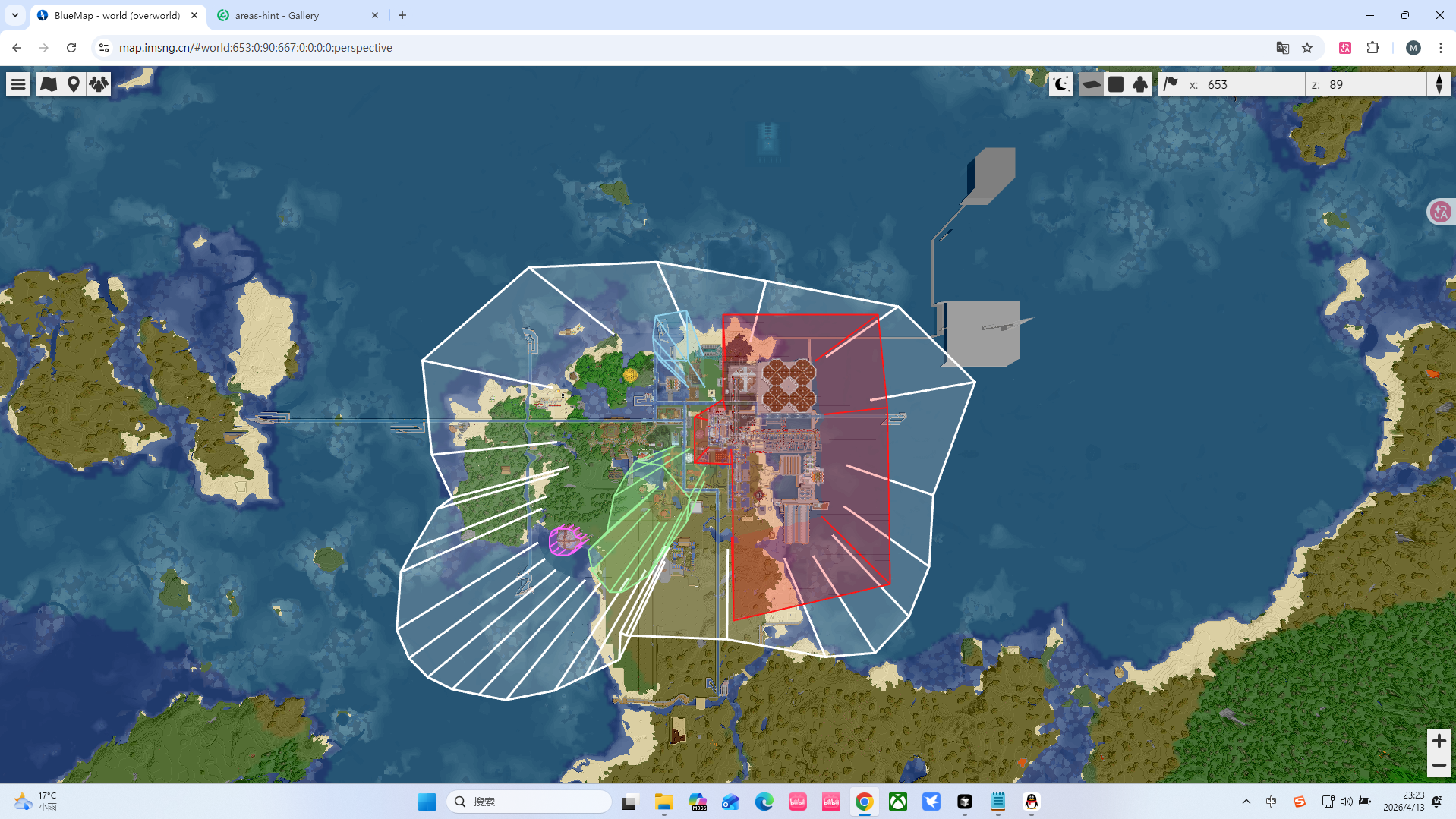 bluemap可视化
 -
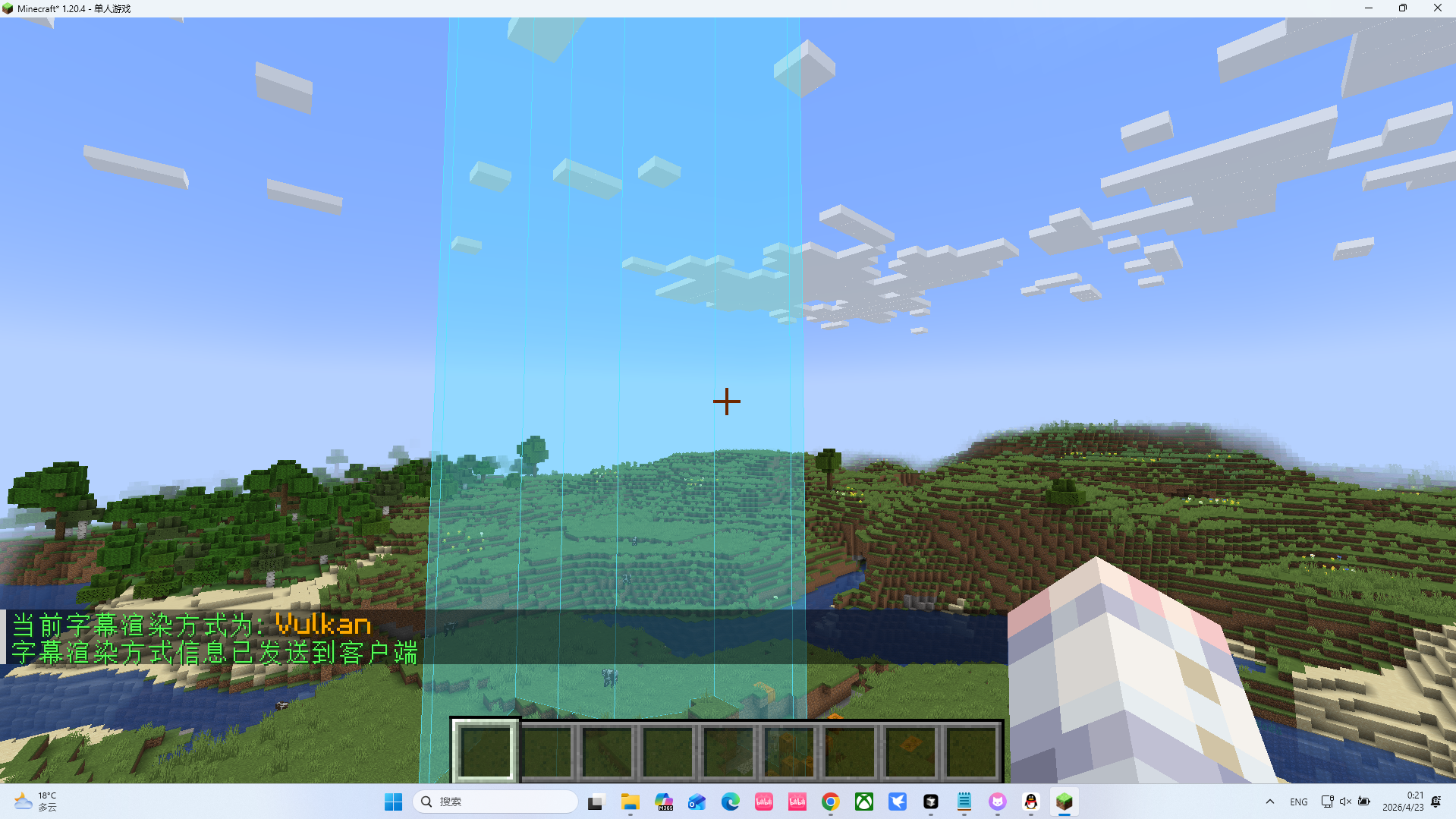 vulkan
 -
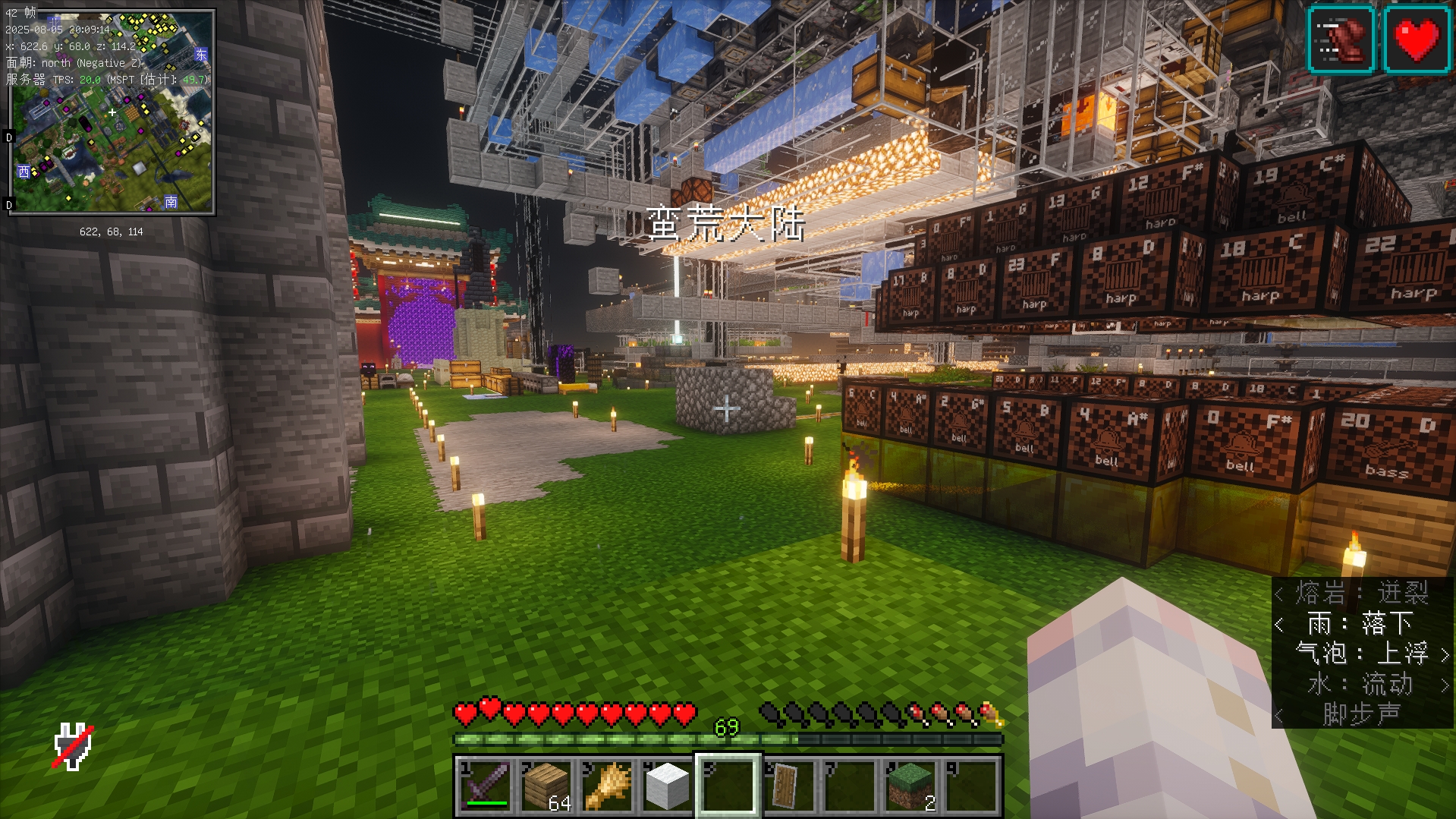
-
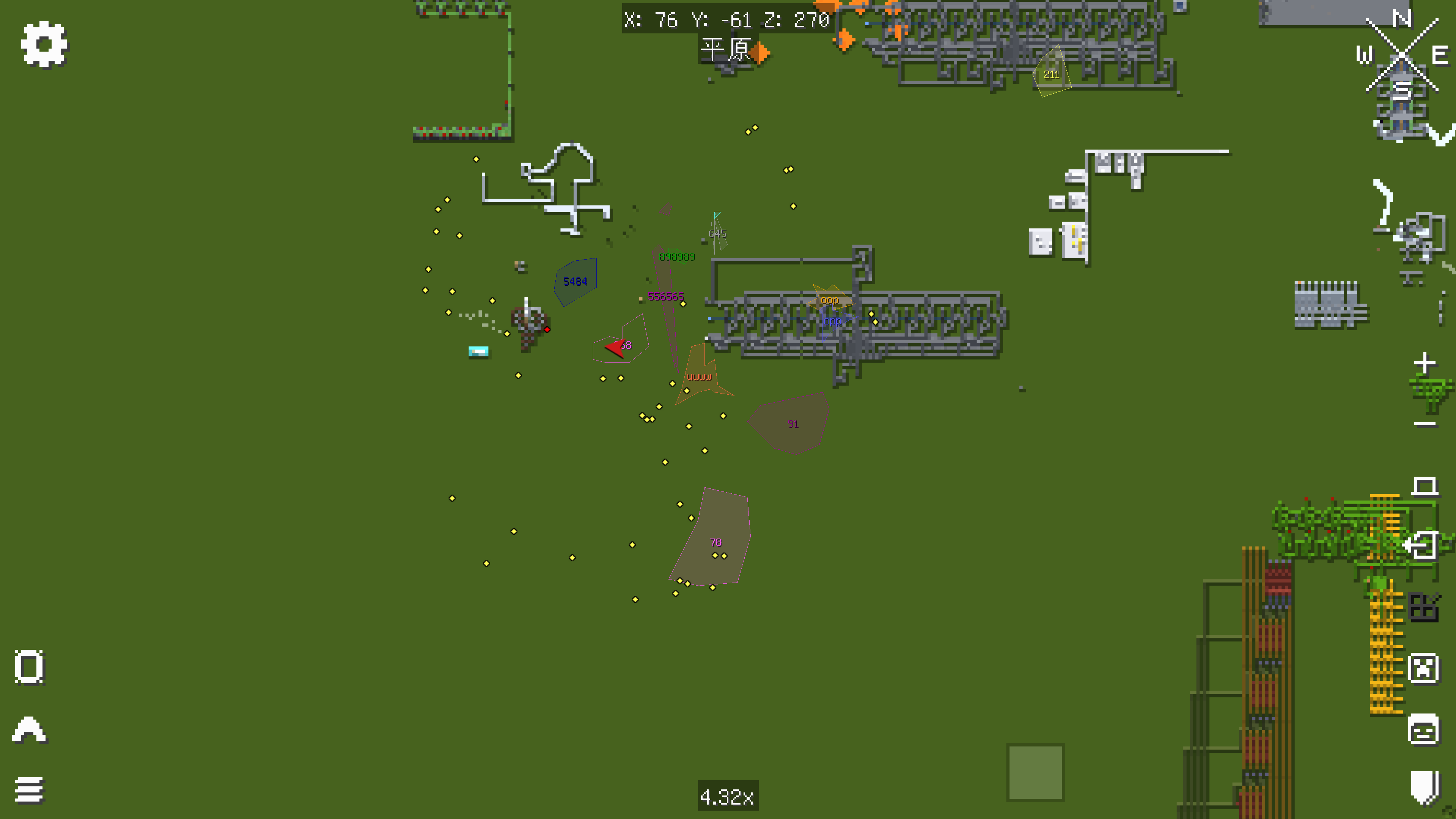 Xaero's World Map的联动
 -
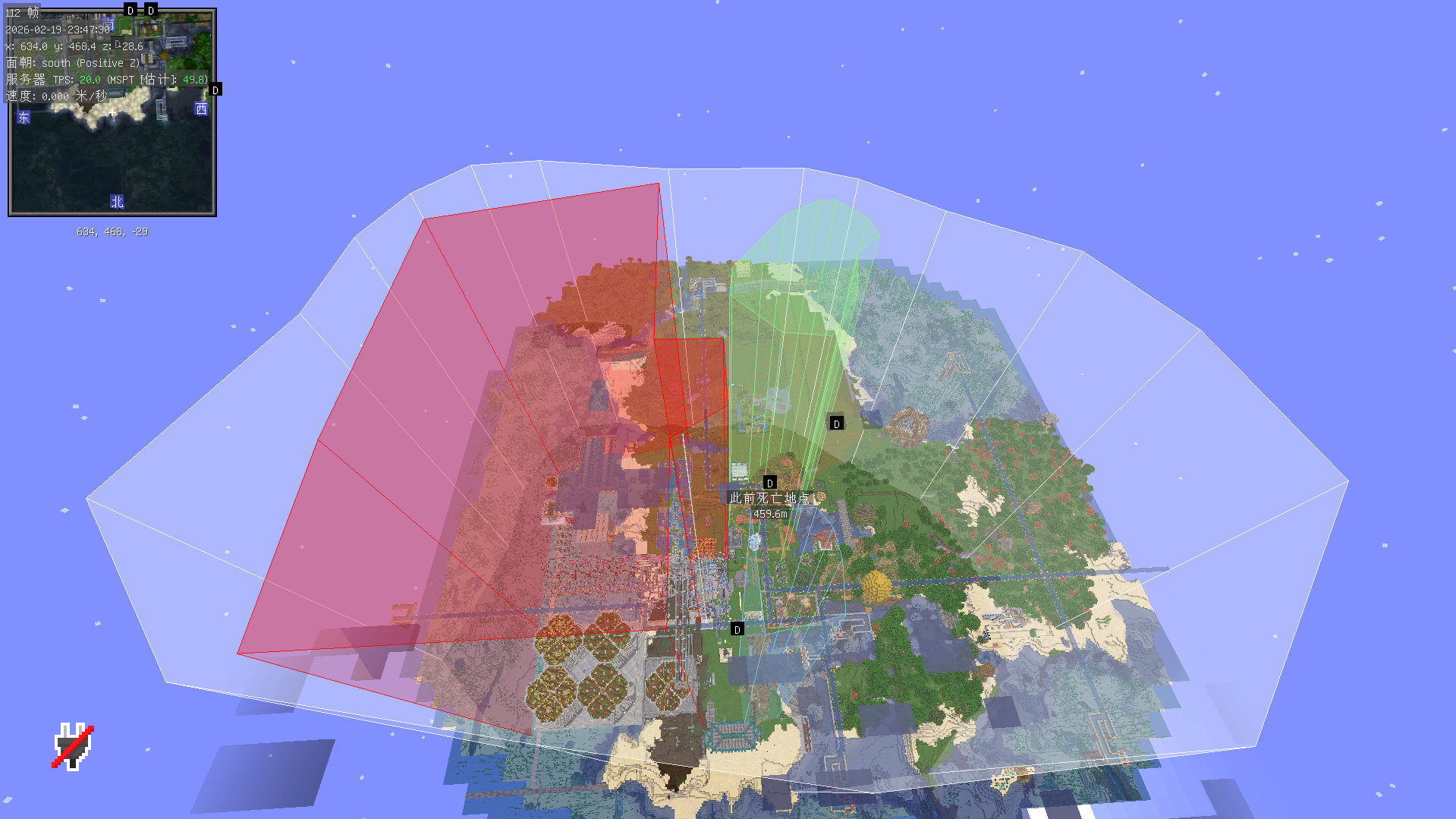 可视化
可视化
Versions
Files
Relations
Project Relations
More like this
Similar Mods
Suggestions use data such as tags, dependencies, dependents, descriptions, titles, and more to rank how much they overlap with this mod.
On ModDex
Community snapshot
By the numbers
Statistics

Want to reach Minecraft players?
We're looking for a server hosting partner to feature here and other parts of the site. Interested? Send us a message!
Get in touchGet it on
Available Platforms
On ModDex
Community snapshot
By the numbers