Community listing page, reviews here may not be monitored by the author.
Area Restore

No reviews yet
Mark a small area and turn it into a self-regenerating mining zone — broken blocks drop loot, then come back.
Community voices
Reviews
No reviews yet. Be the first to review this project!
Get it on
Available Platforms
About
Project Details
For authors
Embed Badge
If you're the author of this project, you can embed a live badge anywhere that supports HTML or Markdown. It updates automatically whenever ratings change.
Use HTML for any page that supports it, or Markdown for README files and Markdown-based descriptions.
Identifiers
Platform IDs
Resources
External Links
About
Description
Area Restore
Tired of running back to the mines every time you need more iron? Area Restore lets you pick a small region of blocks and turn it into a self-regenerating mining zone. Break a block, get the drops, and a few seconds later the block reappears — exactly where it was, with exactly the same state.
Features
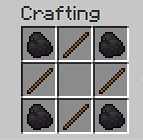
- Area Selector — a craftable tool. Right-click two corners to mark an area (auto-clamped to a 3×3×3 maximum), then right-click in the air to confirm.
- Source-agnostic regeneration — works with any way of breaking blocks: player hands, pickaxes, Create's Mechanical Drill, TNT, even other mods.
- Configurable delay — change
regenDelayTicksin<world>/serverconfig/arearestore-server.toml. Default 3 seconds, range 0.05s–5min. - Persists everywhere — snapshots are stored at the world level, so the tool can sit in a chest, in your ender chest, on the floor — regeneration keeps going.
- Subtle feedback — selection outline shown only to the holder; a soft chime and particle puff when a block regrows.
Crafting
How to use
- Craft the Area Selector.
- Right-click two blocks to define opposite corners.
- Right-click in the air to confirm and start the snapshot.
- Break blocks inside the area — drops fall normally, blocks regenerate after the delay.
- Right-click in the air again to release and stop regeneration.
- Sneak + right-click to fully reset.
Requirements
- Minecraft 1.21.1
- NeoForge 21.1.x (tested on 21.1.222)
- Java 21
License
MIT — fork, modify, include in modpacks freely.
Screenshots
Gallery
Versions
Files
Relations
Project Relations
More like this
Similar Mods
Suggestions use data such as tags, dependencies, dependents, descriptions, titles, and more to rank how much they overlap with this mod.
On ModDex
Community snapshot
By the numbers
Statistics
Want to reach Minecraft players?
We're looking for a server hosting partner to feature here and other parts of the site. Interested? Send us a message!
Get in touchGet it on
Available Platforms
On ModDex
Community snapshot
By the numbers
Statistics
Resources