
ArenaParkour
No reviews yet
Minecraft Parkour plugin using BattleArena. Create your own parkour courses with configurable checkpoints that works as a minigame or as a lobby parkour.
Features small, self-contained games within Minecraft.
Paper is a fork of Spigot that adds its own plugin API on top of the Bukkit API. All Spigot plugins are compatible with paper, not all paper plugins are compatible with Spigot.
Community voices
Reviews
Click once to include, again to exclude, again to clear
No reviews yet. Be the first to review this project!
Get it on
Available Platforms
 Modrinth
Compatibility
Supported Environments
About
Project Details
For authors
Embed Badge
If you're the author of this project, you can embed a live badge anywhere that supports HTML or Markdown. It updates automatically whenever ratings change.
Use HTML for any page that supports it, or Markdown for README files and Markdown-based descriptions.
Identifiers
Platform IDs
About
Description


A parkour plugin using BattleArena
ArenaParkour is a parkour plugin using BattleArena, allowing you to create your own parkour courses with configurable checkpoints. Supports creating parkour minigames, or integrating into existing areas (i.e. lobby parkours).
Parkour Templates
ArenaParkour includes a couple templates for pre-made parkour games. These are the parkour minigame, which act as a standard minigame for parkour, and the lobby parkour which is less of a minigame but sits in an existing lobby.
You can find these modes in the templates folder.
Requirements
- A Paper server (or other derivative) running 1.19.4 or above
- The BattleArena plugin
Map Creation
- The first step follows the same steps as outlined in the BattleArena Map Creation documentation. For ArenaParkour, you will use the /parkour command to initiate the map creation.
- Once you have created a map, you now need to set the parkour checkpoints. Run /parkour checkpoint add to start the process.
- A wizard will open, asking you to set the checkpoint position. Follow the instructions in chat to set the checkpoint position.
- The first checkpoint position will become the start of the parkour, with every subsequent checkpoint becoming the "end" position.
- After setting the checkpoints, you may need to run /battlearena reload to reload the checkpoints, and the parkour will start.
Configuration
The default configuration for Parkour can be found in plugins/ArenaParkour/arenas/parkour.yml. This can be modified in any way. See the Arena Configuration page for more details.
Additionally, configs for other parkour templates can be found here.
Full documentation for ArenaParkour can be found on the BattleDocs website.
Permissions
| Permission | Command |
|---|---|
| battlearena.command.parkour.checkpoint.add | /parkour checkpoint add |
| battlearena.command.parkour.checkpoint.remove | /parkour checkpoint remove |
| battlearena.command.parkour.checkpoint.clear | /parkour checkpoint clear |
| battlearena.command.parkour.checkpoint.index | /parkour checkpoint index |
| battlearena.command.parkour.checkpoint.list | /parkour checkpoint list |
| battlearena.command.parkour.checkpoint | /parkour checkpoint |
Links
- Website: https://www.battleplugins.org
- Discord: BattlePlugins Discord
- Donate: BattlePlugins Patreon
Screenshots
Gallery
-
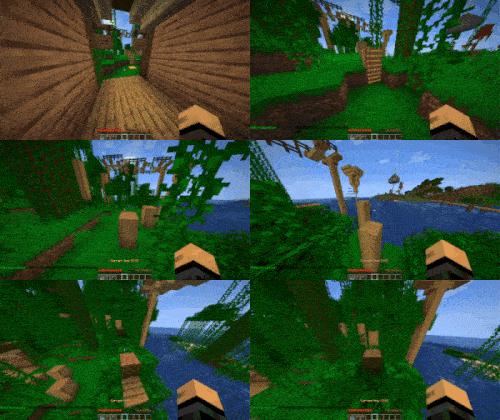 Parkour Start Parkour which starts automatically when a player enters the parkour region.
 -
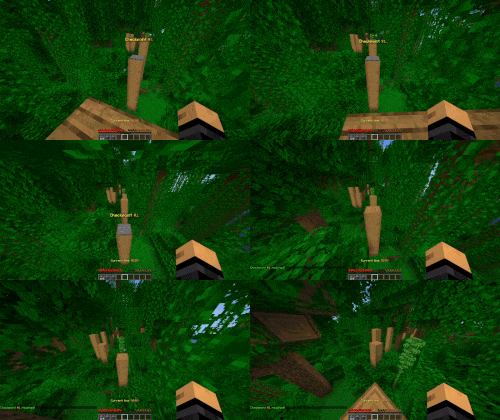 Parkour Checkpoint Parkour checkpoints that save your last position when you jump on them.
Versions
Files
Relations
Project Relations
More like this
Similar Mods
Suggestions use data such as tags, dependencies, dependents, descriptions, titles, and more to rank how much they overlap with this mod.
On ModDex
Community snapshot
By the numbers
Statistics

Want to reach Minecraft players?
We're looking for a server hosting partner to feature here and other parts of the site. Interested? Send us a message!
Get in touchGet it on
Available Platforms
On ModDex
Community snapshot
By the numbers