
Community listing page, reviews here may not be monitored by the author.
Armor Loadout


No reviews yet
Quickly save, manage, and switch between armor sets using hotkeys and visual hover tooltips.
Community voices
Reviews
No reviews yet. Be the first to review this project!
Get it on
Available Platforms
Compatibility
Supported Environments
Runs entirely on the client. Works on vanilla servers.
About
Project Details
For authors
Embed Badge
If you're the author of this project, you can embed a live badge anywhere that supports HTML or Markdown. It updates automatically whenever ratings change.
Use HTML for any page that supports it, or Markdown for README files and Markdown-based descriptions.
Identifiers
Platform IDs
Resources
External Links
About
Description
Armor Loadout
Armor Loadout is a lightweight Fabric mod that allows you to easily save and switch between up to 3 custom armor sets on the fly.
DISCLAIMER: This mod automates inventory management and equipment swapping. Please check the rules of the server you play on before using this in multiplayer. Some server owners, developers, or anti-cheat systems may restrict automated inventory interaction mods, which could result in a punishment or ban. Use this mod at your own discretion.
Features
- Quick Hotkey Swapping: Press `Ctrl + 1`, `Ctrl + 2`, or `Ctrl + 3` to instantly equip your saved armor sets.
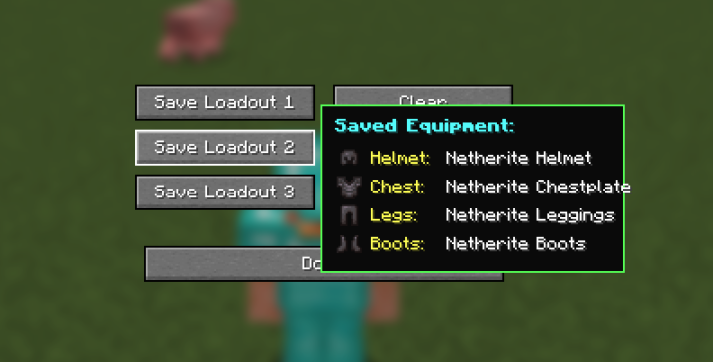
- Visual Tooltip Card: Hover over any loadout button in the settings menu to preview 2D item icons of your saved armor set.
- Smart Inventory Priority: Swapped armor pieces automatically return to your main inventory first without cluttering your hotbar.
- Custom GUI: Access the loadout manager screen anytime by pressing the `.` (Period) key.
How to Use
1. Wear the armor set you want to save.
2. Press `.` (Period) to open the **Armor Loadout Settings** menu.
3. Click Save Loadout 1, 2, or 3.
4. Close the menu and press `Ctrl + 1`, `Ctrl + 2`, or `Ctrl + 3` anywhere in game to equip your set!
Dependencies
Fabric API (Required)
Suggestions/Feedback
If you have any suggestions/feedback or requesting mods, you can dm me on discord @deuxch
Armor Loadout
Armor Loadout is a lightweight Fabric mod that allows you to easily save and switch between up to 3 custom armor sets on the fly.
DISCLAIMER: This mod automates inventory management and equipment swapping. Please check the rules of the server you play on before using this in multiplayer. Some server owners, developers, or anti-cheat systems may restrict automated inventory interaction mods, which could result in a punishment or ban. Use this mod at your own discretion.
Features
- Quick Hotkey Swapping: Press
Ctrl + 1,Ctrl + 2, orCtrl + 3to instantly equip your saved armor sets. - Visual Tooltip Card: Hover over any loadout button in the settings menu to preview 2D item icons of your saved armor set.
- Smart Inventory Priority: Swapped armor pieces automatically return to your main inventory first without cluttering your hotbar.
- Custom GUI: Access the loadout manager screen anytime by pressing the
.(Period) key.
How to Use
- Wear the armor set you want to save.
- Press
.(Period) to open the Armor Loadout Settings menu. - Click Save Loadout 1, 2, or 3.
- Close the menu and press
Ctrl + 1,Ctrl + 2, orCtrl + 3anywhere in game to equip your set!
Dependencies
- Fabric API (Required)
Screenshots
Gallery
-
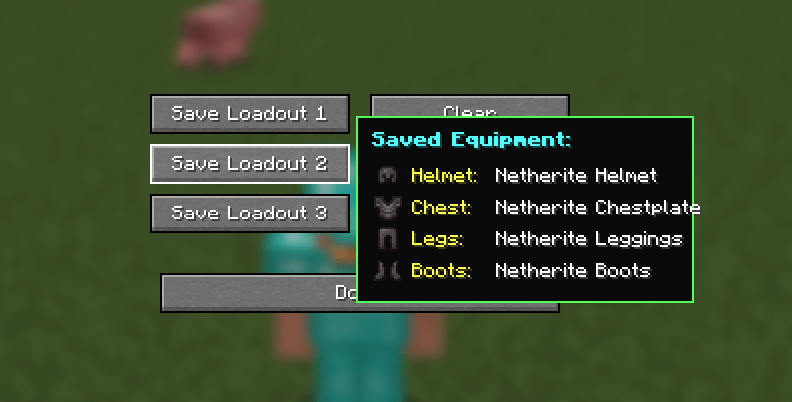 image.png image.png
Versions
Files
Relations
Project Relations
More like this
Similar Mods
Suggestions use data such as tags, dependencies, dependents, descriptions, titles, and more to rank how much they overlap with this mod.
On ModDex
Community snapshot
By the numbers
Statistics
Want to reach Minecraft players?
We're looking for a server hosting partner to feature here and other parts of the site. Interested? Send us a message!
Get in touchGet it on
Available Platforms
On ModDex
Community snapshot
By the numbers
Statistics
Resources