
Community listing page, reviews here may not be monitored by the author.
AST-Tweaks

No reviews yet
A lightweight Fabric 1.19.4 client tweaks mod with 13+ toggleable QoL features: auto eat, auto totem, auto repair, mass grindstone, inventory sort, entity culling, lava highlight, custom scoreboard, notepad and more. Sodium-compatible.
Community voices
Reviews
No reviews yet. Be the first to review this project!
Get it on
Available Platforms
Compatibility
Supported Environments
Runs entirely on the client. Works on vanilla servers.
About
Project Details
For authors
Embed Badge
If you're the author of this project, you can embed a live badge anywhere that supports HTML or Markdown. It updates automatically whenever ratings change.
Use HTML for any page that supports it, or Markdown for README files and Markdown-based descriptions.
Identifiers
Platform IDs
About
Description
AST-Tweaks
A collection of small client-side quality-of-life tweaks for Minecraft 1.19.4 (Fabric). Originally built for the ASTRAL SMP community, but works on any vanilla or modded server.
AST-Tweaks bundles 13+ independent QoL features into a single lightweight client mod. Every feature can be toggled and configured individually, so you can use only what you need. The mod is fully client-side — no server installation required, safe for vanilla and most modded servers.
✨ Features
Automation
- Auto Eat — Automatically eats food when your hunger drops below a configurable threshold. Per-food blacklist included.
- Auto Totem — Automatically moves a Totem of Undying back to your off-hand after one is consumed.
- Auto Repair — Fast-repairs Mending items by using Experience Bottles from a target hotbar slot, with adjustable clicks-per-tick (Tweakeroo style).
- Auto Move — Hold-free auto-walk in any of the four directions, with a dedicated keybind per direction.
Inventory & Items
- Inventory Sort — Sort your inventory or any open container with a keybind (IPN style). Multiple sort modes (Item ID / Name / Category / Stack count / Total count), per-slot exclusions, and optional in-GUI sort buttons.
- Mass Grindstone — Bulk-remove enchantments using the grindstone (ItemScroller / MassCraft style). Whitelist/blacklist mode, configurable operations-per-tick, and an option to drop results for maximum speed.
- Bone Meal Filter — Restrict bone meal usage to a whitelist of blocks to prevent wasting it on the wrong crops.
- Silk Touch Switch — Automatically switches to a Silk Touch tool when
you start mining a target block. Integrates with Tweakeroo's
toolSwitchfor the actual swap.
Rendering & Performance
- Entity Culling — Fine-grained control over entity rendering: hide armor stands, falling blocks, dead mobs, or all non-player entities; set per-frame render limits for item entities and XP orbs; per-entity visibility list.
- Lava Highlight — Highlights lava source blocks and flowing lava with configurable colors, so you can spot them at a glance. Compatible with Sodium via a dedicated mixin.
HUD & UI
- Custom Scoreboard — Replaces the vanilla sidebar scoreboard with a customizable renderer: drag-and-drop position editor, scale, header / body / text colors, paging support for long boards, max line limit, and optional rank numbers.
- Notepad — A simple in-game notepad screen for jotting down coordinates, recipes, or reminders. Notes are persisted between sessions.
- Mouse Sensitivity Toggle — Switch between your normal sensitivity and a target value (e.g. for sniping with bows) with a single keybind.
Quality of Life
- Update Checker — Optionally checks Modrinth for new versions of the mod on startup / daily / weekly and shows a toast notification when one is available.
All features are configured from the in-game settings screen (Mod Menu → AST-Tweaks → Settings). Every toggle, list, and keybind is saved per-profile.
📦 Requirements
| Minecraft | 1.19.4 |
| Mod loader | Fabric Loader 0.14.21 or newer |
| Java | 17 or newer |
| Required | Fabric API |
| Recommended | Mod Menu 6.0+ · Cloth Config 10.0+ |
| Optional | Sodium (Lava Highlight is Sodium-compatible) · Tweakeroo (used by Silk Touch Switch) |
🖥️ Side
Client only. AST-Tweaks does not need to be installed on the server. You can use it on vanilla servers, SMPs, and most modded servers without issues.
📥 Installation
- Install Fabric Loader for Minecraft 1.19.4.
- Download the required dependencies:
- Fabric API (required)
- Mod Menu (recommended)
- Cloth Config (recommended)
- Drop
ast-tweaks-x.x.x.jarinto yourmodsfolder.
🌐 Languages
- English (
en_us) - 日本語 (
ja_jp)
🐛 Issues & Source
- Source code: https://github.com/ASTRAL-SMP/AST-Tweaks
- Bug reports: https://github.com/ASTRAL-SMP/AST-Tweaks/issues
📜 License
Licensed under the Apache-2.0 License.
日本語
AST-Tweaks は、Minecraft 1.19.4 (Fabric) 向けの軽量な クライアントサイド QoL Mod です。 元々は ASTRAL SMP コミュニティのために作られましたが、 バニラサーバー・SMP・ほとんどの Modded サーバーでそのまま使えます。
13個以上の独立した機能を1つのMod内にまとめてあり、 すべての機能を個別にオン/オフ・設定できます。必要なものだけ使えます。 完全にクライアントサイドで動作するため、サーバー側へのインストールは不要です。
✨ 機能一覧
自動化
- Auto Eat(自動食事) — 空腹度が設定したしきい値以下になると自動で食事します。食べ物ごとのブラックリスト対応。
- Auto Totem(自動トーテム) — 不死のトーテムを使った後、オフハンドに自動補充します。
- Auto Repair(自動修理) — Mending 付きアイテムを、ホットバーの指定スロットから経験値の瓶を使って高速修理します(Tweakeroo 互換挙動)。
- Auto Move(自動移動) — 前後左右それぞれにキーバインドを割り当てた、押しっぱなし不要のオート歩行機能。
インベントリ・アイテム
- Inventory Sort(インベントリソート) — キー1つでインベントリやコンテナをソート(IPN 風)。アイテム ID / 名前 / カテゴリ / スタック数 / 合計数の5モード、スロット除外設定、GUI 内ソートボタン対応。
- Mass Grindstone(一括グラインドストーン) — 砥石でエンチャントを一括削除します(ItemScroller / MassCraft 風)。ホワイトリスト/ブラックリストモード、Tickあたりの処理回数調整、結果を地面にドロップする高速モードあり。
- Bone Meal Filter(骨粉フィルタ) — 骨粉の使用先をホワイトリストのブロックに限定。間違って成長させたくない作物への誤使用を防げます。
- Silk Touch Switch(シルクタッチ自動切替) — 指定ブロックを掘り始めたとき、自動でシルクタッチ付きのツールに切り替えます。実際の切り替えには Tweakeroo の
toolSwitchを使います。
描画・パフォーマンス
- Entity Culling(エンティティカリング) — エンティティ描画を細かく制御。防具立て / 落下ブロック / 死亡 mob / プレイヤー以外の全エンティティの非表示、アイテム・経験値オーブのフレームあたり描画上限、エンティティごとの個別表示設定。
- Lava Highlight(溶岩ハイライト) — 溶岩のソースブロックとフローを任意の色でハイライト表示。Sodium に対応(専用 mixin 同梱)。
HUD・UI
- Custom Scoreboard(カスタムスコアボード) — バニラのサイドバースコアボードを置き換えます。ドラッグ&ドロップでの位置編集、スケール調整、ヘッダー / 本体 / 文字色のカスタマイズ、長いボードのページング、最大行数、ランク番号表示などに対応。
- Notepad(メモ帳) — ゲーム内で開けるシンプルなメモ帳画面。座標やレシピ、TODO などを書き残せます。セッションをまたいで保存されます。
- Mouse Sensitivity Toggle(マウス感度切替) — キー1つで通常の感度と任意の感度(例: 弓のスナイプ用)を切り替えます。
その他
- Update Checker(アップデート確認) — 起動時 / 毎日 / 毎週のいずれかで Modrinth API からアップデートを確認し、新バージョンがあればトースト通知します。
すべての機能はゲーム内設定画面(Mod Menu → AST-Tweaks → Settings)から 設定でき、トグル・リスト・キーバインドはすべてプロファイルに保存されます。
📦 動作環境
| Minecraft | 1.19.4 |
| Mod loader | Fabric Loader 0.14.21 以降 |
| Java | 17 以降 |
| 必須 | Fabric API |
| 推奨 | Mod Menu 6.0+ ・ Cloth Config 10.0+ |
| 任意 | Sodium(Lava Highlight が Sodium 対応)・Tweakeroo(Silk Touch Switch から利用) |
🖥️ サイド
クライアント専用です。サーバー側へのインストールは不要なので、 バニラサーバー、SMP、ほとんどの Modded サーバーで安心して使えます。
📥 インストール
- Minecraft 1.19.4 用の Fabric Loader を導入する
- 依存 Mod をダウンロードする
- Fabric API(必須)
- Mod Menu(推奨)
- Cloth Config(推奨)
ast-tweaks-x.x.x.jarをmodsフォルダに入れる
🌐 対応言語
- English (
en_us) - 日本語 (
ja_jp)
🐛 不具合報告 / ソース
- ソースコード: https://github.com/ASTRAL-SMP/AST-Tweaks
- 不具合報告: https://github.com/ASTRAL-SMP/AST-Tweaks/issues
📜 ライセンス
Apache-2.0 License で公開されています。
Screenshots
Gallery
-
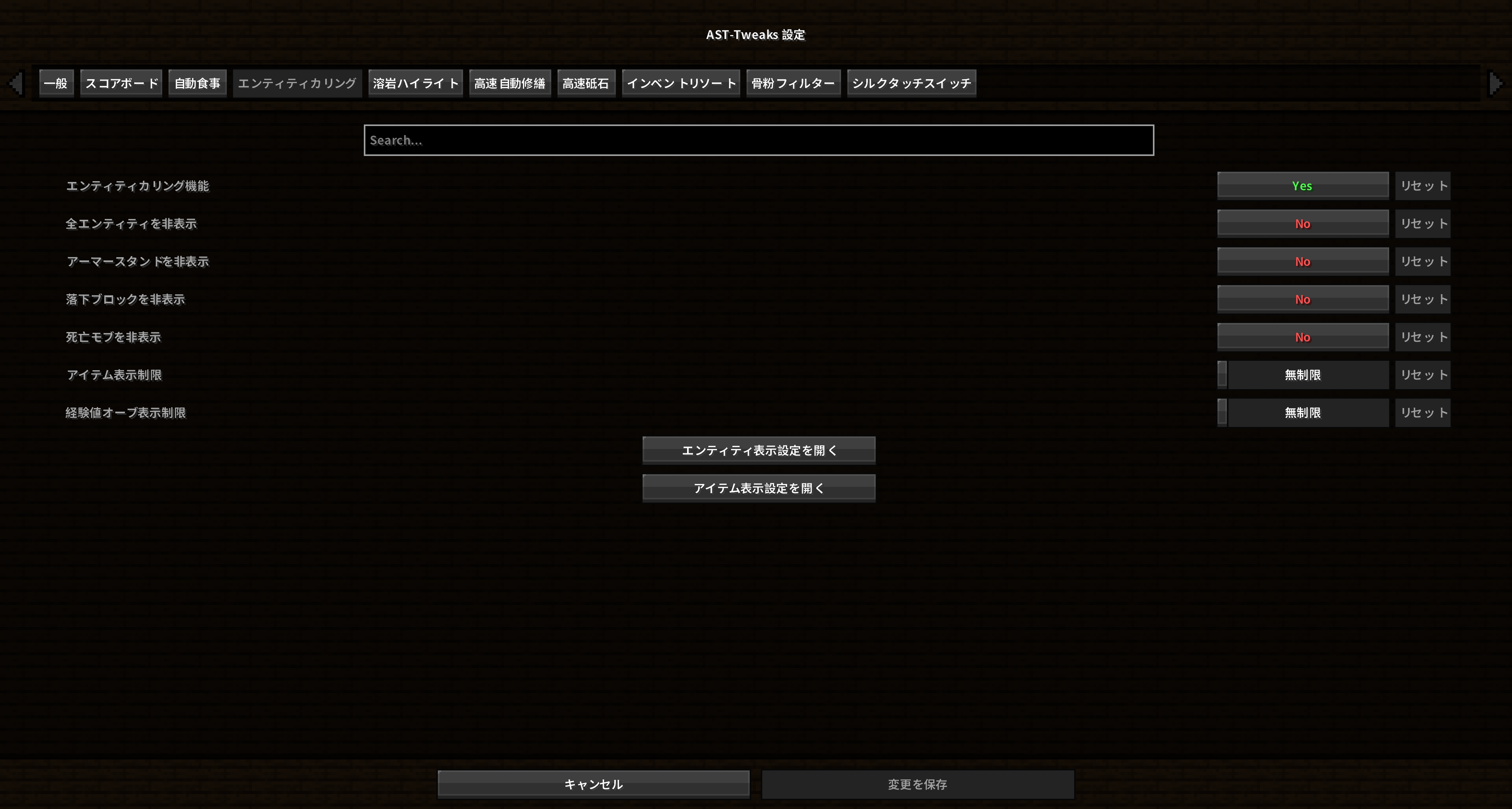 エンティティカリング設定画面。ちなみにアイテム単位、エンティティ単位でカリング出来ます
 -
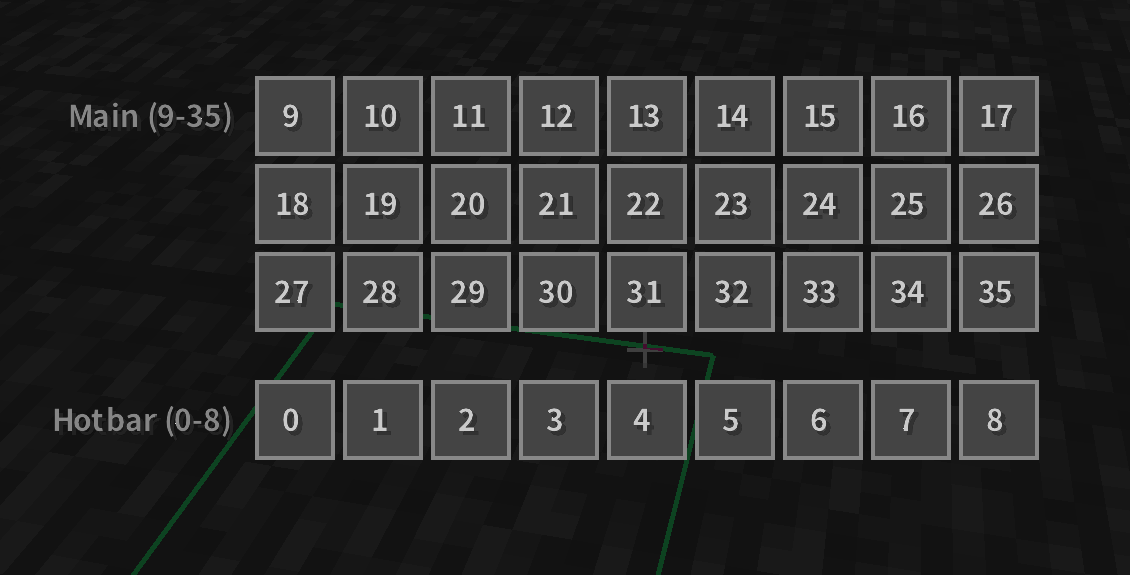 インベントリソート除外設定画面
 -
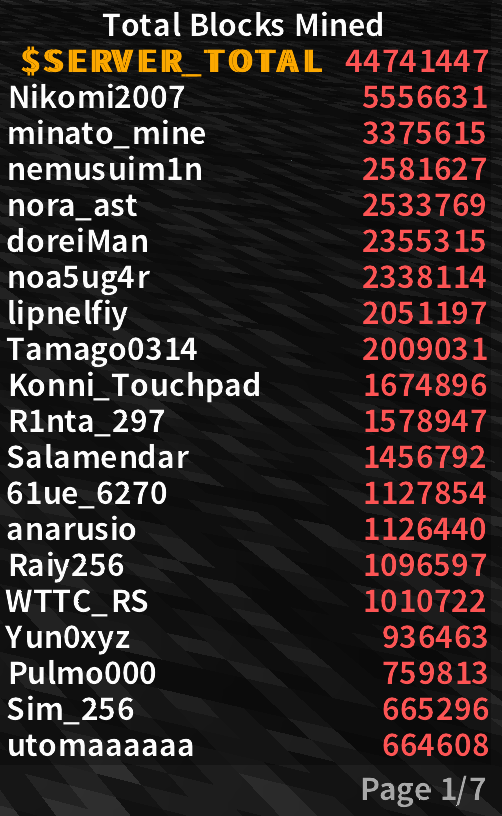 scoreboard
Versions
Files
Relations
Project Relations
More like this
Similar Mods
Suggestions use data such as tags, dependencies, dependents, descriptions, titles, and more to rank how much they overlap with this mod.
On ModDex
Community snapshot
By the numbers
Statistics

Want to reach Minecraft players?
We're looking for a server hosting partner to feature here and other parts of the site. Interested? Send us a message!
Get in touchGet it on
Available Platforms
On ModDex
Community snapshot
By the numbers