Community listing page, reviews here may not be monitored by the author.
AuraLumina


No reviews yet
Overhauls the vanilla glowing outline into 13 dynamic, reactive auras. 100% Client-Side. No PvP disadvantage!
Community voices
Reviews
No reviews yet. Be the first to review this project!
Get it on
Available Platforms
Compatibility
Supported Environments
Runs entirely on the client. Works on vanilla servers.
About
Project Details
For authors
Embed Badge
If you're the author of this project, you can embed a live badge anywhere that supports HTML or Markdown. It updates automatically whenever ratings change.
Use HTML for any page that supports it, or Markdown for README files and Markdown-based descriptions.
Identifiers
Platform IDs
Resources
External Links
About
Description
AuraLumina
AuraLumina is a revolutionary, highly-optimized Client-Side mod that completely overhauls Minecraft's boring, static glowing effect. Instead of a simple white outline, your character now emits dynamic, mathematical, and interactive auras that react in real-time to your gameplay.
Zero PvP Disadvantage (100% Client-Side)
Are you worried about being spotted in the dark or through walls? Don't be.
AuraLumina is entirely Client-Side, meaning ONLY YOU can see your glowing effects. To every other player on the server, you look completely normal. You get to enjoy a gorgeous, Triple-A visual experience on your screen with absolutely zero competitive disadvantage in PvP or stealth situations.
The 13 Reactive Effects
Customize your aura with 13 unique mathematical behaviors directly from the sleek, in-game Menu:
💥 Feedback (Game-Feel): Emit a pure white flash when performing a successful shield parry, a green pulse when collecting experience orbs, and black static when taking critical damage.
🏔️ Altitude: Your aura becomes an altimeter. Glows sky blue on high mountains and volcanic red deep in the mines.
❤️ Health: A green vital indicator that turns critical red and pulses like a heartbeat if your health drops below 40%.
⚡ Speed: A static color at rest that bursts into a hyper-fast rainbow when sprinting or flying with Elytras.
☀️ Celestial: Syncs with your world's sky. Warm tones at dawn/dusk, solar yellow by day, and deep blue by night.
⚔️ Fury & Tension: Emits a fiery flash the exact moment you attack, or pulses with energy as you draw a bow/trident.
🌌 Cosmic & Jade: Project spatial energy alternating between deep purples, or simulate unstable digital "glitches" with emerald green flickers.
🌈 Rainbow, Aurora, Flash & Normal: Beautiful, smooth chromatic cycles, customizable blink rates, and pure solid colors of your choice.
Triple-A Features
💾 Persistent Configuration & Auto-Save
Your setup travels with you. Whether you hop into a Singleplayer world or join a Multiplayer server, your selected aura, intensity, language, and presets are saved automatically and permanently.
🚀 Dynamic FPS Optimization
AuraLumina constantly monitors your PC's performance invisibly. If your game drops below 60 FPS or 30 FPS due to heavy modpacks or entities, the mod automatically reduces the aura's background calculation refresh rate. You won't notice the visual change, but your PC will remain lag-free.
🎛️ Profile System & Keybinds
Save up to 5 favorite aura configurations (Effect + Color + Speed + Intensity). Name your profiles in the menu and link them to custom Keyboard Shortcuts via Minecraft's Control settings to swap between "Combat Mode" or "Exploration Mode" instantly without opening the GUI!
👁️ Colorblind Mode (Protanopia Filter)
Accessibility matters. Click the RGB Eye icon in the menu to apply a global mathematical filter to the entire mod. It alters the glowing effects, UI neon borders, and palettes to high-contrast colors (shifting pure reds to yellows/oranges) for visually impaired players.
🌍 Native Localization (14 Languages)
AuraLumina features a built-in dictionary independent of your Minecraft language settings. Play the mod perfectly translated into English, Spanish, Hindi, Bengali, French, Arabic, Mandarin Chinese, Portuguese, Indonesian, Urdu, Russian, German, Japanese, or Korean.
For Server Admins & Modpack Creators (Server Lock)
Are you a server owner who wants to offer AuraLumina as a VIP reward, a quest unlock, or an achievement prize? AuraLumina has a built-in Server Lock API using vanilla commands!
Since the mod is Client-Side, you can lock or unlock the mod's GUI for specific players by sending them a hidden `/tellraw` message from the server console or a command block:
- To LOCK the mod for a player:
`/tellraw [PlayerName] {"text":"[AURALUMINA:LOCK]"}` - To UNLOCK the mod for a player:
`/tellraw [PlayerName] {"text":"[AURALUMINA:UNLOCK]"}`
The mod automatically saves the lock state locally. To ensure a permanent experience (e.g., for VIP ranks), we recommend configuring your server to send the LOCK command automatically when a player joins (e.g., via EssentialsX "join-commands", Skript, or similar tools). This ensures that the user's status is always synchronized with their current rank or progression.
Note: The mod intercepts and hides these specific messages, so the player's chat won't be spammed. A locked player will see a custom red "LOCKED BY SERVER" screen if they attempt to open the menu.
How to Use
1. Press the assigned Keybind (default: 'L') to open the AuraLumina Menu.
2. Select your desired effect from the left list.
3. Tweak the Intensity, Speed, and Color from the right panel.
4. Preview your character in real-time right in the center of your screen!
5. Click "Save & Sync" (Enjoy the smooth fade transitions!).
License & Copyright
TopAsphalt Studios - All Rights Reserved.
This mod is licensed under CC BY-NC-ND 4.0 (Non-Commercial). You are free to download, play, and include AuraLumina in your modpacks. However, you are strictly prohibited from selling this mod, hiding it behind paywalls, or distributing modified versions of the code. For commercial inquiries, please contact TopAsphalt Studios.
AuraLumina by TopAsphalt Studios™
AuraLumina is a revolutionary, highly-optimized Client-Side mod that completely overhauls Minecraft's boring, static glowing effect. Instead of a simple white outline, your character now emits dynamic, mathematical, and interactive auras that react in real-time to your gameplay.
Zero PvP Disadvantage (100% Client-Side)
Are you worried about being spotted in the dark or through walls? Don't be. AuraLumina is entirely Client-Side, meaning ONLY YOU can see your glowing effects. To every other player on the server, you look completely normal. You get to enjoy a gorgeous, Triple-A visual experience on your screen with absolutely zero competitive disadvantage in PvP or stealth situations.
The 13 Reactive Effects
Customize your aura with 13 unique mathematical behaviors directly from the sleek, in-game Master Menu:
- 💥 Feedback (Game-Feel): Emit a pure white flash when performing a successful shield parry, a green pulse when collecting experience orbs, and black static when taking critical damage.
- 🏔️ Altitude: Your aura becomes an altimeter. Glows sky blue on high mountains and volcanic red deep in the mines.
- ❤️ Health: A green vital indicator that turns critical red and pulses like a heartbeat if your health drops below 40%.
- ⚡ Speed: A static color at rest that bursts into a hyper-fast rainbow when sprinting or flying with Elytras.
- ☀️ Celestial: Syncs with your world's sky. Warm tones at dawn/dusk, solar yellow by day, and deep blue by night.
- ⚔️ Fury & Tension: Emits a fiery flash the exact moment you attack, or pulses with energy as you draw a bow/trident.
- 🌌 Cosmic & Jade: Project spatial energy alternating between deep purples, or simulate unstable digital "glitches" with emerald green flickers.
- 🌈 Rainbow, Aurora, Flash & Normal: Beautiful, smooth chromatic cycles, customizable blink rates, and pure solid colors of your choice.
Triple-A Features
💾 Persistent Configuration & Auto-Save
Your setup travels with you. Whether you hop into a Singleplayer world or join a Multiplayer server, your selected aura, intensity, language, and presets are saved automatically and permanently.
🚀 Dynamic FPS Optimization
AuraLumina constantly monitors your PC's performance invisibly. If your game drops below 60 FPS or 30 FPS due to heavy modpacks or entities, the mod automatically reduces the aura's background calculation refresh rate. You won't notice the visual change, but your PC will remain lag-free.
🎛️ Profile System & Keybinds
Save up to 5 favorite aura configurations (Effect + Color + Speed + Intensity). Name your profiles in the menu and link them to custom Keyboard Shortcuts via Minecraft's Control settings to swap between "Combat Mode" or "Exploration Mode" instantly without opening the GUI!
👁️ Colorblind Mode (Protanopia Filter)
Accessibility matters. Click the RGB Eye icon in the menu to apply a global mathematical filter to the entire mod. It alters the glowing effects, UI neon borders, and palettes to high-contrast colors (shifting pure reds to yellows/oranges) for visually impaired players.
🌍 Native Localization (14 Languages)
AuraLumina features a built-in dictionary independent of your Minecraft language settings. Play the mod perfectly translated into English, Spanish, Hindi, Bengali, French, Arabic, Mandarin Chinese, Portuguese, Indonesian, Urdu, Russian, German, Japanese, or Korean.
For Server Admins & Modpack Creators (Server Lock)
Are you a server owner who wants to offer AuraLumina as a VIP reward, a quest unlock, or an achievement prize? AuraLumina has a built-in Server Lock API using vanilla commands!
Since the mod is Client-Side, you can lock or unlock the mod's GUI for specific players by sending them a hidden /tellraw message from the server console or a command block:
- To LOCK the mod for a player:
/tellraw [PlayerName] {"text":"[AURALUMINA:LOCK]"} - To UNLOCK the mod for a player:
/tellraw [PlayerName] {"text":"[AURALUMINA:UNLOCK]"}
The mod automatically saves the lock state locally. To ensure a permanent experience (e.g., for VIP ranks), we recommend configuring your server to send the LOCK command automatically when a player joins (e.g., via EssentialsX "join-commands", Skript, or similar tools). This ensures that the user's status is always synchronized with their current rank or progression.
Note: The mod intercepts and hides these specific messages, so the player's chat won't be spammed. A locked player will see a custom red "LOCKED BY SERVER" screen if they attempt to open the menu.
How to Use
- Press the assigned Keybind (default: 'L') to open the AuraLumina Menu.
- Select your desired effect from the left list.
- Tweak the Intensity, Speed, and Color from the right panel.
- Preview your character in real-time right in the center of your screen!
- Click "Save & Sync" (Enjoy the smooth fade transitions!).
License & Copyright TopAsphalt Studios - All Rights Reserved. This mod is licensed under CC BY-NC-ND 4.0 (Non-Commercial). You are free to download, play, and include AuraLumina in your modpacks. However, you are strictly prohibited from selling this mod, hiding it behind paywalls, or distributing modified versions of the code. For commercial inquiries, please contact TopAsphalt Studios.
Screenshots
Gallery
-
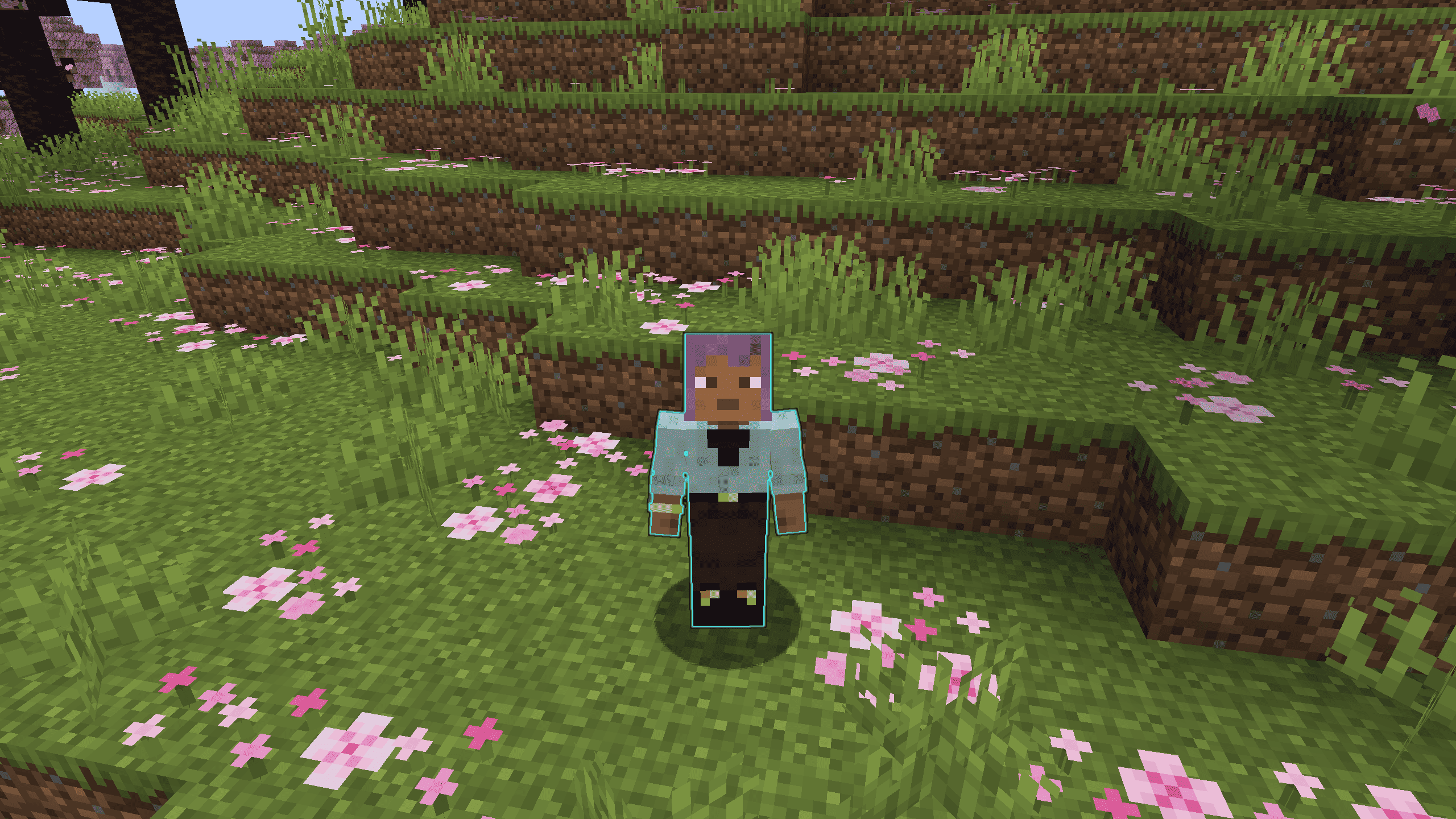 In-Game Aura Preview A gameplay screenshot showing a player character in a Cherry Grove biome with the mod's custom cyan aura effect active around them.
 -
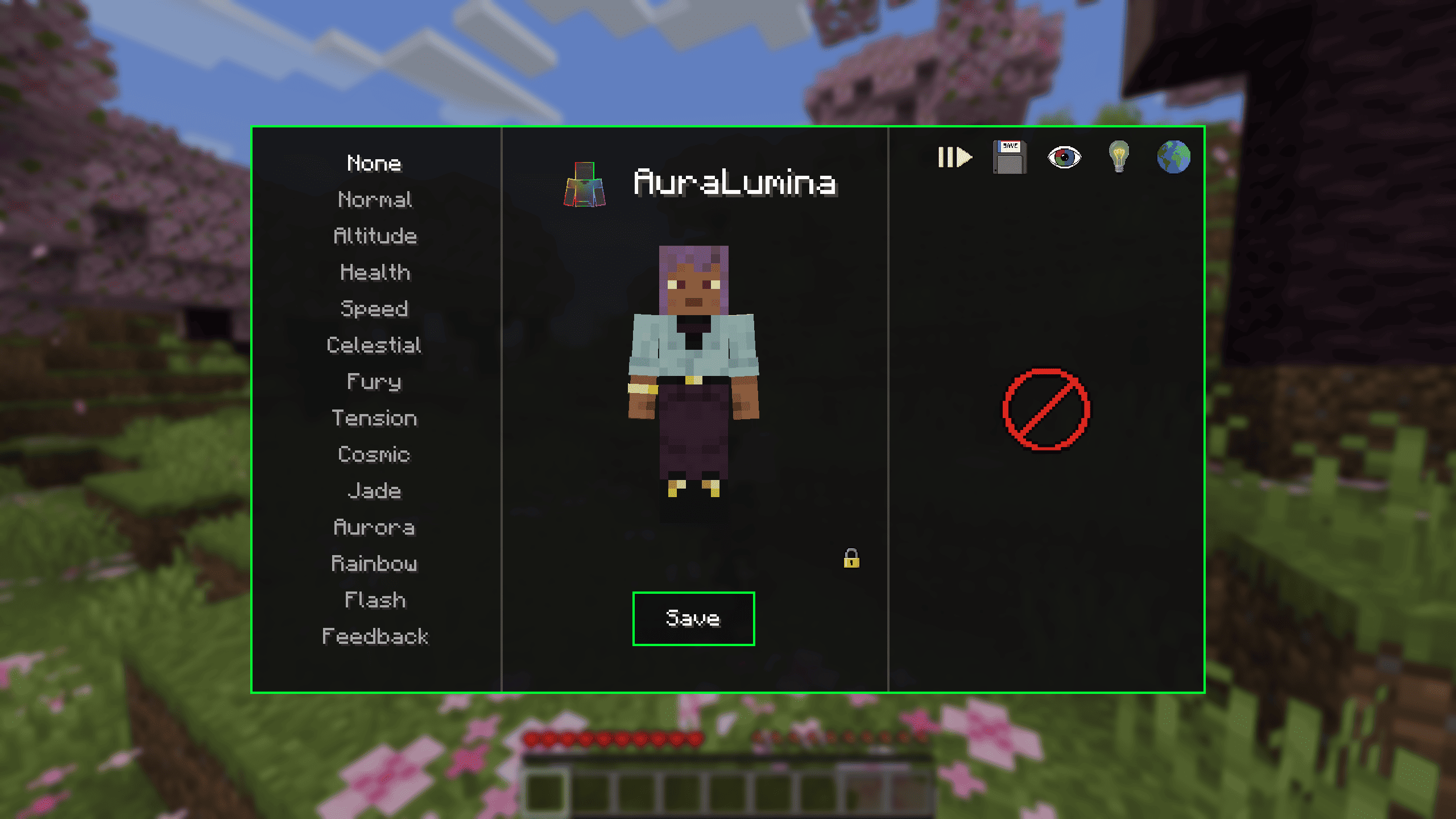 AuraLumina Effect Selection Menu The user interface of the mod where players can preview and select various visual effects (such as Normal, Altitude, Health, Speed, Celestial, and more) applied to the character, featuring a save button.
 -
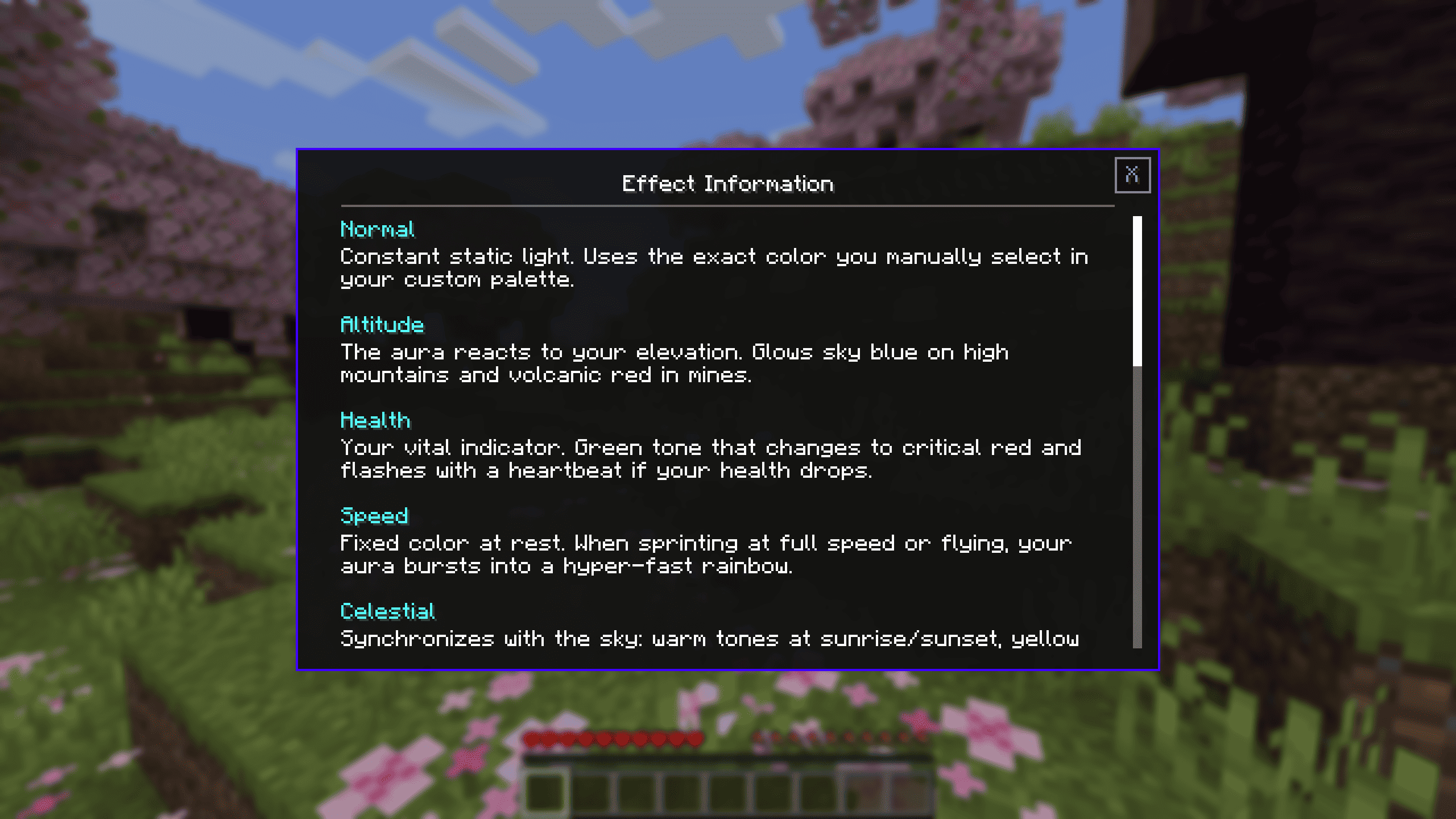 Effects Information Screen A detailed overview screen explaining the behavior of different aura effects such as Normal, Altitude, Health, Speed, and Celestial.
 -
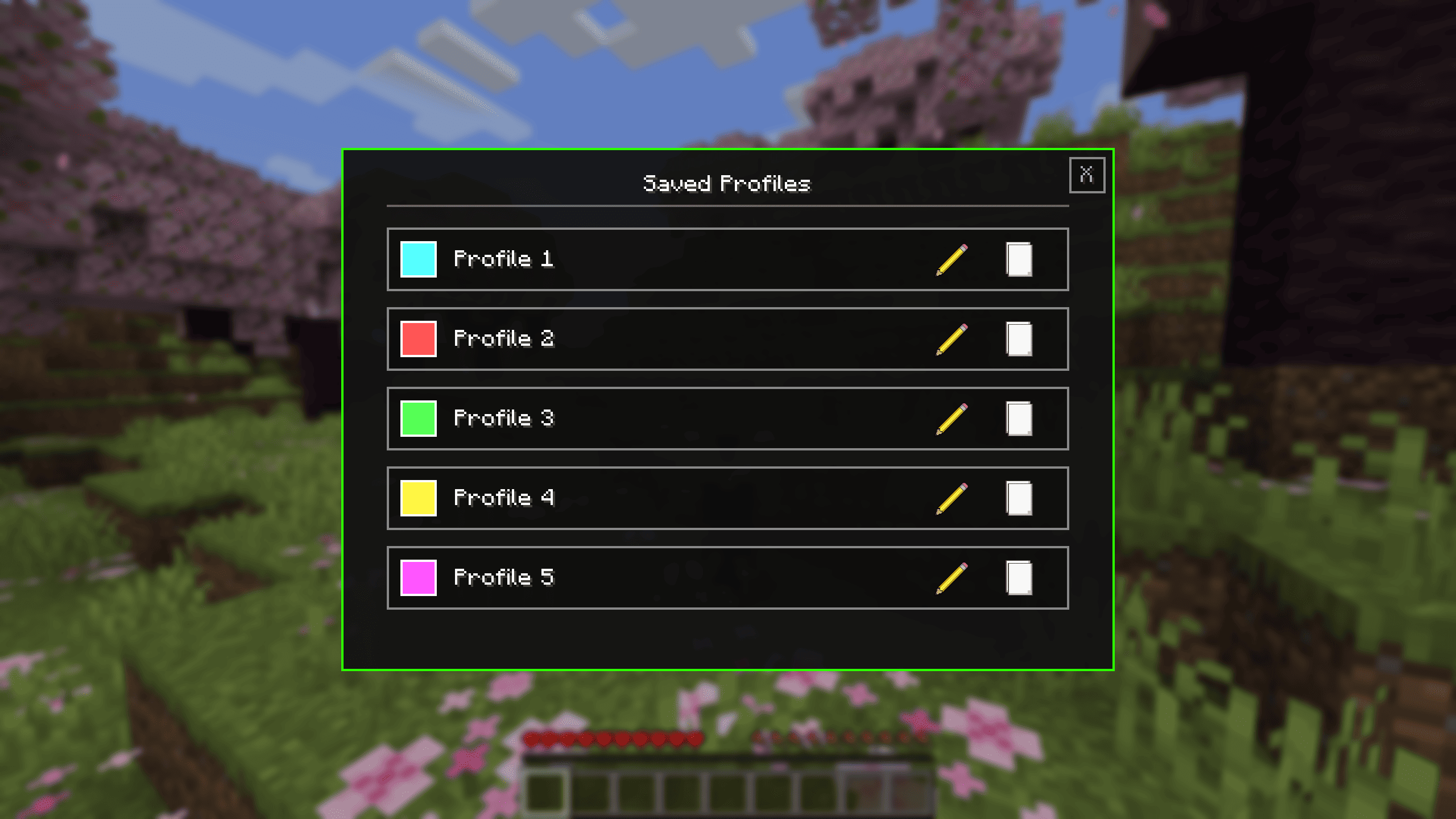 Saved Profiles Menu The management interface displaying a list of custom saved profiles (Profile 1 through Profile 5) with individual color icons, edit options, and management buttons.
 -
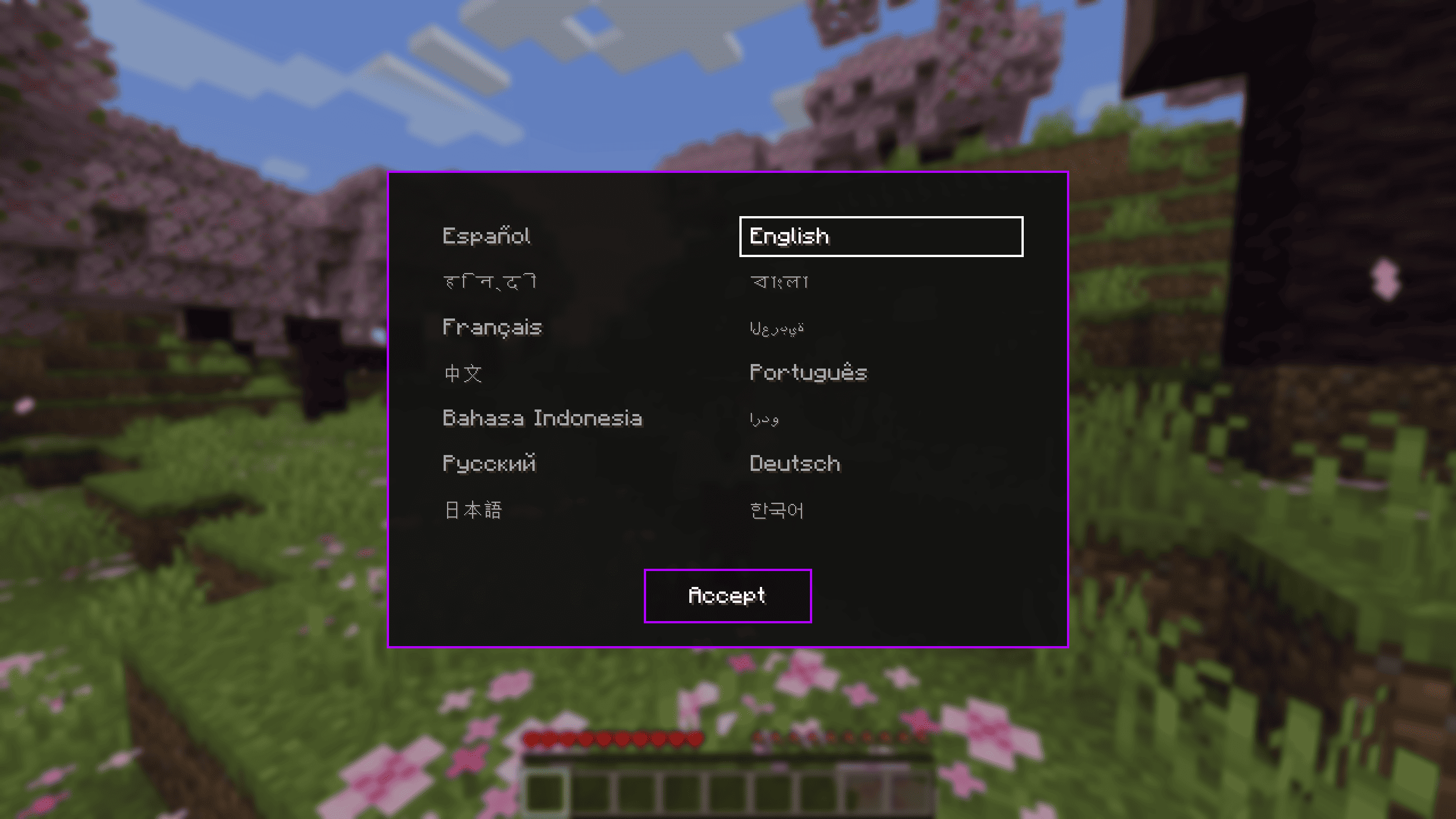 Language Selection Menu The localization interface showing various language options available in the mod, with an Accept button at the bottom.
-
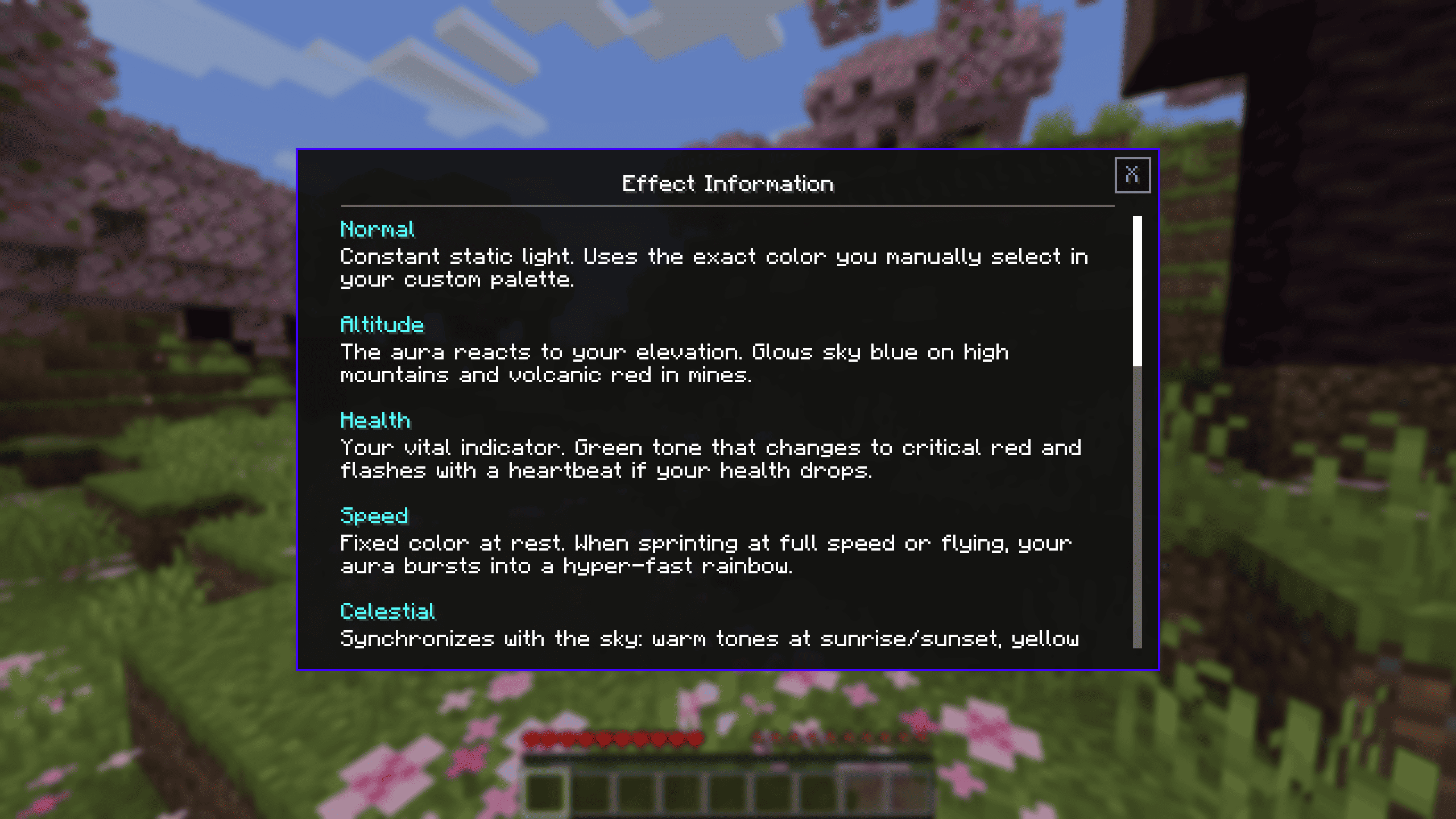 Effects Information Screen A detailed overview screen explaining the behavior of different aura effects such as Normal, Altitude, Health, Speed, and Celestial.
 -
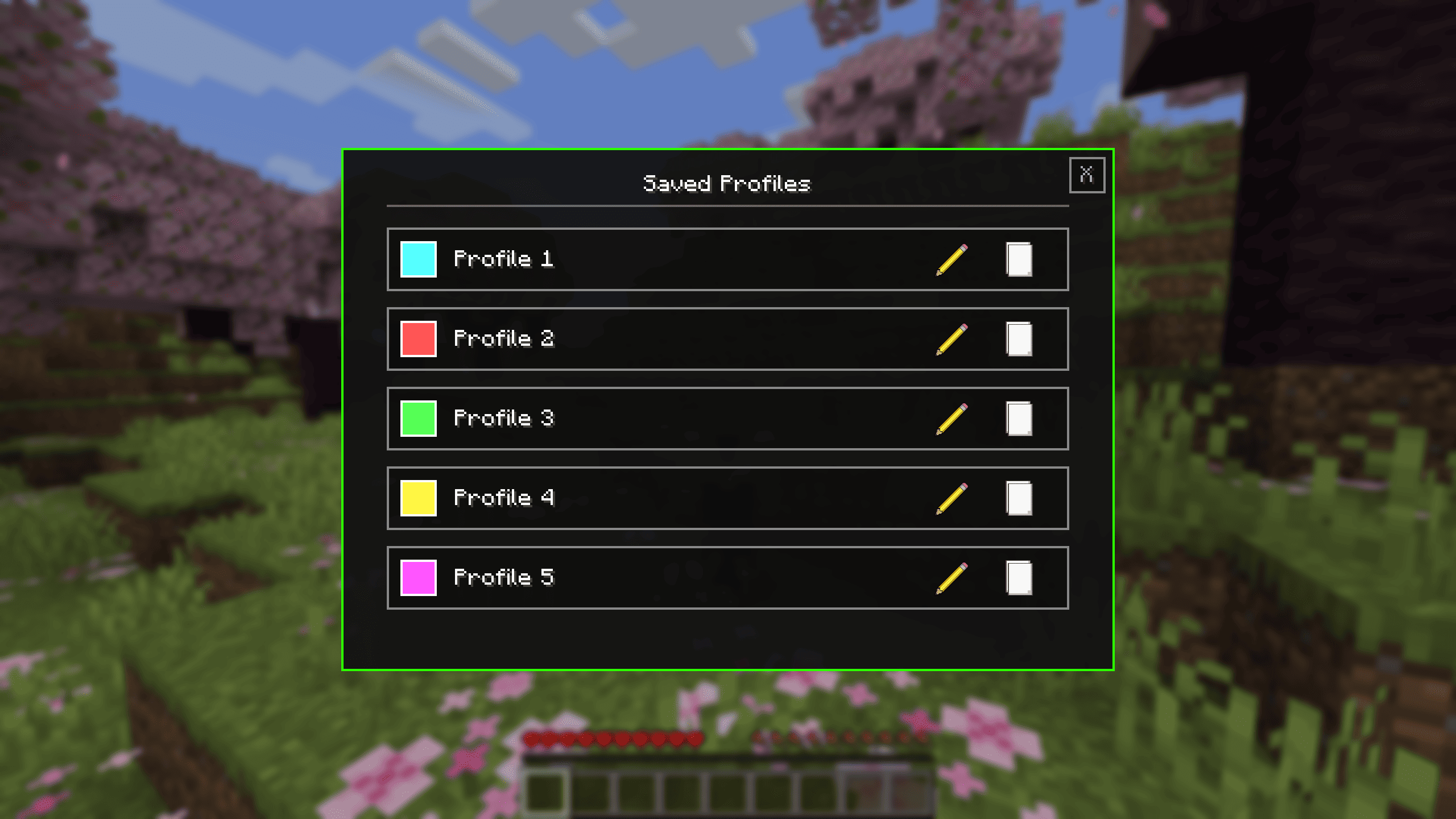 Saved Profiles Menu The management interface displaying a list of custom saved profiles (Profile 1 through Profile 5) with individual color icons, edit options, and management buttons.
 -
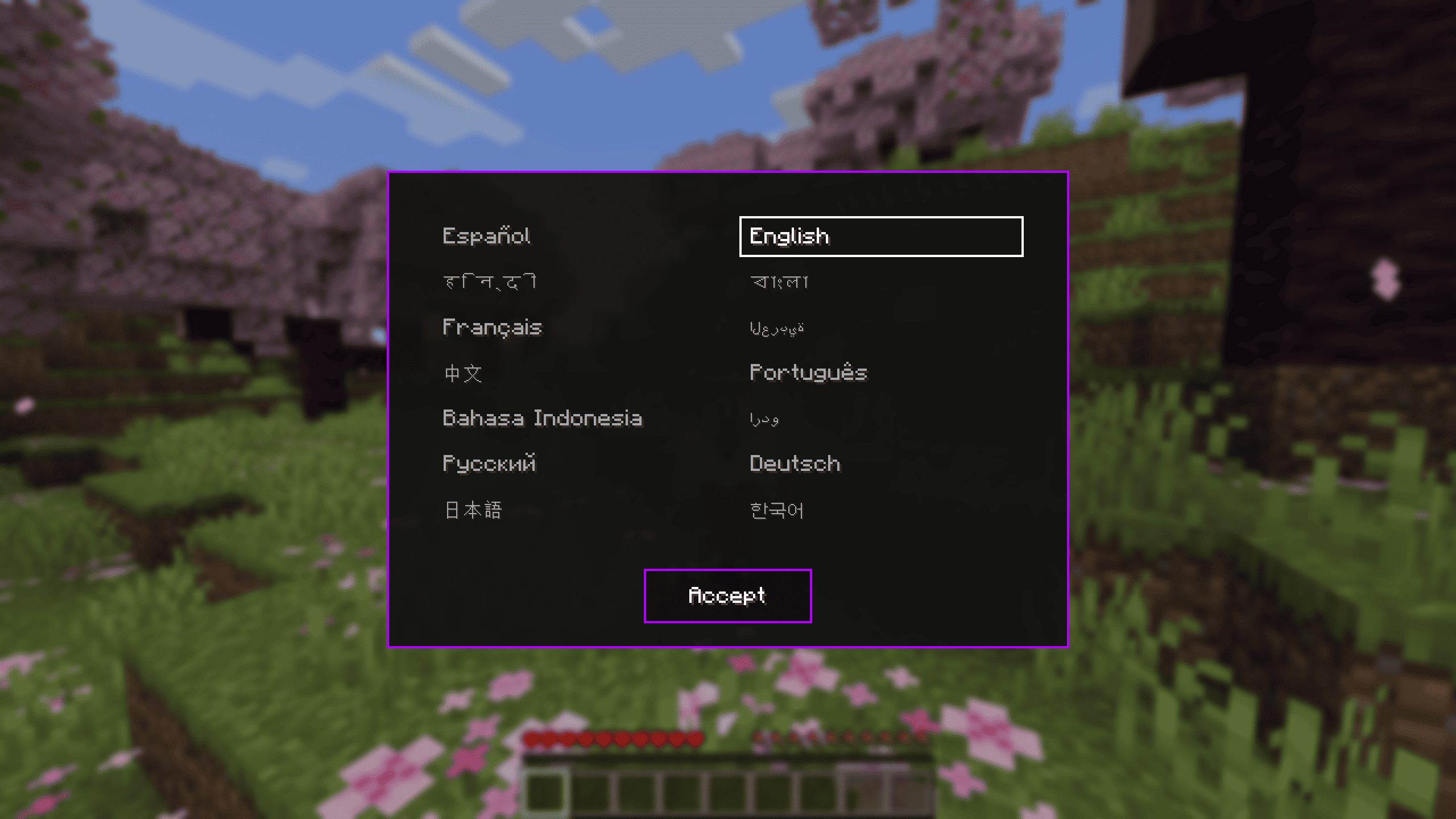 Language Selection Menu The localization interface showing various language options available in the mod, with an Accept button at the bottom.
 -
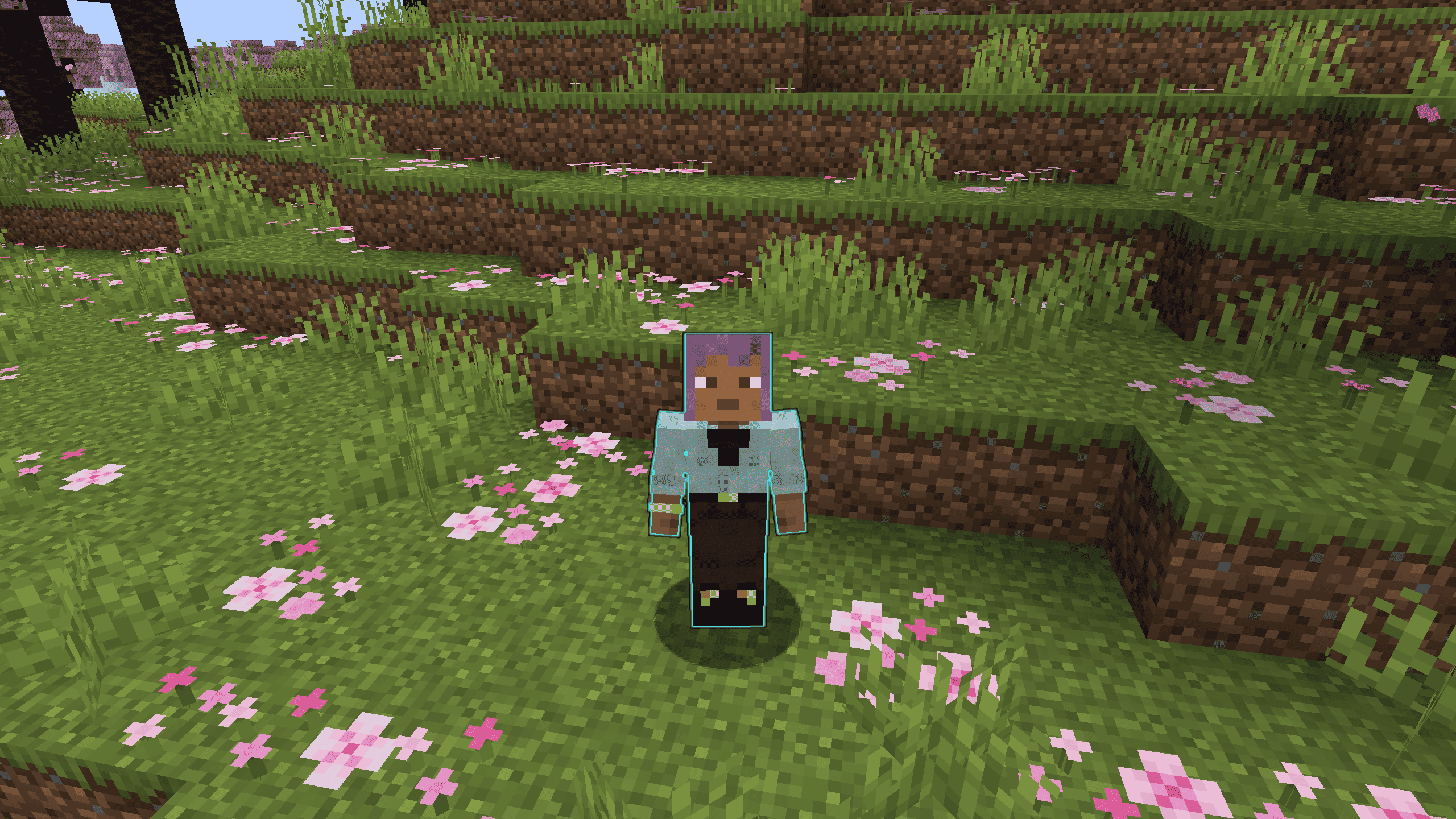 In-Game Aura Preview A gameplay screenshot showing a player character in a Cherry Grove biome with the mod's custom cyan aura effect active around them.
 -
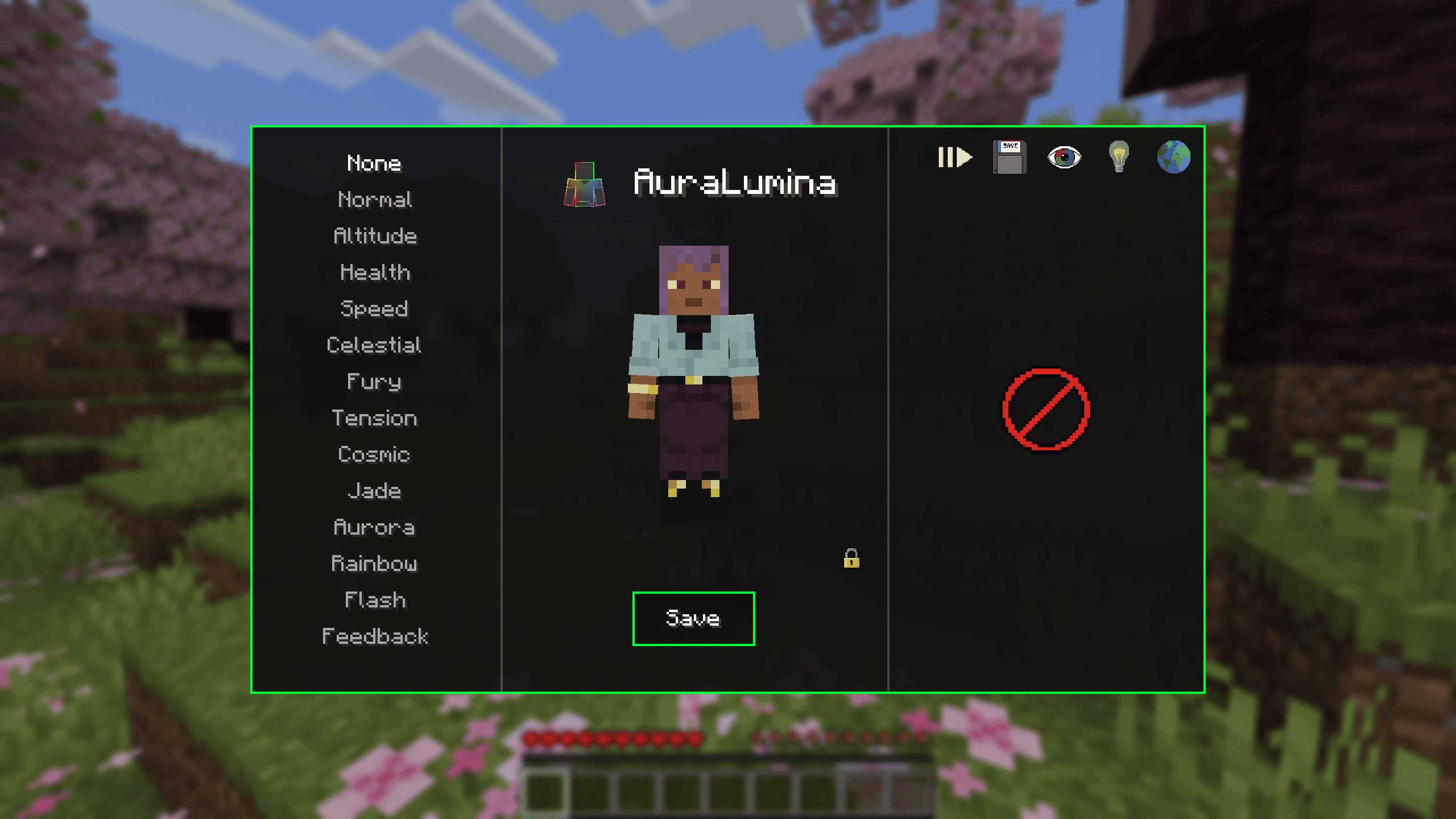 AuraLumina Effect Selection Menu The user interface of the mod where players can preview and select various visual effects (such as Normal, Altitude, Health, Speed, Celestial, and more) applied to the character, featuring a save button.
Versions
Files
Relations
Project Relations
More like this
Similar Mods
Suggestions use data such as tags, dependencies, dependents, descriptions, titles, and more to rank how much they overlap with this mod.
On ModDex
Community snapshot
By the numbers
Statistics
Want to reach Minecraft players?
We're looking for a server hosting partner to feature here and other parts of the site. Interested? Send us a message!
Get in touchGet it on
Available Platforms
On ModDex
Community snapshot
By the numbers
Statistics
Resources