
Aurelium
No reviews yet
A complete Paper economy solution featuring a customizable web-based Market, Player Auction House, and unique Spawner trading. It includes a custom currency and auto-installs Vault for an instant, plug-and-play experience.
Includes systems for trading and managing economies.
Paper is a fork of Spigot that adds its own plugin API on top of the Bukkit API. All Spigot plugins are compatible with paper, not all paper plugins are compatible with Spigot.
Community voices
Reviews
Click once to include, again to exclude, again to clear
No reviews yet. Be the first to review this project!
Get it on
Available Platforms
 Modrinth
Compatibility
Supported Environments
About
Project Details
For authors
Embed Badge
If you're the author of this project, you can embed a live badge anywhere that supports HTML or Markdown. It updates automatically whenever ratings change.
Use HTML for any page that supports it, or Markdown for README files and Markdown-based descriptions.
Identifiers
Platform IDs
About
Description
Aurelium
Experimental Web Features The web dashboard is in active development. I am facing issues at the moment. Expect potential bugs or instability if you enable
web.enabled. The core in-game economy, GUI markets, and auction house are stable.
A comprehensive, standalone economy plugin for Minecraft Paper.
Compatibility: Paper, Purpur, Pufferfish, Leaves
Features
Economy
- Multi-Currency - Define multiple currencies (e.g., Aurels, Dollars, Euros) with unique symbols and starting balances
- Per-Item Currency - Assign specific currencies to individual market items
- Vault Support - Fully compatible with Vault-dependent plugins (ShopGUI+, Essentials, etc.)
- Database - SQLite or MySQL storage with automatic migration
- Offline Earnings - Get paid for auction sales even when offline
Server Market
A server-owned shop with dynamic pricing and three interface modes:
- Classic - Traditional chest-based inventory GUI
- Modern - Styled chest GUI with MiniMessage gradient titles, glass-pane borders, formatted lore
- Web - Browser dashboard (see Web Dashboard)
Pricing Mechanics:
- Prices automatically rise on buys (Demand) and fall on sells (Supply)
- Anti-Exploit: Sell price can never exceed Buy price
- Price Floor: Can't drop below 20% of base (configurable)
- Price Ceiling: Can't rise above 500% of base (configurable)
- Natural Recovery: Prices passively drift toward base value every 10 minutes
Quality of Life:
- Live UI updates every 1 second while a menu is open
- Page indicator books showing current page (e.g., "Page 1 of 5")
- Compass search button to find any item
- Market Crash Alerts for bargain-priced high-value items
- Smart inventory: purchases fill partial stacks first
Performance:
- Viewer-Only Refresh: logic dormant unless a player has a menu open
- Batched Disk I/O: transaction data saved in background batches
- O(1) Data Access: local caching for near-zero CPU impact
- Massive Catalog: all building blocks + 60+ mob spawners
Auction House
A fully self-contained player-driven exchange:
- 100% GUI Driven: sell items, place bids, make private offers via in-menu buttons
- Safety Confirmations: dedicated confirmation screen before deducting funds
- Manage Offers:
/ah offersto Accept or Decline incoming deals - Live Updates: GUI refreshes instantly for all players on buys, bids, cancels; timers update every second
- Auto-Refunds: outbid? Money instantly returned
Buy Orders
A global request system for offline purchasing:
- Request any item (including 120+ enchanted books and ingots) at your price
- Other players browse and fulfill orders from their inventory
- Escrow System: money held safely, refunded on cancel
- Offline Collections: fulfilled items go to
/ah collectbin; notified on login - Buyer Notifications: real-time when filled, or on next login
Custom Item Detection
Automatically discovers custom items from popular third-party plugins:
- Auto-Scan on Startup - runs once, detects all custom items
- Supported Plugins (zero hard dependencies, all via reflection):
- ItemsAdder, Oraxen, MMOItems, MythicMobs, ExecutableItems, Nexo, SX-Item
- Discovered items written to
config.ymlunderdiscovered-items: - Persisted in
custom_itemsdatabase table (schema v2, auto-migrates) - No supported plugins installed? Scanner silently skips with zero overhead
Web Dashboard
A modern, responsive web app with nearly 100% uptime:
- Server Market - purchase items from the web, delivered instantly in-game

- Auction House - place bids and buyout items (BIN) from the browser

- Buy Orders - fulfill player buy orders from your online inventory

- Price Tracker - interactive chart with 7-day history, bezier curves, gradient fills, hover tooltips


Web Features:
- Live Sync: in-game changes reflect instantly on the web and vice-versa
- Prices recorded every 10 minutes, stored for 7 days
- Cloud Mode: optional cloud hosting via Render
- Multi-Currency UI: custom currency symbols synced from
config.yml - Icon Fallbacks: seamless fallback for older MC versions
- Secure Sessions:
/webin-game generates a time-limited link (rolling 1-hour timeout) - Tab Sleep Mode: no network/CPU when tab is inactive; instant wake on return
- RAM Optimized: per-server memory under 1MB via raw JSON string caching
- Activation Queue: fair waitlist when cloud server hits its 500MB limit
Commands
Player Commands
| Command | Description | Permission |
|---|---|---|
/bal [player] [currency] |
Check your own or another player's balance | aureleconomy.bal |
/pay <player> <amount> [currency] |
Pay another player | aureleconomy.pay |
/market |
Open the in-game server market | aureleconomy.market |
/sell |
Sell items from your inventory | aureleconomy.sell |
/stocks |
View market trends | aureleconomy.stocks |
/web |
Generate a secure link to the browser dashboard | aureleconomy.web |
/ah |
Open the Auction House | aureleconomy.ah |
/ah sell <price> [duration] [currency] |
List held item as BIN. Duration: e.g. 1h, 7d |
aureleconomy.ah |
/ah bid <price> [duration] |
List held item for auction. Duration: e.g. 1h, 7d |
aureleconomy.ah |
/ah offer <id> <qty> |
Send a private offer for an auction item | aureleconomy.ah |
/ah offers |
Manage incoming private offers | aureleconomy.ah |
/ah collect |
Collect expired/purchased items | aureleconomy.ah |
/ah search <query> |
Open a filtered Auction House view | aureleconomy.ah |
/orders |
Open the Buy Orders GUI | aureleconomy.orders |
/orders create <item> <amount> <price> [currency] |
Place a buy order | aureleconomy.orders |
/orders fill <id> [amount] |
Fulfill an order from your inventory | aureleconomy.orders |
/orders cancel <id> |
Cancel your order and get a refund | aureleconomy.orders |
/orders my |
List your active buy orders | aureleconomy.orders |
/orders search <query> |
Search active orders by item name | aureleconomy.orders |
Admin Commands
| Command | Description | Permission |
|---|---|---|
/eco <give|take|set> <player> <amount> [currency] |
Modify player balances | aureleconomy.admin |
/customitems scan |
Force rescan all supported custom item plugins | aureleconomy.admin |
/customitems list |
View all discovered custom items | aureleconomy.admin |
/customitems info <id> |
Show details for a specific custom item | aureleconomy.admin |
/customitems reload |
Reload config overrides from disk | aureleconomy.admin |
/customitems toggle <id> |
Enable or disable a discovered item in the market | aureleconomy.admin |
/customitems price <id> <buy> [sell] |
Set buy/sell prices for a discovered item | aureleconomy.admin |
Permissions
| Permission | Description | Default |
|---|---|---|
aureleconomy.bal |
Check balance | Everyone |
aureleconomy.pay |
Pay players | Everyone |
aureleconomy.market |
Use the market | Everyone |
aureleconomy.sell |
Use /sell | Everyone |
aureleconomy.ah |
Use the auction house | Everyone |
aureleconomy.orders |
Use buy orders | Everyone |
aureleconomy.stocks |
View market trends | Everyone |
aureleconomy.web |
Use /web | Everyone |
aureleconomy.admin |
Admin commands (eco, customitems) | OP only |
Setup
- Download the latest
Aurelium.jar - Place it in your server's
plugins/folder - Restart the server
- If Vault is not detected, Aurelium automatically extracts and installs it on first run
Configuration
Database
database:
  type: sqlite          # sqlite or mysql
  file: "database.db"   # SQLite only
  mysql:                # MySQL only
    host: "localhost"
    port: 3306
    database: "aurelium"
    username: "root"
    password: "password"
Economy
economy:
  default-currency: "Aurels"
  currencies:
    Aurels:
      symbol: "₳"
      starting-balance: 100.0
  max-balance: -1       # -1 = unlimited
  min-pay-amount: 0.01
Market Items
Control every price directly:
market-items:
  DIAMOND:
    buy: 5000.0    # Cost to buy from server
    sell: 0.0      # 0.0 = selling disabled
  DIRT:
    buy: 1.0
    sell: 0.5      # Players can sell for 0.5
  BEDROCK:
    buy: -1.0      # -1.0 = buying disabled
Market Settings
market:
  enabled: true
  gui-mode: modern              # "classic" or "modern"
  dynamic-pricing: true
  price-increase-per-buy: 0.001 # +0.1% per buy
  price-decrease-per-sell: 0.001 # -0.1% per sell
  default-sell-ratio: 0.5
  price-floor: 0.2              # Can't drop below 20% of base
  price-ceiling: 5.0            # Can't rise above 500% of base
  price-recovery:
    enabled: true
    rate: 0.01                  # 1% of gap per cycle
    interval-minutes: 10
Auction House
auction-house:
  enabled: true
  default-duration: 86400       # 24 hours (seconds)
  max-duration: 604800          # 7 days max
  listing-fee-percent: 2.0
  sales-tax-percent: 5.0
  max-listings-per-player: -1   # -1 = unlimited
  min-listing-price: 1.0
Buy Orders
buy-orders:
  enabled: true
  max-active-orders-per-player: 10
  min-price-per-piece: 0.1
  max-order-value: -1           # -1 = unlimited
  creation-fee-percent: 2.0
  sales-tax-percent: 5.0
Web Dashboard
web:
  enabled: true
  port: 8585
  # Session timeout: rolling 1 hour of inactivity (hardcoded)
Network Syncing (MySQL Required)
Aurelium supports cross-server synchronization for BungeeCord and Velocity networks.
MySQL is required for synchronization. SQLite does not support cross-server data sharing. Point all backend servers to the same MySQL database:
- Global Balances - player balances refreshed on join across the network
- Global Auction House - active auctions and collection bin shared across all linked servers
- Per-Server Markets - dynamic prices stored in each server's local
config.yml, allowing different economies per server while players keep the same wallet
Language
A messages.yml file is generated on startup.
- Translate: Change any message to your language
- Color Codes: Use MiniMessage formatting (e.g.,
<green>) or legacy&codes
FAQ
"Unknown Command" - If /market or /eco says "Unknown command", the plugin failed to load.
- Check server console/logs for errors
- Ensure you have
Aurelium.jarinplugins/ - Ensure you are running Paper (or compatible forks: Purpur, Pufferfish, Leaves)
"No Permission" - You need OP (/op <player>) or the aureleconomy.admin permission node. Standard player commands are enabled for everyone by default.
Still not working? - Open an issue on GitHub with your server version, error logs, and steps to reproduce.
Screenshots
Gallery
-
 Aurelium Economy & Market Overview A cinematic look at the Aurelium vault. Featuring a dynamic Stock Market with demand-based pricing, a player-driven Auction House with private bidding, and a custom "Aurels" currency system designed for modern survival and Skyblock servers.
 -
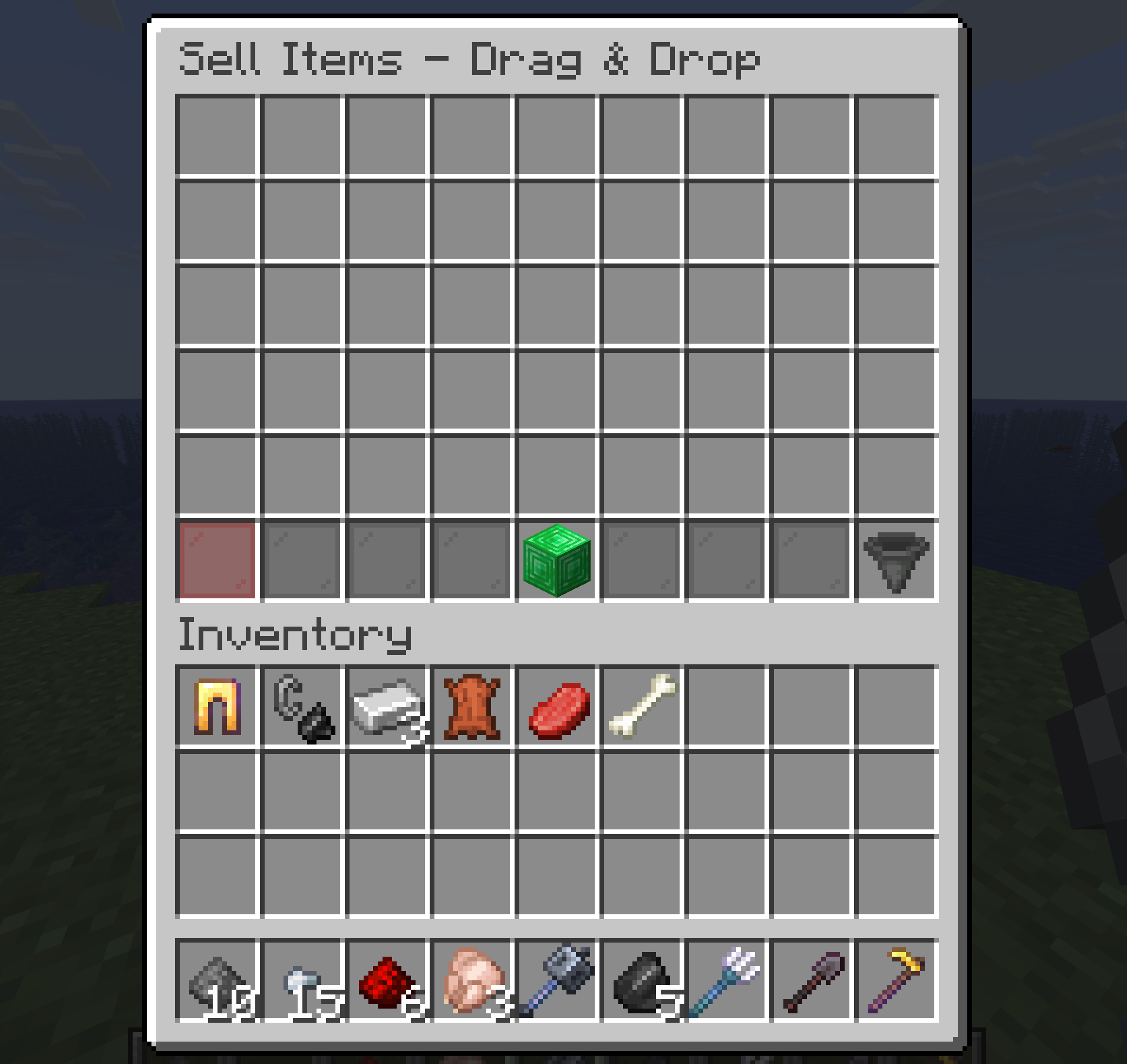 The sell menu The /sell menu allows players to instantly trade items for cash via a simple drag-and-drop chest interface. After clicking confirm, the system payouts your balance and automatically returns any unsellable items to your inventory.
 -
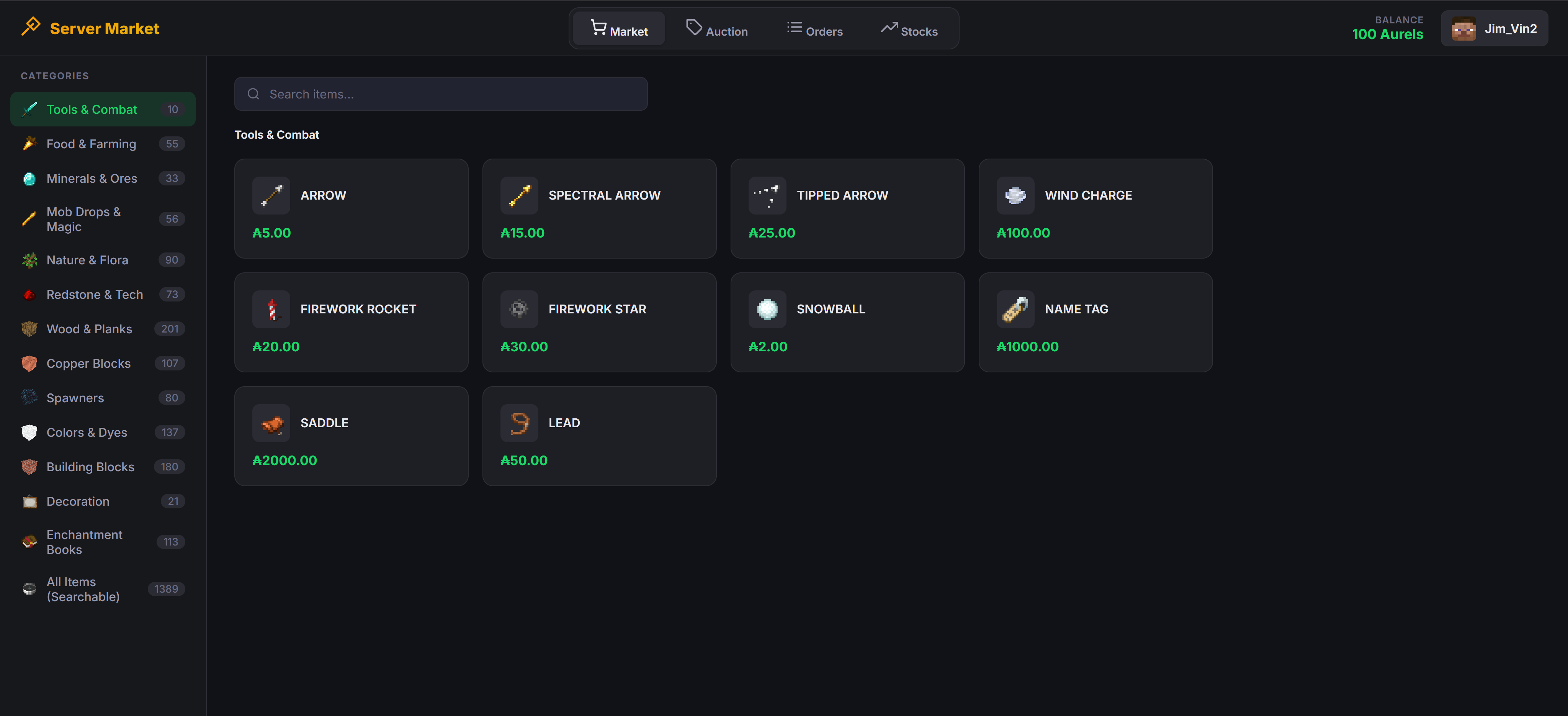 The Web Market
 -
 /web command
 -
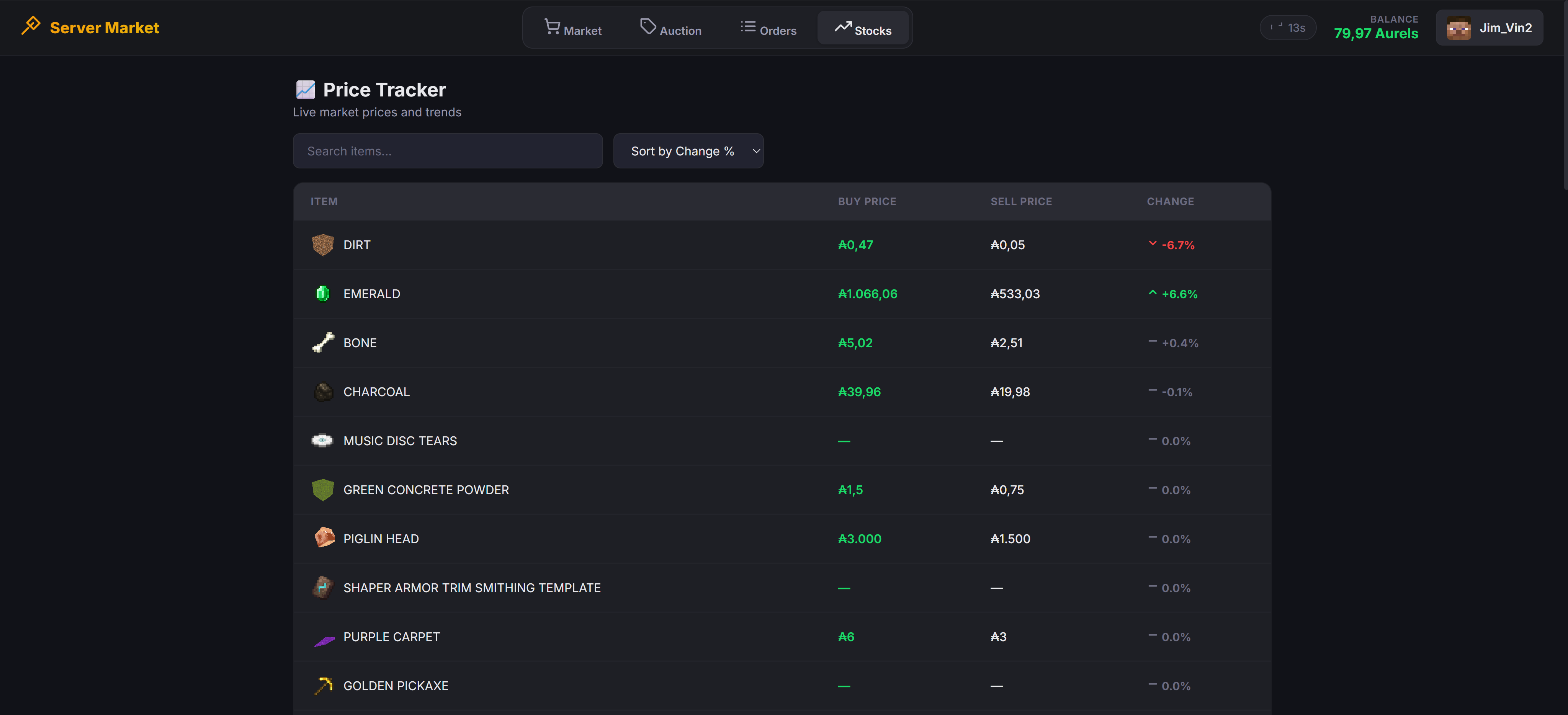 Web Stocks
Versions
Files
Relations
Project Relations
More like this
Similar Mods
Suggestions use data such as tags, dependencies, dependents, descriptions, titles, and more to rank how much they overlap with this mod.
On ModDex
Community snapshot
By the numbers
Statistics

Want to reach Minecraft players?
We're looking for a server hosting partner to feature here and other parts of the site. Interested? Send us a message!
Get in touchGet it on
Available Platforms
On ModDex
Community snapshot
By the numbers