
Autocut
No reviews yet
Automatically cut videos based on your gameplay
Fabric is a mod loader for versions 1.14+ of Minecraft, particularly popular for client side and optimization mods.
Community voices
Reviews
Click once to include, again to exclude, again to clear
No reviews yet. Be the first to review this project!
Get it on
Available Platforms
 Modrinth
Compatibility
Supported Environments
About
Project Details
For authors
Embed Badge
If you're the author of this project, you can embed a live badge anywhere that supports HTML or Markdown. It updates automatically whenever ratings change.
Use HTML for any page that supports it, or Markdown for README files and Markdown-based descriptions.
Identifiers
Platform IDs
About
Description
Cut videos based on your gameplay!
Usage
- Install FFmpeg
- Install OBS
- Open OBS
- In OBS, go to Tools -> WebSocket Server Settings
- Enable web server
- Under Tools -> WebSocket Server Settings, go to Connection Information and copy the password
- In game, run
/autocut connect <password here> - Start Recording in OBS
- Do fun gameplay stuff
- Stop Recording in OBS
- (optional) Delete clips you don't want (see the wiki)
- Run
/autocut finish - When it's finished a new video starting with
cutwill be in your recordings folder.
You can also optionally run /autocut finish "path/to/database" to cut an old video. This will fail if the original video is moved or deleted.
Dependencies
- Includes OBS WebSocket Java, used under MIT
- Includes SQLite JDBC Driver, used under Apache 2.0
- SQLite JDBC Driver also includes software by David Crawshaw under BSD 2-Clause
- The NOTICE file is both available in the sources and in the mod itself
- Includes FFmpeg CLI Wrapper for Java, used under BSD 2-Clause "Simplified"
- Requires FFmpeg, used under LGPL v2.1+
- Requires Fabric API, used under Apache 2.0
- Requires Fabric Loader 0.15.11 or later, used under Apache 2.0
- Requires YACL 3.5.0+1.21-fabric or later, used under LGPL 3.0 or later
- Optionally integrates with Mod Menu 11.0.2 or later, used under MIT
Licensing
...is a mess.
TLDR
Modpacks
You can use this mod in a modpack! Don't re-host the file without permission though. I'd love a mention somewhere for bragging rights.
Videos
You can use this mod to make videos! I'd love a mention somewhere in a description or something so I can have bragging rights.
Programming
You can use and reference all the code in the GitHub repo under MIT.
What's actually going on
Autocut is licensed under MIT, but the JAR file includes several dependencies:
- OBS WebSocket Java is under MIT.
- SQLite JDBC Driver is dual licensed (GPL and Apache) - I used it under Apache.
- It includes a NOTICE
- This is why there's a NOTICE file
- This is why there's a LICENSE.zentus file (it's mentioned in the NOTICE)
- FFmpeg CLI Wrapper for Java is licensed under BSD 2-Clause "Simplified"
- This is why there's a LICENSE.bramp file
- It includes a NOTICE
It also requires a few other things, which are NOT included in the jar
- FFmpeg is used under LGPL
- This is why there's a LICENSE.lgpl
- This is why there's a LICENSE.gpl (required by lgpl)
- Fabric API is used under Apache 2.0
- There's no NOTICE file
- Fabric Loader is used under Apache 2.0
- There's no NOTICE file
- YACL is used under LGPL 3.0 or greater
- Covered by the LICENSE.lgpl and LICENSE.gpl from FFmpeg
- Mod Menu is used under MIT
Screenshots
Gallery
-
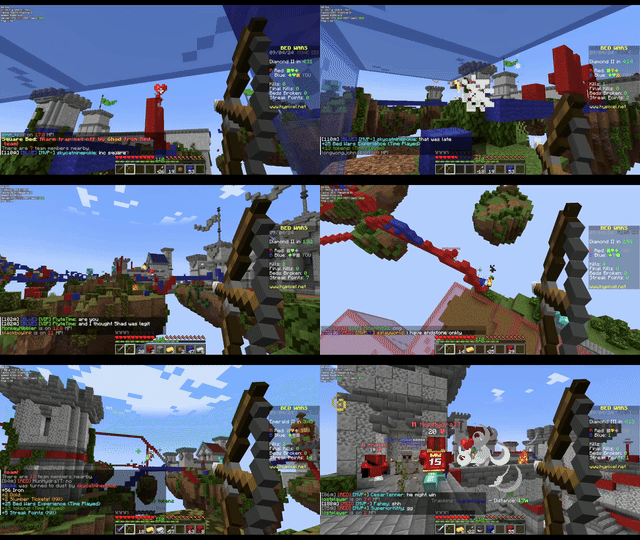 Shooting players A GIF of a video made of cuts generated by Autocut, which only includes shooting players.
Versions
Files
Relations
Project Relations
More like this
Similar Mods
Suggestions use data such as tags, dependencies, dependents, descriptions, titles, and more to rank how much they overlap with this mod.
On ModDex
Community snapshot
By the numbers
Statistics

Want to reach Minecraft players?
We're looking for a server hosting partner to feature here and other parts of the site. Interested? Send us a message!
Get in touchGet it on
Available Platforms
On ModDex
Community snapshot
By the numbers