
AutoGG-Fabric
No reviews yet
Automatic "GG" messages after rounds — Fabric mod for Minecraft
Fabric is a mod loader for versions 1.14+ of Minecraft, particularly popular for client side and optimization mods.
Community voices
Reviews
Click once to include, again to exclude, again to clear
No reviews yet. Be the first to review this project!
Get it on
Available Platforms
 Modrinth
Compatibility
Supported Environments
About
Project Details
For authors
Embed Badge
If you're the author of this project, you can embed a live badge anywhere that supports HTML or Markdown. It updates automatically whenever ratings change.
Use HTML for any page that supports it, or Markdown for README files and Markdown-based descriptions.
Identifiers
Platform IDs
About
Description
AutoGG (Fabric)
AutoGG is a lightweight and highly configurable Fabric mod for Minecraft that automatically sends a “GG” or a customizable message in chat after a game round ends or when specific conditions are met.
Designed especially for multiplayer servers and mini-game environments, AutoGG helps you maintain good sportsmanship without requiring manual input after every match.
✨ Features
-
Automatic GG Messages
Sends “GG” or a custom message automatically when a round ends. -
Configurable Delay
Set a delay before the message is sent to make it feel natural and human-like. -
Fully Customizable Messages
Use your own text instead of a simple “GG” to match your playstyle or server rules. -
Fabric Mod Loader Support
Built for modern Minecraft versions using the Fabric ecosystem. -
Lightweight & Client-Side
Minimal performance impact and easy to install.
🛠️ Use Cases
- Mini-game servers (BedWars, SkyWars, PvP arenas)
- Competitive multiplayer sessions
- Players who want to show sportsmanship automatically
- Streamers who want consistent end-of-round behavior
⚙️ Configuration
AutoGG uses an in-game configuration menu that allows you to:
- Enable or disable
- Adjust message delays
- Customize the sent message
The configuration menu is accessible via Mod Menu.
📦 Installation
- Install Fabric Loader for your Minecraft version.
- Install the required dependencies:
- Download the AutoGG (Fabric) mod.
- Place all
.jarfiles into yourmodsfolder. - Launch Minecraft and configure AutoGG via Mod Menu.
⚠️ Note:
Cloth Config API and Mod Menu are required for AutoGG to work correctly.
🔗 Source Code
GitHub Repository:
https://github.com/EinsLucaaa/AutoGG-Fabric
🧩 Compatibility
- Minecraft (Fabric)
- Client-side mod
- Works on most multiplayer servers (no server-side installation required)
AutoGG is perfect for players who want to keep chat friendly and respectful — automatically.
Screenshots
Gallery
-
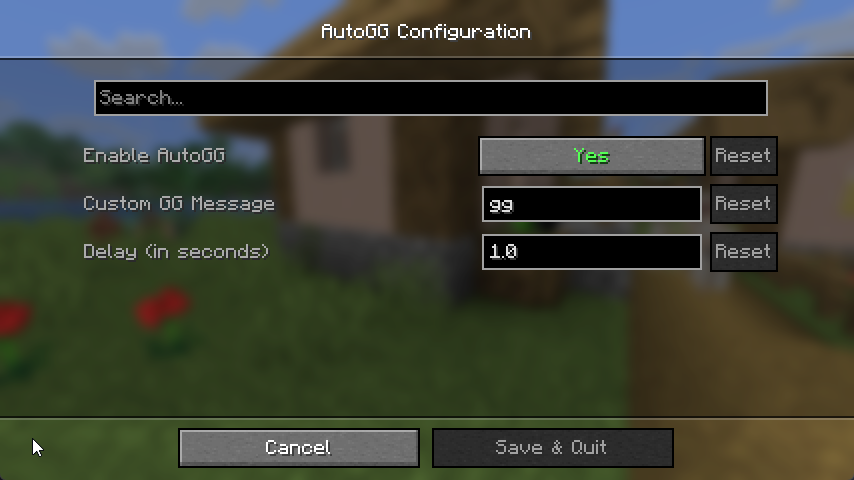 Settings Menu
Versions
Files
Relations
Project Relations
More like this
Similar Mods
Suggestions use data such as tags, dependencies, dependents, descriptions, titles, and more to rank how much they overlap with this mod.
On ModDex
Community snapshot
By the numbers
Statistics

Want to reach Minecraft players?
We're looking for a server hosting partner to feature here and other parts of the site. Interested? Send us a message!
Get in touchGet it on
Available Platforms
On ModDex
Community snapshot
By the numbers