
Community listing page, reviews here may not be monitored by the author.


Community voices
Reviews
No reviews yet. Be the first to review this project!
Get it on
Available Platforms
Compatibility
Supported Environments
Runs entirely on the client. Works on vanilla servers.
Install on the client or the server; either alone gives full functionality.
Varies by version.
About
Project Details
For authors
Embed Badge
If you're the author of this project, you can embed a live badge anywhere that supports HTML or Markdown. It updates automatically whenever ratings change.
Use HTML for any page that supports it, or Markdown for README files and Markdown-based descriptions.
Identifiers
Platform IDs
Resources
External Links
About
Description
AutoTranslator – Smart AI-Powered Minecraft Mod Translation https://img.shields.io/badge/License-MIT-green https://img.shields.io/badge/NeoForge-1.21.1-blue https://img.shields.io/badge/Translation%2520Data-CC%2520BY--NC--SA%25204.0-lightgrey
One-click AI translation – say goodbye to untranslated mods! AutoTranslator is a client-side NeoForge 1.21.1 mod that uses any AI model you configure (local or cloud) to batch-translate all installed mod language files into Simplified Chinese and automatically pack them as a resource pack for immediate effect.
✨ Key Features 🤖 AI-Powered Automation No more manual searching for translation packs. Just configure your AI API endpoint, click "Start Translation", and all missing Chinese entries are generated automatically. Enjoy a fully localized experience in minutes.
📚 Built-in Terminology Database Before sending requests to the AI, the mod queries a local SQLite dictionary (sourced from the CFPA project) for known Minecraft terms. This ensures consistent translations and drastically reduces API calls, saving token costs.
🔗 i18n Resource Pack Synergy Unique integration with existing i18n resource packs (e.g., Minecraft-Mod-Language-Modpack). The mod can read translations from an external Chinese resource pack and only forward the remaining missing entries to the AI. This further reduces costs and improves overall quality.
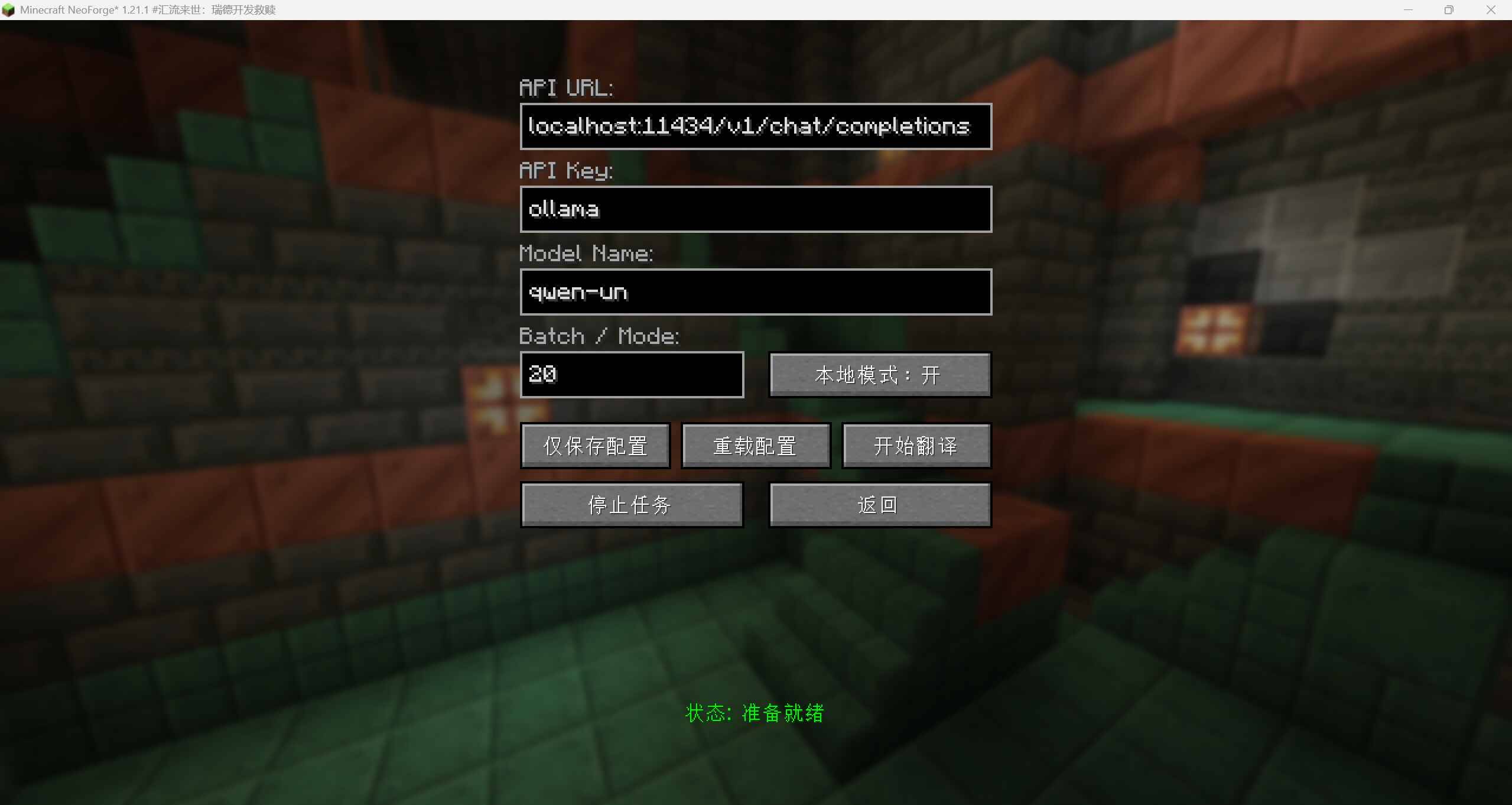
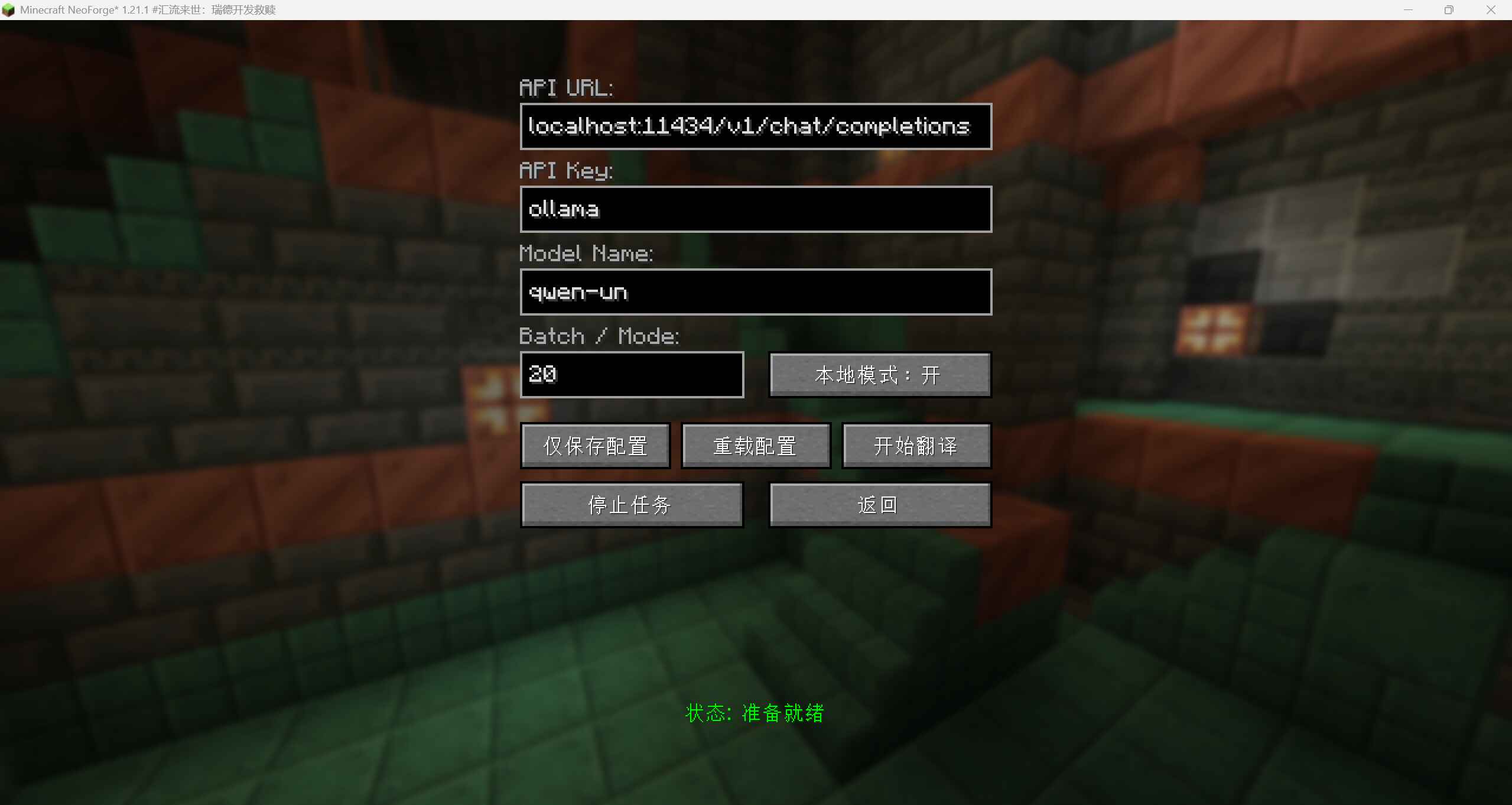
⚙️ Full Transparency & Control In-game GUI for easy configuration: API URL, key, model name, local/remote mode, etc.
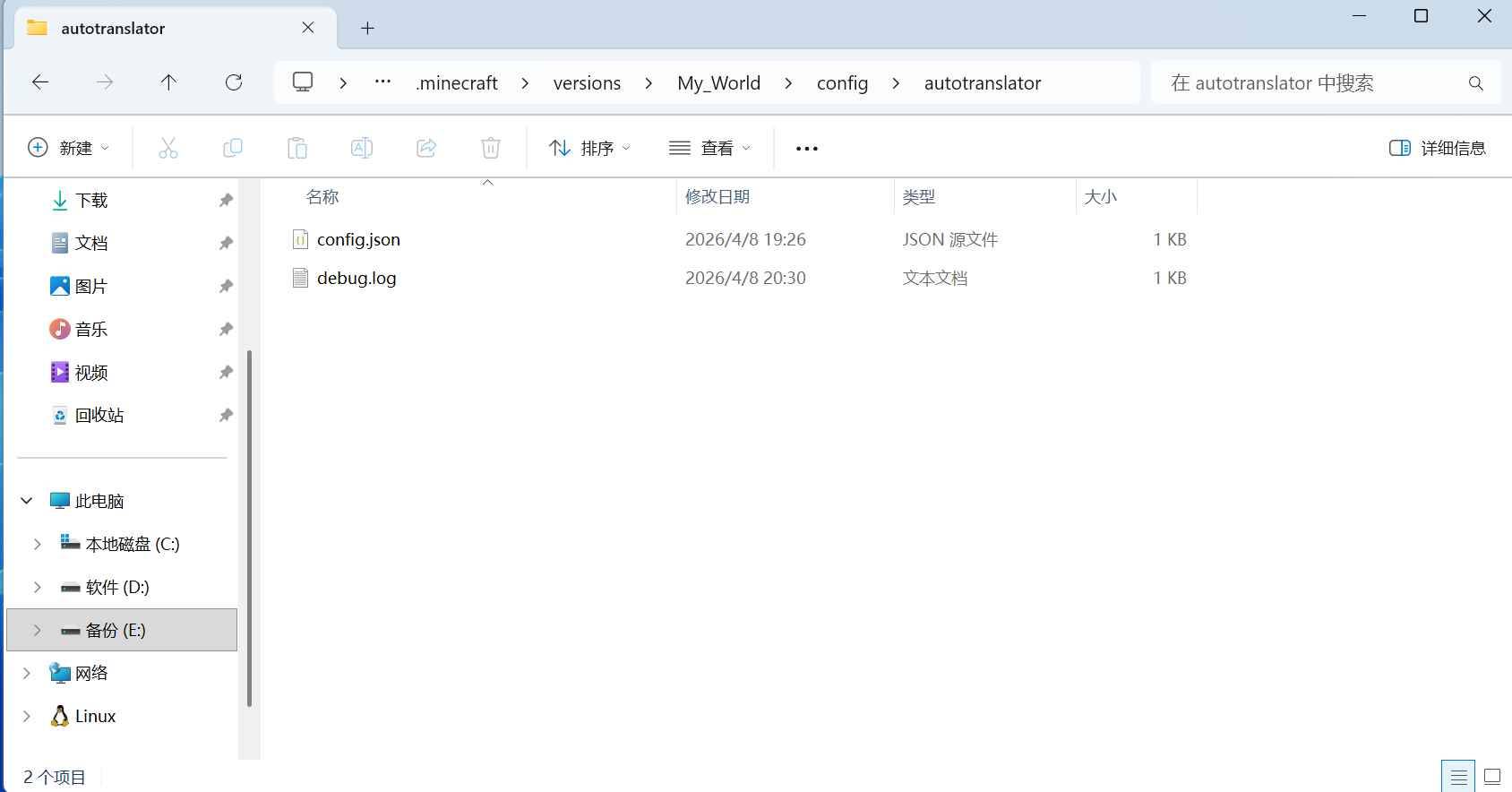
Detailed debug log at config/autotranslator/debug.log – tracks every request, dictionary hit, and progress.
Whitelist / Blacklist filtering to translate only specific mods.
Manual stop anytime without corrupting the generated pack.
Atomic resource pack replacement – temporary file is atomically moved to the final pack, preventing incomplete reads.
📦 Quick Start
Install Place the mod .jar into your mods folder and launch the game.
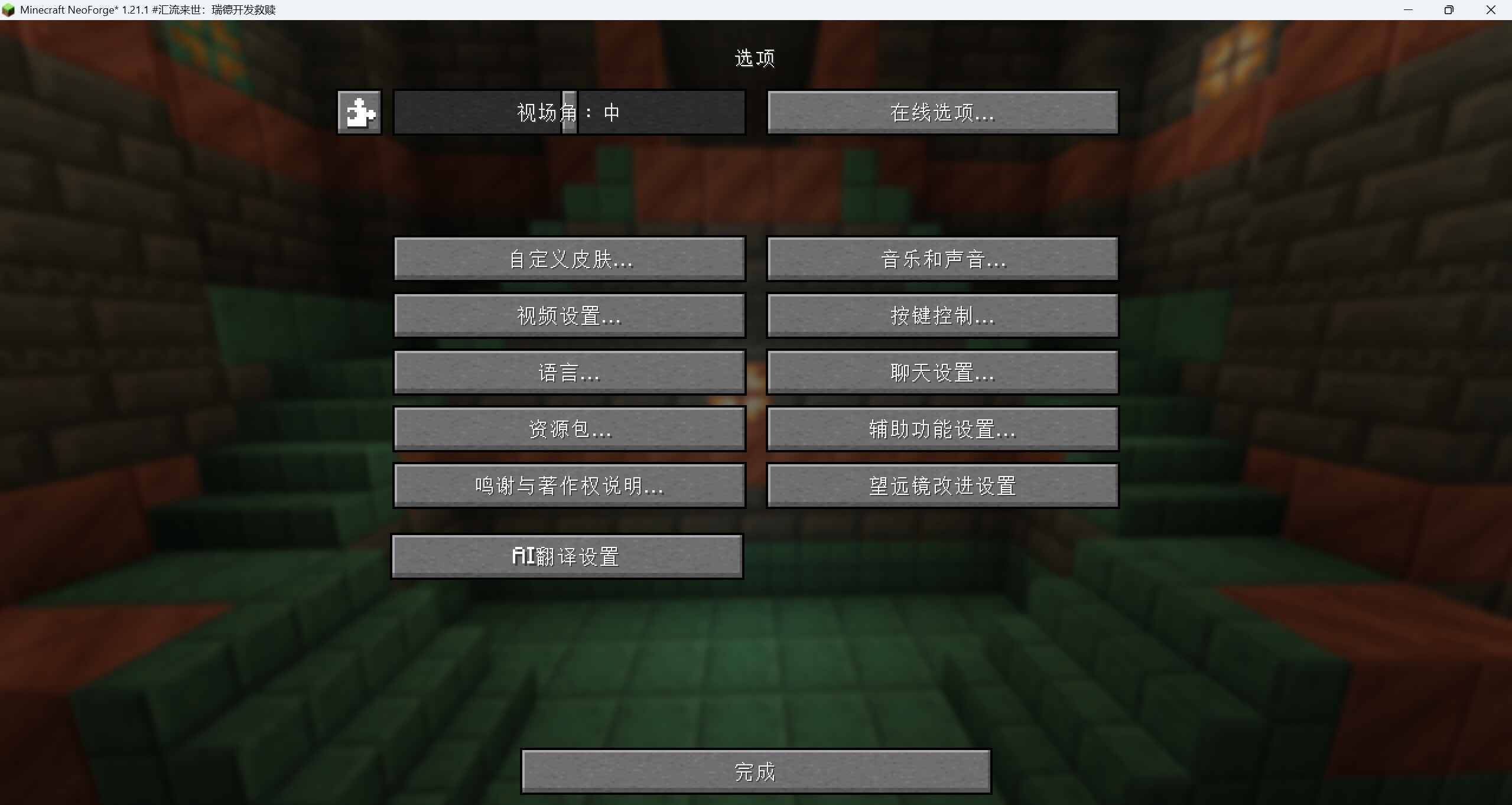
Open Configuration From the main menu, go to Mods, find AutoTranslator in the list, and click the Configure button (gear icon).
Enter API Details API URL: e.g., https://api.deepseek.com/v1/chat/completions (cloud) or http://localhost:1234/v1/chat/completions (local LM Studio).
API Key: For cloud services, enter your key. For local models, any string works (e.g., lm-studio).
Model Name: Exact model identifier, e.g., deepseek-chat, qwen2.5-7b-instruct.
Local Mode: Enable when using a local API (runs tasks sequentially to avoid overload).
- (Optional) Advanced Configuration Edit config/autotranslator/config.json for hidden settings (preserved across saves even though not in GUI):
timeout_seconds: Request timeout in seconds (default 300; recommend 600 for slow local models).
batch_size: Number of entries per AI call (default 30; reduce to 10 if timeouts occur).
requests_per_second: Max API calls per second (default 5; can be increased for local models).
filter_mode / filter_list: Mod filtering (whitelist/blacklist).
system_prompt: Custom AI translation instructions.
i18n_resourcepack_name: Name of an external i18n resource pack file; set to "none" to disable (see i18n synergy below).
- Start Translation Make sure the AutoTranslation.zip resource pack is disabled in the Resource Packs screen before starting.
Back in the configuration screen, click "Start Translation".
Progress is shown at the bottom. After completion, press F3+T to reload resource packs.
🌐 i18n Resource Pack Synergy (Detailed) If you have a community-maintained i18n pack such as Minecraft-Mod-Language-Modpack-Converted-1.21.1.zip, place it inside the resourcepacks folder and update config.json:
json
"i18n_resourcepack_name": "Minecraft-Mod-Language-Modpack-Converted-1.21.1.zip"
When translating, the mod will extract all Chinese strings from that pack and overwrite its own output with them. Only keys that are still missing will be sent to the AI. This can save over 70% of API calls.
Priority: i18n pack > previous AutoTranslator cache > AI translation. Enabling: After modifying config, click "Reload File" in the GUI or restart the game.
⚠️ Important Notes Resource Pack Conflict: Always disable the existing AutoTranslation.zip in the resource pack menu before starting a new translation.
Network Issues: If dictionary download or GitHub access fails in some regions, add -Djava.net.useSystemProxies=true to your launcher's JVM arguments and enable a system proxy.
Token Consumption: When using cloud APIs, be aware of token billing. Using the built-in dictionary and an i18n pack drastically reduces costs.
Local Model Tuning: Set a higher timeout (e.g., 600 seconds) and smaller batch size (e.g., 10) to avoid request timeouts.
Safety: This mod only runs on the client, does not modify core game files, and only adds a resource pack.
📂 File Structure text
config/autotranslator/ ├── config.json # User configuration ├── debug.log # Detailed translation log └── dict/ └── Dict-Sqlite.db # Automatically downloaded Minecraft terminology database resourcepacks/ └── AutoTranslation.zip # Generated Chinese resource pack
🤝 Open Source & Attribution This mod's built-in translation database is sourced from CFPATools/i18n-dict, with original data maintained by CFPAOrg/Minecraft-Mod-Language-Package under the Creative Commons Attribution-NonCommercial-ShareAlike 4.0 International License (CC BY-NC-SA 4.0).
The mod code is released under the MIT License.
📝 Debugging & Logs All translation activities are recorded in config/autotranslator/debug.log with timestamps ([HH:mm:ss]). The log is in Chinese for the developer's convenience.
Monitor it live:
bash
tail -f config/autotranslator/debug.log
💡 FAQ Q: Why do some entries fail to translate? A: Usually an API timeout or malformed response. Increase timeout_seconds, decrease batch_size, and verify the model name.
Q: How to translate only specific mods? A: Set filter_mode to whitelist and add mod IDs to filter_list (comma-separated) in config.json.
Q: How to update the built-in dictionary? A: The dictionary auto-updates every 7 days. Alternatively, delete config/autotranslator/dict/Dict-Sqlite.db and restart the game.
Q: Can I share the generated resource pack? A: Absolutely! AutoTranslation.zip is a standard resource pack and can be shared freely.
AutoTranslator – Smart AI-Powered Minecraft Mod Translation https://img.shields.io/badge/License-MIT-green https://img.shields.io/badge/NeoForge-1.21.1-blue https://img.shields.io/badge/Translation%2520Data-CC%2520BY--NC--SA%25204.0-lightgrey
One-click AI translation – say goodbye to untranslated mods! AutoTranslator is a client-side NeoForge 1.21.1 mod that uses any AI model you configure (local or cloud) to batch-translate all installed mod language files into Simplified Chinese and automatically pack them as a resource pack for immediate effect.
✨ Key Features 🤖 AI-Powered Automation No more manual searching for translation packs. Just configure your AI API endpoint, click "Start Translation", and all missing Chinese entries are generated automatically. Enjoy a fully localized experience in minutes.
📚 Built-in Terminology Database Before sending requests to the AI, the mod queries a local SQLite dictionary (sourced from the CFPA project) for known Minecraft terms. This ensures consistent translations and drastically reduces API calls, saving token costs.
🔗 i18n Resource Pack Synergy Unique integration with existing i18n resource packs (e.g., Minecraft-Mod-Language-Modpack). The mod can read translations from an external Chinese resource pack and only forward the remaining missing entries to the AI. This further reduces costs and improves overall quality.
⚙️ Full Transparency & Control In-game GUI for easy configuration: API URL, key, model name, local/remote mode, etc.
Detailed debug log at config/autotranslator/debug.log – tracks every request, dictionary hit, and progress.
Whitelist / Blacklist filtering to translate only specific mods.
Manual stop anytime without corrupting the generated pack.
Atomic resource pack replacement – temporary file is atomically moved to the final pack, preventing incomplete reads.
📦 Quick Start
-
Install Place the mod .jar into your mods folder and launch the game.
-
Open Configuration From the main menu, go to Mods, find AutoTranslator in the list, and click the Configure button (gear icon).
-
Enter API Details API URL: e.g., https://api.deepseek.com/v1/chat/completions (cloud) or http://localhost:1234/v1/chat/completions (local LM Studio).
API Key: For cloud services, enter your key. For local models, any string works (e.g., lm-studio).
Model Name: Exact model identifier, e.g., deepseek-chat, qwen2.5-7b-instruct.
Local Mode: Enable when using a local API (runs tasks sequentially to avoid overload).
- (Optional) Advanced Configuration Edit config/autotranslator/config.json for hidden settings (preserved across saves even though not in GUI):
timeout_seconds: Request timeout in seconds (default 300; recommend 600 for slow local models).
batch_size: Number of entries per AI call (default 30; reduce to 10 if timeouts occur).
requests_per_second: Max API calls per second (default 5; can be increased for local models).
filter_mode / filter_list: Mod filtering (whitelist/blacklist).
system_prompt: Custom AI translation instructions.
i18n_resourcepack_name: Name of an external i18n resource pack file; set to "none" to disable (see i18n synergy below).
- Start Translation Make sure the AutoTranslation.zip resource pack is disabled in the Resource Packs screen before starting.
Back in the configuration screen, click "Start Translation".
Progress is shown at the bottom. After completion, press F3+T to reload resource packs.
🌐 i18n Resource Pack Synergy (Detailed) If you have a community-maintained i18n pack such as Minecraft-Mod-Language-Modpack-Converted-1.21.1.zip, place it inside the resourcepacks folder and update config.json:
json
"i18n_resourcepack_name": "Minecraft-Mod-Language-Modpack-Converted-1.21.1.zip"
When translating, the mod will extract all Chinese strings from that pack and overwrite its own output with them. Only keys that are still missing will be sent to the AI. This can save over 70% of API calls.
Priority: i18n pack > previous AutoTranslator cache > AI translation. Enabling: After modifying config, click "Reload File" in the GUI or restart the game.
⚠️ Important Notes Resource Pack Conflict: Always disable the existing AutoTranslation.zip in the resource pack menu before starting a new translation.
Network Issues: If dictionary download or GitHub access fails in some regions, add -Djava.net.useSystemProxies=true to your launcher's JVM arguments and enable a system proxy.
Token Consumption: When using cloud APIs, be aware of token billing. Using the built-in dictionary and an i18n pack drastically reduces costs.
Local Model Tuning: Set a higher timeout (e.g., 600 seconds) and smaller batch size (e.g., 10) to avoid request timeouts.
Safety: This mod only runs on the client, does not modify core game files, and only adds a resource pack.
📂 File Structure text
config/autotranslator/ ├── config.json # User configuration ├── debug.log # Detailed translation log └── dict/ └── Dict-Sqlite.db # Automatically downloaded Minecraft terminology database resourcepacks/ └── AutoTranslation.zip # Generated Chinese resource pack
🤝 Open Source & Attribution This mod's built-in translation database is sourced from CFPATools/i18n-dict, with original data maintained by CFPAOrg/Minecraft-Mod-Language-Package under the Creative Commons Attribution-NonCommercial-ShareAlike 4.0 International License (CC BY-NC-SA 4.0).
The mod code is released under the MIT License.
📝 Debugging & Logs All translation activities are recorded in config/autotranslator/debug.log with timestamps ([HH:mm:ss]). The log is in Chinese for the developer's convenience.
Monitor it live:
bash
tail -f config/autotranslator/debug.log
💡 FAQ Q: Why do some entries fail to translate? A: Usually an API timeout or malformed response. Increase timeout_seconds, decrease batch_size, and verify the model name.
Q: How to translate only specific mods? A: Set filter_mode to whitelist and add mod IDs to filter_list (comma-separated) in config.json.
Q: How to update the built-in dictionary? A: The dictionary auto-updates every 7 days. Alternatively, delete config/autotranslator/dict/Dict-Sqlite.db and restart the game.
Q: Can I share the generated resource pack? A: Absolutely! AutoTranslation.zip is a standard resource pack and can be shared freely.


Screenshots
Gallery
-
 å±å¹æªå¾ 2026-04-08 203402.jpg å±å¹æªå¾ 2026-04-08 203402.jpg
 -
 å±å¹æªå¾ 2026-04-08 203348.jpg å±å¹æªå¾ 2026-04-08 203348.jpg
 -
 å±å¹æªå¾ 2026-04-08 203426.jpg å±å¹æªå¾ 2026-04-08 203426.jpg
Versions
Files
Relations
Project Relations
More like this
Similar Mods
Suggestions use data such as tags, dependencies, dependents, descriptions, titles, and more to rank how much they overlap with this mod.
On ModDex
Community snapshot
By the numbers
Statistics
Want to reach Minecraft players?
We're looking for a server hosting partner to feature here and other parts of the site. Interested? Send us a message!
Get in touchGet it on
Available Platforms
On ModDex
Community snapshot
By the numbers
Statistics
Resources