

Community listing page, reviews here may not be monitored by the author.
Azalea Growth Control


No reviews yet
Limits azalea generation to appropriate biomes. Because even trees need boundaries.

Community voices
Reviews
No reviews yet. Be the first to review this project!
Get it on
Available Platforms
Compatibility
Supported Environments
Runs entirely on the server. Also works in singleplayer.
About
Project Details
For authors
Embed Badge
If you're the author of this project, you can embed a live badge anywhere that supports HTML or Markdown. It updates automatically whenever ratings change.
Use HTML for any page that supports it, or Markdown for README files and Markdown-based descriptions.
Identifiers
Platform IDs
About
Description









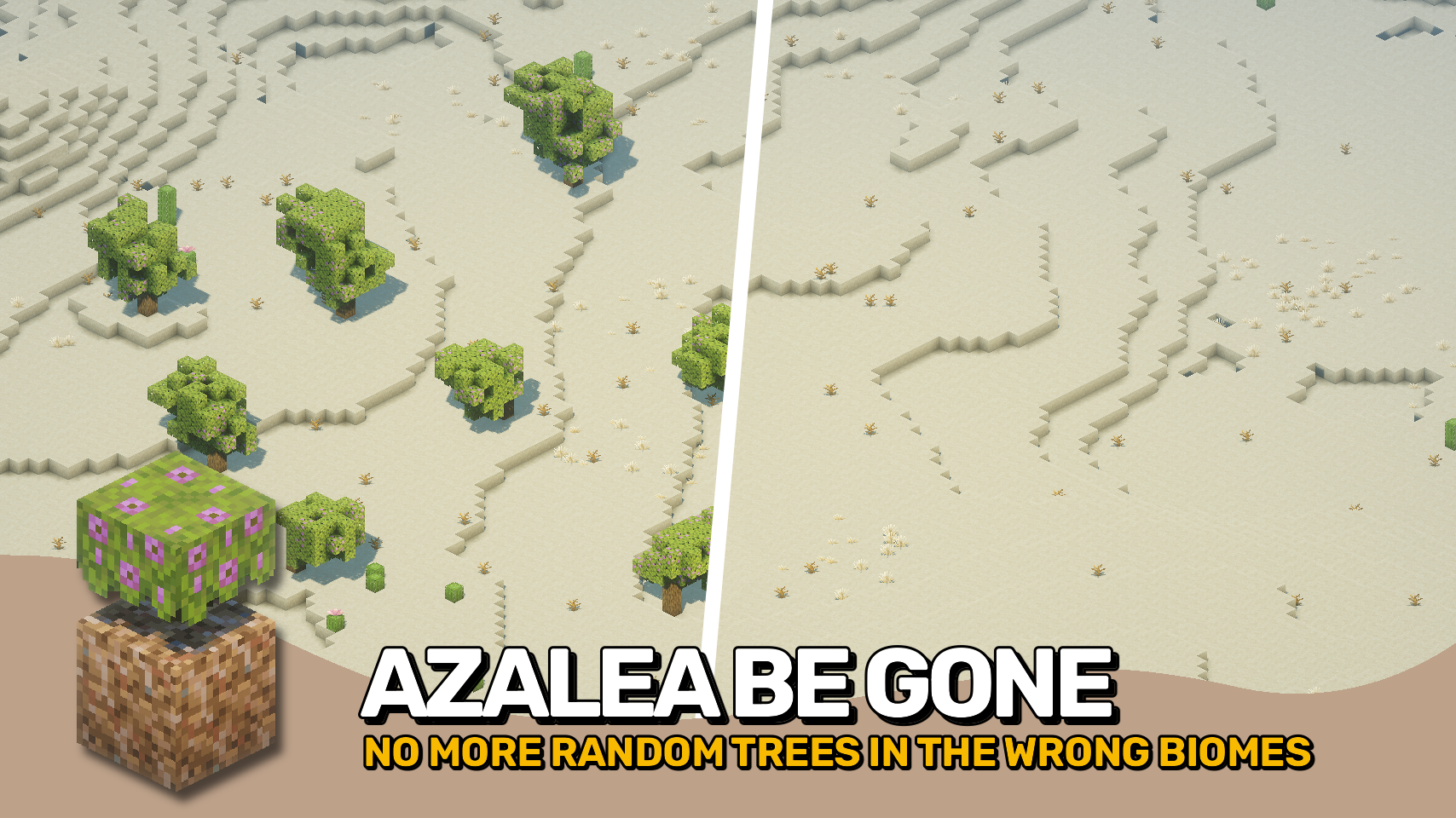
Vanilla Minecraft grows azalea trees in any surface biome, even deserts and snowy tundras. 🌱 This behavior was officially marked as Works As Intended in MC-238499.
Azalea Growth Control restores some sanity to world generation by limiting azalea trees to biomes that actually suit them. 🌍 Using the azaleagrowthcontrol:grows_azalea_trees biome tag, you can define exactly where these trees are allowed to grow. ⚙️
It works seamlessly with both vanilla and modded biomes, giving your worlds a more natural and consistent look. 🍃 No more random green blobs in frozen wastelands!


⏩ INSTALLATION REQUIRED ON SERVER
⏩ REQUIRES PUZZLES LIB TO BE INSTALLED (FABRIC & NEOFORGE)
⏩ REQUIRES FABRIC API TO BE INSTALLED (FABRIC)
⏩ REQUIRES FORGE CONFIG API PORT TO BE INSTALLED (FABRIC)

If available for a mod, configuration is possible directly from in-game using the mod menu (requires Mod Menu by Prospector to be installed on Fabric).
For manual configuration using an external text editor all files are found at .minecraft/config, named as MOD_ID-client.toml, MOD_ID-common.toml, or MOD_ID-server.toml, depending on the type of config. Not all types might exist for a mod, if any at all.
 |
 |
|
 |
 |
|
 |
 |
|
 |
 |
|
 |
 |
|

© 2026 @heyitsfuzs. All rights reserved. This page was last edited on 11 September 2026, at 06:44 (UTC).
Vanilla Minecraft grows azalea trees in any surface biome, even deserts and snowy tundras. 🌱 This behavior was officially marked as Works As Intended in MC-238499.
Azalea Growth Control restores some sanity to world generation by limiting azalea trees to biomes that actually suit them. 🌍 Using the azaleagrowthcontrol:grows_azalea_trees biome tag, you can define exactly where these trees are allowed to grow. ⚙️
It works seamlessly with both vanilla and modded biomes, giving your worlds a more natural and consistent look. 🍃 No more random green blobs in frozen wastelands!
⏩ INSTALLATION REQUIRED ON SERVER
⏩ REQUIRES PUZZLES LIB TO BE INSTALLED (FABRIC & NEOFORGE)
⏩ REQUIRES FABRIC API TO BE INSTALLED (FABRIC)
⏩ REQUIRES FORGE CONFIG API PORT TO BE INSTALLED (FABRIC)
If available for a mod, configuration is possible directly from in-game using the mod menu (requires Mod Menu by Prospector to be installed on Fabric).
For manual configuration using an external text editor all files are found at .minecraft/config, named as MOD_ID-client.toml, MOD_ID-common.toml, or MOD_ID-server.toml, depending on the type of config. Not all types might exist for a mod, if any at all.
 |
 |
|
 |
 |
|
 |
 |
|
 |
|
|
 |
 |
© 2026 @heyitsfuzs. All rights reserved. This page was last edited on 11 September 2026, at 06:44 (UTC).
Screenshots
Gallery
Versions
Files
Relations
Project Relations
More like this
Similar Mods
Suggestions use data such as tags, dependencies, dependents, descriptions, titles, and more to rank how much they overlap with this mod.
On ModDex
Community snapshot
By the numbers
Statistics
 (opens in a new tab)
Get it on
Available Platforms
On ModDex
Community snapshot
By the numbers