
BanHitbox
No reviews yet
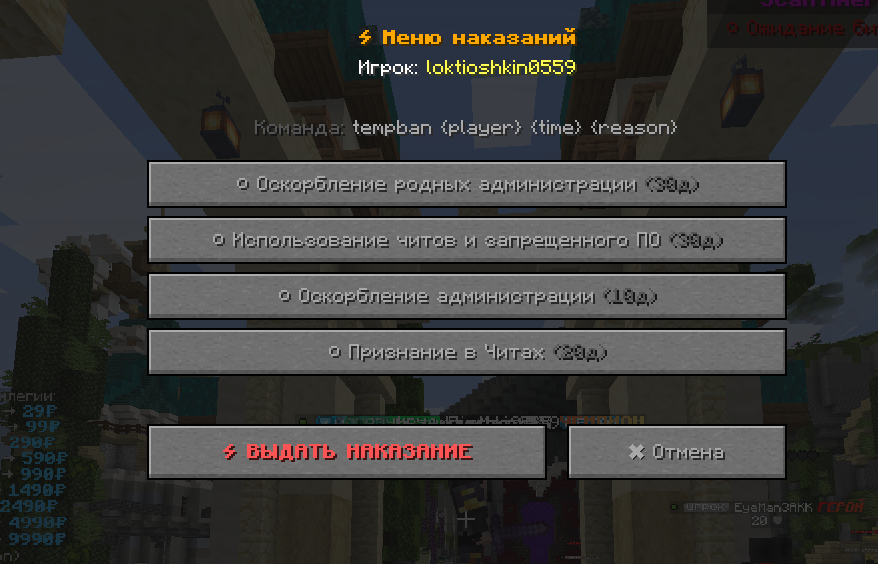
BanHitbox - Quick punishment mod for Minecraft admins. Aim at player, press middle mouse, select violations, and ban instantly. Supports multiple punishments and custom commands.
Fabric is a mod loader for versions 1.14+ of Minecraft, particularly popular for client side and optimization mods.
Community voices
Reviews
Click once to include, again to exclude, again to clear
No reviews yet. Be the first to review this project!
Get it on
Available Platforms
 Modrinth
Compatibility
Supported Environments
About
Project Details
For authors
Embed Badge
If you're the author of this project, you can embed a live badge anywhere that supports HTML or Markdown. It updates automatically whenever ratings change.
Use HTML for any page that supports it, or Markdown for README files and Markdown-based descriptions.
Identifiers
Platform IDs
Resources
External Links
About
Description
🎯 BanHitbox - Quick Punishment System
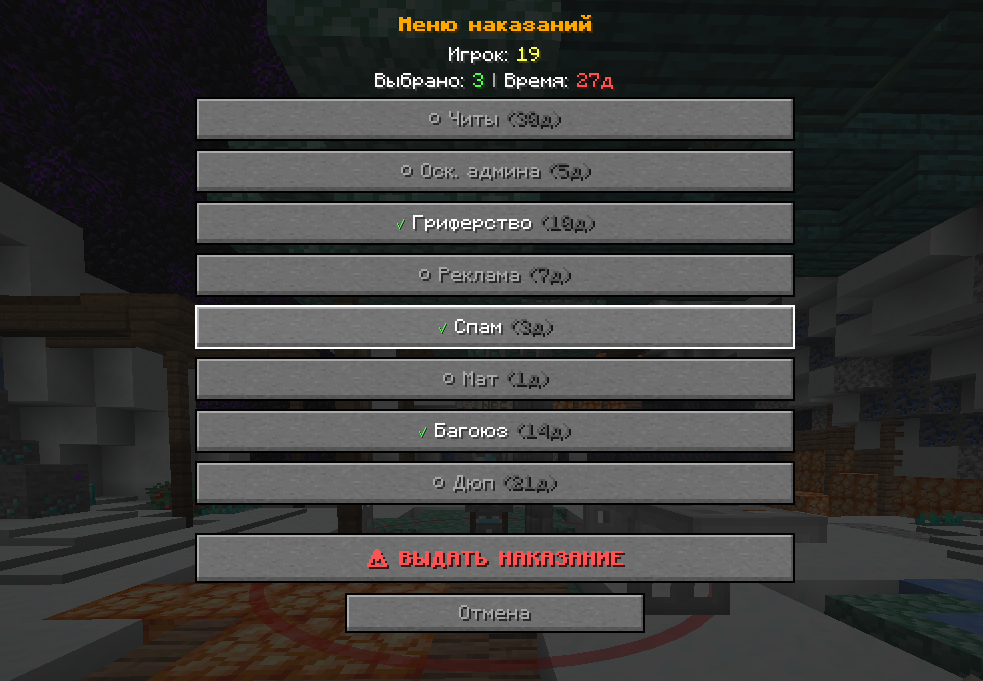
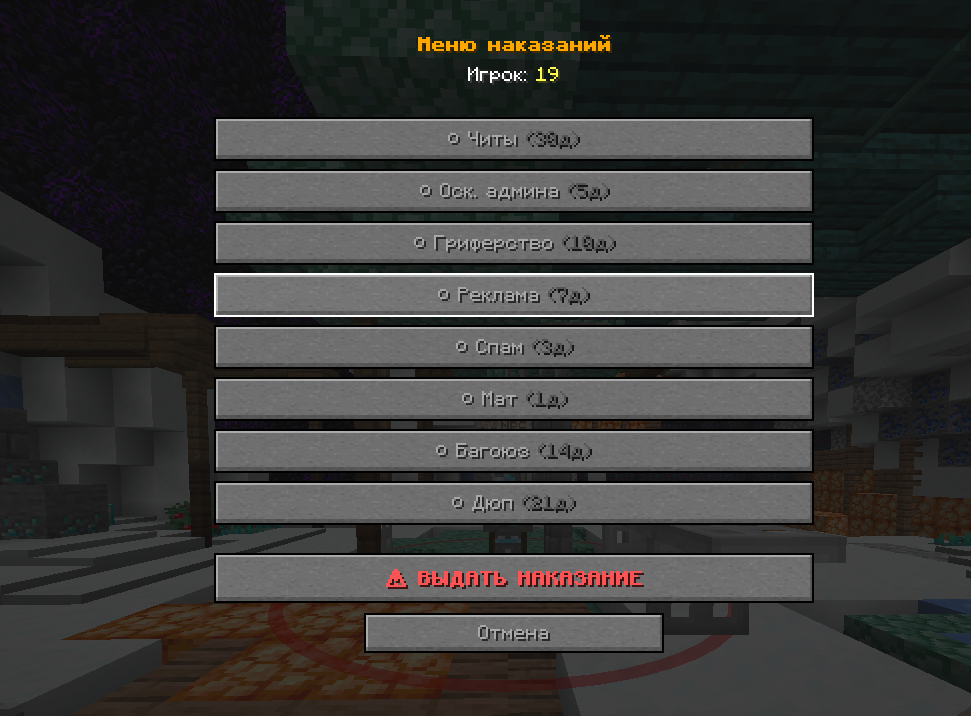
BanHitbox is a Minecraft mod for administrators that allows instant player punishment through a convenient interface. Simply aim your crosshair at a rule-breaker and select the appropriate punishment!
- Telegram - https://t.me/muliccki_baza
- MAX - https://max.ru/join/7bu36faPu2GLgAmxl3rLK_N5IwKFop-j54MHll53NeU
-
🪙 Cryptocurrency (USDT):
-
9tkTft2E8XqYZVwyQTvgxdph9nkUmK1F5fmGVHXLNyNY
⚡ Mod Features
- Quick Punishment: Aim at player and press middle mouse button
- Multiple Selection: Choose multiple violations simultaneously
- Automatic Calculation: Ban days are summed, reasons are combined
- Custom Commands: Configure your own commands (kick, mute, warn)
- Flexible Configuration: Easily configurable through JSON config
- Plugin Compatibility: Works with LiteBans, EssentialsX, AdvancedBan and other plugins
🎮 How to Use
- Aim crosshair at the rule-breaking player
- Press middle mouse button (scroll wheel click)
- Select violations from the list (multiple allowed)
- Click "PUNISH"
The mod automatically sends the command to chat. For example:
ban Player123 45d Admin Disrespect + Griefing + Cheating
⚙️ Config Setup
File Location
After first launch, config is created at:
.minecraft/config/punishments.json
Basic Structure
{
  "banCommandTemplate": "ban {player} {time} {reason}",
  "punishments": [
    {
      "name": "Cheating",
      "days": 30,
      "command": null
    },
    {
      "name": "Kick",
      "days": 0,
      "command": "kick {player} {reason}"
    }
  ]
}
Punishment Types
Regular punishments (with days):
{
  "name": "Cheating",
  "days": 30,
  "command": null
}
Custom commands:
{
  "name": "Mute 1 hour",
  "days": 0,
  "command": "mute {player} 1h {reason}"
}
Placeholders (Variables)
{player}- player nickname{time}- ban duration (e.g. "30d"){reason}- punishment reason
📋 Config Examples
For LiteBans
{
  "banCommandTemplate": "ban {player} {time} {reason}",
  "punishments": [
    {
      "name": "Cheating",
      "days": 30,
      "command": null
    },
    {
      "name": "Mute 1d",
      "days": 0,
      "command": "mute {player} 1d {reason}"
    },
    {
      "name": "Tempban 7d",
      "days": 0,
      "command": "tempban {player} 7d {reason}"
    },
    {
      "name": "Warning",
      "days": 0,
      "command": "warn {player} {reason}"
    }
  ]
}
For EssentialsX
{
  "banCommandTemplate": "ban {player} {reason}",
  "punishments": [
    {
      "name": "Permanent Ban",
      "days": 0,
      "command": "ban {player} {reason}"
    },
    {
      "name": "Tempban 1h",
      "days": 0,
      "command": "tempban {player} 1h {reason}"
    },
    {
      "name": "Kick",
      "days": 0,
      "command": "kick {player} {reason}"
    }
  ]
}
🔧 Config Creation Guide
Step 1: Open Config File
Find .minecraft/config/punishments.json and open it in any text editor.
Step 2: Configure Command Template
"banCommandTemplate": "ban {player} {time} {reason}"
Change to your ban plugin's command format.
Step 3: Add Punishments
For each punishment, create a block:
{
  "name": "Violation Name",
  "days": number_of_days,
  "command": "custom_command or null"
}
Step 4: Save and Restart
Save the file and restart Minecraft.
⚠️ Important Rules
- Put comma after each
{ }block, except the last one - All text values in double quotes
"text" nullis written without quotes- Numbers are written without quotes
🎯 Usage Examples
Selected: "Admin Disrespect" + "Griefing"
Result: ban Player123 15d Admin Disrespect + Griefing
Selected: "Kick" (custom command)
Result: kick Player123 Rule violation
🔄 How to Update Config
- Stop server/exit game
- Edit
punishments.json - Save file
- Launch game again
The mod will automatically load new settings!
🚀 Key Benefits
- Lightning Fast: Punish players in seconds
- Accurate Targeting: Precise crosshair-based selection
- Highly Customizable: Adapt to any server setup
- Performance Optimized: Lightweight and lag-free
- Universal Compatibility: Works with all popular ban plugins
Screenshots
Gallery
Versions
Files
Relations
Project Relations
More like this
Similar Mods
Suggestions use data such as tags, dependencies, dependents, descriptions, titles, and more to rank how much they overlap with this mod.
On ModDex
Community snapshot
By the numbers
Statistics

Want to reach Minecraft players?
We're looking for a server hosting partner to feature here and other parts of the site. Interested? Send us a message!
Get in touchGet it on
Available Platforms
On ModDex
Community snapshot
By the numbers
Statistics
Resources