
Bank Card
No reviews yet
A simple resource/datapack and mod that turns the brown bundle into a bank card.
Data Packs were introduced to vanilla Minecraft in version 1.13 and allow the server to modify data about the game, or run commands. Data Packs are compatible with all mod loaders.
Forge is a popular mod loader for versions 1.1+ of Minecraft.
Neoforge is a fork of the Minecraft Forge available for versions 1.20.1+ of Minecraft. Many Forge mods are compatible with Neoforge and vice versa.
Fabric is a mod loader for versions 1.14+ of Minecraft, particularly popular for client side and optimization mods.
Quilt is a fork of the Fabric mod loader. Many Fabric mods are compatible with Quilt and vice versa.
Community voices
Reviews
Click once to include, again to exclude, again to clear
No reviews yet. Be the first to review this project!
Get it on
Available Platforms
 Modrinth
Compatibility
Supported Environments
About
Project Details
For authors
Embed Badge
If you're the author of this project, you can embed a live badge anywhere that supports HTML or Markdown. It updates automatically whenever ratings change.
Use HTML for any page that supports it, or Markdown for README files and Markdown-based descriptions.
Identifiers
Platform IDs
About
Description
Bank Card





Scroll to the bottom for translations.
Role até o final para ver as traduções.
Faites défiler jusqu'en bas pour les traductions.
What is Bank Card?
It's a (very) simple resource pack that transforms the brown bundle into a bank card!
Wait... There's a brown bundle in the game? Isn't the default bundle already brown?
Yes, there is. I don't know why, but there is. Because it's useless i decided to re-texture it to a bank card.
Why?
I created it because i once installed a mod that added money into Minecraft, and i thought it would be cool to add a bank card! Well, there weren't any mods that did that, so i created my own!
Is there like a... a twist? A surprise? Something ACTUALLY useful?
Nope. Just that. Also by the way it's my first ever 'modifier' for Minecraft, so expect it to be very VERY simple. But, i'm trying to make a datapack that makes a custom crafting recipe for it.
⚠ Warning ⚠
For people that download the resource/datapack: For some reason Modrinth does not show you what are the dependencies of resource/datapacks when you install them, so please check the dependencies! (Install P-x.y.z DATAPACK + P-x.y.z RESOURCEPACK ; Both files can be seen by clicking the version you want to install, then scrolling down).
Crafting Recipe

Gallery


Informations
Some informations about this project's versions
This project uses a similar system to Semantic Versioning: M/P-x.y.z
M/P : Mod / Pack (Resource/Datapack)
x : Major Version (Number changes when an update that adds/removes/modifies big features occurs)
y : Minor Version (Number changes when an update that adds/removes/modifies small features occurs)
z : Minecraft Update Version (Number changes when a Minecraft update occurs, but no actual changes to the resourcepack are made)
Some informations about Minecraft versions
In case i stop posting updates to the resource/datapack version, here's a quick tutorial on how to update the resource/datapack to the newest Minecraft version:
-
Unzip the "bankcard_resourcepack_kakaunet.zip" and "bankcard_datapack_kakaunet.zip" folders.
-
Inside the unzipped folders, find "pack.mcmeta" and open them using the notepad or any other app that allows you to edit text.
-
Open Minecraft, and enter a world.
-
Inside the world, open chat and type "/version".
-
In the output in chat that appears, search for "pack_resource = ", and remember the number located in .
-
In the output in chat that appears, search for "pack_data = ", and remember the number located in .
-
Go back to the notepad, where both "pack.mcmeta" are open.
-
In the "pack.mcmeta" from "bankcard_resourcepack_kakaunet", search for " "pack_format": , ", and replace the number located in with from before.
-
In the "pack.mcmeta" from "bankcard_datapack_kakaunet", search for " "pack_format": , ", and replace the number located in with from before.
-
Close the notepad, and zip the folders "bankcard_resourcepack_kakaunet" and "bankcard_datapack_kakaunet" (THE ONES WHO ARE NOT ZIPPED). Warning: Check inside the newly zipped folders if "pack.mcmeta", "pack.png", and "assets"/"data" are the first things that you find inside! If not, find a way to make it so that they are the first things that you find inside, else the resource/datapack won't work!
Translations
🇫🇷 Traduction en Français / French Translation
Bank Card
⚠ Avertissement ⚠
C'est assez difficile de traduire tout ça, alors il sera très peu probable que la description (en français) soit actualisé.
Qu’est-ce que Bank Card ?
C’est un pack de ressources (très) simple qui transforme le bundle marron en carte bancaire !
Attends… Il y a un bundle marron dans le jeu ? Le bundle par défaut n’est-il pas déjà marron ?
Oui, il y en a un. Je ne sais pas pourquoi, mais il existe. Comme il est inutile, j’ai décidé de le retexturer en carte bancaire.
Pourquoi ?
Je l’ai créé parce qu’un jour j’ai installé un mod qui ajoutait de l’argent dans Minecraft, et j’ai pensé que ce serait cool d’ajouter une carte bancaire ! Eh bien, comme aucun mod ne le faisait, j’ai créé le mien !
Y a-t-il un… un rebondissement ? Une surprise ? Quelque chose de VRAIMENT utile ?
Non. C’est tout. Au passage, c’est mon tout premier « modificateur » pour Minecraft, donc attendez-vous à quelque chose de très, TRÈS simple. Mais j’essaie de créer un datapack qui ajoute une recette de craft personnalisée pour elle.
⚠ Avertissement ⚠
Pour les personnes qui installent le resource/datapack: Je ne sais pas pourquoi, mais Modrinth ne vous montre pas les dépendances d’un resource/datapack quand vous le téléchargez, donc n’oubliez pas de vérifier le resource/datapack associé (Installez P-x.y.z DATAPACK + P-x.y.z RESOURCEPACK ; Les deux fichiers peuvent être trouvés dans la version que vous désirez installez, tout en bas).
Recette de craft
Galerie
Informations
Quelques informations sur les versions de ce projet
Ce projet utilise un système similaire au Semantic Versioning : M/P-x.y.z
R/D : Resourcepack / Datapack
x : Version majeure (le chiffre change lorsqu’une mise à jour ajoute/supprime/modifie de grandes fonctionnalités)
y : Version mineure (le chiffre change lorsqu’une mise à jour ajoute/supprime/modifie de petites fonctionnalités)
z : Version de mise à jour Minecraft (le chiffre change lorsqu’une mise à jour de Minecraft a lieu, mais qu’aucune modification réelle n’est apportée au resourcepack)
Quelques informations sur les versions de Minecraft
Au cas où j’arrêterais de publier des mises à jour de la version resource/datapack, voici un petit tutoriel sur la façon de le mettre à jour vers la dernière version de Minecraft :
-
Décompressez les dossiers "bankcard_resourcepack_kakaunet.zip" et "bankcard_datapack_kakaunet.zip".
-
Dans les dossiers décompressés, trouvez "pack.mcmeta" et ouvrez-les avec le bloc-notes ou toute autre application permettant d’éditer du texte.
-
Ouvrez Minecraft et entrez dans un monde.
-
Dans le monde, ouvrez le chat et tapez « /version ».
-
Dans la sortie du chat qui apparaît, cherchez « pack_resource = » et notez le numéro situé dans .
-
Dans la sortie du chat qui apparaît, cherchez « pack_data = » et notez le numéro situé dans .
-
Retournez dans le bloc-notes, où les deux "pack.mcmeta" sont ouverts.
-
Dans le "pack.mcmeta" de "bankcard_resourcepack_kakaunet", cherchez « "pack_format": , » et remplacez le numéro par .
-
Dans le "pack.mcmeta" de "bankcard_datapack_kakaunet", cherchez « "pack_format": , » et remplacez le numéro par .
-
Fermez le bloc-notes et compressez à nouveau les dossiers "bankcard_resourcepack_kakaunet" et "bankcard_datapack_kakaunet" (CEUX QUI NE SONT PAS ZIPPÉS). Attention : vérifiez dans les nouveaux dossiers compressés que "pack.mcmeta", "pack.png" et "assets"/"data" sont les premiers fichiers visibles ! Sinon, assurez-vous qu’ils le soient, sinon le resource/datapack ne fonctionnera pas !
🇧🇷 Tradução em Português (Brasil) / Portuguese (Brazil) Translation
Bank Card
⚠ Aviso ⚠
É muito difícil traduzir tudo isso, então é altamente improvável que a descrição (em português) seja atualizada.
O que é o Bank Card?
É um resource pack (muito) simples que transforma o bundle marrom em um cartão bancário!
Espera… Existe mesmo um bundle marrom no jogo? O bundle padrão já não é marrom?
Sim, existe. Eu não sei por quê, mas existe. Como ele é inútil, decidi retexturizá-lo para virar um cartão bancário.
Por quê?
Eu o criei porque uma vez instalei um mod que adicionava dinheiro ao Minecraft e achei que seria legal ter um cartão bancário! Bem, não havia nenhum mod que fizesse isso, então eu criei o meu!
Tem algum… truque? Surpresa? Algo REALMENTE útil?
Não. Só isso. Ah, e é o meu primeiro “modificador” para Minecraft, então espere algo bem, BEM simples. Mas estou tentando fazer um datapack que crie uma receita de craft personalizada para ele.
⚠ Aviso ⚠
Para as pessoas que instalam o resource/datapack: Não sei por que, mas o Modrinth não mostra as dependências de um resource/datapack quando você o baixa, então não esqueça de verificar o resource/datapack relacionado (Instale P-x.y.z DATAPACK + P-x.y.z RESOURCEPACK ; Os dois arquivos podem ser encontrados dentro da versão que você quer instalar, lá embaixo).
Receita de Craft
Galeria
Informações
Algumas informações sobre as versões deste projeto
Este projeto usa um sistema semelhante ao Semantic Versioning: M/P-x.y.z
M/P : Mod / Pack (Resource/Datapack)
x : Versão Maior (o número muda quando uma atualização adiciona/remove/modifica grandes recursos)
y : Versão Menor (o número muda quando uma atualização adiciona/remove/modifica pequenos recursos)
z : Versão de Atualização do Minecraft (o número muda quando uma atualização do Minecraft ocorre, mas nenhuma mudança real é feita no resourcepack)
Algumas informações sobre as versões do Minecraft
Caso eu pare de postar atualizações para a versão resource/datapack, aqui vai um tutorial rápido de como atualizar o resource/datapack para a versão mais recente do Minecraft:
-
Descompacte as pastas "bankcard_resourcepack_kakaunet.zip" e "bankcard_datapack_kakaunet.zip".
-
Dentro das pastas descompactadas, encontre "pack.mcmeta" e abra-os usando o Bloco de Notas ou qualquer outro app que permita editar texto.
-
Abra o Minecraft e entre em um mundo.
-
Dentro do mundo, abra o chat e digite "/version".
-
Na saída do chat que aparecer, procure por "pack_resource = " e anote o número localizado em .
-
Na saída do chat que aparecer, procure por "pack_data = " e anote o número localizado em .
-
Volte ao Bloco de Notas, onde ambos os "pack.mcmeta" estão abertos.
-
No "pack.mcmeta" de "bankcard_resourcepack_kakaunet", procure por " "pack_format": , " e substitua o número em por .
-
No "pack.mcmeta" de "bankcard_datapack_kakaunet", procure por " "pack_format": , " e substitua o número em por .
-
Feche o Bloco de Notas e compacte novamente as pastas "bankcard_resourcepack_kakaunet" e "bankcard_datapack_kakaunet" (AS QUE NÃO ESTÃO ZIPADAS). Atenção: verifique dentro das novas pastas zipadas se "pack.mcmeta", "pack.png" e "assets"/"data" são os primeiros arquivos visíveis! Caso contrário, dê um jeito de fazer com que eles sejam, senão o resource/datapack não funcionará!
Screenshots
Gallery
-
 Bank Card: Looking in Inventory
 -
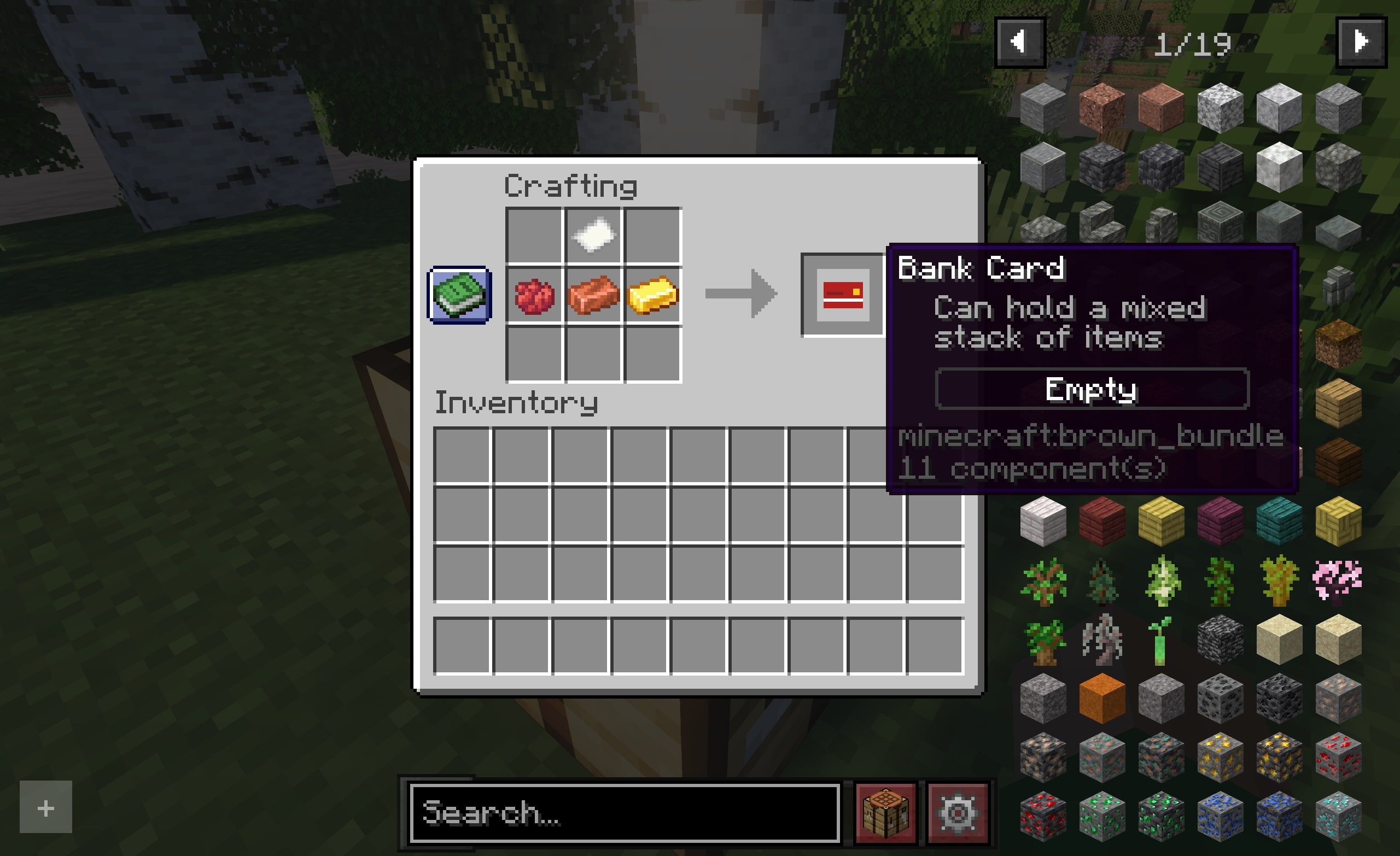 Bank Card: Crafting a Bank Card
 -
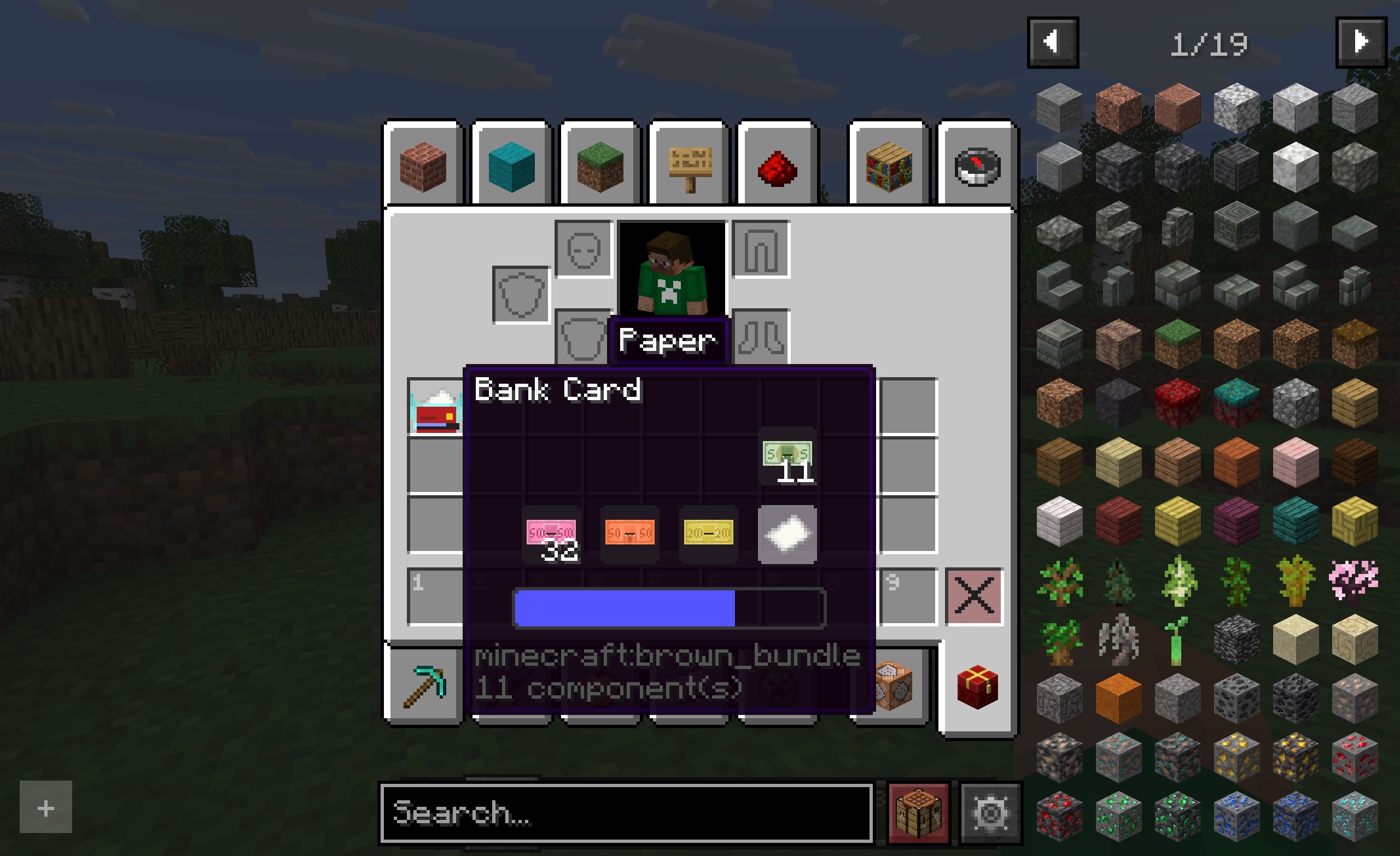 Bank Card: Removing Paper
 -
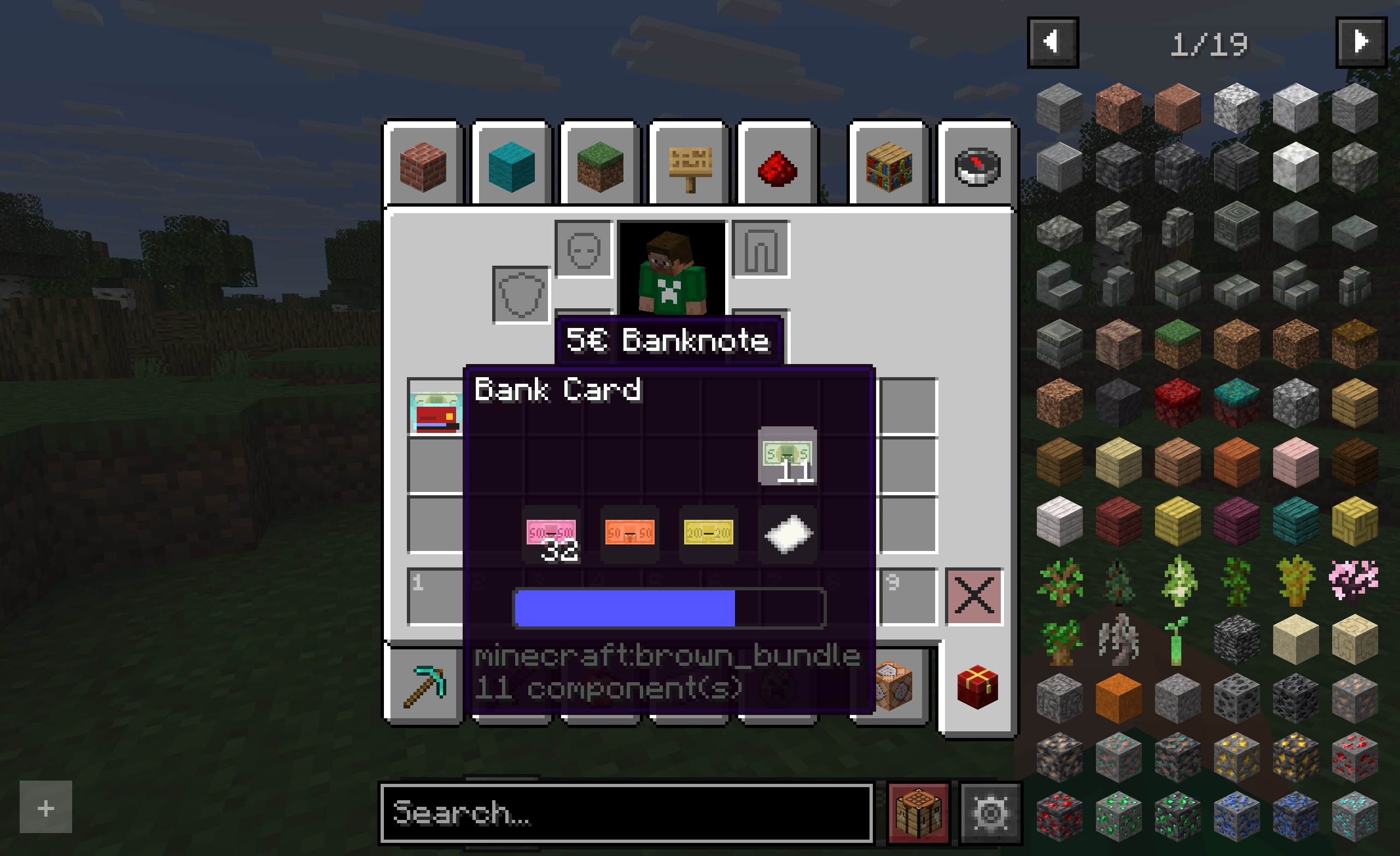 Bank Card: Removing 5€ Banknote (Mod: New Currencies)
 -
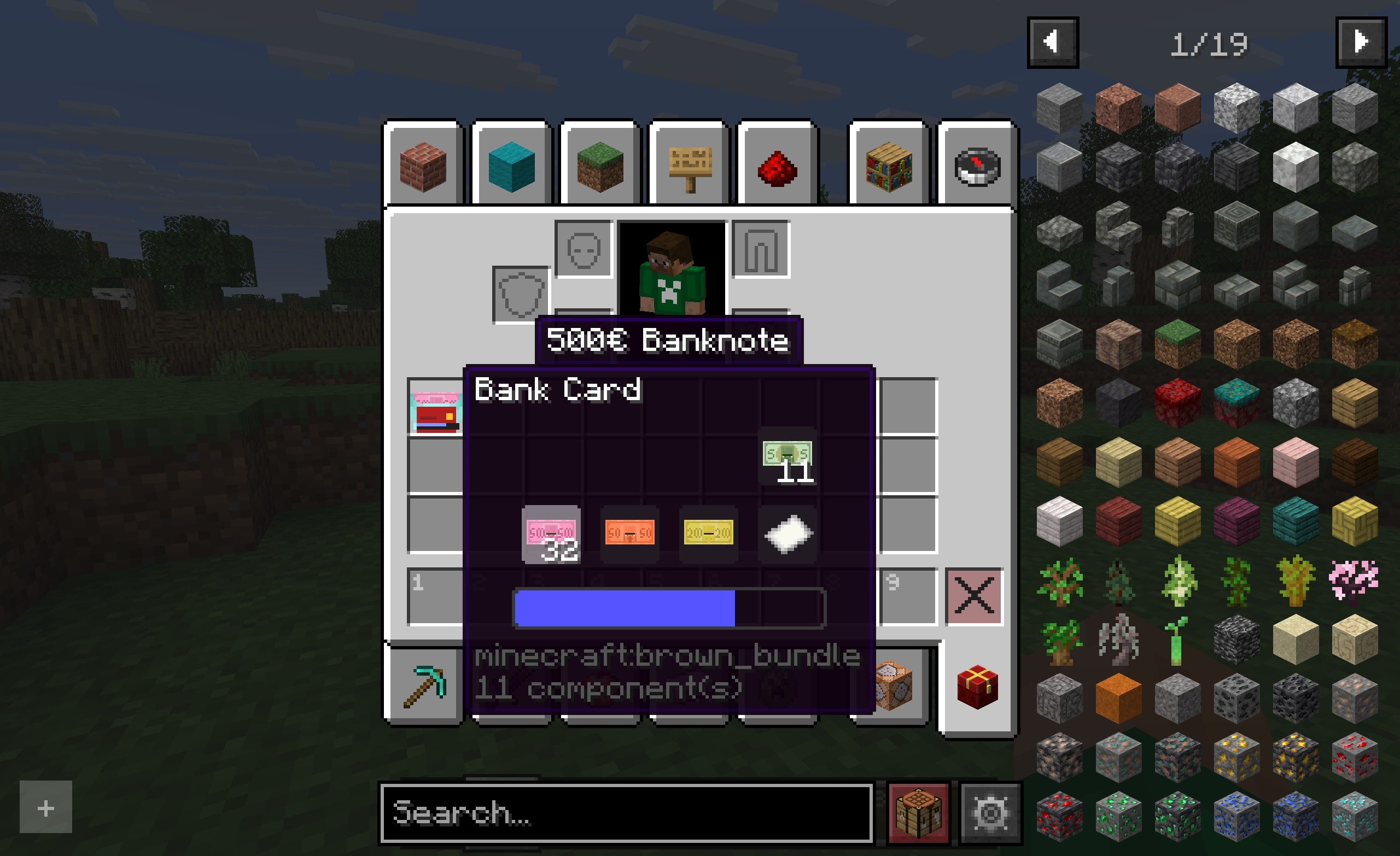 Bank Card: Removing 500€ Banknote (Mod: New Currencies)
Versions
Files
Relations
Project Relations
More like this
Similar Mods
Suggestions use data such as tags, dependencies, dependents, descriptions, titles, and more to rank how much they overlap with this mod.
On ModDex
Community snapshot
By the numbers
Statistics

Want to reach Minecraft players?
We're looking for a server hosting partner to feature here and other parts of the site. Interested? Send us a message!
Get in touchGet it on
Available Platforms
On ModDex
Community snapshot
By the numbers