Community listing page, reviews here may not be monitored by the author.
Bathymetry


No reviews yet
Visualizes underwater terrain depth through water color.

Community voices
Reviews
No reviews yet. Be the first to review this project!
Get it on
Available Platforms
Compatibility
Supported Environments
Runs entirely on the client. Works on vanilla servers.
About
Project Details
For authors
Embed Badge
If you're the author of this project, you can embed a live badge anywhere that supports HTML or Markdown. It updates automatically whenever ratings change.
Use HTML for any page that supports it, or Markdown for README files and Markdown-based descriptions.
Identifiers
Platform IDs
About
Description

|


|

Bathymetry — A Client-side mod that visualizes underwater terrain depth through water color.
In vanilla, a puddle will look the same as a deep ocean. This mod changes the water's color depending on the depth from the surface to the bottom. Shalllows will look the same but the deeper you go the darker the water gets.
This mod ensures the biome tint stays by multiplying the colors instead of overwriting them.
Showcase


The mod is client-side and fully compatible with resource packs and datapacks, even if they change biome colors.
Shaders: Some shaders overwrite the water color and ignore the mod so it depends on the shader.

Distant Horizons Compatibility 🗺️


The mod is very easily configurable using Mod Menu and YACL for instant updates without a restart, things you can configure are listed below.
Appearance
- Intensity overall strength without touching hue.
- Shallow and Deep Tint the two ends of the gradient. White is vanilla.
Depth
- Shallow and Deep Depth over what range of water deepness the gradient ramps up.
- Smooth Edges and Smoothing Radius how far the transition is blended across large drop-offs, so a cliff in the sea floor does not look like a hard seam.
Fog
- Underwater Fog thickens fog with depth once you are submerged. Disabled by default.
- Deep Fog Distance how much visibility is left at maximum depth.

Everything is also editable by hand in config/bathymetry.json5, colors included, they are stored as plain hex strings.

Want to support mod and authors? Just tell everyone about this mod!
Yeah, you got it right. Just by advertising, you will support the mod and the creators well. The more people will know about this mod, the more downloads it will have, more downloads will give good motivation to authors and increase income from the site (literally free donation). Remember, advertising must not be intrusive and annoiyng!
What you can do?
- Make a video review / advertisement
- Share it on social media or Discord
- Tell your friends about this mod
- Add it to your modpack or just download and enjoy the game
Every mention matters — thank you for helping the community grow 🤍

The license terms for this project are defined in the LICENSE file in this repository. That file always takes precedence over any license shown anywhere else.
See the original mod repository
|
|
|
Bathymetry — A Client-side mod that visualizes underwater terrain depth through water color.
In vanilla, a puddle will look the same as a deep ocean. This mod changes the water's color depending on the depth from the surface to the bottom. Shalllows will look the same but the deeper you go the darker the water gets.
This mod ensures the biome tint stays by multiplying the colors instead of overwriting them.
Showcase
The mod is client-side and fully compatible with resource packs and datapacks, even if they change biome colors.
Shaders: Some shaders overwrite the water color and ignore the mod so it depends on the shader.
Distant Horizons Compatibility 🗺️
The mod is very easily configurable using Mod Menu and YACL for instant updates without a restart, things you can configure are listed below.
Appearance
- Intensity overall strength without touching hue.
- Shallow and Deep Tint the two ends of the gradient. White is vanilla.
Depth
- Shallow and Deep Depth over what range of water deepness the gradient ramps up.
- Smooth Edges and Smoothing Radius how far the transition is blended across large drop-offs, so a cliff in the sea floor does not look like a hard seam.
Fog
- Underwater Fog thickens fog with depth once you are submerged. Disabled by default.
- Deep Fog Distance how much visibility is left at maximum depth.
Everything is also editable by hand in config/bathymetry.json5, colors included, they are stored as plain hex strings.
Want to support mod and authors? Just tell everyone about this mod!
Yeah, you got it right. Just by advertising, you will support the mod and the creators well. The more people will know about this mod, the more downloads it will have, more downloads will give good motivation to authors and increase income from the site (literally free donation). Remember, advertising must not be intrusive and annoiyng!
What you can do?
- Make a video review / advertisement
- Share it on social media or Discord
- Tell your friends about this mod
- Add it to your modpack or just download and enjoy the game
Every mention matters — thank you for helping the community grow 🤍
The license terms for this project are defined in the LICENSE file in this repository. That file always takes precedence over any license shown anywhere else.
See the original mod repository
Screenshots
Gallery
-
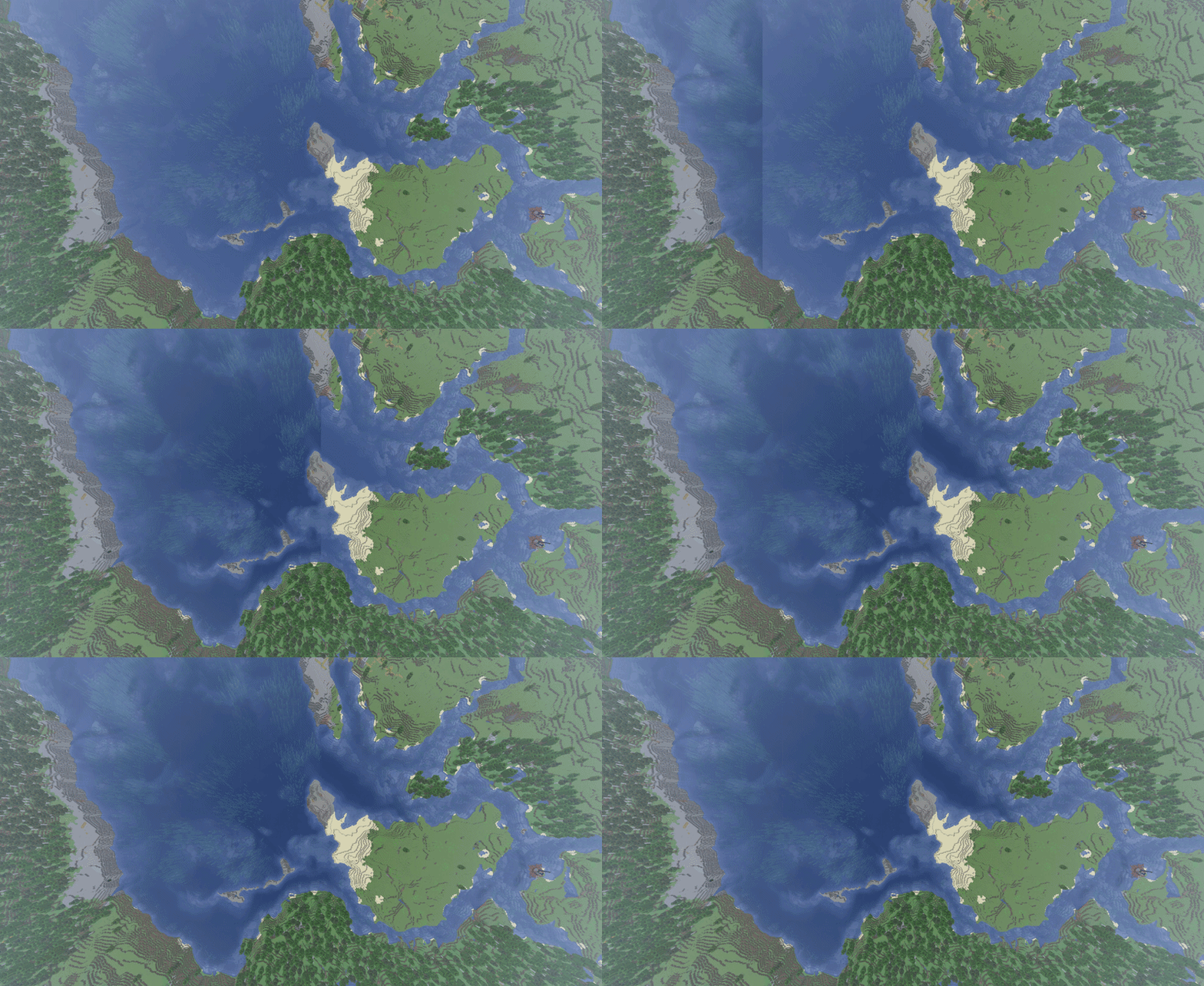 Showcase
 -
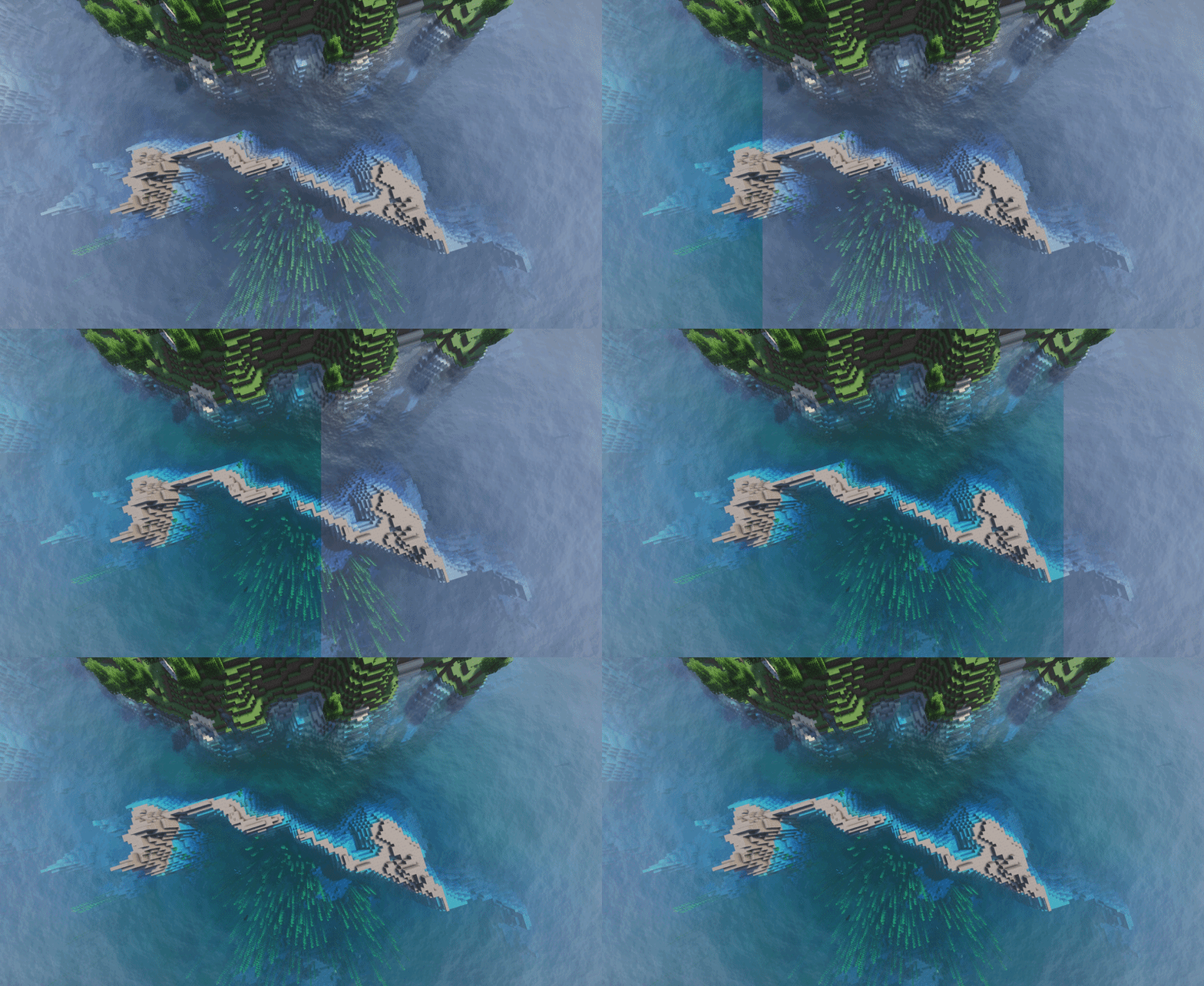 Showcase Shaders
-
 Showcase
 -
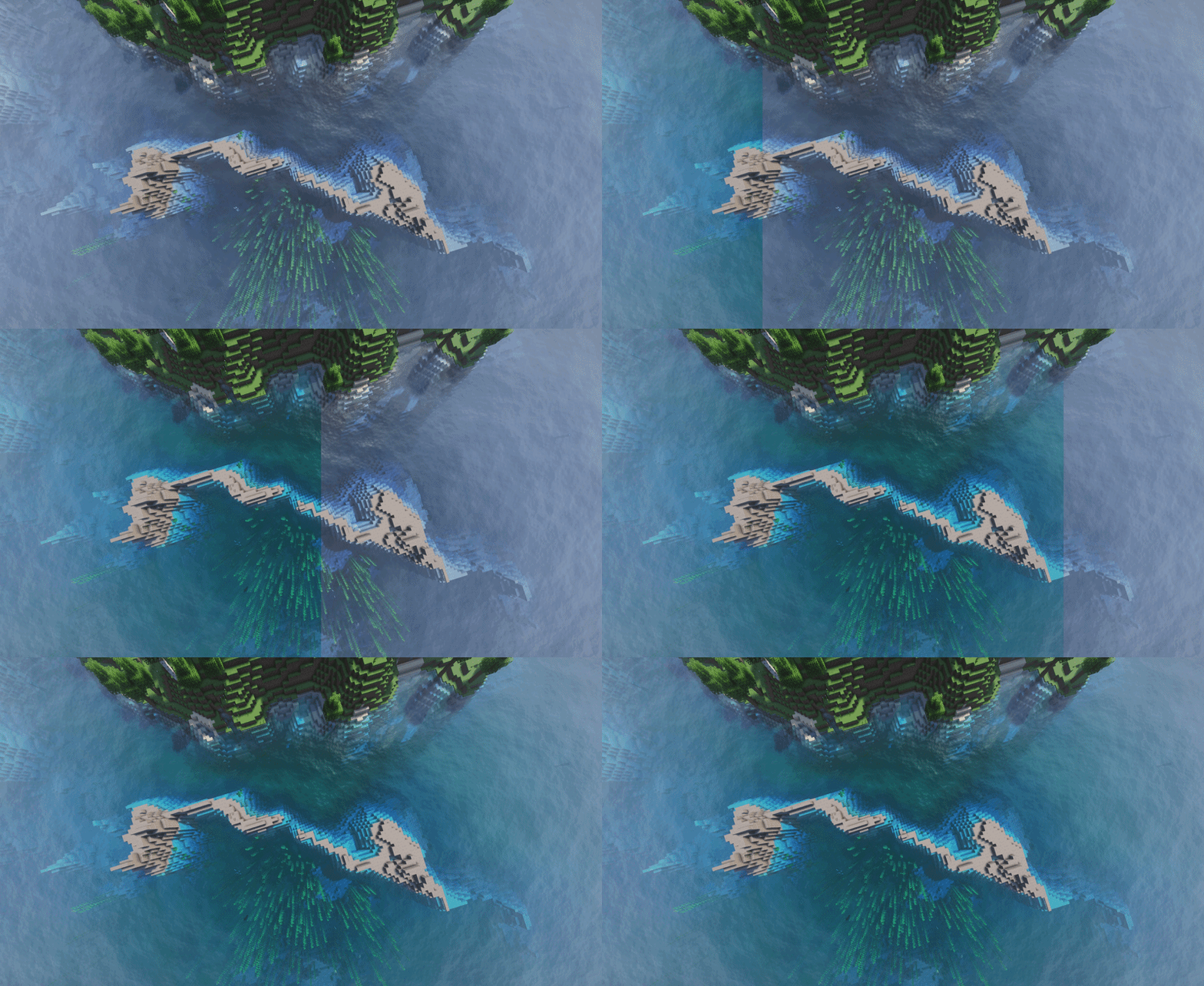 Showcase Shaders
Versions
Files
Relations
Project Relations
More like this
Similar Mods
Suggestions use data such as tags, dependencies, dependents, descriptions, titles, and more to rank how much they overlap with this mod.
On ModDex
Community snapshot
By the numbers
Statistics
 (opens in a new tab)
Get it on
Available Platforms
On ModDex
Community snapshot
By the numbers