
Community listing page, reviews here may not be monitored by the author.
Bean blaster calculator

No reviews yet
Calculate easily the amount of windcharges needed to travel to your destination with the Iddiebean pearl Launcher
Community voices
Reviews
No reviews yet. Be the first to review this project!
Get it on
Available Platforms
Compatibility
Supported Environments
Runs entirely on the client. Works on vanilla servers.
About
Project Details
For authors
Embed Badge
If you're the author of this project, you can embed a live badge anywhere that supports HTML or Markdown. It updates automatically whenever ratings change.
Use HTML for any page that supports it, or Markdown for README files and Markdown-based descriptions.
Identifiers
Platform IDs
Resources
External Links
About
Description
Bean Blaster Calculator
A simple client-side calculator for Bean Blasters / Pearl Launchers.
Use it to calculate how many Wind Charges must be placed in each dispenser to launch an Ender Pearl toward your target coordinates.
Commands
Setup the Bean Blaster
Look directly at the magma block of your Bean Blaster and run:
/bb setup
You can also use:
/beanblaster setup
The mod will save the magma block position for the current world or server.
Calculate a launch
Run:
/bb <x> <z>
Example:
/bb 1250 -840
You can also use:
/beanblaster 1250 -840
The mod will calculate which dispensers need Wind Charges and how many to place in each one.
Help command
Run:
/bb help
or:
/beanblaster help
This shows the available commands and basic usage instructions in-game.
Result Format
The result shows the raw amount and the Minecraft inventory version.
Example:
Dispenser 1: 124 (1 Stack + 60 Items) Wind Charges
Inventory conversion:
1 Stack = 64 items
1 Shulker Box = 27 Stacks = 1728 items
How to Use
- Build or find your Bean Blaster.
- Look directly at the blaster's magma block.
- Run:
/bb setup
- Choose the target coordinates where you want to launch the Ender Pearl.
- Run:
/bb <target x> <target z>
Example:
/bb 3000 -1200
- Put the shown amount of Wind Charges into the listed dispensers.
- Use your Bean Blaster normally.
Notes
- You must run setup before calculating a target.
- Setup is saved separately for each world or server.
- Setup is also separated by dimension.
- If you move or rebuild the Bean Blaster, run setup again.
- Use
/bbinstead of/blasterto avoid conflicts with other mods.
Credits
Pearl Launcher (Bean Blaster) and python code original creator:
@IddieBean on YT
Mod creators:
wavedtime
Sboby_
Albuz999
Modrinth profiles:
Sboby_
Albuz999
:::
Screenshots
Gallery
-
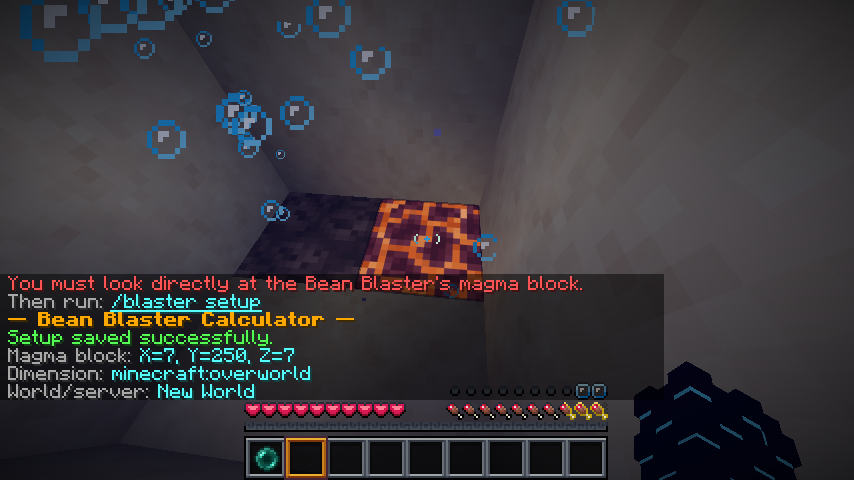 setting the magma block coordinates using /blaster setup
 -
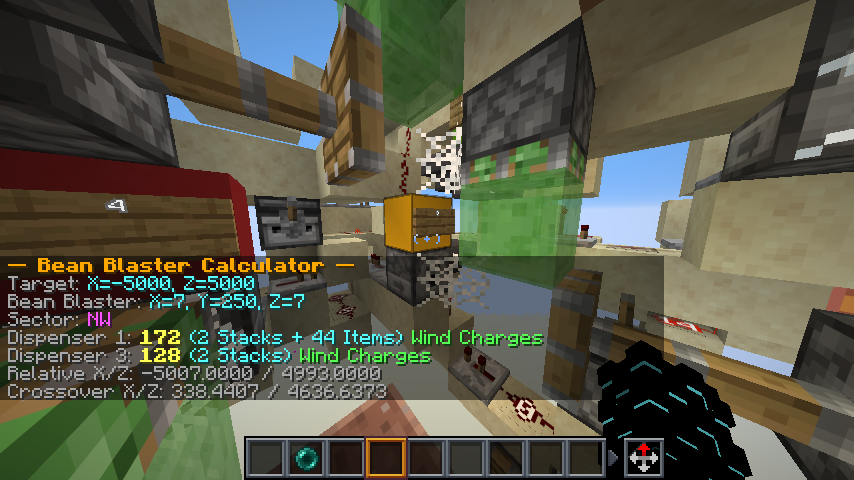 asking the mod for a set of cordinates The mod directlt gives the ammount of wind charges needed
Versions
Files
Relations
Project Relations
More like this
Similar Mods
Suggestions use data such as tags, dependencies, dependents, descriptions, titles, and more to rank how much they overlap with this mod.
On ModDex
Community snapshot
By the numbers
Statistics

Want to reach Minecraft players?
We're looking for a server hosting partner to feature here and other parts of the site. Interested? Send us a message!
Get in touchGet it on
Available Platforms
On ModDex
Community snapshot
By the numbers
Statistics
Resources