
BEconomy
No reviews yet
• BEconomy is a mod that adds virtual economy as well as item type economy, which makes it very customizable and easy to use. • Cobblemon Support
Includes systems for trading and managing economies.
Fabric is a mod loader for versions 1.14+ of Minecraft, particularly popular for client side and optimization mods.
Community voices
Reviews
Click once to include, again to exclude, again to clear
No reviews yet. Be the first to review this project!
Get it on
Available Platforms
 Modrinth
Compatibility
Supported Environments
About
Project Details
For authors
Embed Badge
If you're the author of this project, you can embed a live badge anywhere that supports HTML or Markdown. It updates automatically whenever ratings change.
Use HTML for any page that supports it, or Markdown for README files and Markdown-based descriptions.
Identifiers
Platform IDs
Resources
External Links
About
Description
BEconomy
BEconomy is a powerful and customizable economy mod designed for Minecraft servers that provides a flexible system for managing currencies, player balances, and economic transactions. Whether you're running a small community server or a large-scale network, BEconomy can be tailored to suit your needs with its easy-to-use commands, flexible configuration options, and support for multiple currencies.
Key Features
- Multiple Currency Support: Create and manage multiple currencies with unique names, lore, materials, and identifiers to suit your server's economy.
- Custom Item Integration: Use Minecraft items with custom model data and lore as physical currency representations.
- Database Integration: Supports MySQL or SQLite databases to store player balances and economic data persistently. Also provides an option for local JSON storage.
- Dynamic Economy System: Set starting balances for new players, manage transactions, and track player balances across currencies.
- Server Console Compatibility: Execute all commands directly from the server console for full administrative control.
- Integrated Permissions: Offers fine-grained permission control to manage player access to specific economy actions.
- Highly Configurable: Customize messages, GUI interfaces, currency settings, and more through an intuitive JSON configuration system.
Commands & Permissions
The BEconomy mod provides a range of commands for managing the economy. Below is a list of commands with a brief description and their associated permissions:
Spoiler
/beco balance <currencyType>
- Permission:
beconomy.balance - Displays the player's current balance for the specified currency type.
/beco balance <player> <currencyType>
- Permission:
beconomy.balance.others - Displays another player's balance for the specified currency type.
/beco pay <amount> <player> <currencyType>
- Permission:
beconomy.pay - Transfers a specified amount of currency to another player.
/beco add <amount> <player> <currencyType>
- Permission:
beconomy.add - Adds a specified amount of currency to a player's balance.
/beco remove <amount> <player> <currencyType>
- Permission:
beconomy.remove - Removes a specified amount of currency from a player's balance.
/beco deposit <currencyType>
- Permission:
beconomy.deposit - Converts in-game items representing a currency into balance.
/beco withdraw <amount> <currencyType>
- Permission:
beconomy.withdraw - Withdraws a specified amount of currency as an item stack for trading or holding.
/beco reload
- Permission:
beconomy.reload - Reloads the mod configuration without requiring a server restart.
/beco top
- Permission:
beconomy.top - Displays a leaderboard of players with the highest balances for a specified currency.
/beco set <amount> <currencytype> <player>
- Permission:
beconomy.set - with this command you can set a amount of money for a player.
/beco offline set <amount> <currencytype> <player>
- Permission:
beconomy.offline.set - with this command you can set an amount of money to an offline player.
/beco offline balance <player> <currencytype>
- Permission:
beconomy.offline.balance - with this command you can see the balance from an offline player.
/beco offline add <player> <amount> <currencytype>
- Permission:
beconomy.offline.add - with this command you can add money to an offline player.
/beco offline remove <player> <amount> <currencytype>
- Permission:
beconomy.offline.remove - with this command you can remove a certain amount of money from an offline player.
Configuration
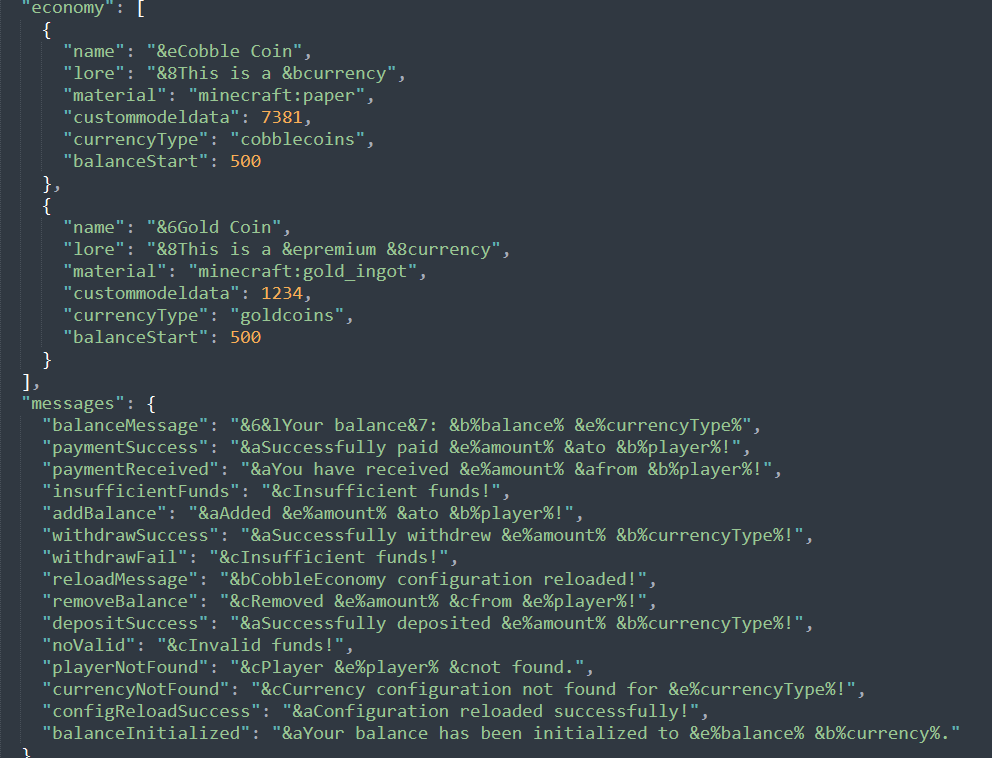
The configuration for BEconomy is highly customizable and can be easily adjusted to fit the needs of your server.
The config file (config/beconomy/config.json) allows you to set up various settings for the economy.
- Define custom currencies with unique settings (name, lore, material, symbol, etc.).
- Set starting balances for each currency.
- Enable or disable features like withdrawals, deposits, and transfers for specific currencies.
- Customize all in-game messages, supporting color codes and placeholders.
- Configure database settings for persistent storage.
Adding New Currencies To add a new currency to the economy system, follow these steps:
-
Locate the Configuration File: Open the
config/beconomy/config.jsonfile located in your server's config folder. -
Define a New Currency: Add a new entry in the economy list within the config file.
Each currency entry must include:
- name: The display name of the currency.
- lore: A description or lore for the currency item.
- material: The Minecraft item type that represents the currency (e.g., minecraft:gold_ingot).
- custommodeldata: Custom model data for the item, if applicable.
- currencyType: A unique identifier for the currency (e.g., gold_coin).
- balanceStart: The starting balance for new players for this currency.
- symbol: Symbol to represent the currency (e.g., $).
- isPrimary: Set to true if this is the primary currency.
- transfer: Enable or disable
/beco payfeatures. - withdraw: Enable or disable
/beco withdrawfeatures.
Example:
{
      "name": "&eCobble Coin",
      "lore": [
        "&8This is a &bcurrency",
        "&8Lore 2"
      ],
      "material": "minecraft:paper",
      "custommodeldata": 7381,
      "currencyType": "cobblecoins",
      "balanceStart": 500,
      "symbol": "$",
      "isPrimary": true,
      "transfer": true,
      "withdraw": true
    }
EX: For Sqlite Database
"localSave": false,
  "databaseSave": true,
  "database": {
    "type": "sqlite",
    "host": null,
    "port": null,~~~~
    "databaseName": "economy.db",
    "username": null,
    "password": null
  }
EX: For MySQL/MongoDB/PostgreSQL Database
"localSave": false,
  "databaseSave": true,
  "database": {
    "type": "mysql", // here you set which type of database to use the plugin!
    "host": "localhost",
    "port": 3306,
    "databaseName": "economy",
    "username": "root",
    "password": "password"
  }
- Save and Reload: After adding the new currency, save the config file and use the /beco reload command to apply the changes.
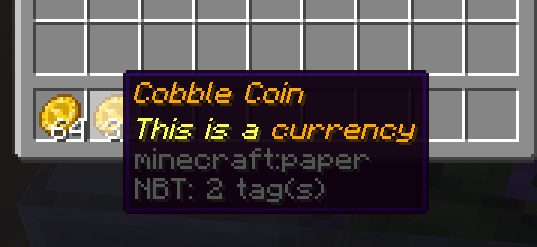
IMG


Screenshots
Gallery
Versions
Files
Relations
Project Relations
More like this
Similar Mods
Suggestions use data such as tags, dependencies, dependents, descriptions, titles, and more to rank how much they overlap with this mod.
On ModDex
Community snapshot
By the numbers
Statistics

Want to reach Minecraft players?
We're looking for a server hosting partner to feature here and other parts of the site. Interested? Send us a message!
Get in touchGet it on
Available Platforms
On ModDex
Community snapshot
By the numbers
Statistics
Resources