
Community listing page, reviews here may not be monitored by the author.

Community voices
Reviews
No reviews yet. Be the first to review this project!
Get it on
Available Platforms
About
Project Details
For authors
Embed Badge
If you're the author of this project, you can embed a live badge anywhere that supports HTML or Markdown. It updates automatically whenever ratings change.
Use HTML for any page that supports it, or Markdown for README files and Markdown-based descriptions.
Identifiers
Platform IDs
Resources
External Links
About
Description
Features
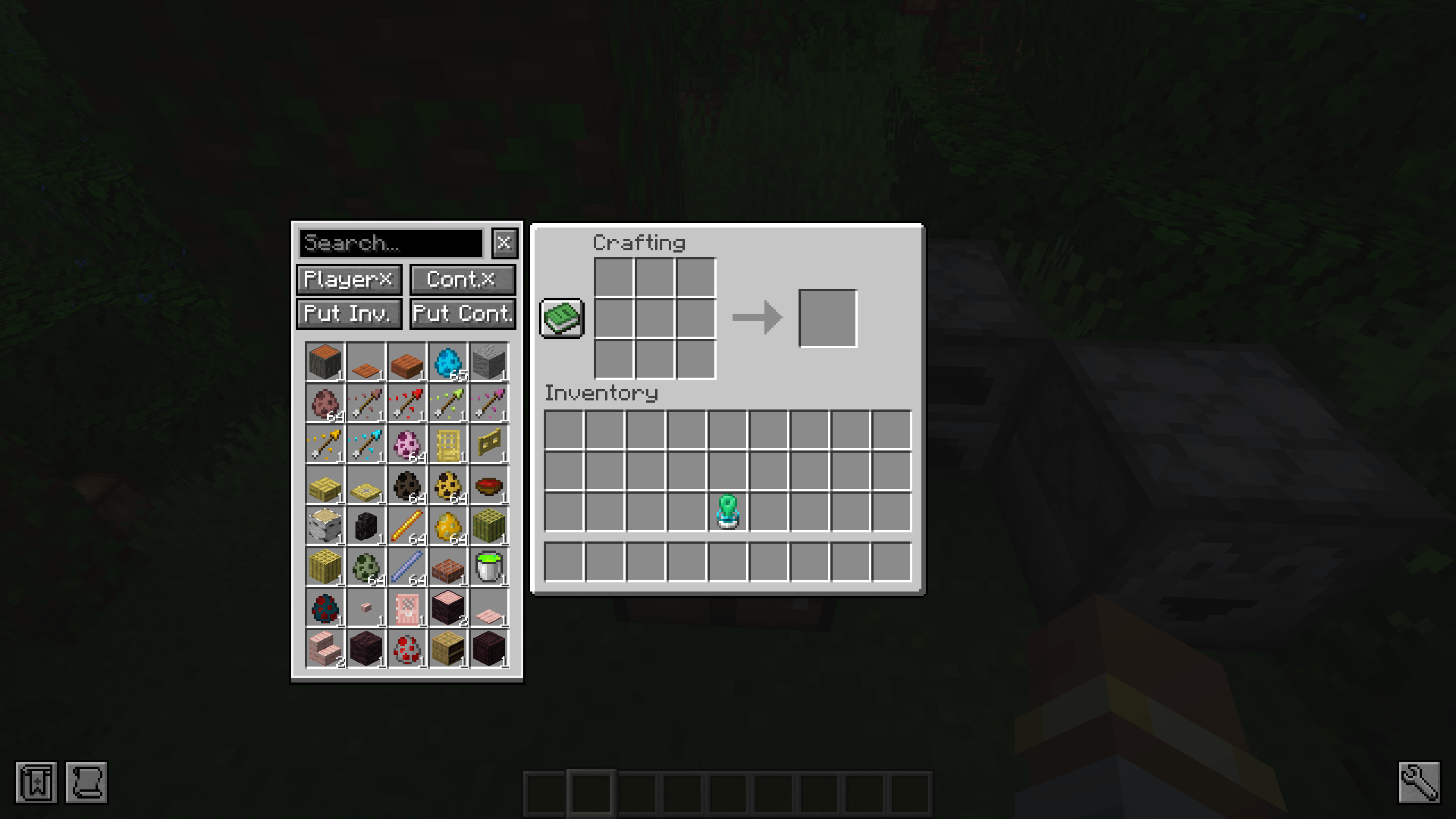
- Displays a searchable Beyond Dimensions network sidebar on the left side of all
AbstractContainerScreenscreens. - The sidebar is shown only when the server confirms that the player has an available Beyond Dimensions network.
- Left-click extracts one stack from the network; right-click extracts one item. Search supports both display names and registry names.
- “Move Player Items” and “Move Container Items” independently control Shift-click behavior.
- “Deposit Container” stores items from the currently open container into the network. “Deposit Inventory” only processes the player’s main inventory; the hotbar is excluded.
- Default shortcuts:
Ffor “Deposit Container” andGfor “Deposit Inventory`. They only work while the sidebar is visible and the search box is not focused. - Player and container Shift-transfer settings are saved to the client file
config/better_beyond_dimensions-settings.jsonand synchronized with the server when a new screen is opened. - All network storage operations and Shift-click interception are validated and executed server-side.
Sidebar Display Event
SidebarDisplayEvent is fired on the client after the sidebar has been created and before it is displayed. The event can access the current Screen, disable the functionality of individual buttons, override button text or tooltips, or completely disable the sidebar for the current screen. The event only affects the current screen instance and does not modify the server-side menu.
For example, to disable “Deposit Container” on the crafting screen and change its tooltip to “Disabled”:
private static void onSidebarDisplay(SidebarDisplayEvent event)
{
    if (event.getScreen() instanceof CraftingScreen)
    {
        event.disableButton(SidebarDisplayEvent.ButtonId.DEPOSIT_CONTAINER);
        event.setButtonTooltip(
                SidebarDisplayEvent.ButtonId.DEPOSIT_CONTAINER,
                Component.literal("Disabled")
        );
    }
}
Screenshots
Gallery
-
 b1ebb337-7649-4db4-ad65-080e97215d4e.png b1ebb337-7649-4db4-ad65-080e97215d4e.png
Versions
Files
Relations
Project Relations
More like this
Similar Mods
Suggestions use data such as tags, dependencies, dependents, descriptions, titles, and more to rank how much they overlap with this mod.
On ModDex
Community snapshot
By the numbers
Statistics
Want to reach Minecraft players?
We're looking for a server hosting partner to feature here and other parts of the site. Interested? Send us a message!
Get in touchGet it on
Available Platforms
On ModDex
Community snapshot
By the numbers
Statistics
Resources