
Community listing page, reviews here may not be monitored by the author.
Better Sprinting


No reviews yet
New ways to control sprinting, sneaking, and flying.
Community voices
Reviews
No reviews yet. Be the first to review this project!
Get it on
Available Platforms
Compatibility
Supported Environments
Works on the client or the server alone, but does more when on both.
About
Project Details
For authors
Embed Badge
If you're the author of this project, you can embed a live badge anywhere that supports HTML or Markdown. It updates automatically whenever ratings change.
Use HTML for any page that supports it, or Markdown for README files and Markdown-based descriptions.
Identifiers
Platform IDs
About
Description
My Website | Twitter | Patreon | Ko-Fi
Better Controls
Better Controls is a new client-only mod that includes many more toggle keybinds and options than Better Sprinting. It's available for Forge and Fabric.
While not a direct replacement, I intend to support Better Controls in the future and eventually stop updating Better Sprinting.
Features
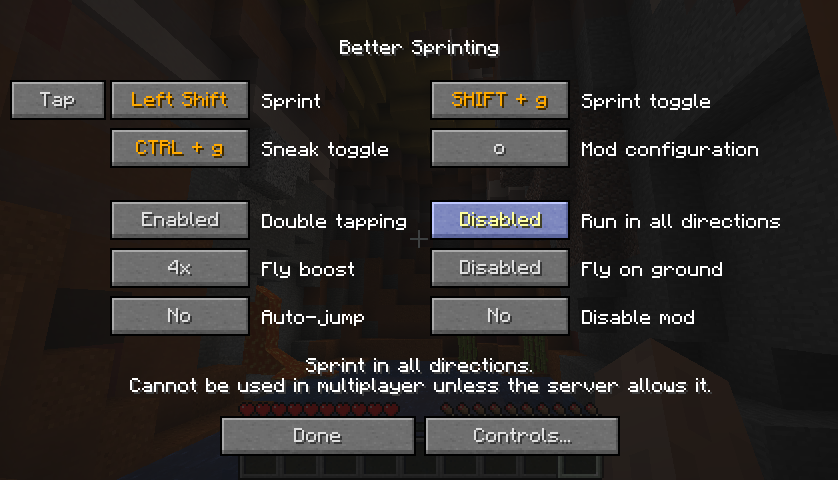
- Sprint key can be set to Tap or Hold mode
- Toggle keys for sprinting and sneaking
- Option to turn off double tapping W
- Option to sprint in all directions in singleplayer
- Configurable speed boost when flying in creative/spectator mode
- Option to continue flying when touching the ground
- To configure the mod, click the Better Sprinting button in Controls, or press the configuration key in-game (default: 'O')
- To configure update notifications in Minecraft 1.13/1.14, open the config folder (same location as the mods folder), and edit the bettersprinting-client.toml file in a text editor
Tips
- While sprinting, press the Sprint key again to stop
- Opening a GUI while toggle sneaking makes you automatically stand up until you close it
- LAN multiplayer allows sprinting in all directions if the host has the mod installed
Servers
Use the /bettersprinting admin command to enable special features, or automatically disable the mod for players on the server. If you don't have a Forge server, you can read about the server protocol to implement a custom plugin and benefit from the features.
Installation Guide
Client
1. Download and run Forge installer
2. Select Install client, and click OK
3. Start the Minecraft Launcher
4. Visit the Installations tab, and click the Forge profile
5. Open the folder shown in Game directory, and create a folder named mods inside it
6. Download Better Sprinting and place the file into the mods folder
Server
1. Download and run Forge installer
2. Select Install server, don't forget to change the installation folder, and click OK
3. Create a folder named mods in the server folder
4. Download Better Sprinting and place the file into the mods folder
5. Start the server by running forge-<version>.jar
Old Versions
- Old releases for Minecraft versions between 1.2.5 - 1.8 are available in the archive
- If you experience a mod conflict, try installing PlayerAPI Core (only applies to versions 2.0.3 and older)
- In 1.7.10, vanilla clients cannot join Forge servers; if you install the mod on a 1.7.10 server, your users will need to install Forge (the mod itself is not required)
License / Modpacks
Official files released after 12 June 2019 are licensed under MPL-2.0, which allows you to use them in modpacks.
To verify, open the .jar file in an archive program, view the included LICENSE file, and ensure the first line reads Mozilla Public License Version 2.0.
If the LICENSE file is missing, you must follow Hardcore Ender Expansion 1's License and Modpack Guidelines.
My Website | Twitter | Patreon | Ko-Fi
Better Controls
Better Controls is a new client-only mod that includes many more toggle keybinds and options than Better Sprinting. It's available for Forge and Fabric.
While not a direct replacement, I intend to support Better Controls in the future and eventually stop updating Better Sprinting.
Features
-
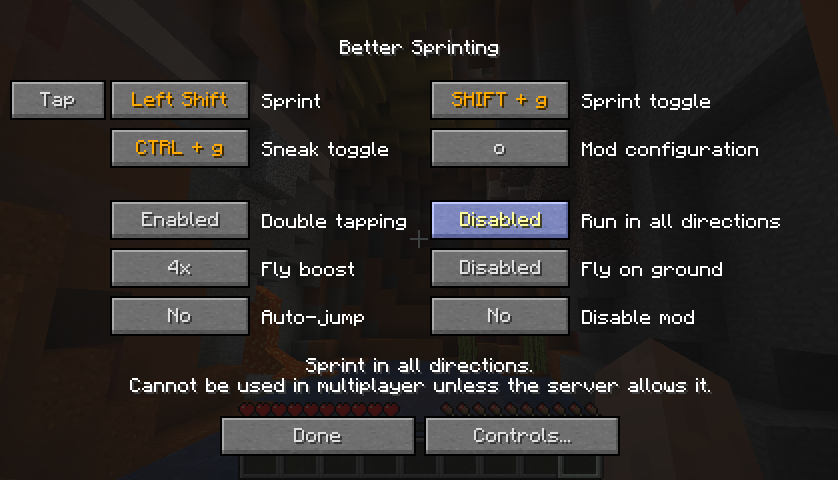
Sprint key can be set to Tap or Hold mode
-
Toggle keys for sprinting and sneaking
-
Option to turn off double tapping W
-
Option to sprint in all directions in singleplayer
-
Configurable speed boost when flying in creative/spectator mode
-
Option to continue flying when touching the ground
-
To configure the mod, click the Better Sprinting button in Controls, or press the configuration key in-game (default: 'O')
-
To configure update notifications in Minecraft 1.13/1.14, open the config folder (same location as the mods folder), and edit the bettersprinting-client.toml file in a text editor
Tips
- While sprinting, press the Sprint key again to stop
- Opening a GUI while toggle sneaking makes you automatically stand up until you close it
- LAN multiplayer allows sprinting in all directions if the host has the mod installed
Servers
Use the /bettersprinting admin command to enable special features, or automatically disable the mod for players on the server. If you don't have a Forge server, you can read about the server protocol to implement a custom plugin and benefit from the features.
Installation Guide
Client
- Download and run Forge installer
- Select Install client, and click OK
- Start the Minecraft Launcher
- Visit the Installations tab, and click the Forge profile
- Open the folder shown in Game directory, and create a folder named mods inside it
- Download Better Sprinting and place the file into the mods folder
Server
- Download and run Forge installer
- Select Install server, don't forget to change the installation folder, and click OK
- Create a folder named mods in the server folder
- Download Better Sprinting and place the file into the mods folder
- Start the server by running forge-.jar
Old Versions
- Old releases for Minecraft versions between 1.2.5 - 1.8 are available in the archive
- If you experience a mod conflict, try installing PlayerAPI Core (only applies to versions 2.0.3 and older)
- In 1.7.10, vanilla clients cannot join Forge servers; if you install the mod on a 1.7.10 server, your users will need to install Forge (the mod itself is not required)
License / Modpacks
Official files released after 12 June 2019 are licensed under MPL-2.0, which allows you to use them in modpacks.
To verify, open the .jar file in an archive program, view the included LICENSE file, and ensure the first line reads Mozilla Public License Version 2.0.
If the LICENSE file is missing, you must follow Hardcore Ender Expansion 1's License and Modpack Guidelines.
Screenshots
Gallery
-
Mod configuration
-
Mod configuration
Versions
Files
Relations
Project Relations
More like this
Similar Mods
Suggestions use data such as tags, dependencies, dependents, descriptions, titles, and more to rank how much they overlap with this mod.
On ModDex
Community snapshot
By the numbers
Statistics
Want to reach Minecraft players?
We're looking for a server hosting partner to feature here and other parts of the site. Interested? Send us a message!
Get in touchGet it on
Available Platforms
On ModDex
Community snapshot
By the numbers